
-
ORBITER-FORUM will be temporarily closed at 2026-07-23 18:00 UTC while we complete some OF maintenance tasks. The amount of downtime is expected to take up to one hour, but probably less.
You are using an out of date browser. It may not display this or other websites correctly.
You should upgrade or use an alternative browser.
You should upgrade or use an alternative browser.
New Release D3D9Client Development
- Thread starter jarmonik
- Start date


n72.75
Seize the means of computation
Orbiter Contributor
Addon Developer
Tutorial Publisher
Donator
- Joined
- Mar 21, 2008
- Messages
- 2,874
- Reaction score
- 1,718
- Points
- 128
- Location
- Saco, ME
- Website
- mwhume.space
- Preferred Pronouns
- he/him
Well, the D3D11 client looks like it's GPL2 so that's good news.
- Joined
- Mar 28, 2008
- Messages
- 2,707
- Reaction score
- 881
- Points
- 128
I have adirectx_Jun2010_redist.exe(100.273.008 Bytes) with an MD5-sum of4e41372e8775e8025be013480b0629b3and
I have adirectx_Jun2010_redist.exe(100.271.992 Bytes) with an MD5-sum of7c1fc2021cf57fed3c25c9b03cd0c31a.
What's valid?
I searched those files yesterday from my computer and found nothing. Just the *.cab files in a DX SDK.
By the way,...isn't DirectX 12 a more logical target? Or is that yet another big change in concept?
I would consider Vulkan. But the main problem with any API is Orbiter's dependency of DX7. Lot of things that are done in the Orbiter and in a many add-ons are done in a DirectX 7 mindset. In our case the D3D9ClientSurface class is very much like a DX7 to DX9 wrapper. Without that wrapper the client wouldn't render a single frame of graphics.
I don't know if a DX7 to Vulcan wrapper is doable with a good performance. It would take a lot of team efforts to move from DX7 world to a native Vulkan. It comes down to a little things like not mixing an old fashion GDI and GPU based drawing together.

- Joined
- Jan 7, 2008
- Messages
- 5,813
- Reaction score
- 869
- Points
- 203
- Location
- Earth
- Website
- orbides.org
- Preferred Pronouns
- she/her
Feels like Vulkan client would be similar to OpenGL one, and the latter didn't fare all too well.

By the way,...isn't DirectX 12 a more logical target? Or is that yet another big change in concept?
AFAIK, going from DX11 to DX12 is no big change anymore.
- Joined
- Mar 14, 2015
- Messages
- 258
- Reaction score
- 142
- Points
- 58
- Location
- Osaka
- Website
- orbinautjp.github.io
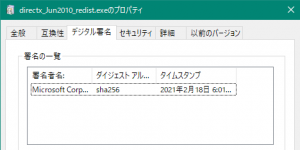
Download link for directx_Jun2010_redist.exe is back online again!
The difference is that it now uses SHA-256.
Download DirectX End-User Runtimes (June 2010) from Official Microsoft Download Center
The Microsoft DirectX® End-User Runtime installs a number of runtime libraries from the legacy DirectX SDK for some games that use D3DX9, D3DX10, D3DX11, XAudio 2.7, XInput 1.3, XACT, and/or Managed DirectX 1.1. Note that this package does not modify the DirectX Runtime installed on your Windows...
www.microsoft.com
The difference is that it now uses SHA-256.
- Joined
- Mar 28, 2008
- Messages
- 2,707
- Reaction score
- 881
- Points
- 128
Thanks, Looks like the old link is working again. So, it was just a temporary issue.Download link for directx_Jun2010_redist.exe is back online again!

Download link for directx_Jun2010_redist.exe is back online again!
OK, good news, let's save that one preciously and maybe someone burns it on 3 redundant DVD-ROM copies and locks them into a safe ! No, seriously, we should do that.

Say, is there any plugin to export blender materials to D3D9 materials? As I understand it, they're quite a bit more advanced than the default orbiter stuff.
Much more advanced. Blender uses Principled BSDF shader as default which is the kind of stuff used by Pixar/Disney. The Shader Node Editor is extremely powerful and I don't see how this could be emulated easily in Orbiter.
I was more thinking the difference between Orbiter native and the D3D9 client, I don't expect the full features of blender materials to be available. However, I think the D3D9 client offers some extended material settings in files that can be supplied to the mesh, or is that "just" normal and specular maps? I guess I should have a look at the documentation again, but I can't seem to find it anywhere on the project site now that I'm looking for it...

4throck
Enthusiast !
- Joined
- Jun 19, 2008
- Messages
- 3,489
- Reaction score
- 1,012
- Points
- 153
- Location
- Lisbon
- Website
- orbiterspaceport.blogspot.com
When PBR materials were added to D3D9, they where based on Blender's Open GL shader. It's a very simple shader, but good enough to get metal reflections.
That's were the .spec texture comes from. At least that's how I remember it
Current Blender shaders are indeed more advanced.
That's were the .spec texture comes from. At least that's how I remember it
Current Blender shaders are indeed more advanced.

igel
Addon Developer
Just a heads-up on D3D9 materials (reflective ant other) - I found out (hard way) in the recent Vostok update that in Orbiter 2016 they only work in the external view (in 2010, they work both in the external and cockpit views).
I was more thinking the difference between Orbiter native and the D3D9 client, I don't expect the full features of blender materials to be available.
I guess it would be possible to export Blender properties like "roughness", and translate Blender "metallic" in D3D9 "reflectivity", that alone would be quite useful.
- Joined
- Mar 28, 2008
- Messages
- 2,707
- Reaction score
- 881
- Points
- 128
There is a new Beta (4.12) of the D3D9Client published.
This version contains a new (experimental) PBR shader using a "Metalness" workflow. All models currently existing for the Orbiter are using the old shaders by default, so, the new shader shouldn't mess up any existing add-ons. This new "Metalness.fx" shader can be assigned into a Mesh by using the Material editor in D3D9DebugControls. This is very easy to use shader with very simple user input parameters and it's designed to be used with the "Light Glow" post processing to improve the "HDR" capabilities. Shader output isn't clamped to 0-1 so it extends beyond it. There is also a new "D3D9 Graphics Controls" dialog added, currently containing sliders to tune the post-processing. That is a control center for real-time adjustment, more controls are likely to appear. There are also intentions to create a more advanced shader that would use the reflection map "*_refl.dds" instead of metalness map.
The main Textures or Material properties required by the shader are:
Optional texture maps supported by the shader:
Not Supported by the shader:
The questions for the "advanced" shader are:
1.) Should the reflection and roughness textures be modulated by material value to allow easy real-time fine tuning ?
2.) Should it be safe-guarded from an over saturation like the current default shader is, or should the responsibility be moved to a user not to over saturate textures. As an example the diffuse color of a radiators on the Space Shuttle is dark blue which is a bit difficult to archive with the safe-guards on, since it would require a bright blue diffuse texture and even that wouldn't work at all if the reflection is set to be slightly too intense.
Without safe guards: FinalColor = DiffuseColor + Reflection
With safe guards: FinalColor = DiffuseColor * ( 1.0 - intensity_of( Reflection ) ) + Reflection
Here are some images rendered with the new shader.
The shader is experimental and modifications are likely to occur. Feel free to experiment on your own by editing the Metalness.fx. Ideas and suggestions are always welcome.
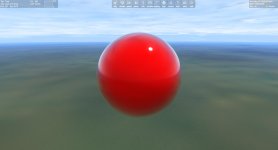
EDIT: I forgot to mention that there is a "MaterialTestSphere" "vessel" located in a Scenario Editor, you can place it anywhere for testing. (No texture)
This version contains a new (experimental) PBR shader using a "Metalness" workflow. All models currently existing for the Orbiter are using the old shaders by default, so, the new shader shouldn't mess up any existing add-ons. This new "Metalness.fx" shader can be assigned into a Mesh by using the Material editor in D3D9DebugControls. This is very easy to use shader with very simple user input parameters and it's designed to be used with the "Light Glow" post processing to improve the "HDR" capabilities. Shader output isn't clamped to 0-1 so it extends beyond it. There is also a new "D3D9 Graphics Controls" dialog added, currently containing sliders to tune the post-processing. That is a control center for real-time adjustment, more controls are likely to appear. There are also intentions to create a more advanced shader that would use the reflection map "*_refl.dds" instead of metalness map.
The main Textures or Material properties required by the shader are:
- Regular "diffuse" texture map as used by the DX7 as an example.
- Grey scale Roughness texture "*_rghn.dds" and/or roughness material property. The texture is modulated by material just like in a case of the diffuse texture.
- Grey scale Metalness texture "*_metal.dds" or metalness material property. The "metalness" value is 1.0 for metals and 0.0 for non-metals. Values between the two are rare. The "metalness" can be in most cases set by using the material property without need of a texture.
Optional texture maps supported by the shader:
- Normal Map (Tested OK)
- Transluciency "*_transl.dds" and Transmittance "_transm.dds" (Tested OK)
- Emission map "*_emis.dds" (Not tested)
Not Supported by the shader:
- Specular Map "*_spec.dds"
- Reflection Map "*_refl.dds"
The questions for the "advanced" shader are:
1.) Should the reflection and roughness textures be modulated by material value to allow easy real-time fine tuning ?
2.) Should it be safe-guarded from an over saturation like the current default shader is, or should the responsibility be moved to a user not to over saturate textures. As an example the diffuse color of a radiators on the Space Shuttle is dark blue which is a bit difficult to archive with the safe-guards on, since it would require a bright blue diffuse texture and even that wouldn't work at all if the reflection is set to be slightly too intense.
Without safe guards: FinalColor = DiffuseColor + Reflection
With safe guards: FinalColor = DiffuseColor * ( 1.0 - intensity_of( Reflection ) ) + Reflection
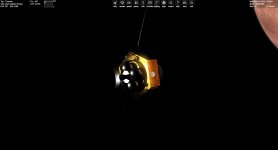
Here are some images rendered with the new shader.
The shader is experimental and modifications are likely to occur. Feel free to experiment on your own by editing the Metalness.fx. Ideas and suggestions are always welcome.
EDIT: I forgot to mention that there is a "MaterialTestSphere" "vessel" located in a Scenario Editor, you can place it anywhere for testing. (No texture)
Attachments
Last edited:
- Joined
- Feb 4, 2008
- Messages
- 9,758
- Reaction score
- 1,028
- Points
- 203
Tested it around a bit and the only thing I have found so far is that the "Glow" property of the material editor doesn't seem to do anything. It seems to be totally inert. Also, it seems like the atmosphere rendering has been improved as well and it looks great! Now even with proper sunrise/sunset effects.
Later edit:
Now that I have taken a closer look at things, it looks like it applies a uniform lighting to all parts of the mesh, ignoring shading completely. I've attached a screenshot that shows this. It looks like it has an emissive setting applied to it but it doesn't.
Any news on multi-cam setups for reflections?
Later edit:
Now that I have taken a closer look at things, it looks like it applies a uniform lighting to all parts of the mesh, ignoring shading completely. I've attached a screenshot that shows this. It looks like it has an emissive setting applied to it but it doesn't.
Any news on multi-cam setups for reflections?
Attachments

Last edited:
Soooo... what's the filename convention for those?Normal Map (Tested OK)
- Joined
- Feb 4, 2008
- Messages
- 9,758
- Reaction score
- 1,028
- Points
- 203
They have the suffix _norm.Soooo... what's the filename convention for those?

Similar threads

- Sticky
- Replies
- 6
- Views
- 10K

- Replies
- 10
- Views
- 4K


- Replies
- 1
- Views
- 4K


- Replies
- 7
- Views
- 4K