New Release D3D9Client Development

Thanks a lot - will try right away.
Before that... I tried to play with tileedit myself. Used the precompiled version published in another forum - maybe also not the freshest build, but reported workable. However, in my case, I was not able to save edits. Tile gets geneared, I edit it, walk to neighbouring tile (to save it), walk back - nothing was saved, tile not existing again, re-generated, nothing on HDD. Well, almost nothing- neighbouring tiles are written, but the one that I was trying to edit, is not on HDD. Not sure what's causing it. Level 17 or level 19 - just the same.
 
I don't know much about tileedit, sorry.
 
With the newly provided elev tile set I finally got some hands-on with tileedit. Now I can edit tiles. The difference with past unsuccessful run is that I have both Elev and Elev_mod folders. Before, only Elev_mod was being created. I guess I just need to re-read the Orbiter doc regarding these tiles tree in general (rather than continuing asking dumb questions :-) )

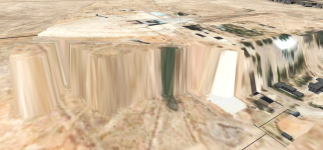
But I still have one not so dumb question. Here is the screenshot from my tile editing experiment. Don't worry for distortions, they are expected.
BaseAlt.PNG
Here, I elevated the portion of the base (including base coordinates point - that's important) to 107m - this is closer to average AGL of Baikonur area. The remainder of the tile is still at 45 AGL. Flattening is commented out after initial testing, to get it out of the picture. What surprises me here is that base is still rendered at 45m, not at 107. As my edit only touched tile at level 17, when I zoom out to next level (16 and up), my distortion is gone, and the whole area gets back to 45m rendering. So, at level 17, while surface rendering is taken from the tile 17, base elevation is still taken from... well, apparently, from some other level tile. I guess this also causes shadows awkwardness in other runs...

I hope, these effects will go away once all elevation levels are properly aligned. But may be a helluva lot of work... And there comes the next question: is there an easy way to change elevation of the whole tile? tileedit only allows you to paint with a maximum 5-pixel brush, and any accidental move of mouse out of the window will CTD... Is there an easier way to set the elevation to the whole tile? Maybe with elev2png?
 
For base elements and shadows, what I found is that the elements are placed on the height corresponding to their element position. They follow terrain, so to say. Shadows are placed on the level of the base location point for all elements. However, with my own tests with the new D3D9Client, I have also observed some kind of race condition, where it is not determined at what level the base elements get placed. In general, though, mismatching level tiles (17 edited, but 16 not and so on) produce many visual artifacts and problems.

As for ele2png, all it does is converting ELV files to PNG and back again. You can edit those PNGs with an image editor and e.g. fill the whole picture with a color that represents your height. Note that the tiles I produced for you are probably not convertable with it, because those tiles were special flat tiles of type 0 (which makes them super small due to the single height being used from offset).
 
I finally have some real progress, with hope to improve the look for 2016 to more or less acceptable level. The best result came from flattening a few key tiles in level 17 in tooledit, and then flattening a rather small area in .flt file:

; flat 3 km radius circle at Baikonur-2
ELLIPSE 107 +63.3176154 +45.9151219 3000
; minimum pad 1 dugout
RECT 70 +63.343 +45.9193 150 50

Just a small 3 km circle centered at Site 2 flattens 5 or 6 most important areas, including Pad 1. With converted surface textures, this produces quite nice result even without pits. Some texture work is still needed - dynamic texture look with changing zoom is still quite uneven and jumpy.

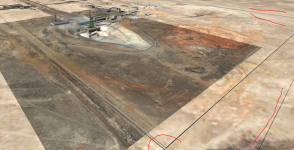
Digging pits, however, is still a long shot. Test dig finally looks promising, and shows that the task can indeed be achieved... in principle:
Dig1.PNG
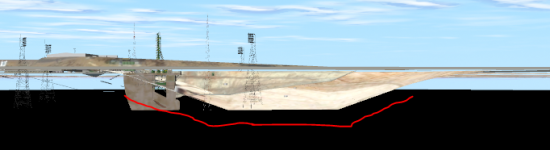
Even at the minimum possible intervention at a wide base, shadows get still distorted even at perimeter distances (red lines). Guess this is because fence runs close to the pit right close to its placing point. Even though I got pit as small as 150 by 50, I am still having too inclined "ramps", only about 30 degrees:
Dig2.PNG
This leads to... well, we already discussed that base coordinates should be moved away from the pit to some "neutral" place. Far from ideal (base coordinates are selected for a reason), but in my case will lead to moving hundreds of objects (each base has up to 5 partially repeating variations). Though this can be scripted, the next thing can't: as the dig gets under the centre of the pad, each object within it ends up either on pit or on a slope. Incidentally, this is the most built-up area, so the dig will affect elevation of way too many objects of the base. And those will have to be adjusted manually. In up to five configurations. Only for 2016 (looks like I still can't do a full switchover within at least another year).

So, to summarize: the trench-digging approach may already be a great option for new development. But still not quite suitable for converting existing intensely-populated bases. So, I'll probably exclude pitting from my current iteration of 2016 improvements, and delay a shot for a full switchover. This should still get me ~70% of what is needed for that - not bad at all. Thanks a lot for all your help, much appreciated!
 
Nice to see you made progress at last.
As I wrote before, it would be possible to implement a "visual-only-flag" feature, where the D3D9Client renders some flattening (the trench) only visually, without doing the same for collision. This would on the one hand get rid of the additional tile problem AND on the other remove the element and shadow problem (because the the hole is only visual).
 
...shadows get still distorted even at perimeter distances (red lines).
Have you tried the no shadows flag on the meshes ?

... that base coordinates should be moved away from the pit to some "neutral" place. Far from ideal ...
Please keep them at their correct placements. Otherwise things will never match (terrain, satellite imagery, open street map data ;) , etc)

Anyway, looking very very good! Your hard work is paying off!
 
Have you tried the no shadows flag on the meshes ?
Those are true base objects, not meshes. I think I have this flag already for launchpad meshes (for 2010), and should probably keep them that way.
Please keep them at their correct placements. Otherwise things will never match (terrain, satellite imagery, open street map data ;) , etc)
No, the look and proper placement is not a concern here. "Moving" the base will mean moving the base coordinates to some flat place - but then moving all the objects on the base in the opposite direction to offset the coordinates move. So the visuals won't change. Totally out of reach if done manually, but scriptable, and doable (in principle). Much easier if done for any newly developed base, started from scratch. For existing bases - not for this development iteration, and who knows: maybe D3D9Client will support easier options by the time of next iteration.
 
With elevation and tiles more or less covered, I'd like to return to my earlier, totally different question. Er haven't got to it yet, and it got lost in the past pages, so I am just quoting it here, rather than retyping the whole thing:

Another 2016 question. In the last 2010 client, mirror surfaces (full-reflection materials) are rendered as such both in outside and cockpit views. In the latest 2016 client, they render as mirrors only in the outside view. Or is there some flag-setting somewhere that triggers this internal rendering on/off? Did not find any...
This had sucker-punched me with new Vostok release - where I re-implemented Vzor (optical orienting device) with true mirrors, and just prior to release - way too late - discovered that is is useless in 2016. Any way to activate it or get it back in the next versions?
 
Could the ability of the view on generic camera include a way to rotate the view ? Reason being, some of the cameras on the station point down, and would be useful to be able to change the view, to right side up.
 
Dumb question, but one I couldn't find by searching.

Are we still limited to 8 local lights?
 
Dumb question, but one I couldn't find by searching.

Are we still limited to 8 local lights?
Yes and No. The number of local lights in a scenario is unlimited. Then each mesh picks 4 or 8 lights those are most relevant to it for rendering. So, each mesh can have it own set of local lights. (4 or 8 depends on settings used. "Partial" lights only compute diffuse part of the lighting and "Full" lights do specular part too)
 
  • Like
Reactions: GLS
Yes and No. The number of local lights in a scenario is unlimited. Then each mesh picks 4 or 8 lights those are most relevant to it for rendering. So, each mesh can have it own set of local lights. (4 or 8 depends on settings used. "Partial" lights only compute diffuse part of the lighting and "Full" lights do specular part too)
I don't know if that info is already in the D3D9 manual, but I think it would be a nice addition.
 
Hmm. So making a light for every thruster wouldn't be possible, but two or four main engines would be okay?
 
Hmm. So making a light for every thruster wouldn't be possible, but two or four main engines would be okay?
It would be possible, but if you fire more than 4 or 8 thrusters, some will not "light up". This is, if there are no other more-powerful lights nearby.
 
I don't know if that info is already in the D3D9 manual, but I think it would be a nice addition.
I'll take that as a task for me ;).
As I am writing the "Features & Limitations" section, can anybody point me to a list of features / limitations?
I am so much used to using D3D9Client that I can not even remember all the added features (compared to inline graphics)...
 
  • Like
Reactions: GLS
I'll take that as a task for me ;).
As I am writing the "Features & Limitations" section, can anybody point me to a list of features / limitations?
I am so much used to using D3D9Client that I can not even remember all the added features (compared to inline graphics)...
Sketchpad2 comes to mind.
 
I have problem with landing on some bodies like Enceladus, where gravity is very low. I got drasticly drope of frame rate when wheels of XR2 vessel touch the ground.
Somebody had sothing like that? What I cab do with this?
 
Hello everybody.

Could someone please describe how the "enable terrain flattering" function is used in the Advanced Setup of the D3D9 Client?

Thanks in advace!
 
Back
Top