New Release D3D9Client Development

So going forward, what is the plan for D3D9Client? Keep it and continue improving things since we should not be bound to the old DX7 client anymore or go with something newer like DX12?

Plans been shifting a bit, currently I would say that the next Orbiter (2025, 26) would still release with DX9 (via DX9 to Vulkan wrapper if needed (already supported)) (DX12 wrapper is somewhat buggy) after that there would be a change to native Vulkan graphics API.
So, in other words, I would like to get the planned graphics features ready and fully operational and stable. Cleaning a table before starting a major operation with the graphics API upgrade.
 
Hi,
I'm interested what the "absolute animation handling" option on the D3D9 advanced settings panel does. I noticed, that disabling this option makes some animations incorrect. Are there any reasons to disable this setting?
 
Hi,
I'm interested what the "absolute animation handling" option on the D3D9 advanced settings panel does. I noticed, that disabling this option makes some animations incorrect. Are there any reasons to disable this setting?
This is the description of this feature from D3D9Client.html:

Enable absolute animation handling

By default Orbiter uses incremental animations, meaning that for each frame the previous animation state is incremented by a small amount, which will induce some small error. Over time these errors accumulate and the animation is no longer in the orientation it's supposed to be (3-10 mins in worst cases).

Absolute animations updates the animation state from a default state for each frame. Which doesn't suffer from the accumulated error mentioned before. But absolute animations can fail if an add-on alters the order of operations (rotations). Therefore it's not 100% backwards compatible. So far however, no add-on is known to fail.
This really doesn't explain what "Enable absolute animation handling" actually does at all.

I understand the first bit... if you are incrementing an animation state x by a small number dx every time step like state = x + dx, the numerical roundoff will rapidly accumulate.

Absolute animations are essentially just taking a value and presenting it relative to 0. The airspeed indicator level comes from the airspeed. No numerical roundoff to accumulate.

I don't understand what they mean in the last three sentences, other than if you keep shuffling the order of a series of rotations that that will eventually screw up something.

On the R-4, the only incremental animations are the rotors, where accumulated numerical rounding doesn't matter. All of the instrument gauges are absolute animations, and the animation rotations don't change.

From the description, we should NOT be having the problem that this mode supposedly fixes, but the description is too poorly written to glean what it actually does.

EDIT: I'm thinking about the mesh visuals, and maybe it is referring to how the mesh vertices are moved in space. The center of mass position of the vessel is propagated using Newton's 2nd Law, but then the position of the mesh vertices need to be located relative to the center of mass. It could be that the pitch/bank/yaw rotations are applied incrementally after each time step to each vertex, and that would cause a position error to accumulate. That would cause all the vertices to drift around slowly relative to the vessel and each other.

The alternative would be to take the absolute pitch/bank/yaw angles and rotate the vertices through the the full angles. The above relative drift would not have a chance to occur.

The incremental method would be computationally lighter I think as you're just adding increments of displacement to each vertex, where you would need to do some linear algebra to rotate the mesh through the absolute angles at each time step. Using the absolute angles might be more accurate, but it increases the computational cost.

 
Last edited:
All of the instrument gauges are absolute animations, and the animation rotations don't change.
Wrong, Let's consider airspeed, you have 100 knots which increases to 101 knots. These are "absolute" values but the Orbiter's internal mechanics will update the animations by computing a difference 101 (new) - 100 (old) = 1 and increments the animation state by 1. In other words the vertices are moved from "100" state to "101" state.

If the "absolute" animations are enabled (D3D9 Only) animation state is always updated from "zero" (i.e. "default") state.
 

That's a bit blunt. Was this really necessary? We're just trying to understand something that is a bit of a black box to us.

Let's consider airspeed, you have 100 knots which increases to 101 knots. These are "absolute" values but the Orbiter's internal mechanics will update the animations by computing a difference 101 (new) - 100 (old) = 1 and increments the animation state by 1. In other words the vertices are moved from "100" state to "101" state.
If the "absolute" animations are enabled (D3D9 Only) animation state is always updated from "zero" (i.e. "default") state.
So as I realized and wrote in my edit, it's not how the user defines the animation, but how Orbiter executes it.
 
Are there any reasons to disable this setting?
So the main disadvantage of using it is the demand on proccessing power?
I guess most of the default settings are for very low spec PCs. There's a good setup walkthrough for beginners over on the Dansteph site (Orb2016). Maybe an updated one here would be good?
 
I'd like to understand what the "Enable shader cache for faster startup" checkbox does (on D3D9 video settings panel).

Also, how surface mipmaps work. Do they created during the session and reset (deleted) after exiting to launchpad?
 
Is there a upper limit to the number of metalness textures that a single vessel can use? I've attached a screenshot showing the problem. Despite the radiator panels and Ku band antenna having properly made metal and roughness textures, they're not rendered. Other textures that also have metal and rougness textures are being rendered though. I've attached the GC cfg file, it would be of any help. Total number of textures that use metal and roughness textures is 19.
 

Attachments

  • OpenOrbiter_D3D9Client_metal_textures_not_rendered.jpg
    OpenOrbiter_D3D9Client_metal_textures_not_rendered.jpg
    57.9 KB · Views: 37
  • SSV_OV.txt
    SSV_OV.txt
    335 bytes · Views: 2
Another sun issue. The solar disc is not hidden by base meshes as shown in the attached screenshot. The rays are hidden as expected but the disc is still visible when it should be hidden.
 

Attachments

  • OpenOrbiter_D3D9Client_sun_disc_not_hidden_base_mesh.jpg
    OpenOrbiter_D3D9Client_sun_disc_not_hidden_base_mesh.jpg
    88.1 KB · Views: 17
Another sun issue. The solar disc is not hidden by base meshes as shown in the attached screenshot. The rays are hidden as expected but the disc is still visible when it should be hidden.
 
Hi everyone! Recently I am slowly getting back to Orbiter after a long hiatus. I am using mostly an installation of Orbiter 2016 beta [190914] with the D3D9 Client R30.7. I initially installed an older version of the D3D9 Client into this Orbiter installation and later "overwrote" the folder with the newer R30.7 client version. The problem is all the changes in the D3D9 Client Advanced Setup are lost after ending a session and revert to the default settings. Is it because I created the symbolic links with the older client before? When I try to do this step again it says "Config: Ok, link exists". Any tips very welcome!
 
Hi everyone! Recently I am slowly getting back to Orbiter after a long hiatus. I am using mostly an installation of Orbiter 2016 beta [190914] with the D3D9 Client R30.7. I initially installed an older version of the D3D9 Client into this Orbiter installation and later "overwrote" the folder with the newer R30.7 client version.


The problem is all the changes in the D3D9 Client Advanced Setup are lost after ending a session and revert to the default settings. Is it because I created the symbolic links with the older client before?
I don't think so as the symbolic links that the D3D9Client creates are only from \Modules\Server\ (link) to \Config\ (real).
The D3D9Client configuration is located in Orbiters "root" folder \D3D9Client.cfg.

...unless I did not understand the issue correctly.

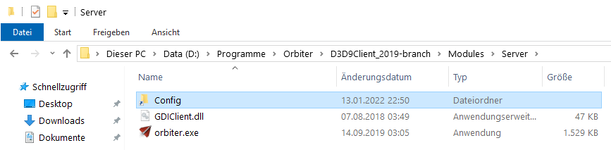
In case you would like to remove the created link, just delete the "Sub-Folder" Config in folder \Modules\
1756148550882.png

The little arrow indicates "this is a symbolic link", so you can just delete it - no harm is done to the "real" folder.
 
Addendum:
As you are using Orbiter 2016, there were two symbolic links:
  • {Orbiter_root}\Modules\Server\Config => {Orbiter_root}\Config
  • {Orbiter_root}\Modules\Server\Sound => {Orbiter_root}\Sound (only if OrbiterSound (4.0) Module detected)
 
Back
Top