Ok. I'll see what I can make of the new shader then. Never fiddled around with post processing effects before...

ORBITER-FORUM will be temporarily closed at 2026-07-23 18:00 UTC while we complete some OF maintenance tasks. The amount of downtime is expected to take up to one hour, but probably less.
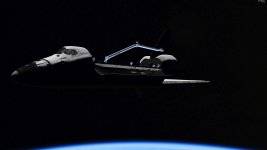
I don't know what has happened by the emissivity problem is gone all of a sudden. Now instead, the orbiter has this metallic sheen to it. I'm thing this is an expected behavior of the shader, is this correct?I noticed from the screen shot that the blur is not blurry enough. Likely a result from the higher map resolution. This problem has been fixed. The reason behind "all emissive" issue is still unknown. I don't see anything really wrong in the shuttle rendering behind the reflection map in your screen shot. I am working on the Metalness shader and a new shader using a reflection map as well. I'll upload a new version as soon as I am able.
I am not seeing anything unusual there. It's very likely a material configuration issue. Also it looks like the robotic arm runs with the old shader.I don't know what has happened by the emissivity problem is gone all of a sudden. Now instead, the orbiter has this metallic sheen to it. I'm thing this is an expected behavior of the shader, is this correct?
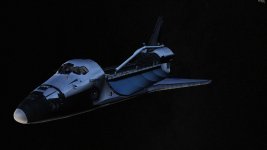
That looks like material/texture configuration issue. It's a good idea to wait a next release before investing much efforts for material or texture adjustments. I already have multiple fixes and adjustments in my working copy.My fault, I uploaded the wrong screenshot. This is the correct one, showing the sheen.
The main mesh only has materials configured to use the Metalness shader and a diffuse texture while the radiator panels and Ku band antenna sport the same but with an additional roughness texture but no reflection texture.That looks like material/texture configuration issue. It's a good idea to wait a next release before investing much efforts for material or texture adjustments. I already have multiple fixes and adjustments in my working copy.

Please notice my commits (r1371 - r1373) and update, so my changes do not make too much trouble when you try to commit yours.I already have multiple fixes and adjustments in my working copy.

This is exciting!
Can the amount of smoothness adjust the amount of Fresnel reflection? I'm interested in adding frost to the outer skin in places (white diffuse, 0 smoothness, reduced metalness? just a guess) which has zero Fresnel reflection, while not changing the Fresnel reflections on the rest of the material.
No worries. Thanks for adding the reset buttons.Please notice my commits (r1371 - r1373) and update, so my changes do not make too much trouble when you try to commit yours.
Hoping that it does not disturb your progress
Could this be a problem with the "Earth" glow. Does the color change if you are over land ?My fault, I uploaded the wrong screenshot. This is the correct one, showing the sheen. And I went back to the original R4.12 D3D9Client files, so this is with the stock Metalness.fx.
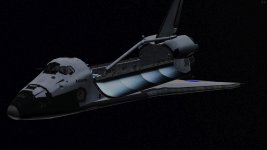
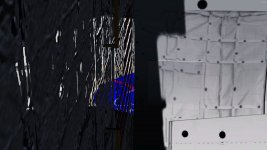
Can't really tell as Earth glow has now disappeared for me when using the Metalness shader. There's another issue with it as you can see the NASA logo on the left wing through the aft payload bay bulkhead as seen in the second attached screenshot.Could this be a problem with the "Earth" glow. Does the color change if you are over land ?
I think starting out I would implement frost as "baked-in" with the rest of the texture. I would make it opaque white or partially transparent white overlaid on the diffuse color, with high roughness so that there's no environment reflection or Fresnel reflection. I might make a version of the texture with frost and without, and let the vessel decide which to use when, using Spacecraft dll or VesselBuilder, etc. I don't know if it makes sense to have the graphics client decide when to display frost and when not to. Otherwise I might just use a single frosted texture.Frost, that would be interesting to see. I have never given much thought to that but I once thought about rendering of snow and having ice crystals glittering in a different colors. (Not for Orbiter). Right now the Fresnel effect in attenuated by roughness and there is a limit above which the Fresnel in completely off-line. There is no Fresnel texture implemented and I am unsure how to do that properly. Would a coating need it's own roughness ? Also could one of the color channels be used for frost overlay ?
How would you like to implement the frost ?
It would be difficult for a client to know when to render the frost and when not to. So, it would need to be application controlled. I don't know the capabilities of Spacecraft.dll or VesselBuilder if they can swap a texture. A vessel controlled by it's own DLL could open up some other possibilities like an overlay effect being blended in by using using some kind of control variable, could be useful for re-entry heating effects too. Also I have used the Sketchpad to blend/mix textures but, of course, right now there are no interface to access sub-textures.I don't know if it makes sense to have the graphics client decide when to display frost and when not to.
One small idea:
I find myself always checking the "Pick" checkbox the first thing every time I open the D3D9 Debug window. Would it be possible to make that box checked by default whenever you start orbiter and open the debug window? Or maybe remember its last state when quitting. Just a thought.
So, there are transparent gaps in the texture ? I suppose a division by zero could feed some NaN's to the pipeline and cause the transparency if that's what it is.There's another issue with it as you can see the NASA logo on the left wing through the aft payload bay bulkhead as seen in the second attached screenshot.