New Release D3D9Client Development

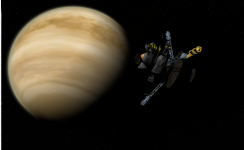
Hello, I have a problem: Whenever I open Orbiter in D3D9 mode, I notice that the clouds on Venus have trouble rendering properly (screenshot below). Any ideas?
Ok, Thanks, Will look into it...
 
Just wanted to write that I still often (chance ~25 - 30%) do not have vessel shadows (and self shadows). If I reload scenario, it's OK. I use Gattispilot's shuttle's, but it should have nothing to do with this, I think, because reloading works. What causes this is possibly buried deep in a code.
 
Hello, I have a problem: Whenever I open Orbiter in D3D9 mode, I notice that the clouds on Venus have trouble rendering properly (screenshot below). Any ideas?
View attachment 22744

This seems to be the problem with a Venus terrain addon for orbiter 2016. The clouds supplied with the addon are known to be buggy. The terrain and textures work fine. You have to go to the Venus.cfg file in Config folder and remove the CloudFormat = 2 line under Visualisation Parameters. Then it will use Orbiter stock .tex clouds, which work fine
 
This seems to be the problem with a Venus terrain addon for orbiter 2016. The clouds supplied with the addon are known to be buggy. The terrain and textures work fine. You have to go to the Venus.cfg file in Config folder and remove the CloudFormat = 2 line under Visualisation Parameters. Then it will use Orbiter stock .tex clouds, which work fine
Got the clouds working again! Thanks:cheers:
(Replaced the stock 2016 clouds with those on Venus 8 level texture since they're the same format)
D3D9.png
 
So you didn't follow Abloheet's advice (...remove CloudFormat = 2 line...)?
I did follow Abloheet's advice....I just notice that the default 2016 cloud is named "Venus_cloud.tex", so I easily replaced it with the one built for 2010.

I just liked that texture way back when my version of Orbiter is 2010
 
Thank you for the help, jarmonik!

The supplied dll works great. I in fact do not notice a difference, even with 400-600 polygon sides (skp->Polygon), although I use a quite low MFD refresh rate (0.1 s), so there may be a difference that is not apparent at this rate.

There is some flickering of specific triangles though, but this also happens with the inline client (although not as frequently). It seems to occur when the vertices are not evenly spaced.
I assume that this will be fixed by using the gcCreateTriangles function, when the graphics client does not need to guess the geometry of my shape, but I can control them manually.

So onto that problem:

I tried to implement your gcCreatePoly example, but the MFD does not display any lines. I suspect it has something to do with me commenting out the FVECTOR4& operateor*= function (see end of my previous post). So can you please explain how one would fix the compile error?

I also tried to compile your basic example of the hexagon using gcCreateTriangles, but I get a compile error displaying the following information:
1>LINK : warning LNK4098: defaultlib 'LIBCMT' conflicts with use of other libs; use /NODEFAULTLIB:library 1>GraphicsMFDPolygonFillTest.obj : error LNK2001: unresolved external symbol "void * __cdecl gcCreateTriangles(void *,struct gcCore::TriangleVtx const *,int,unsigned long)" (?gcCreateTriangles@@YAPAXPAXPBUTriangleVtx@gcCore@@HK@Z) 1>..\..\..\..\Modules\Plugin\GraphicsMFDPolygonFillTest.dll : fatal error LNK1120: 1 unresolved externals 1>Done building project "GraphicsMFDPolygonFillTest.vcxproj" -- FAILED.
I've added gcAPI.lib, in addition to the default Orbiter libraries. Do I need an extra library, or maybe a special VS setting?

As for your thoughts about using a constant daylight shape, and transforming it, I'm too new to the field of graphics to give you an answer.
But most/all of the map projections in my MFD are reasonably simple, mostly being combinations of trigonometric functions, and some using higher powers (up to 9) and square roots, numeric iteration (Newton's method to solve an equation), and logarithms.
 
But most/all of the map projections in my MFD are reasonably simple, mostly being combinations of trigonometric functions, and some using higher powers (up to 9) and square roots, numeric iteration (Newton's method to solve an equation), and logarithms.
Thanks, I took a quick look into that and even though it's a little a bit more complex than I hoped it should be still well do-able with the GPU, but I still need to study it in more detail. In what kind of format the coastal line data is in ? Is it in polar coordinates (lng, lat) or 2D cylindrical projection (x, y) or something else ?

As for the compilation error, Sorry About That, it looks like the gcCreateTriangles is missing from gcAPI.lib for some unknown reason. Since, we do rely on automation, it's possible that auto-merge has messed something up. I no longer have Visual Studio 2008 on my new computer, so, I can't recompile the gcAPI.lib without finding and installing that old compiler. Also the gcAPI is no longer being developed since it's been replaced by new gcCore interface that is much easier to maintain. So, the "CreateTriangles" is available under that interface. To use it you no longer need the gcAPI.h nor gcAPI.lib just the gcConst.h

Here's the above example translated to gcCore

C++:
#include "gcConst.h"

gcCore *pCore = gcGetCoreInterface();

if (pCore) {

    float a = 0.0f;
    float s = float(PI2 / 6.0);

    gcCore::TriangleVtx Vtx[8];
    oapi::FVECTOR2 Pol[6];

    for (int i = 0; i < 6; i++) {
        Pol[i].x = cos(a);
        Pol[i].y = sin(a);
        Vtx[i + 1].pos.x = Pol[i].x;
        Vtx[i + 1].pos.y = Pol[i].y;
        Vtx[i + 1].color = pCore->Color(&HUEtoRGB(a));
        a += s;
    }

    // Center vertex
    Vtx[0].pos.x = 0.0f;
    Vtx[0].pos.y = 0.0f;
    Vtx[0].color = 0xFFFFFFFF;    // White
    Vtx[7] = Vtx[1];

    hPoly[0] = pCore->CreateTriangles(NULL, Vtx, 8, PF_FAN);
}
 
Also the gcAPI is no longer being developed since it's been replaced by new gcCore interface that is much easier to maintain.
Is this finished now?
 
Is this finished now?

Depends on what you mean by finished. I guess it's never really finished but it should be reasonably stable now.

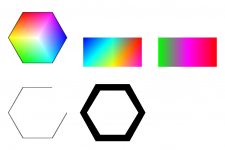
I made some tests and trials with the "CreatePoly" and "CreateTriangles" functions and they seem to work as intended.

C++:
// Run Different Kind of Tests
//

hTgt = oapiCreateSurfaceEx(768, 512, OAPISURFACE_RENDERTARGET);

if (!hTgt) return;

gcCore *pCore = gcGetCoreInterface();

if (!pCore) return;

float a = 0.0f;
float s = float(PI2 / 6.0);

gcCore::TriangleVtx Vtx[8];
oapi::FVECTOR2 Pol[6];

for (int i = 0; i < 6; i++) {
    Pol[i].x = cos(a);
    Pol[i].y = sin(a);
    Vtx[i + 1].pos.x = Pol[i].x;
    Vtx[i + 1].pos.y = Pol[i].y;
    a += s;
}

//                 AABBGGRR
Vtx[1].color = 0xFFFF0000;
Vtx[2].color = 0xFFFFFF00;
Vtx[3].color = 0xFF00FF00;
Vtx[4].color = 0xFF00FFFF;
Vtx[5].color = 0xFF0000FF;
Vtx[6].color = 0xFFFF00FF;

// Center vertex
Vtx[0].pos.x = 0.0f;
Vtx[0].pos.y = 0.0f;
Vtx[0].color = 0xFFFFFFFF;    // White
Vtx[7] = Vtx[1];

HPOLY hColors = pCore->CreateTriangles(NULL, Vtx, 8, PF_FAN);
HPOLY hOutline = pCore->CreatePoly(NULL, Pol, 6, PF_CONNECT);
HPOLY hOutline2 = pCore->CreatePoly(NULL, Pol, 6);

Vtx[0].color = 0xFFFF0000;   
Vtx[1].color = 0xFFFFFF00;     
Vtx[2].color = 0xFFF0FF00;   
Vtx[3].color = 0xFF00FFFF;   
Vtx[4].color = 0xFF0000FF;   
Vtx[5].color = 0xFFFF00FF;

Vtx[0].pos = FVECTOR2(-1, 0);
Vtx[1].pos = FVECTOR2(-1, 1);
Vtx[2].pos = FVECTOR2(0, 0);
Vtx[3].pos = FVECTOR2(0, 1);
Vtx[4].pos = FVECTOR2(1, 0);
Vtx[5].pos = FVECTOR2(1, 1);

HPOLY hStrip = pCore->CreateTriangles(NULL, Vtx, 6, PF_STRIP);


Vtx[0].color = 0xFF00FF00;    // Green
Vtx[1].color = 0xFF00FF00;      // Green   
Vtx[2].color = 0xFFFF00FF;    // Mangenta
Vtx[3].color = 0xFFFF00FF;      // Mangenta
Vtx[4].color = 0xFF0000FF;    // Blue
Vtx[5].color = 0xFF0000FF;      // Blue

Vtx[0].pos = FVECTOR2(-1, 1);
Vtx[1].pos = FVECTOR2(-1, 0);
Vtx[2].pos = FVECTOR2(0, 1);
Vtx[3].pos = FVECTOR2(0, 0);
Vtx[4].pos = FVECTOR2(1, 1);
Vtx[5].pos = FVECTOR2(1, 0);

HPOLY hStrip2 = pCore->CreateTriangles(NULL, Vtx, 6, PF_STRIP);


IVECTOR2 pos0 = { 128, 128 };
IVECTOR2 pos1 = { 128, 384 };
IVECTOR2 pos2 = { 384, 128 };
IVECTOR2 pos3 = { 640, 128 };
IVECTOR2 pos4 = { 384, 384 };

pSkp = static_cast<Sketchpad3 *>(oapiGetSketchpad(hTgt));

pSkp->ColorFill(FVECTOR4((DWORD)0xFFFFFFFF), NULL);

pSkp->QuickBrush(0xA0000088);
pSkp->QuickPen(0xA0000000, 3.0f);
pSkp->PushWorldTransform();

pSkp->SetWorldScaleTransform2D(&FVECTOR2(100.0f, 100.0f), &pos0);
pSkp->DrawPoly(hColors);
pSkp->DrawPoly(hOutline);

pSkp->SetWorldScaleTransform2D(&FVECTOR2(100.0f, 100.0f), &pos1);
pSkp->DrawPoly(hOutline2);

pSkp->SetWorldScaleTransform2D(&FVECTOR2(100.0f, 100.0f), &pos2);
pSkp->DrawPoly(hStrip);

pSkp->SetWorldScaleTransform2D(&FVECTOR2(100.0f, 100.0f), &pos3);
pSkp->DrawPoly(hStrip2);

pSkp->SetWorldScaleTransform2D(&FVECTOR2(100.0f, 100.0f), &pos4);
pSkp->QuickPen(0xFF000000, 25.0f);
pSkp->DrawPoly(hOutline);

pSkp->PopWorldTransform();

oapiReleaseSketchpad(pSkp);


pCore->DeletePoly(hColors); // Must release Sketchpad before releasing any sketchpad resources
pCore->DeletePoly(hOutline);
pCore->DeletePoly(hOutline2);
pCore->DeletePoly(hStrip);
pCore->DeletePoly(hStrip2);

clbkSaveSurfaceToImage(hTgt, "SketchpadOutput2", ImageFileFormat::IMAGE_PNG);

 

Attachments

  • SketchpadOutput2.png
    SketchpadOutput2.png
    18.4 KB · Views: 7
I did follow Abloheet's advice....I just notice that the default 2016 cloud is named "Venus_cloud.tex", so I easily replaced it with the one built for 2010.

I just liked that texture way back when my version of Orbiter is 2010


The default 2016 Venus_cloud.tex should be same as the Orbiter 2010 Venus_cloud.tex, as fas as I remember.. The stock Orbiter 2010 Venus_cloud.tex could be lower resolution, level 6 .tex, and the addon link you posted is one of best Venus textures for Orbiter 2010. I guess 4th rock replicated the surface textures from this mod's source into the Venus 2016 tile format, included terrain, but messed up the cloud conversion from stock Orbiter 2016 .tex level 6 clouds.

So, now you have best of both worlds. Best surface and terrain for 2016 from 4th rock's addon, and best clouds from the level 8 .tex
 
Depends on what you mean by finished. I guess it's never really finished but it should be reasonably stable now.
Well, then I have to try it out. :hailprobe:

BTW, anyway that font width control is added?
 
There is a new build 4.10 out for Orbiter 2016
  • n-gon limit increased to 1024
  • CreateSketchpadFont(int height, char *face, int width, int weight, int style, float spacing) function added.
    • Allows to define font width, charter spacing and style
    • See "gcFont::" namespace for style combinations, gcFont::CRISP and gcFont::ANTIALIAS allows to override application settings and define anti-aliasing behavior in per font basis.
    • Do not use "*" hack in a font "face" name.
 
Switched to the new interface, and it all seems to be working as before, with one exception: the ADI ball. Finding the new mesh loading (and unloading) function was easy, but I'm not sure how to replace gcWorldMatrix()...
I'll now try the new font function.
 
The new font function works great!!!! It looks just like the GDI version! :hailprobe:
One question: to delete the font, it is still with oapiReleaseFont(), right?
 
One question: to delete the font, it is still with oapiReleaseFont(), right?

Yes, it's still released with oapiReleaseFont(). I'll add the missing helper function to the next version, but here's the code for it so you don't have to wait.

C:
void gcWorldMatrix(FMATRIX4 *mat, const VECTOR3 &pos, const VECTOR3 &x, const VECTOR3 &z, double scale)
{
    VECTOR3 y = crossp(x, z);

    mat->m11 = float(x.x * scale);
    mat->m12 = float(x.y * scale);
    mat->m13 = float(x.z * scale);
    mat->m14 = 0.0f;

    mat->m21 = float(y.x * scale);
    mat->m22 = float(y.y * scale);
    mat->m23 = float(y.z * scale);
    mat->m24 = 0.0f;

    mat->m31 = float(z.x * scale);
    mat->m32 = float(z.y * scale);
    mat->m33 = float(z.z * scale);
    mat->m34 = 0.0f;

    mat->m41 = float(pos.x);
    mat->m42 = float(pos.y);
    mat->m43 = float(pos.z);
    mat->m44 = 1.0f;
}
 
  • Like
Reactions: GLS
Yes, it's still released with oapiReleaseFont(). I'll add the missing helper function to the next version, but here's the code for it so you don't have to wait.

C:
void gcWorldMatrix(FMATRIX4 *mat, const VECTOR3 &pos, const VECTOR3 &x, const VECTOR3 &z, double scale)
{
    VECTOR3 y = crossp(x, z);

    mat->m11 = float(x.x * scale);
    mat->m12 = float(x.y * scale);
    mat->m13 = float(x.z * scale);
    mat->m14 = 0.0f;

    mat->m21 = float(y.x * scale);
    mat->m22 = float(y.y * scale);
    mat->m23 = float(y.z * scale);
    mat->m24 = 0.0f;

    mat->m31 = float(z.x * scale);
    mat->m32 = float(z.y * scale);
    mat->m33 = float(z.z * scale);
    mat->m34 = 0.0f;

    mat->m41 = float(pos.x);
    mat->m42 = float(pos.y);
    mat->m43 = float(pos.z);
    mat->m44 = 1.0f;
}
Thanks!
Not need to rush it, as the changes I've made for gcCore are in a branch, so they aren't "blocking" anything.
 
Hi,

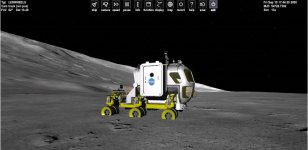
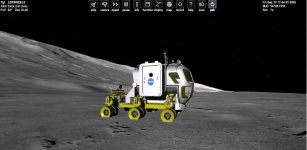
Very interresting details. By raising mesh resolution from 32 to 64, with linear interpolation mod, wheels on a vessel seem less "cut" by terrain. I have tested with LER from GeneralVehicle created by Fred18, but I am not sure that it works with every vessel. I have enabled the "terrain flattening" option but it does not change very much. I wonder if by increasing even more the mesh resolution (eg to 128), the issue could be definitively solved. It is just an idea and I don't think it is so simple.

Yet another issue appears while increasing this mesh resolution : the shadows generated by lunar terrain are more aliased, or more sharpened and so less good-looking. But it is subtle. I have joined 2 pictures to illustrate.
 

Attachments

  • linear_elev_32.JPG
    linear_elev_32.JPG
    57.8 KB · Views: 76
  • linear_elev_64.JPG
    linear_elev_64.JPG
    57.5 KB · Views: 82
  • shadows_lunar_terrain_elev_32.JPG
    shadows_lunar_terrain_elev_32.JPG
    40.7 KB · Views: 33
  • shadows_lunar_terrain_elev_64.JPG
    shadows_lunar_terrain_elev_64.JPG
    39 KB · Views: 30
Last edited:
Very interresting details. By raising mesh resolution from 32 to 64, with linear interpolation mod, wheels on a vessel seem less "cut" by terrain.

Have you tried to increase "MaxPatchResolution = 16" setting from the used "Moon.cfg" higher, let's say "19" ? Could you test that and report back ?

Sorry, We can't go to 128 in mesh resolution because it will cause major increase in memory consumption and "Out Of Memory" situation.
 
I have enabled the "terrain flattening" option but it does not change very much.
Terrain flattening only works if "Surface elevation, using" in the "Visual effects" tab is set to linear interpolation instead of cubic. Also flattening is not doing anything on its own, instead you have to author *.flt files in the planet's tree "Flat" layer to actually flatten certain areas.
 
Back
Top