New Release D3D9Client Development

The selected shader should apply automatically but it's possible that bugs may exists.
No, that part works fine. But it won't switch to the shader if I remove the file but have the necessary maps for it. I would have expected it to switch to the shader automatically when a material has a diffuse map, a metal map and a roughness map. I take it that means that you need to have that file present to at least set the shader, then? For each mesh in the vessel, and one file per kind of vessel? That may get a bit inconvenient for my purposes, but I guess I can make it work...
 
I too confirm an issue with Mercury. I have an old savegame (saved on Nov. 2018) with a DG landed at Discovery Rupes.
When I load it now the DG is landed as expected, but well below the visible surface.

Pasting the scenario so that others can replicate the issue:

Code:
BEGIN_DESC

END_DESC

BEGIN_ENVIRONMENT
  System Sol
  Date MJD 54753.7444437087
  Help CurrentState_img
END_ENVIRONMENT

BEGIN_FOCUS
  Ship GL-01S
END_FOCUS

BEGIN_CAMERA
  TARGET GL-01S
  MODE Extern
  POS 1682.815933 -81.049612 124.847671
  TRACKMODE GlobalFrame
  FOV 50.00
END_CAMERA

BEGIN_HUD
  TYPE Docking
  NAV 0
END_HUD

BEGIN_MFD Right
  TYPE Orbit
  PROJ Ship
  FRAME Ecliptic
  ALT
  REF Mercury
END_MFD

BEGIN_SHIPS
GL-01S:DG-S
  STATUS Landed Mercury
  POS -38.0000000 -56.0000000
  HEADING 284.59
  ALT 2.534
  AROT 171.170 25.464 29.301
  AFCMODE 7
  PRPLEVEL 0:0.712318 1:0.699040 2:0.993788
  THLEVEL 0:1.000000 1:1.000000
  NAVFREQ 94 524 84 114
  XPDR 0
  HOVERHOLD 0 1 0.0000e+000 0.0000e+000
  TRIM 0.270000
  GEAR 1.0000 0.0000
  AAP 0:0 0:0 0:0
  PSNGR 2 3 4
  TANKCONFIG 1
END
END_SHIPS

 
While looking for a solution or turn-around for Mercury (in vain), I have discovered one thing : there is small altimetry problems (vessel in the emptyness above the ground) with celestial bodies using .tex format as Textures, like Ariel. For other planets and satellites which use .bmp/.dds formats as textures (like Pluto I have downloaded from OHM) and if we set the MaxPatchResolution to 19, the sphere is perfect and the vessel is well positionned on the ground.

Apparently, Mercury has its Mercury.tex file in the Textures folder but it's not the case for other planets. I have deleted the file as I have put the Hires textures files in the Archive folder but it does not change anything.
 
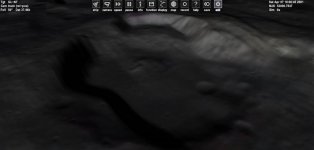
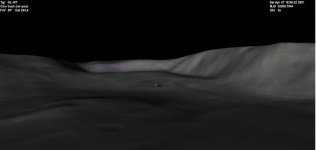
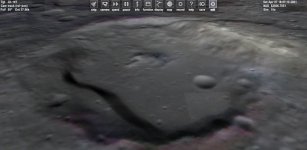
New snapshoots to illustrate the elevation issue on Mercury. The elevation rendering is clearly not the same between the D3D9 and native D3D7 client. Mountains seem to be smaller with the D3D9 client. Increase Mesh resolution does not change anything. Disable Terrain flatening has also no effect, as Face has said on another thread.

Honestly, I don't know where is the issue exactly but I suspect more a problem with D3D9 client than the elevation tile. And it is above my knowledge. Let us wait that Doctor Jarmonik try to find a fix.
 

Attachments

  • D3D7_hires_textures_elevation.JPG
    D3D7_hires_textures_elevation.JPG
    32.5 KB · Views: 11
  • D3D7_hires_textures_elevation_view2.JPG
    D3D7_hires_textures_elevation_view2.JPG
    24.5 KB · Views: 10
  • D3D9_hires_textures_elevation.JPG
    D3D9_hires_textures_elevation.JPG
    43 KB · Views: 11
  • D3D9_hires_textures_elevation_view2.JPG
    D3D9_hires_textures_elevation_view2.JPG
    29.1 KB · Views: 10
To take terrain flattening completely out of the picture, the current client could be re-compiled with the hooking process for the core-patching commented out. The flag alone is early-returning the function on false, but the patching is still present. I don't think that it is a problem that will result in these symptoms, but it would help to narrow down the issue.
 
Can't we simply install older D3D9 versions and see where the problem started ?
I have 4.7 (from Aug 2020 I think) on a different install (to run TerrainTools) and I can confirm that the problem is present....
 
As there are often multiple changes between versions, I think you can't really tell if a specific feature is the culprit without explicitly deactivating that feature in the given version. Of course bisecting through the previous versions can give a good hint. According to the commit log, flattening got in between 4.7 and 4.8. Anybody tried those versions?
 
@Face read my previous post ;-) The problem is present on 4.7
Huh? How did I miss that? I could swear that was not there when I wrote my comment...
 
D3D9Client 4.17 is out
  • The "Extended Map MFD" polygon render problem should be fixed.
  • Metalness Map should now enable Metalness shader if no configuration file is present. (not tested)
  • Global Ambient light level is now included in Metalness shader.
  • "Mercury" elevation issue should be fixed as fas as it's possible. (see notes)

If Orbiter Beta specific elevation is used in Orbiter 2016 elevation scale factor can be incorrect in Physics and Graphics. In a case of the Mercury, mountains and valleys are twice as high or deep as they should be.
 
D3D9Client 4.17 is out
  • The "Extended Map MFD" polygon render problem should be fixed.
  • Metalness Map should now enable Metalness shader if no configuration file is present. (not tested)
  • Global Ambient light level is now included in Metalness shader.
  • "Mercury" elevation issue should be fixed as fas as it's possible. (see notes)

If Orbiter Beta specific elevation is used in Orbiter 2016 elevation scale factor can be incorrect in Physics and Graphics. In a case of the Mercury, mountains and valleys are twice as high or deep as they should be.
Thanks Jarmonik,

That explains why the vessel don't collide with the surface on Mercury (even approximately). Let us wait your next update...
 
While testing the Extended Map MFD which runs fine. I have noticed that the virtual cockpit of the Delta Glider has a sort of wallpaper. Amazing ! What is happening ?
 

Attachments

  • wallpaper_virtual_cockpit.JPG
    wallpaper_virtual_cockpit.JPG
    72.4 KB · Views: 20
That explains why the vessel don't collide with the surface on Mercury (even approximately). Let us wait your next update...
Accurate surface collision is only supported in "linear interpolation" not with the "cubic interpolation". We don't know how the Orbiter physics performs the cubic interpolation. Based on my understanding there are different solutions those might give different results. I am not exactly familiar with it, so I don't feel like starting to guess it, too many unknown variables. Martin could easily fix it.

Could you check that the collisions do work with "linear interpolation". If not then could you post a scenario using a stock DG.
 
Could you check that the collisions do work with "linear interpolation". If not then could you post a scenario using a stock DG.
Hold on a second. It's broken Again.
 
D3D9Client 4.18 is Out

- Mercury elevation should be fix.

Since it the April 1st, let's consider the previous fix announchment was just Aprils day fool. ?

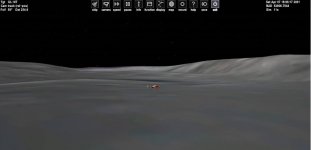
DG Landed on Mercury.
 

Attachments

  • dg.jpg
    dg.jpg
    107.8 KB · Views: 22
Back
Top