New Release D3D9Client Development

Now, I have a third question - about the vessel's Size value.

In Orbiter 2010, you can approach vessel pretty much indefinitely, regardless of what Size is set for it. In Orbiter 2016, Size is the hard limit - you cannot get your view any closer to the vessel than that. What's worse, the speed of view movement (with mouse wheel) is not linear when you are close to the Size limit, so when you start close, it takes forever to distantiate.

Is there a way to get to previous 2010 behaviour for that in 2016? I've checked and checked, experimented with Size and ClipRadius but did not find any client option or configuration or API.
 
To keep the sun glint from disappearing completely at full smoothness, try this at line 285 of Metalness.fx:

float fD = GGX_NDF(dHN, lerp(0.01f, 1.0f, fRgh3));
Ok, Thanks. I'll commit the change to SVN. Have you made any progress with the heat effect ?
 
Now, I hope for the answer to the second question, about the expected lifecycle of the internal mirrors in 2016 client.
Sorry, I don't know.

Metallic parts inside a virtual cockpit should reflect the cockpit interior by default. We should improve the existing mesh/visual editor/debugger so that it can handle reflection camera setups and would allow to bind a specified mesh groups to a specified reflections. After this modification is made the mirror you need would be officially possible.

Of course, one possibility is that we keep reflecting the exterior world by default at-least with the old shader. It's hard to say how it's going to work better from the implementation point of view before it's been implemented.
 
In Orbiter 2010, you can approach vessel pretty much indefinitely, regardless of what Size is set for it. In Orbiter 2016, Size is the hard limit - you cannot get your view any closer to the vessel than that. What's worse, the speed of view movement (with mouse wheel) is not linear when you are close to the Size limit, so when you start close, it takes forever to distantiate.
Many have complained about that and I am not aware of any work-a-rounds. Camera behavior is part of the Orbiter. We can't override the camera behavior from the client side without causing lots of unintended side effects.
 
Sorry, I don't know.

Metallic parts inside a virtual cockpit should reflect the cockpit interior by default. We should improve the existing mesh/visual editor/debugger so that it can handle reflection camera setups and would allow to bind a specified mesh groups to a specified reflections. After this modification is made the mirror you need would be officially possible.

Of course, one possibility is that we keep reflecting the exterior world by default at-least with the old shader. It's hard to say how it's going to work better from the implementation point of view before it's been implemented.
Good, thanks! I can then keep the current implementation for now, and simply document to use Beta client for this feature. At least for now. And concentrate on other things to fix. And can explore custom camera implementation at my leisure, without urgency.
 
Many have complained about that and I am not aware of any work-a-rounds. Camera behavior is part of the Orbiter. We can't override the camera behavior from the client side without causing lots of unintended side effects.
I see. Well, another problem of changing a feature and causing side effects. :-(. In Orbiter 2010, camera was not tied to Size - so Size value choice for the vessel could be influenced by other, more subtle considerations. For example, for a 3-stage rocket, it often helps to select same Size for all stages (and even for payloads) to avoid camera/view jumping radically upon each separation. With same sizes, you get smoother visual experience through the flight. And, as stages get smaller, you just move the view closer manually - but only when you want it, on your conditions. But now single Size selected for the biggest stage prevents you from zooming in later.

Then, there is a lock-in effect. My full collection is now over 100 individual vessels. Tweaking Size value for each of them is daunting. But worse, I have about 500 scenarios - each carefully set for comfortable and pleasant initial camera placement. Changing Size for focused vessels will hopelessly screw these starting views.

I think, the only way for me is to address it programamtically, in the library. I already have a deferred sizing change after pilot ejection on Vostok, that I was already planning to make common for all vessels. Now I'll have to somehow protect initial scenario sizing and resize to a tweaked Size (or maybe Size2) at some convenient point later in simulation... or leave it fully to the user action (whenever he wants) by some key combination... We'll see - that's likely for later, not for the current installment. Except maybe for launchpads - I want to shrink their Size after launch saw they'll disappear from view faster.
 
Have you made any progress with the heat effect ?
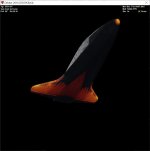
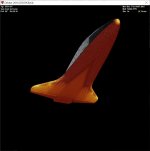
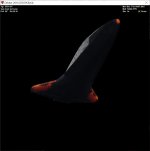
Yes! Still might need some tweaking, but here's the effect:

shuttle-heat0.jpg
shuttle-heat1.jpg
shuttle-heat2.jpg

Line 173 & 174 in Metalness.fx:
if (gCfg.Heat) fHeat = saturate((tex2D(HeatS, frg.tex0.xy).g) - 1.0f + (gMtrl.specialfx.x * gMtrl.specialfx.x * gMtrl.specialfx.x)); else fHeat = (gMtrl.specialfx.x * gMtrl.specialfx.x * gMtrl.specialfx.x);

New lines starting at 343:
// Add heat glow float3 cHeat = float3(pow(abs(fHeat), 0.5f),pow(abs(fHeat), 1.5f),pow(abs(fHeat), 8.0f)); cDiff.rgb = cDiff.rgb + cHeat;
 
That looks fantastic. Great work there.
Agree fully with this reply. Any chance of adding the wake effect that was actually seen by the crew through the forward windows? This a video from STS-114 that shows the Entry and landing through the Pilot Point of View (PLT PoV) camera, AKA HUD camera) so it shows the wake effect nicely as it was a night entry and landing at Edwards AFB after four scrubbed landing attempts at KSC (two the day before, August 8 2005 and two on the landing day, August 9 2005): https://www.dropbox.com/s/s58vqcv5t1wdvr9/STS-114-HUD-Entry.wmv?dl=0

The wake effect starts at 33:25.
 

Attachments

  • STS114_HUDcam_entry.jpg
    STS114_HUDcam_entry.jpg
    85.8 KB · Views: 16
Yes! Still might need some tweaking, but here's the effect:

View attachment 24830
View attachment 24831
View attachment 24832

Line 173 & 174 in Metalness.fx:
if (gCfg.Heat) fHeat = saturate((tex2D(HeatS, frg.tex0.xy).g) - 1.0f + (gMtrl.specialfx.x * gMtrl.specialfx.x * gMtrl.specialfx.x)); else fHeat = (gMtrl.specialfx.x * gMtrl.specialfx.x * gMtrl.specialfx.x);

New lines starting at 343:
// Add heat glow float3 cHeat = float3(pow(abs(fHeat), 0.5f),pow(abs(fHeat), 1.5f),pow(abs(fHeat), 8.0f)); cDiff.rgb = cDiff.rgb + cHeat;
Could you upload a sample package? I'd like to try this with SSU.
 
The translucent glow through the forward windows is the re-entry plasma, and not heating on the orbiter's surface itself. I think it would need some custom effect modeling, either specific to the spacecraft itself, or an upgrade to the generic re-entry effects already provided by Orbiter.

If there could be a re-entry plasma mesh around the orbiter, that would be cool. And then you could control its material values based on dynamic pressure, velocity, etc. Something like the picture at the link below:

I got the heating map from this NASA paper on infrared observations of the Shuttle heat shield during re-entry:
https://ntrs.nasa.gov/citations/20120007110

For a more realistic Shuttle heat shield texture, we'd need to modify the Shuttle mesh to use a single dedicated heatshield texture, instead of loading only half of the heat shield and then mirroring it.

Here's a Dropbox link to the MGAtlantis_heat.dds that I am using.
 
If there could be a re-entry plasma mesh around the orbiter, that would be cool. And then you could control its material values based on dynamic pressure, velocity, etc. Something like the picture at the link below:
SSU actually has an entry mesh, it's called SSU_entry.msh. I've attached an archive that contains it and its texture.
 

Attachments

Jarmonik, would it be possible to add a button to the D3D9 debug window that forces a reload of all of the vessel's textures? I don't know how easy that would be. But it would help a lot while doing texture development. I know VesselBuilder can do it after some configuration.
 
Jarmonik, would it be possible to add a button to the D3D9 debug window that forces a reload of all of the vessel's textures? I don't know how easy that would be. But it would help a lot while doing texture development. I know VesselBuilder can do it after some configuration.

Yes, Texture reload modification commited to SVN.

I was also experimenting with the heat effect and came up with this, it's different but can't say if it's better or worse.
Code:
// Fetch Heat map
//
if (gCfg.Heat) {
    float fH = (gMtrl.specialfx.x * gMtrl.specialfx.x * gMtrl.specialfx.x);
    float iH = 1.0f / max(fH, 0.001f);
    fHeat = pow(abs(tex2D(HeatS, frg.tex0.xy).g), iH) * pow(abs(fH), 0.02f * iH);
}
else fHeat = (gMtrl.specialfx.x * gMtrl.specialfx.x * gMtrl.specialfx.x);
 
I was also experimenting with the heat effect and came up with this, it's different but can't say if it's better or worse.
Code:
// Fetch Heat map
//
if (gCfg.Heat) {
    float fH = (gMtrl.specialfx.x * gMtrl.specialfx.x * gMtrl.specialfx.x);
    float iH = 1.0f / max(fH, 0.001f);
    fHeat = pow(abs(tex2D(HeatS, frg.tex0.xy).g), iH) * pow(abs(fH), 0.02f * iH);
}
else fHeat = (gMtrl.specialfx.x * gMtrl.specialfx.x * gMtrl.specialfx.x);

Interesting. It looks decent when I test it. If I were to change it, I would only change the fHeat line to this. It makes the hotspots not heat up quite so quickly relative to the cooler areas.
fHeat = pow(abs(tex2D(HeatS, frg.tex0.xy).g), iH) * pow(abs(fH), 0.1f * iH);

Is there a risk of it being too computationally intensive?

And thanks for adding the ability to reload textures! This will be a huge time-saver. I'm not connected to the SVN repository, so will you upload it soon to http://users.kymp.net/~p501474a/D3D9Client/ ?
 
And thanks for adding the ability to reload textures! This will be a huge time-saver. I'm not connected to the SVN repository, so will you upload it soon to http://users.kymp.net/~p501474a/D3D9Client/ ?
Sorry, I though you were able to compile the client. I have upload a new beta on the project site.

Is there a risk of it being too computationally intensive?

It shouldn't be a problem. The pow(abs(fH), 0.1f * iH) is actually a constant so pre-shader should take care of that. But "heat" effect is your work so it's up to you how you want it to work.
 
The Reload Textures button doesn't work for normal textures, but only for the heatmap texture. Can it reload all of a vessel's textures?

Edit:
There's some other weird stuff happening that may be the root cause. I changed the base Shuttle texture, saved and clicked Reload Textures, but nothing changed. I then completely restarted Orbiter, but the Shuttle still was using the old texture, which seems impossible.

Then I tried modifying and resaving the heatmap texture, and the Reload Textures button updated that one correctly, but the base texture was still showing the old one.

Anyone have any idea what I did wrong? How can the base texture still show the same thing after being modified and restarting Orbiter?
 
Last edited:
How can the base texture still show the same thing after being modified and restarting Orbiter?
The textures are referenced in the mesh file, so unless D3D9client changes those (which could be considered rude), that sounds like expected behavior.
 
The Reload Textures button doesn't work for normal textures, but only for the heatmap texture. Can it reload all of a vessel's textures?
Orbiter, but the Shuttle still was using the old texture, which seems impossible.
It should reload all textures. But there are some exceptions like if a texture is modified by a Sketchpad or by oapiBlt(), then the reload is disabled.
The anomaly with a stock Atlantis is likely due to base texture being loaded from "Textures2" folder.
 
Back
Top