New Release D3D9Client Development

I don't know the capabilities of Spacecraft.dll or VesselBuilder if they can swap a texture.
I just randomly ran through this, I don't even know what you guys are discussing about, but for the sake of completion: yes VB has that specific capability, it's the texture swap event:

cheers guys
 
When I discovered that Vostok's internal reflective surface (in VZOR device) does work in cockpit view in 2010 but not in 2016, I thought there was a big time frame in between to trace that change. However, thanks to Nikogori, we've now narrowed this change down - back to 2010 era, between R14 and R16_5 (latest version for 2010).

As far as I can tell, VZOR works in cockpit view with R14, but not in R15 or higher.
 
When I discovered that Vostok's internal reflective surface (in VZOR device) does work in cockpit view in 2010 but not in 2016, I thought there was a big time frame in between to trace that change. However, thanks to Nikogori, we've now narrowed this change down - back to 2010 era, between R14 and R16_5 (latest version for 2010).
I looked at the code and it looks like the reflections were disabled due to reasons I can't remember. Also there is a small problem that parts in a virtual cockpit should reflect the virtual cockpit interior by default not the exterior. So, we would need to implement multi reflections and some kind of a way to choose what viewpoint to reflect. Due to low workforce we need to prioritize what to implement.

If the vessel is controlled by it own DLL, then there is a custom camera interface that allows you to render a view of your choice to a texture that can be place where ever you want it.
 
Last edited:
Hi,
I have discovered a small glitch with the last version (r1392) of the D3D9 client.
That issue has existed from the beginning and there are no easy ways to fix it, it gets complicated. Since it's a very minor glitch fixing it is not worth the trouble.
 
This issue is still open I'm afraid:
I haven't had luck reproducing the issues with SSU_v4.2r2570. The client makes bounding sphere/light cone intersections check to evaluate which meshes are lit by which lights. And it looks like the checks fail. But if the old shader works then that shouldn't be the issue, the checks and the code are the same. Can you confirm that the old shader works ?
 
I haven't had luck reproducing the issues with SSU_v4.2r2570. The client makes bounding sphere/light cone intersections check to evaluate which meshes are lit by which lights. And it looks like the checks fail. But if the old shader works then that shouldn't be the issue, the checks and the code are the same. Can you confirm that the old shader works ?
The old PBR shader also fails now. The latest 5.0 revision can be obtained here: https://www.dropbox.com/s/rbzhm14zi19vsu7/SSU_v5.0r3273.zip?dl=0
I've attached a scenario which shows the problem as well.
 

Attachments

I looked at the code and it looks like the reflections were disabled due to reasons I can't remember. Also there is a small problem that parts in a virtual cockpit should reflect the virtual cockpit interior by default not the exterior. So, we would need to implement multi reflections and some kind of a way to choose what viewpoint to reflect. Due to low workforce we need to prioritize what to implement.

If the vessel is controlled by it own DLL, then there is a custom camera interface that allows you to render a view of your choice to a texture that can be place where ever you want it.
I see, thanks for looking. The current Vostok implementation (that relies on R14 client) actually depends on internal cockpit BOT being rendered. But that's indeed far from universal. I was already thinking of custom camera mapping. But that's a longer project, not a quick fix. Plus, if I remember correctly, it was introduced in 2016, so won;t work in 2010. And addon still need to support both 2010 and 2016 in foreseeable future - so I try as much as I can to keep versioning ifdefs to the absolute bare minimum. I'll eventually fix it with cameras for 2016 - just not sure when.
 
And addon still need to support both 2010 and 2016 in foreseeable future

Honestly, why ? If all addons were 2016-only compatible, more people would switch to 2016. We now have a working solution for keeping vessels grounded (see Parking Brake MFD and code sample). 2016 has 3D terrain with collision detection. I'm sorry but 2010 is a retrogaming thing for me, we have to look forward. Backwards compatibility isn't a goal in itself.

We need more intuitive tools for 2016 yes, and Jarmo's client is a huge effort in that direction.
 
There are at this point only two (or at least two, depending on how you look at it) show-stoppers for retiring my 2010 addons.

1. Ground views of launchpads. They have deep dugouts - and in 2016, anything "below 0 mark" is filled with ground texture. Recent flattening feature improved look and feel greatly, but dugouts are still outstanding - totally ruins visual impression. Taking off may be only 1% of the mission time - but it is the percent that most people are most familiar with from launch reports.

2. 2010 touchdown points behave really unpredictably. My collection now has over hundred(!) of individual vessels with config files with defined Orbiter 2010 TDPs. About 50% of them work the same in 2016. About half of the remaining vessels work "so-so" and the "other half" - don't work at all, no matter what I try. I have an item in my plan to add 2016-style touchdown points - but then I'll have to go back and set and test those for all 100 vessels! Quite a task to just reinstate something that already used to work... chances are I won't get to it until I figure out some way to script it.

These two are the biggest. There are a couple more smaller things - for which I know solutions, but which still have to be actually solved :-). Like this Vostok/Vzor issue, or ground textures conversions (which are done for my areas to about 80% of my liking, with remaining 20%, unfortunately, following the universal 80/20 effort rule).

And another purely personal obstacle - it happens so that I currently have to do my development on a non-gaming machine. For 2016, every Orbiter launch takes sometimes almost a minute to load all ground textures. If you are, for example, tweaking some geometry or placement or those touchdown points - you have to launch scenario so often it becomes impractical. You start tinkering with your environment to try to speed it up instead of thinking of what you are working on. So things are much easier done in 2010 first, then, when all is done, tested in 2016 (and, when it gets really intense, on a better machine).

 
Try this, it should greatly help you with the #2 issue. There's even the code samples with it (thx again @asbjos)


The issue #1 is quite interesting and I never thought about it. What we need is a convenient heightmap editor, many people have issue with those.

And another purely personal obstacle - it happens so that I currently have to do my development on a non-gaming machine. For 2016, every Orbiter launch takes sometimes almost a minute to load all ground textures. If you are, for example, tweaking some geometry or placement or those touchdown points - you have to launch scenario so often it becomes impractical. You start tinkering with your environment to try to speed it up instead of thinking of what you are working on. So things are much easier done in 2010 first, then, when all is done, tested in 2016 (and, when it gets really intense, on a better machine).

Well I wouldn't try to develop add-ons for say Fallout 4 (2015) on a 2010 machine. For such frequent big textures load you need a SSD, it helps drastically.
 
Last edited:
Try this, it should greatly help you with the #2 issue. There's even the code samples with it (thx again @asbjos)


The issue #1 is quite interesting and I never thought about it. What we need is a convenient heightmap editor, many people have issue with those.


Well I wouldn't try to develop add-ons for say Fallout 4 (2015) on a 2010 machine. For such frequent big textures load you need a SSD, it helps drastically.
For dugouts - I don't think any elevation editing will solve the problem. Launchpad "landscapes" in my case are all artificially and sharply shaped constructs, not smooth natural features. There are even underground silos with fully vertical walls. Their accuracy goes down to a meter or even a few centimiters. Elevation maps just don't have this degree of accuracy especially with possible variable elev level sspecified. Also, there is some lock-in effect for launchpads: there are hundreds of small objects placed around them and on them, all carefully elevated according to where they should be - over the flat Earth but relative to the pad terrain mesh. Even if I get a perfect down-to-centimiter elev map for the pad - I'll have to re-elevate every such object that falls within the new height. All that - in about 50 config files for surface bases (some are repeated 3-4 times for different historical periods of the pad evolution). Seems totally unrealistic unless scripted! But I don't think elev maps will ever be that precise to even start thinking about it - they are just not the tool intended for this job. Maybe easier to fix with rendering order, if only for special mesh flags, and excluding ground collision detection?

I'll check the parking MFD code, thanks for hinting - I already spotted it in yuor previous post and got curious. Interestingly, in 2010 code, I also have "glueing" code, as default Orbiter behavior on touchdowns was not desirable in most cases :-). So it is already familiar problem to me, so I'd be happy to check out 2016 solution!

...Woluld be happy to try the SSD idea (thanks - did not think of it myself). Currently I only have SSD on my boot drive, and it has only ~30 GB left, textures folder in 2016 is already over that size. But at least this is "another problem with known solution", so even if solution is not immediate, it is within reach :-).
 
Just a thought on @igel s "problem" about the elevation: Would a reversed approach be an option?
What I mean is: Your base configuration defines all the (relative) heights of all the assets (buildings, launch-pads, etc.) and the terrain adapts to that on an interpolation / extrapolation thing?
This is just an idea popping into my mind, so no request or something like that :)

and: ...we're currently in a very dynamic change-session already, so let @jarmonik do his things in his preferred order ?
 
Just a thought on @igel s "problem" about the elevation: Would a reversed approach be an option?
What I mean is: Your base configuration defines all the (relative) heights of all the assets (buildings, launch-pads, etc.) and the terrain adapts to that on an interpolation / extrapolation thing?
This is just an idea popping into my mind, so no request or something like that :)

and: ...we're currently in a very dynamic change-session already, so let @jarmonik do his things in his preferred order ?
No, this option did not work. One simple example: some "objects" simulate fences around the pad. A single straight section of such fence can be hundreds of meters long. It is "made" of a single rectangular shape - very thin, only 2 meters high - but big dozens or hundreds of meters long. When such long section runs along the terrain - this terrain has to be absolutely flat. Even smallest hills or dips will screw the look.

Luckily, the "localized flattening" feature of the client solved this problem completely. The look of the bases went right away from total F to B+. So, the only problem now is that it can't be anything below A :-). Because the better it looks (and tose look really good :-) ), the more any remaining eyesores stand out and irritate you. Contrary, when you play with the rough models just one step above wireframe, you'll be a lot more tolerant to the glitches in the other areas of simulation.
 
I can publish a new version of the Client for Orbiter 2010 with the cockpit reflections re-enabled. Also, have you noticed the surface elevation checkbox in the visual options. It will make the earth a flat sphere. As for the O2016 I try to find some ways to get the reflection camera issues sorted out for the interior and exterior reflections. It would be nice to have a better vessel configuration file interface since the amount of data will likely increase a lot.

The current work priorities are:
1. TerrainToolKit and Metalness/Specular shader fixes
2. Reflection cameras
3. Engine exhausts and condensation effects

and: ...we're currently in a very dynamic change-session already, so let @jarmonik do his things in his preferred order ?

"dynamic change session" :unsure: ? I am not aware of anything been or being changed that would effect add-on compatibility. The whole idea of the new shaders was to enable a possibility to add a new features without breaking the behavior of older add-ons. Yeah, but the priorities do tend to change.
As for the engine exhausts and condensation effects, etc... we would probably need some kind of effect composer dialog with following entries:
  • Effect type selector (Engine exhaust, condensation effect, particle effect, reentry effect)
  • A way to assign textures to a specific slots
  • Set of sliders controlling various parameters (depending on effect type of course)
  • Somewhere on a bottom a spline/bezier curve control allowing user to edit how a variable is changing over time. And a Combobox to select the variable in question.
 
I can publish a new version of the Client for Orbiter 2010 with the cockpit reflections re-enabled. Also, have you noticed the surface elevation checkbox in the visual options. It will make the earth a flat sphere. As for the O2016 I try to find some ways to get the reflection camera issues sorted out for the interior and exterior reflections. It would be nice to have a better vessel configuration file interface since the amount of data will likely increase a lot.
May be a good idea to return internal reflections to a would-be-latest 2010 client. Not critical, "nice to have". Vostok is probably the only vessel to use it, but Vostok is sufficiently popular addon :-). If no, I can simply document recomendation to downgrade client version for just Vostok.

My addons are "reasonably intense" when it comes to setting up client, so I always document detailed instructions. For pre-flattening 2016 clients, disabling surface elevation was an absolute requirement - otherwise launchpads did not stand level, and rockets could not launch from them, period. Flattening allowed to restore 3D terrain for other things - like landings, which already looks better than 2010 (and will become even better when I restore "sticking to the ground").

And my vessel configs are already quite filled - with my own stuff. Even though all vessels have DLLs, a lot of things are configured in cfg rather than hard-coded in the dll. So adding 2016-style TDPs should not be that hard... It is just so many vessels to update :-)
 
The old PBR shader also fails now. The latest 5.0 revision can be obtained here: https://www.dropbox.com/s/rbzhm14zi19vsu7/SSU_v5.0r3273.zip?dl=0
I've attached a scenario which shows the problem as well.

I have looked at the problem and it looks like the "Range" parameter is set to a very low setting only 2 meters. So, the Client won't apply lighting due to out of range condition. If the "range" is set too high then the Client will automatically reduce it to a practical level which is a range of 1% light level (i.e. 31m with PLB Floodlights). The next version of the Client will have a light cone visualization option in DebugControls.
 
..."dynamic change session"...was meant to be more like "dynamic change request session" ;)
 
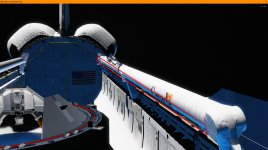
Another thing that should addressed is that Earth glow is visible through meshes when it shouldn't be. Example screenshot attached. In it the bottom of the orbiter should be block any Earth glow on elements inside the PLB, but as illustrated on the bottom of the RMS, it isn't.
 

Attachments

  • Earth_glow_visible_through_PLB.jpg
    Earth_glow_visible_through_PLB.jpg
    942.1 KB · Views: 18
Hey Jarmo,
I took the liberty and merged the changes from branch 2016 to trunk.
Each "version bump" step is presented as one merge (and a "version bump"), so there should be a correlation between branch-2016- and trunk-versions.
This is not important per se, but who knows ;) ...

While doin' that I realized something on gcConst.h:
Shouldn't all compound assignment operators[1] be modifying "this"?
So, instead of...
C++:
        inline FVECTOR4& operator*= (float f)
        {
            return FVECTOR4(x * f, y * f, z * f, w * f);
        }
...shouldn't it be more like...
C++:
        inline FVECTOR4& operator*= (float f)
        {
            x *= f; y *= f; z *= f; w *= f;
            return *this;
        }
...don't you think?


[1] *=, /= %=, += -=, <<=, >>=, &=, ^=, |=
 
What will be the recommended process for creating multi-layer materials?

I find that solar panels (and things with foil surfaces like Hubble) can be made to look very realistic with multi-layer materials. Is it possible to have a shader that defaults to metalness without a specular map, but when a specular map is present, the sun and local light specular reflections are defined by the specular map instead of metal/smoothness? All other lighting and environment reflections would still obey the metalness rules.

I want to switch over to the metalness workflow for developing textures because it'll be easier and faster, but I also want to retain direct control of specular only in situations where I need it.
 
Back
Top