
You are using an out of date browser. It may not display this or other websites correctly.
You should upgrade or use an alternative browser.
You should upgrade or use an alternative browser.
New Release D3D9Client Development
- Thread starter jarmonik
- Start date
- Joined
- Feb 4, 2008
- Messages
- 9,758
- Reaction score
- 1,028
- Points
- 203
Fully available for Orbiter 2016: http://users.kymp.net/~p501474a/D3D9Client/Will it be available for non-beta, Or is it not compatible ?

- Joined
- Apr 1, 2008
- Messages
- 2,168
- Reaction score
- 663
- Points
- 113

- Joined
- Mar 28, 2008
- Messages
- 2,707
- Reaction score
- 881
- Points
- 128
The elevation rendering is strange now (In BETA)
When you move around with the external camera relatively shallow, all weird things happen (scenario for easy start attached)...
Ok, Thanks. Will look into it. Can't reproduce without high resolution elevation. Downloading now...
---------- Post added at 03:55 ---------- Previous post was at 02:00 ----------
I can see it now. Looks like "cubic" interpolation is broken at least in Beta, so, mean while use "linear" interpolation until the next release is out.
- Joined
- Feb 4, 2008
- Messages
- 9,758
- Reaction score
- 1,028
- Points
- 203
Any idea where to start with getting rid of this weird oily haze around on-orbit sunrises/sunsets? It seems linked to the rayleigh density. It needs to be at the highest setting to get the deep red color seen in this photo series by Bob Behnken during his and Doug Hurley's 62 day stay on the ISS:
[ame]https://twitter.com/AstroBehnken/status/1287741440383242240[/ame]
[ame]https://twitter.com/AstroBehnken/status/1287741440383242240[/ame]
Attachments

- Joined
- Mar 28, 2008
- Messages
- 2,707
- Reaction score
- 881
- Points
- 128
The elevation rendering is strange now (In BETA)
When you move around with the external camera relatively shallow, all weird things happen (scenario for easy start attached)...
There is a fix uploaded to trunk. Could you check that the issue is fixed.
---------- Post added at 04:58 ---------- Previous post was at 04:37 ----------
Any idea where to start with getting rid of this weird oily haze around on-orbit sunrises/sunsets? It seems linked to the rayleigh density. It needs to be at the highest setting to get the deep red color seen in this photo series by Bob Behnken during his and Doug Hurley's 62 day stay on the ISS:
The model that we got is simply not accurate enough to give that kind of fine detail as seen in the photo series. Also, the sunset/sunrise conditions at the sea level are broken and there's no point attempting to get a good sunrise because it won't work. The simplified model that we got is pushed to give better orbital and daytime results with the cost of sunset conditions.
The early implementation did give a pretty good sunrise at sea level but the orbital sunrise was also red. It was fixed with an expense of sea level sunrise.
We would need much more accurate model to produce all conditions in finer detail but I don't really have the inspiration to start working on it right now. And there is high number of other things that would need to be done too.
I don't get the "Oily" looking sunrise with default settings. If there is too much color, reduce rayleigh density.

- Joined
- Feb 18, 2008
- Messages
- 365
- Reaction score
- 259
- Points
- 63
- Location
- Melbourne
- Website
- eightymileshigh.wordpress.com
I'm having some issues when landed on outer planet moons, when using R4.6 with Orbiter 2016. On most of the Jovian and Saturnian moons I see bad flickering and jumping of textures.
These scenarios capture the problem for me:
Ganymede:
Tethys:
The moons of Uranus and Neptune appear stable but the DG doesn't cast a shadow.
A couple of Saturn's moons show no problem at all; Mimas, Enceladus.
Hope this is helpful.
These scenarios capture the problem for me:
Ganymede:
Code:
BEGIN_DESC
Ganymede surface graphics glitch.
END_DESC

BEGIN_ENVIRONMENT
  System Sol
  Date MJD 52024.8592697715
END_ENVIRONMENT

BEGIN_FOCUS
  Ship GL-01S
END_FOCUS

BEGIN_CAMERA
  TARGET GL-01S
  MODE Extern
  POS 16.337456 -128.901679 -7.734930
  TRACKMODE TargetRelative
  FOV 41.81
END_CAMERA

BEGIN_HUD
  TYPE Surface
END_HUD

BEGIN_MFD Left
  TYPE Surface
  SPDMODE 1
END_MFD

BEGIN_MFD Right
  TYPE Launch
  NAV 0
END_MFD

BEGIN_SHIPS
GL-01S:DG-S
  STATUS Landed Ganymede
  POS 14.0000000 -131.9000000
  HEADING 178.06
  ALT 2.554
  AROT 102.464 46.953 -71.434
  RCSMODE 2
  AFCMODE 7
  PRPLEVEL 0:1.000000 1:1.000000 2:1.000000
  NAVFREQ 434 94 84 114
  XPDR 0
  RCOVER 1.0000 0.0000
  HOVERHOLD 0 1 0.0000e+000 0.0000e+000
  GEAR 1.0000 0.0000
  AAP 0:0 0:0 0:0
  PSNGR 2 3 4
  PANELCOL 4
  TANKCONFIG 1
END
END_SHIPS
Tethys:
Code:
BEGIN_DESC
Tethys surface graphics glitch.
END_DESC

BEGIN_ENVIRONMENT
  System Sol
  Date MJD 52036.3996687836
END_ENVIRONMENT

BEGIN_FOCUS
  Ship GL-01S
END_FOCUS

BEGIN_CAMERA
  TARGET GL-01S
  MODE Extern
  POS 6.399219 -107.636825 -7.465196
  TRACKMODE AbsoluteDirection
  FOV 41.81
END_CAMERA

BEGIN_HUD
  TYPE Surface
END_HUD

BEGIN_MFD Left
  TYPE Surface
  SPDMODE 1
END_MFD

BEGIN_MFD Right
  TYPE Launch
  NAV 0
END_MFD

BEGIN_SHIPS
GL-01S:DG-S
  STATUS Landed Tethys
  POS 14.0000000 -131.9000000
  HEADING 178.06
  ALT 2.568
  AROT 102.433 46.892 -71.456
  RCSMODE 2
  AFCMODE 7
  PRPLEVEL 0:1.000000 1:1.000000 2:1.000000
  NAVFREQ 434 94 84 114
  XPDR 0
  RCOVER 1.0000 0.0000
  HOVERHOLD 0 1 0.0000e+000 0.0000e+000
  GEAR 1.0000 0.0000
  AAP 0:0 0:0 0:0
  PSNGR 2 3 4
  PANELCOL 4
  TANKCONFIG 1
END
END_SHIPS
The moons of Uranus and Neptune appear stable but the DG doesn't cast a shadow.
A couple of Saturn's moons show no problem at all; Mimas, Enceladus.
Hope this is helpful.
- Joined
- Apr 1, 2008
- Messages
- 2,168
- Reaction score
- 663
- Points
- 113
Checked! It's fine now (cubic interpolation & linear interpolation) :thumbup:There is a fix uploaded to trunk. Could you check that the issue is fixed.
- Joined
- Mar 28, 2008
- Messages
- 2,707
- Reaction score
- 881
- Points
- 128
I'm having some issues when landed on outer planet moons, when using R4.6 with Orbiter 2016. On most of the Jovian and Saturnian moons I see bad flickering and jumping of textures.
The moons of Uranus and Neptune appear stable but the DG doesn't cast a shadow.
There is a new build uploaded for Orbiter 2016. Could you check if the texture flickering issue is fixed. There is currently no vessel shadow support for planets/moons using the old tile format. Only the new tile format is fully supported.
Broken clouds of Jupiter/Venus should be fixed.
- Joined
- Feb 18, 2008
- Messages
- 365
- Reaction score
- 259
- Points
- 63
- Location
- Melbourne
- Website
- eightymileshigh.wordpress.com
There is a new build uploaded for Orbiter 2016. Could you check if the texture flickering issue is fixed. There is currently no vessel shadow support for planets/moons using the old tile format. Only the new tile format is fully supported.
Broken clouds of Jupiter/Venus should be fixed.
Yes, fixed - that was fast!
 Thanks.
I do still get the effect, in some places, of the vessel separated from its ground shadow by some small altitude. I gather that's an unavoidable consequence of the way surface elevation is calculated now?
- Joined
- Mar 28, 2008
- Messages
- 2,707
- Reaction score
- 881
- Points
- 128
I do still get the effect, in some places, of the vessel separated from its ground shadow by some small altitude. I gather that's an unavoidable consequence of the way surface elevation is calculated now?
Not really, you can avoid it in most cases by increasing "MaxPatchResolution" from planet/moon config file. "10" should be good enough. It shouldn't have any negative side effects.
- Joined
- Mar 28, 2008
- Messages
- 2,707
- Reaction score
- 881
- Points
- 128
Just started to think is there a way to make water less transparent? Looking from KSC - away from the sun (so no reflections) water seems dirty greenish, etc... it is depicted in tiles this way...
Probably, but if the water is less transparent then it would need to have a color (and that's not a constant). Right now the color comes from the background texture like you said. Are you saying that water color in the tiles is incorrect ? I suppose it would should be possible to shift it a bit towards a cleaner blue but is that correct ?
EDIT: Hmmm.. Maybe the problem is how much light the texture receives through the water.

Last edited:
- Joined
- Mar 28, 2008
- Messages
- 2,707
- Reaction score
- 881
- Points
- 128
Just started to think is there a way to make water less transparent? Looking from KSC - away from the sun (so no reflections) water seems dirty greenish, etc... it is depicted in tiles this way...
I played around with water setting. It's possible to tune it so that the dirt looks like floating but it's probably not any better. The dirty greenish color is real as far as I can tell so I leave it be as it is at-least for now.

- Joined
- Jun 14, 2008
- Messages
- 813
- Reaction score
- 868
- Points
- 108
- Location
- FRANCE
- Website
- francophone.dansteph.com
Hello
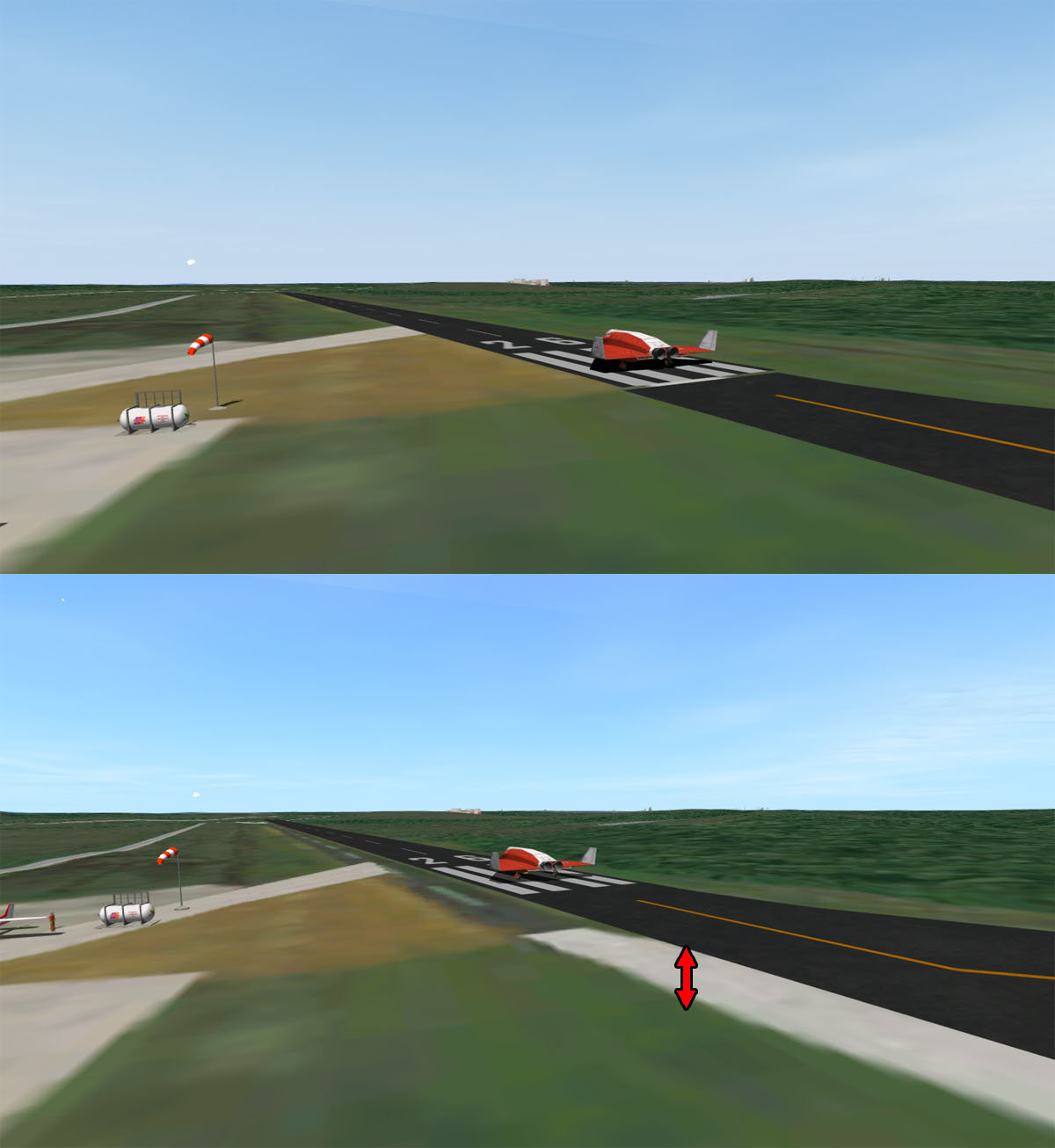
So I have a problem ...(with my add-on Kourou-CSG)
Since the latest version of D3D9 (D3D9ClientR4.7-forOrbiter2016 (r1335)
my Kourou track is in the air: (bottom image)
With the previous version (D3D9ClientR4.4-forOrbiter2016 (r1306)
everything was fine (top image)
So I have a problem ...(with my add-on Kourou-CSG)
Since the latest version of D3D9 (D3D9ClientR4.7-forOrbiter2016 (r1335)
my Kourou track is in the air: (bottom image)
With the previous version (D3D9ClientR4.4-forOrbiter2016 (r1306)
everything was fine (top image)
- Joined
- Jun 14, 2008
- Messages
- 813
- Reaction score
- 868
- Points
- 108
- Location
- FRANCE
- Website
- francophone.dansteph.com
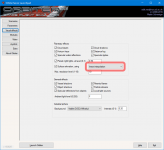
Ah yes ! thank you very much: that solves the problem 
Similar threads

- Sticky
- Replies
- 6
- Views
- 11K

- Replies
- 10
- Views
- 4K


- Replies
- 1
- Views
- 4K


- Replies
- 7
- Views
- 4K