
-
ORBITER-FORUM will be temporarily closed at 2026-07-23 18:00 UTC while we complete some OF maintenance tasks. The amount of downtime is expected to take up to one hour, but probably less.
You are using an out of date browser. It may not display this or other websites correctly.
You should upgrade or use an alternative browser.
You should upgrade or use an alternative browser.
New Release D3D9Client Development
- Thread starter jarmonik
- Start date

- Joined
- Feb 4, 2008
- Messages
- 9,758
- Reaction score
- 1,028
- Points
- 203
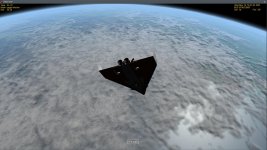
How about getting the cloud micro textures working again? I think that the attached screenshot from 2010-P1 shows just how much life they put into the clouds. Currently they looks just bland and flat.Are we ready for 3.11 release or are there something that should be addressed before that ?
Attachments

Currently, is there a chance gcSketchpadVersion() doesn't return 2?
- Joined
- Mar 28, 2008
- Messages
- 2,707
- Reaction score
- 881
- Points
- 128
Currently, is there a chance gcSketchpadVersion() doesn't return 2?
Yes, for an example running MFD in DX9ExtMFD plugin currently returns "1" but there are plans in motion to upgrade the plugin to support DirectX and Skepchpad 2.
Also if a Sketchpad is created for a surface that's been created with OAPISURFACE_SYSMEM or OAPISURFACE_GDI flags, the return value is "1" but is very rare case, I don't know any.
Yes, for an example running MFD in DX9ExtMFD plugin currently returns "1" but there are plans in motion to upgrade the plugin to support DirectX and Skepchpad 2.
Also if a Sketchpad is created for a surface that's been created with OAPISURFACE_SYSMEM or OAPISURFACE_GDI flags, the return value is "1" but is very rare case, I don't know any.
Thanks!
I'm trying to avoid doing uneeded checks in the MFD logic, and after establishing that D3D9 is running I was wondering if there was a point (currently) to check the version.
So, the surfaces created with those 2 flags, they would not be MFD, right?
About the ExtMFDs, I think I'll "disable" SSU's MFD in it, as it raises "internal questions" (data and power source), so that won't be an issue.
- Joined
- Mar 28, 2008
- Messages
- 2,707
- Reaction score
- 881
- Points
- 128
Right, they wouldn't be MFDs. I am not aware of any case where MFD would be created with type "1" other than the DX9ExtMFD.So, the surfaces created with those 2 flags, they would not be MFD, right?
ExtMFD might return "2" but if it does it's really laggy.
NOTE: The DX7 Inline engine always returns "1".
This is not an issue in MOGE, as I use GDI there.NOTE: The DX7 Inline engine always returns "1".
Thanks!
- Joined
- Mar 28, 2008
- Messages
- 2,707
- Reaction score
- 881
- Points
- 128
New Build is Out
There is a new build of the client published.
- Cloud microtextures are now enabled. On/Off toggle option in "Advanced Setup" Dialog.
- Jumps in a water/sea texturing fixed.
There is a new build of the client published.
- Cloud microtextures are now enabled. On/Off toggle option in "Advanced Setup" Dialog.
- Jumps in a water/sea texturing fixed.
- Joined
- Feb 4, 2008
- Messages
- 9,758
- Reaction score
- 1,028
- Points
- 203
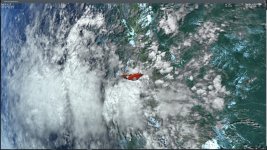
Thanks for implementing the micro textures for the cloud layer. Things look very much improved now. The only thing from me now is shadows on diffuse particle streams. Right now particle streams be they diffuse or emmissive, they're not affected by shadows. They can cast shadows, but not be affected by them (IE, do a night launch, a diffuse particle streams is lit exactly the way it it would be in full on bright daylight).There is a new build of the client published.
- Cloud microtextures are now enabled. On/Off toggle option in "Advanced Setup" Dialog.
- Jumps in a water/sea texturing fixed.
Attachments
- Joined
- Mar 28, 2008
- Messages
- 2,707
- Reaction score
- 881
- Points
- 128
Thanks, it is better. Where is defined the size of cloud microtextures (scale)?
But yes, I also share DaveS's thoaughts about particle illumination, but it can be diffiicult.
P.S. are ocean waves moving faster?
The scale is tied to a tile level which can be changed only from the (*.cpp) source codes. Also the scale can be only doubled or reduced in half. A Finer control is possible by altering the micro-texture size that is currently 256x256. It doesn't need to be power of two.
There are some plans to create a particle effect editor which would allow more options and capabilities for particles and emitters. This editor would be an extension to the mesh/vessel editor that's been mentioned earlier. The particle lighting issues would be addressed during the upgrade process.
Is the water too fast ? It's defined in Surface.fx line 679, current speed in 60 tiles / h
- Joined
- Feb 4, 2008
- Messages
- 9,758
- Reaction score
- 1,028
- Points
- 203
This the cloud micro textures I'm using, it's a bit on the old side but still works well: [ame="https://www.orbithangar.com/searchid.php?ID=3164"]Just a moment...[/ame]Thanks, it is better. Where is defined the size of cloud microtextures (scale)?

- Joined
- Apr 1, 2008
- Messages
- 2,167
- Reaction score
- 663
- Points
- 113
Yeah, they are definitely "feeling" to fast.P.S. are ocean waves moving faster?
I would rather go for 1/3 of the speed, as it "feels" better.
Easy fix by changing Modules\D3D9Client\Surface.fx (SurfaceTechPS; Line 679):
vUVWtr.x += fTime/180.0f;
For some reason I do not see cloud microtextures... I know this mcwgogs addon, and effect is absent. Client is installed, microtexture checkbox is checked, but Orbiter though is not r.90 but otherwise everything runs OK.
I tried to update Orbiter, but TortoiseSVN somehow fails. Is it address issue?
I see "svn://orbiter-forum.com/orbiter" but should it be like "svn://svn.orbiter-forum.com/orbiter" (with another svn in address?)
I tried to update Orbiter, but TortoiseSVN somehow fails. Is it address issue?
I see "svn://orbiter-forum.com/orbiter" but should it be like "svn://svn.orbiter-forum.com/orbiter" (with another svn in address?)
- Joined
- Feb 4, 2008
- Messages
- 9,758
- Reaction score
- 1,028
- Points
- 203
I've noticed the same, the micro-texture blending with the cloud layer texture isn't that strong and it seems to be a hit-or-miss situation on whether or not it's going to work. It's nothing like Orbiter 2006/2010.For some reason I do not see cloud microtextures... I know this mcwgogs addon, and effect is absent. Client is installed, microtexture checkbox is checked, but Orbiter though is not r.90 but otherwise everything runs OK.
Last edited:
For some reason I do not see cloud microtextures... I know this mcwgogs addon, and effect is absent. Client is installed, microtexture checkbox is checked, but Orbiter though is not r.90 but otherwise everything runs OK.
I tried to update Orbiter, but TortoiseSVN somehow fails. Is it address issue?
I see "svn://orbiter-forum.com/orbiter" but should it be like "svn://svn.orbiter-forum.com/orbiter" (with another svn in address?)
Orbiter BETA address should be:
Code:
svn://svn.orbiter-forum.com/orbiter/- Joined
- Apr 1, 2008
- Messages
- 2,167
- Reaction score
- 663
- Points
- 113
Assuming you use TortoiseSVN, you can easily relocate the repository URL:I see "svn://orbiter-forum.com/orbiter" but should it be like "svn://svn.orbiter-forum.com/orbiter" (with another svn in address?)
- Right-click on your working-copy (base-)folder,
- select TortoiseSVN->Relocate...
- and enter the new URL (svn://svn.orbiter-forum.com/orbiter)
- and confirm with OK.
thanks to kuddel now everything should be OK, but I noticed sometimes in a scenario I do not have shadows and selfshadows cast by vessels. But just occasionally. It was relatively "cloudy day" in that particular scenario...
- Joined
- Mar 28, 2008
- Messages
- 2,707
- Reaction score
- 881
- Points
- 128
...but I noticed sometimes in a scenario I do not have shadows and selfshadows cast by vessels. But just occasionally. It was relatively "cloudy day" in that particular scenario...
Screen shots could help to identify the problem. Also, In the configurations there are selfshadowing option like "Near by objects", "All visible objects" which might have an effect.
---------- Post added at 14:53 ---------- Previous post was at 14:52 ----------
I am currently thinking a bout a repository-relayout, but that definitely should be postponed!
What kind of layout changes ? I have no idea what you mean by that.
Similar threads

- Sticky
- Replies
- 6
- Views
- 10K

- Replies
- 10
- Views
- 4K


- Replies
- 1
- Views
- 4K


- Replies
- 7
- Views
- 4K