

You are using an out of date browser. It may not display this or other websites correctly.
You should upgrade or use an alternative browser.
You should upgrade or use an alternative browser.
New Release D3D9Client Development
- Thread starter jarmonik
- Start date
- Joined
- Mar 28, 2008
- Messages
- 2,707
- Reaction score
- 881
- Points
- 128
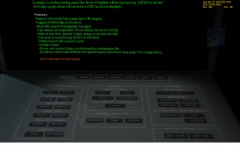
I'm wondering if anyone else has this problem I'm seeing with Space Shuttle Atlantis. If I pick the Launch into Sunrise scenario, the HUD and MFD's won't display any information. (I've made sure CTRL+H is on and the MFD's are powered up.)
I can reproduce the problem. I'll take a look in it.
---------- Post added at 17:59 ---------- Previous post was at 17:57 ----------
This could be caused by ENB series tweaking. Can you reproduce in a clean installation. (I can't reproduce)For me, mars texture is missing. Just a black planet with atmosphere.

- Joined
- Jun 29, 2010
- Messages
- 642
- Reaction score
- 0
- Points
- 16
I can reproduce the problem. I'll take a look in it.
Note also that clicking the button on the opposite side of the MFD (opposite of the Power On/Off button) causes Orbiter to crash. At least it does on mine. Are you able to reproduce that as well?
- Joined
- Mar 28, 2008
- Messages
- 2,707
- Reaction score
- 881
- Points
- 128
In the Arrow Freighter's virtual cockpit, the text on the panels is blurred. Confirmed on two different machines, does not occur in the default graphics client.
It's blurred and badly. I haven't been able to reproduce with the default setup. It's a texture sampler issue of some kind. Could you replace the sampler section from a D3D9Client.fx it's located in /Modules/D3D9Client/ folder.
Look for "sampler Tex0S = sampler_state" and replace it with the following code:
Code:
sampler Tex0S = sampler_state       // Primary Mesh texture sampler
{
    Texture = <gTex0>;
    MinFilter = LINEAR;
    MagFilter = LINEAR;
    MipFilter = LINEAR;
    MaxAnisotropy = 4;
    MipMapLODBias = 0;
    AddressU = WRAP;
    AddressV = WRAP;
};If the code above will work then change back into an anisotropic filtering.
---------- Post added at 18:16 ---------- Previous post was at 18:15 ----------
Yes.Note also that clicking the button on the opposite side of the MFD (opposite of the Power On/Off button) causes Orbiter to crash. At least it does on mine. Are you able to reproduce that as well?

I'm wondering if anyone else has this problem I'm seeing with Space Shuttle Atlantis. If I pick the Launch into Sunrise scenario, the HUD and MFD's won't display any information. (I've made sure CTRL+H is on and the MFD's are powered up.)
Here's a screenshot.

The odd thing is, when I choose a scenario like Atlantis docked at ISS, the HUD and MFD's are working. Also, if I run Orbiter.exe (to use the built-in graphics system), the HUD and MFD's work just fine.
Any idea why the Space Shuttle Atlantis HUD and MFD's won't work on the ground under D3D9Client?
If this is posted to the wrong thread, please move it.
I can confirm that in SSU too. Whole drawing surface is white, and everything comes good after External Tank separation.
- Joined
- Jun 29, 2010
- Messages
- 642
- Reaction score
- 0
- Points
- 16
I can confirm that in SSU too. Whole drawing surface is white, and everything comes good after External Tank separation.
I noticed that also with the standard shuttle. (Forgot to mention it in my first post.) When reaching orbit, when I jettison the ET, the HUD and MFD's come online.
Also, I just did a quick test ... while sitting on the launch pad, I pressed + on the number keypad, and then pressed J twice to jettison the SRB's and ET. As soon as I did that, the HUD and MFD's came online.
- Joined
- Mar 28, 2008
- Messages
- 2,707
- Reaction score
- 881
- Points
- 128
Ok, I found the bug. MFDs will be back online in RC22. There was an error in a transformation matrix and the MFDs were mispalced.
---------- Post added at 20:08 ---------- Previous post was at 19:47 ----------
The CTD is caused by feeding a NULL meshhandle to the oapiMeshMaterial() function in Atlantis.dll (using idx 10). The NULL handle is obviously received from VESSEL::GetMesh() function. The proposal for "Improved backwards compatibility" in the project section would most likely fix the CTD.
---------- Post added at 20:08 ---------- Previous post was at 19:47 ----------
The CTD is caused by feeding a NULL meshhandle to the oapiMeshMaterial() function in Atlantis.dll (using idx 10). The NULL handle is obviously received from VESSEL::GetMesh() function. The proposal for "Improved backwards compatibility" in the project section would most likely fix the CTD.
Tried the suggested changes in the D3d9Client.fx file, but they had no effect on the blurriness for me.
---------- Post added at 12:54 PM ---------- Previous post was at 12:48 PM ----------
If I change the texture settings on the Intel Graphics control panel on this machine to quality instead of performance, the textures are fine & no blur exists. Switching back to performance causes the blurriness.
This setting seems to have no effect on the inline DX7 client. They look clear regardless.
---------- Post added at 12:54 PM ---------- Previous post was at 12:48 PM ----------
If I change the texture settings on the Intel Graphics control panel on this machine to quality instead of performance, the textures are fine & no blur exists. Switching back to performance causes the blurriness.
This setting seems to have no effect on the inline DX7 client. They look clear regardless.
- Joined
- Mar 28, 2008
- Messages
- 2,707
- Reaction score
- 881
- Points
- 128
Tried the suggested changes in the D3d9Client.fx file, but they had no effect on the blurriness for me.
---------- Post added at 12:54 PM ---------- Previous post was at 12:48 PM ----------
If I change the texture settings on the Intel Graphics control panel on this machine to quality instead of performance, the textures are fine & no blur exists. Switching back to performance causes the blurriness.
This setting seems to have no effect on the inline DX7 client. They look clear regardless.
Yes, the driver can override an application settings. But it still doesn't explain the blurriness of that magnitude. Low quality filter shouldn't cause a bluriness like that. Is the Arrow Freighter only add-on having the problem ? What's the effect of quality mode in the framerate ?
Yes, the driver can override an application settings. But it still doesn't explain the blurriness of that magnitude. Low quality filter shouldn't cause a bluriness like that. Is the Arrow Freighter only add-on having the problem ? What's the effect of quality mode in the framerate ?
2-4 FPS difference. About 37 FPS Quality vs. 40 Performance, in the Arrow cockpit.
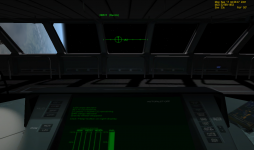
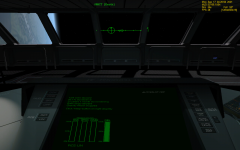
Also noticed, as a result of this anomaly, the main display on the Arrow bridge, as well as the HUD, are also blurred and barely legible, when setting to Performance.
**EDIT** Attached are DX9 Client, graphics set for performance mode, and inline DX7, graphics set on performance.
Attachments
Last edited:
- Joined
- Mar 28, 2008
- Messages
- 2,707
- Reaction score
- 881
- Points
- 128
2-4 FPS difference. About 37 FPS Quality vs. 40 Performance, in the Arrow cockpit.
Also noticed, as a result of this anomaly, the main display on the Arrow bridge, as well as the HUD, are also blurred and barely legible, when setting to Performance.
**EDIT** Attached are DX9 Client, graphics set for performance mode, and inline DX7, graphics set on performance.
The blurriness is probably created by a mipmap auto-generation. I made a small change in the texture loading algorithm. Let's see it that will fix the problem.

luki1997a
Active member
Hello:hello:
I've a question: Is it possible, if after completing the basic D3D9Client, to make it as default/inline client of Orbiter?(I know- martins have to do this) After tweaks to load DGIV and work to get it to be 100% compatible with all add-ons?
BTW thanks for RC22:thumbup:
I've a question: Is it possible, if after completing the basic D3D9Client, to make it as default/inline client of Orbiter?(I know- martins have to do this) After tweaks to load DGIV and work to get it to be 100% compatible with all add-ons?
BTW thanks for RC22:thumbup:
- Joined
- Mar 28, 2008
- Messages
- 2,707
- Reaction score
- 881
- Points
- 128
Hello:hello:
I've a question: Is it possible, if after completing the basic D3D9Client, to make it as default/inline client of Orbiter?(I know- martins have to do this) After tweaks to load DGIV and work to get it to be 100% compatible with all add-ons?
Martin can't use the D3D9Client source code directly in the inline engine due to the GPL lisence. But, it is possible to redistribute the D3D9Client with the Orbiter.
Currently, the situation is somewhat complicated. Martin would have upgraded the inline engine to use DX9 or DX10 twice already with the efforts he has invested in the graphics client interface. And now when we have almost a fully operational client implemented, he's ignoring it. That doesn't make much sence. Unless, he's abandoned the client interface a long ago and is working on to upgrade the inline engine. And in that case every effort invested in the D3D9Client will get wasted. My inspiration to work with this project is pretty low at a moment.
I belive that the CTDs those occur under the D3D9Client could be fix by makeing a few modifications into the Orbiter, but I can't be absolutely sure about it. There are some factors I simply don't know about.
The blurriness is probably created by a mipmap auto-generation. I made a small change in the texture loading algorithm. Let's see it that will fix the problem.
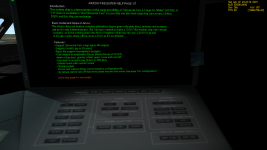
Still blurry when set on Performance. In fact, I think it might even be just a bit blurrier
Attachments
- Joined
- Jun 29, 2010
- Messages
- 642
- Reaction score
- 0
- Points
- 16
My inspiration to work with this project is pretty low at a moment.
Yikes, I'm sorry to hear that. Your efforts are hugely appreciated by me, and I'm sure, many others. I don't know what I'd do without D3D9Client ... the thought of 9 to 15 frames per second (20 to 30 tops) is very unappealing to me.

- Joined
- Feb 7, 2008
- Messages
- 422
- Reaction score
- 105
- Points
- 43
My inspiration to work with this project is pretty low at a moment.
Hello Jarmo! I think I can understand your low motivation at the moment. I just thought to let you know that it seems martins is very busy with real life these days. I conclude that from his statement in this recent post where he writes
That is what the external open graphics clients are for: allowing you guys to experiment with new visualisation ideas without having to wait for me. I haven't even got enough time to implement my own ideas these days ...
So I believe this is the reason why you haven't received a reply for now. Of course, I can't speak for martins. I just wanted to let you know.
Your work on the D3D9Client is highly appreciated by many, and I would kill to see you integrate your fantastic new skydome and atmospheric rendering similar to Eric Bruneton's work, planet shine and vessel-vessel self-shadow casting.
Hoping that martins will get back to you within the near future, I am watching your work in awe.
:tiphat:
luki1997a
Active member
FordPerfect, and this is why martins should open source for trusted orbinauts(artlav, Dan, jarmonik?). It might help in evolution of Orbiter and no more 4 years break between 2 base releases of Orbiter. ...but it's not proper thread...
Jarmonik! Don't stop work. Your client is better than inline in many ways..(open code, better fps..). The main motivation is: hundreds of happy guys using your client:thumbup:
Let's keep it that way..:thumbup:
Jarmonik! Don't stop work. Your client is better than inline in many ways..(open code, better fps..). The main motivation is: hundreds of happy guys using your client:thumbup:
Let's keep it that way..:thumbup:

I get a CTD when I launch the D3D9 client with LaunchMFD v1.4.4 ; on the same scenario there is no problem with the D3D7 client. Not a new issue, though (sorry if that was posted before). :tiphat:
Weirdo Earthtorch
Member
- Joined
- Mar 23, 2008
- Messages
- 165
- Reaction score
- 0
- Points
- 16
What Ford Prefect said.
Please continue your excellent work on this client. I am one of those who is following this with great interest, not least because it a) doubles my framerate under Win7 & Vista (although it is 50% slower than inline graphics under WinXP) and b) allows multi-monitor spanning, plus all the other visual goodies.
Many thanks!
Please continue your excellent work on this client. I am one of those who is following this with great interest, not least because it a) doubles my framerate under Win7 & Vista (although it is 50% slower than inline graphics under WinXP) and b) allows multi-monitor spanning, plus all the other visual goodies.
Many thanks!
- Joined
- Mar 28, 2008
- Messages
- 2,707
- Reaction score
- 881
- Points
- 128
I get a CTD when I launch the D3D9 client with LaunchMFD v1.4.4 ; on the same scenario there is no problem with the D3D7 client. Not a new issue, though (sorry if that was posted before). :tiphat:
I was able to reproduce the problem but it do happen with the inline D3D7 engine as well. It's probably a resource allocation/release issue.
Here is the procedure:
1. Open DG-S ready for takeoff scenario
2. Set target to ISS [TGT]
3. Select page 3/3 by pressing [MOD]
4. Switch cockpit modes a few cycles. [F8]
---------- Post added at 17:14 ---------- Previous post was at 16:48 ----------
Still blurry when set on Performance. In fact, I think it might even be just a bit blurrier
I don't know what's going on there. For some reason the driver/hardware will prefer to use a second level mipmap instead of the top level. The top level is the only usable level. The second level is blurred. The one stored in the dds file is even more blurred than the auto-generated ones. You could try to setup the MipMapLODBias paramater to "-1" but it's unlikely going to work.
In your screen shot, it looks like the HUD is also blurred. So, it's either a driver failure or a global configuration issue. I don't know and I have done everything I can.
Similar threads

- Sticky
- Replies
- 6
- Views
- 11K

- Replies
- 10
- Views
- 4K


- Replies
- 1
- Views
- 4K


- Replies
- 7
- Views
- 4K