New Release D3D9Client Development

I just made a 32-bit build and I don't see DG at all. Atlantis seems to work. Some scenarios give an instant CTD on launch. It have used to work before so what now..🤯

EDIT: Bad Exe format. It seems that switching from x64 to x86 doesn't rebuild all modules.
 
In a clean 32-bit build I don't see anything abnormal in DG (never had) therefore it's very difficult to pinpoint the source of the problem. Does is still "flash" if you disable every optional feature such as (Local Lights, Reflections, Shadows). Is there a revision in the repository that doesn't have the problem ? It's obviously bad data coming to the shader but from which variable or structure.
 
looks cool tho
can you release it :unsure:


i know i know.... joking 😌
 
I am pretty sure that it is something I have tried at the shaders...
I've build it on a clean machine (at work o_O...don't tell by boss) and it works as expected (no flashing).
I'll just have to work it step by step - I am a bit excited what it will be ;)
 
On the Debug D3D9.dll not loading, I checked the dependencies and it depends on d3dx9d_43.dll, which I'm guessing is a debug DirectX file, which I probably didn't install, so that is one mystery is solved.

The terrain in the Edwards area is now normal again.

The local lights now work again... but only illuminate the ground. Vessels, self and others, are still in the dark. This prevents me from testing the 4- vs 8-light flickering issue.

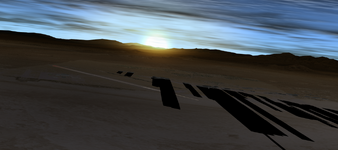
While flying the DG at sunset I found another problem: the building shadows also "shadow" the runway lights. Flying thru them, I realized they were above the ground. Plus, they are too dark for a planet with atmosphere, which will have some diffuse light. In MOGE they disappear before reaching the runway, so I can't tell if they shadow the lights, but they are also too dark and above the ground.
1666529658289.png
On D3D9 only, sometimes the shadows flip direction and head towards the Sun.

The red flashing on the DG still happens: day, night and dawn/dusk, with or without the main engines firing, but not when landed. I have everything enabled in the Visual Effects tab, and here is the D3D9 config file:
Code:
FrameRate = 200
EnableLimiter = 0
CustomCamMode = 1
PlanetPreloadMode = 0
PlanetTexLoadFreq = 50
Anisotrophy = 4
SceneAntialias = 4
SketchpadFont = 1
PreLoadBaseVisuals = 0
EnableNormalMapping = 1
NearClipPlaneMode = 1
RwyLightAnimate = 1
RwyLightAngle = 120
RwyBrightness = 1
NightLightsAngle = 10
BumpMapAmplitude = 1
PlanetGlow = 0.7
EnvMapSize = 256
EnvMapMode = 2
EnvMapFaces = 2
ShadowMapMode = 3
ShadowMapFilter = 2
ShadowMapSize = 2048
TerrainShadowing = 2
EnableGlass = 1
EnableMeshDbg = 1
TileMipmaps = 1
TextureMips = 1
TileDebug = 0
StereoSeparation = 65
StereoConvergence = 0.2
DebugLvl = 4
VCNearPlane = 0.1
LightConfiguration = 4
DisableDrvMgm = 0
NVPerfHUD = 0
DebugLineFontSize = 18
DisableVisualHelperReadout = 0
LODBias = 0
MeshRes = 1
MicroMode = 1
MicroFilter = 3
BlendMode = 1
MicroBias = 3
CloudMicro = 1
PostProcess = 0
ShaderDebug = 0
PresentLocation = 1
PlanetTileLoadFlags = 3
LabelDisplayFlags = 3
GDIOverlay = 0
gcGUIMode = 0
AbsoluteAnimations = 0
NormalmappedClouds = 1
TerrainFlats = 1
DebugBreak = 0
ShaderCacheUse = 1
OrbitalShadowMult = 0.85
GFXIntensity = 0.380392
GFXDistance = 1
GFXThreshold = 1.1
GFXGamma = 1
GFXSunIntensity = 1.2
GFXLocalMax = 0.5
SolCfg = Sol
DebugLineFont = Fixed

I am a bit excited what it will be ;)
I'm guessing you want to turn it into a feature. :ROFLMAO:
 
Hey,
it seems I've found the "feature switch"...
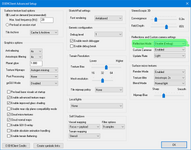
Whenever I enable the Reflection Mode (any option other than "Disable" will do), my ship gets fancy:ROFLMAO:

1666547426541.png
The sub-settings "Custom Cameras" and "Update Rate" do not appear to have any influence. Neither do the "Reflection Mode"s "Planet Only" or "Full Scene" change it.
So: To get a flashing DeltaGlider - just switch in on/off here :p

Could it be that the material of the DeltaGlider is flagged somehow as being "camera surface"?
 
Could it be that the material of the DeltaGlider is flagged somehow as being "camera surface"?
I don't know really. It would need a bad material and a bad camera surface. You could check if the "reflection camera" "sees" a proper view from the D3D9Debug controls. (2nd page) after that you could replace Config/GC/Deltaglider.cfg with a one from a fresh build. So far, I haven't been able to produce any anomalous behavior in DG exterior. Other than texture mipmaps don't load as they are supposed to leading some tearing effects in textures.

EDIT: might be good idea to backup the old Deltaglider.cfg if there's some interesting bad data in it.
 
Last edited:
The local lights now work again... but only illuminate the ground. Vessels, self and others, are still in the dark. This prevents me from testing the 4- vs 8-light flickering issue.
That's odd. I checked the DeltaGlider "Docked at ISS" scenario and docking/landing lights will lit the station while using Debug or Release builds. If it's not too much trouble could you try clean installation. It could be some old shader file that refuses to replace with a new one.

EDIT: I will look into the shadows you reported, thanks.

@kuddel Does local lights work for you ?
 
  • Like
Reactions: GLS
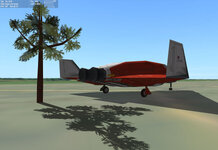
Rendering order independent transparency is now implemented (not yet merged to main) and can be enabled with MeshGroup flag 0x20. This will only work with one-bit-alpha i.e. either fully transparent or opaque.
I have also fixed a missing mipmaps and there is a small change that flashy DG seen by @kuddel and @GLS been cause by this issue.

TreeScorchTest.jpg
 
@kuddel Does local lights work for you ?
No, not on this machine (have to check it on my main rig this evening)
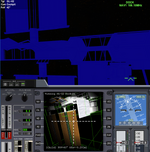
but it seems that the env-map (as seen here in Generic Camera View) does get it ....

1666605152334.png
Note: The bluish ISS is because "Highlight selected mesh" from the "D3D9Client Debug Controls" is activated - else I could not see anything.
BTW: The scenario I used is \Scenarios\2016 Edition\Spotlights.scn

The latest changes regarding this are in this branch, right?
 
I am a bit puzzled by this part of the code (Scene.cpp around line 933) - see my comments ( ////// )
C++:
void Scene::UpdateCamVis()
{
    // ...
    // Process Local Light Sources -------------------------------------
    if (bLocalLight) {

        ClearLocalLights(); ////// This sets 'this->nLights' of the Scene-instance to zero

        VOBJREC *pv = NULL;
        for (pv = vobjFirst; pv; pv = pv->next) {
            if (!pv->vobj->IsActive() || !pv->vobj->IsVisible() || pv->vobj->GetScene()->nLights < 1) continue; ////// Here 'pv->vobj->GetScene()->nLights' will be zero
                                                                                                                ////// ...and isn't 'pv->vobj->GetScene()' equal to 'this' ?
            OBJHANDLE hObj = pv->vobj->Object();
            if (oapiGetObjectType (hObj) == OBJTP_VESSEL) {
                VESSEL *vessel = oapiGetVesselInterface (hObj);
                DWORD nemitter = vessel->LightEmitterCount();
                for (DWORD j = 0; j < nemitter; j++) {
                    const LightEmitter *em = vessel->GetLightEmitter(j);
                    if (em->GetVisibility() & LightEmitter::VIS_EXTERNAL) AddLocalLight(em, pv->vobj);          ////// AddLocalLight() is what would increment 'this->nLights'
                }
            }
        }
    }
    // ...
}

When i just remove the last check from the expression like so:
if (!pv->vobj->IsActive() || !pv->vobj->IsVisible()) continue;
Local lights work.

Is the call to ClearLocalLights(); maybe "shifted up" too much?


EDIT: Ahhhh I see you've already changed that in the d3d9_local_lights branch.
 
Last edited:
The latest changes regarding this are in this branch, right?
Yes, that branch. And your comments in the code are right. The initial cause for the failure was incorrect "|| pv->vobj->GetScene()->nLights < 1" in the code.
You got your code from a wrong branch and it did work because of that, right ? Is this the case with @GLS too ?
 
This github "upstream" "origin" "fork" "whatever..." overkill makes me dizzy.

I usually only test main (or master or whatever it is called at github). Testing local lights was not very high on my priority list, so I just looked at the code during (lunch) break.
At home I'll try to fork & pull & whatever-is-needed the d3d9_local_lights branch...

The "flashy Delta-glider issue" might be fixed by that, too - but I can not tell yet.
 
Yes, that branch. And your comments in the code are right. The initial cause for the failure was incorrect "|| pv->vobj->GetScene()->nLights < 1" in the code.
You got your code from a wrong branch and it did work because of that, right ? Is this the case with @GLS too ?
My comments yesterday came from running the d3d9_local_lights branch.


This github "upstream" "origin" "fork" "whatever..." overkill makes me dizzy.
0*6PBCOoKU9E4aKP-X
 
So back to the "flashy bit"...

I've checked out a clean build;
Local lights in Orbiter main are enabled; although "Local lights" in D3D9Client extended config is set to "None";
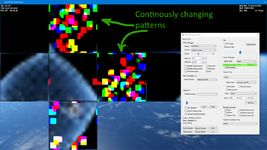
In the debug Dialog I've turned on the "IrdPre ltg" env map display (as suggested by Jarmo);

Here's what I see:
1666634966668.png
Could this be some kind of memory overwrite in a shaders memory? Frequency is something like 2-5 Hz.
 
FYI: With local lights enabled I can confirm that those do work!
1666635430816.png
 
Addendum:
I can turn off flashing when I remove \Config\GC\DeltaGlider.cfg (which was unmodified from the checkout & build process - it's referencing MESH DG\deltaglider_ns ...don't exactly know where it is coming from, though)
 
Last edited:
So back to the "flashy bit"...
Here's what I see:
Could this be some kind of memory overwrite in a shaders memory? Frequency is something like 2-5 Hz.

Thanks a lot, you found a major clue. I have no idea (yet) where those come from but now I have a solid lead to follow. Memory overwrite shouldn't happen with GPU but reading data from an uninitialized texture has caused weird graphics anomalies before.
 
Local lights in Orbiter main are enabled; although "Local lights" in D3D9Client extended config is set to "None";
This wasn't enabled...
1ZJb.gif


But how does the ground get lit with the (D3D9) lights disabled?
Also, maybe the None option should not exist there, as it already exists globally in the Visuals tab. The lights on/off control would be done by the base configuration, and then each graphics engine would handle whatever options they might have, if the lights are on.

So, tested the PLB light flickering and there seems to be no issues, both at x4-partial and x4-full. (y)
The bad news is that there is a very noticeable problem when I launch with the pad lights on: as the vehicle lifts off and leaves the light cones, it stays lit. A few seconds later it goes "back to normal" but, if I decrease the apparent size of the vessel (moving the camera away or zooming out) it gets lit as if it was back on the pad. This threshold seems to be related to how far the vehicle is from the pad lights, which are not pointing up but have 180º opening. If I focus the launch pad, where the lights are, then the vehicle leaves the light cones as expected.

BTW: I'm getting some CTDs right after loading, which debugging with a Release build point to the d3d9x_43.dll... I'll try to install the debug stuff from DirectX to track this one.
 
Thanks a lot, you found a major clue. I have no idea (yet) where those come from but now I have a solid lead to follow. Memory overwrite shouldn't happen with GPU but reading data from an uninitialized texture has caused weird graphics anomalies before.
Good to hear it's not a bug no one can explain :D

Do these errors (from Orbiter.log) have something to do with it?
Code:
...
000021.504: D3D9: NewShader [DG\deltaglider_ns]=4
000021.517: D3D9: NewShader [DG\deltaglider_ns]=4
000021.831: D3D9ERROR: CreateShaderCache: CreateFile Error: 0x3
000021.832: D3D9ERROR: Path=[Cache/Shaders/IPIVS_VSMain_IPI.hlsl.bin]
000021.862: D3D9ERROR: CreateShaderCache: CreateFile Error: 0x3
000021.863: D3D9ERROR: Path=[Cache/Shaders/IPIPS_PSBlur_EnvMapBlur.hlsl.bin]
000021.947: D3D9ERROR: CreateShaderCache: CreateFile Error: 0x3
000021.947: D3D9ERROR: Path=[Cache/Shaders/IPIVS_VSMain_IPI.hlsl.bin]
000021.987: D3D9ERROR: CreateShaderCache: CreateFile Error: 0x3
000021.987: D3D9ERROR: Path=[Cache/Shaders/IPIPS_PSPreInteg_IrradianceInteg.hlsl.bin]
000022.819: D3D9ERROR: CreateShaderCache: CreateFile Error: 0x3
000022.820: D3D9ERROR: Path=[Cache/Shaders/IPIPS2_PSInteg_IrradianceInteg.hlsl.bin]
000022.832: D3D9ERROR: CreateShaderCache: CreateFile Error: 0x3
000022.833: D3D9ERROR: Path=[Cache/Shaders/IPIPS2_PSPostBlur_IrradianceInteg.hlsl.bin]

Edit: It doesn't seem to make a difference. If I disable ShaderCache in D3D9Client.cfg (ShaderCacheUse = 0) the errors went, but flashing stays.
 
Last edited:
Back
Top