New Release D3D9Client Development

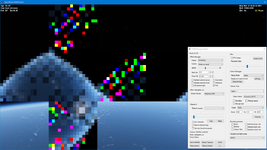
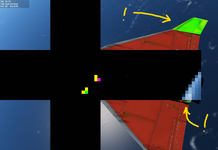
Here's what I see:
I have looked at the code and found nothing yet. One thing I don't quite understand is this: The cube texture displayed on the image in only 16x16 pixels stretched to fit the screen, it's a simple copy blit no programmable GPU involved. How can a low resolution image store those abnormal shapes ? @GLS Can you see any abnormal shapes there, "red" in your case ?

@kuddel Could you replace a function located in IrradianceInteg.hlsl with this one, it will write the image you see with a constant flat grey color. Do the abnormal shapes still appear ?
C++:
float4 PSPreInteg(float x : TEXCOORD0, float y : TEXCOORD1) : COLOR
{
    return float4(0.2f, 0.2f, 0.2f, 1);
}
 
So, tested the PLB light flickering and there seems to be no issues, both at x4-partial and x4-full. (y)
The bad news is that there is a very noticeable problem when I launch with the pad lights on: as the vehicle lifts off and leaves the light cones, it stays lit. A few seconds later it goes "back to normal" but, if I decrease the apparent size of the vessel (moving the camera away or zooming out) it gets lit as if it was back on the pad. This threshold seems to be related to how far the vehicle is from the pad lights, which are not pointing up but have 180º opening. If I focus the launch pad, where the lights are, then the vehicle leaves the light cones as expected.

BTW: I'm getting some CTDs right after loading, which debugging with a Release build point to the d3d9x_43.dll... I'll try to install the debug stuff from DirectX to track this one.
Thanks for testing the PLB lights issue. If you can track the CTD where it's coming from, that would be very helpful.
It's kinda odd that the lighting conditions depend on camera distance. 180deg opening could break the math and lead to a division by zero. 175deg is a safe maximum. The world in the Orbiter is centered on the camera. Maybe the math computing light positions is broken and move along with the camera, somehow. I'll look into that.
 
Can you see any abnormal shapes there, "red" in your case ?
Yep! Red squares, usually less than 3 at the same time, at maybe 0.5-1Hz, both in SSV and DG. Not seeing any side effects in SSV, but in the DG some of them coincide with the red flashes (or maybe all of them, but it's hard to see the vehicle with the debug output).
 
@kuddel Could you replace a function located in IrradianceInteg.hlsl with this one, it will write the image you see with a constant flat grey color. Do the abnormal shapes still appear ?
No change at all, ... strange I would have assumed that at least the background would be solid grey...
That's with the same Version of Orbiter/DeltaGlider of last time.


With the current "HEAD" (if that's what it's called in git) of d3d9_local_lights branch it's a bit blockier, but still "flashy" :/

1666718735662.png
 
Last edited:
Grrr that nasty ninja build process always overwrites any changes made to the output (IrradianceInteg.hlsl shader in this case) !

Here's what it looks like, now:
1666719119583.png

...so as expected it's solid grey and no flashing.

I'll try to add one line after the other into PSPreInteg(float x : TEXCOORD0, float y : TEXCOORD1) and see if I can isolate something

I am starting to suspect my Drivers[*] ... I have had mixed experience (2 out of 10 Versions were good) with them

[*]https://www.intel.com/content/www/us/en/download/19344/intel-graphics-windows-dch-drivers.html
 
Last edited:
I'll try to add one line after the other into PSPreInteg(float x : TEXCOORD0, float y : TEXCOORD1) and see if I can isolate something
There is not much choice there. The artifacts must come from the texture sampling but what creates them in the source texture from the first palce.

Could you restore the original shader "IrradianceInteg.hlsl" and then disable everything else except the following line from Scene::RenderSecondaryScene() subroutine just to be sure that the artifacts doesn't come from any scene drawing routine.

C++:
// Clear the viewport
HR(pDevice->Clear(0, NULL, D3DCLEAR_TARGET | D3DCLEAR_ZBUFFER | D3DCLEAR_STENCIL, 0, 1.0f, 0L));

If the artifacts still appear then could you try even more direct clearing of the source texture by adding one line in this code section in Scene::IntegrateIrradiance() subroutine.

C++:
    // ---------------------------------------------------------------------
    // Pre-Integrate Irradiance Cube
    //
    pIrradiance->Activate("PSPreInteg");
    pIrradiance->SetFloat("fD", &D3DXVECTOR2(1.0f / float(desc.Width), 1.0f / float(desc.Height)), sizeof(D3DXVECTOR2));

    for (DWORD i = 0; i < 6; i++)
    {
        pSrc->GetCubeMapSurface(D3DCUBEMAP_FACES(i), 0, &pSrf);
        pIrradTemp->GetCubeMapSurface(D3DCUBEMAP_FACES(i), 0, &pTgt);
        
        pDevice->StretchRect(pSrf, NULL, pTmp2, NULL, D3DTEXF_POINT);

        pDevice->ColorFill(pTmp2, NULL, 0); //// <---- ADD THIS LINE

        pIrradiance->SetOutputNative(0, pTgt);
        pIrradiance->SetTextureNative("tSrc", pIrradTemp2, IPF_POINT | IPF_CLAMP);

        if (!pIrradiance->Execute(true)) {
            LogErr("pIrradiance Execute Failed");
            return false;
        }

        SAFE_RELEASE(pTgt);
        SAFE_RELEASE(pSrf);
    }
 
Hi,

I've done step 1 ( "[...]restore the original shader "IrradianceInteg.hlsl[...]" & "[...]disable everything else except the following line from Scene::RenderSecondaryScene()[...]" )
and the Ship stays solid red! (y)

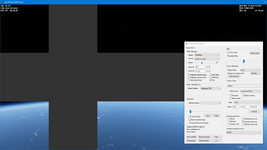
Now all the env-maps (from the D3D9Client Debug Dialog) show black "unfolded boxes" except for shadow ...) like this - as expected I think:
1666729475995.png

...sorry for the 50 minute delay ;) I watched some "curious marc" :D
 
Hey,
out of curiosity I've thought: Let's re-enable the disabled parts of RenderSecondaryScene() step by step:
Surely, enabeling the part before HR(pDevice->Clear(0, NULL, D3DCLEAR_TARGET | D3DCLEAR_ZBUFFER | D3DCLEAR_STENCIL, 0, 1.0f, 0L)); made no change;
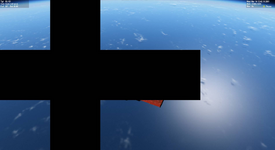
But as soon as the "render planets" part (only) was enabled the flashing came back!

1666736691299.png

...just to inform you (y)

Good night
 
...sorry for the 50 minute delay ;) I watched some "curious marc" :D
That's no problem really, my delays are much longer.

Yeah, the boxes are expected to be all black. Which indicates that the clearing works at least.

I checked pretty much every shader and none of them are writing on that area on the map. Could it be that some surface base is playing tricks, or something. Does it work in a clean installation on your computer ?

I guess the next step is to turn the planet rendering and then the local lights back on to see if the artifacts reappear. If it's the planet rendering code then try to disable features on a planet level like base rendering, runway lights, etc... until the artifacts disappear.
 
The bad news is that there is a very noticeable problem when I launch with the pad lights on: as the vehicle lifts off and leaves the light cones, it stays lit.
Can you check if this problem is fixed.
 
[...] Could it be that some surface base is playing tricks, or something. Does it work in a clean installation on your computer ?[...]
I think I am using a "clean installation":
  • new directory;
  • git checkout ...;
  • open in Visual Studio;
  • build (Debug_x64);
  • Execute out\Orbiter_ng;
  • select D3D9Client in Video Tab; enable the "Reflection Mode" setting in D3D9CLient Advanced Setup Dialog (set to "Full Scene")
  • run Scenario
I am not even including hi-res planet textures any more ;)


[...] I guess the next step is to turn the planet rendering and then the local lights back on to see if the artifacts reappear. If it's the planet rendering code then try to disable features on a planet level like base rendering, runway lights, etc... until the artifacts disappear.
You mean the code-sections in Scene::RenderSecondaryScene(), right?
I'll try isolating the affecting code as much as I can (once I'm back on my home-machine).

Edit: refined "the list"
 
Last edited:
1st I have to add, that I have to refine my "clean" setup procedure two posts above a bit: I surely had to enable the "Reflection Mode" setting in D3D9CLient Advanced Setup Dialog (set to "Full Scene")

2nd: The flashing will not appear as long as the "render planets" part in Scene::RenderSecondaryScene() is commented out.

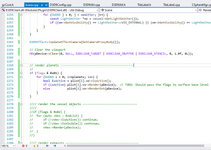
3rd: l just changed the line 2272
bool isActive = plist[i].vo->IsActive();
to​
bool isActive = plist[i].vo->IsActive() && plist[i].vo->IsVisible();
to see what this will change and found that it reduces the flashing area (see image)​
1666811857660.png
...maybe this helps isolate the issue?

I will continue to look for anything that might shed some light.
 
Addendum:
If I remove "Earth" from the rendering ( if (std::string(plist[i].vo->GetName()) == "Earth") continue; ), the flashing is gone!
So it seems your idea about base rendering, runway lights, etc... might be the route to go.

I'll keep you (all) informed - and sorry if this thread is too noisy for anyone :whistle:
 
3rd: l just changed the line 2272
bool isActive = plist[i].vo->IsActive();
to​
bool isActive = plist[i].vo->IsActive() && plist[i].vo->IsVisible();
Looks like a large parts of the Earth are not rendered while plist.vo->IsVisible() check is active. I'll look into it but it won't solve the problem.
 
So I've tried to "reduce" bool vPlanet::Render(LPDIRECT3DDEVICE9 dev) as much as possible (and keep as much in as possible) so that no flashing is happening.
It seems like any call to another RenderXxx method will cause flashing. Independent of what method!

Whether it's the part calling...
  • hazemgr2->Render(mWorld, float(apr)) or
  • RenderSphere (dev) or
  • RenderCloudLayer (dev, D3DCULL_CCW) or
  • hazemgr->Render (dev, mWorld, true) or
  • ringmgr->Render (dev, mWorld, true)
...enabeling just one of them and it flashes.
I don't know. Is there an issue with the virtual function table in my build?

Here's my "does not flash" method:
C++:
bool vPlanet::Render(LPDIRECT3DDEVICE9 dev)
{
    _TRACE;
    if (!active) return false;

    D3D9Effect::UpdateEffectCamera(hObj);
    D3D9Effect::FX->SetFloat(D3D9Effect::eDistScale, 1.0f/float(dist_scale));

    const Scene::SHADOWMAPPARAM *shd = scn->GetSMapData();

    float s = float(shd->size);
    float is = 1.0f / s;
    float qw = 1.0f / float(Config->ShadowMapSize);

    HR(D3D9Effect::FX->SetBool(D3D9Effect::eEnvMapEnable, false));
    HR(D3D9Effect::FX->SetBool(D3D9Effect::eShadowToggle, false));


    if (shd->pShadowMap && (scn->GetRenderPass() == RENDERPASS_MAINSCENE) && (Config->TerrainShadowing == 2)) {
        if (scn->GetCameraAltitude() < 10e3 || IsMesh()) {
            HR(D3D9Effect::FX->SetMatrix(D3D9Effect::eLVP, &shd->mViewProj));
            HR(D3D9Effect::FX->SetTexture(D3D9Effect::eShadowMap, shd->pShadowMap));
            HR(D3D9Effect::FX->SetVector(D3D9Effect::eSHD, &D3DXVECTOR4(s, is, qw, 0)));
            HR(D3D9Effect::FX->SetBool(D3D9Effect::eShadowToggle, true));
        }
    }

    if (!mesh) { // Skip for a mesh
        PlanetRenderer::InitializeScattering(this);
        PlanetRenderer::SetViewProjectionMatrix(scn->GetProjectionViewMatrix());
    }

    if (DebugControls::IsActive()) {
        // DWORD flags  = *(DWORD*)gc->GetConfigParam(CFGPRM_GETDEBUGFLAGS);
        DWORD displ  = *(DWORD*)gc->GetConfigParam(CFGPRM_GETDISPLAYMODE);
        vObject *vSel =  DebugControls::GetVisual();
        if (vSel && displ>0) {
            if (vSel->GetObjectA()) {
                if (oapiGetObjectType(vSel->GetObjectA())==OBJTP_VESSEL) return false;
            }
        }
    }

    pCurrentVisual = this;

    if (renderpix) { // render as 2x2 pixel block
        RenderDot (dev);
    } else {             // render as sphere
        DWORD amb = prm.amb0col;
////        bool ringpostrender = false;
        float fogfactor;
//
//        D3DCOLOR bg        = scn->GetBgColour();
//        prm.bFog        = prm.bFogEnabled;
//        prm.bTint        = prm.bFogEnabled;
//        prm.bAddBkg        = ((bg & 0xFFFFFF) && (hObj != scn->GetCameraProxyBody()));
//        prm.FogDensity    = 0.0f;
//        prm.SkyColor    = D3DXCOLOR(bg);
//        prm.AmbColor    = D3DXCOLOR(0,0,0,0);
//        prm.FogColor    = D3DXCOLOR(0,0,0,0);
//        prm.TintColor    = D3DXCOLOR(0,0,0,0);
//        prm.SunDir        = _D3DXVECTOR3(SunDirection());

        if (ringmgr) {
            ringmgr->Render(dev, mWorld, false);
            dev->SetRenderState(D3DRS_CULLMODE, D3DCULL_CCW);
        }

        //if (hazemgr2) {
        //    double apr = 180.0 * scn->GetCameraAperture() / (scn->GetCameraAspect() * PI);
        //    hazemgr2->Render(mWorld, float(apr));
        //}

        if (prm.bCloud && (prm.cloudvis & 1))
            RenderCloudLayer (dev, D3DCULL_NONE);      // render clouds from below

        if (hazemgr) hazemgr->Render(dev, mWorld);       // horizon ring


        if (prm.bAtm) {
            if (ModLighting (amb))
                prm.AmbColor = D3DXCOLOR(amb);
        }

        if (prm.bFog) { // set up distance fog
            double h = max (1.0, cdist-size);

            VECTOR3 fogcol = fog.col;
            double h_ref = fog.alt_ref;   // 3e3;
            double fog_0 = fog.dens_0;    // 5e-5;
            double fog_ref = fog.dens_ref; // 3e-5;
            double h_max = size*1.5; // At this altitude, fog effect drops to zero
//            double scl = h_ref*fog_ref;

            if (h < h_ref) {
                // linear zone
                fogfactor = (float)(h/h_ref * (fog_ref-fog_0) + fog_0);
            } else {
                // hyperbolic zone: fogfactor = a/(h+b) + c
                // a, b and c are designed such that
                // * fogfactor(h) is continuous at h = h_ref
                // * d fogfactor / dh is continuous at h = h_ref
                // * fogfactor(h_max) = 0
                double b = - (fog_ref*h_max + (fog_ref-fog_0)*(h_max-h_ref)) / (fog_ref + (fog_ref-fog_0)/h_ref * (h_max-h_ref));
                double a = fog_ref*(h_ref+b)*(h_max+b)/(h_max-h_ref);
                double c = -a/(h_max+b);
                fogfactor = (float)(a/(h+b)+c);
            }

            if (fogfactor < 0.0) prm.bFog = false;
            else {
                // day/nighttime fog lighting
                VECTOR3 ppos;
                oapiGetGlobalPos (hObj, &ppos);
                double cosa = dotp (unit(ppos), unit(cpos));
                double bright = 1.0 * max (0.0, min (1.0, cosa + 0.3));
                float rfog = (float)(bright*(min(1.0,fogcol.x)+0.0)); // "whiten" the fog colour
                float gfog = (float)(bright*(min(1.0,fogcol.y)+0.0));
                float bfog = (float)(bright*(min(1.0,fogcol.z)+0.0));
                prm.FogDensity = fogfactor;
                prm.FogColor = D3DXCOLOR(rfog, gfog, bfog, 1.0f);
            }
        }


        //if (mesh) {
        //    mesh->SetSunLight(scn->GetSun());
        //    mesh->Render(&mWorld, RENDER_ASTEROID);
        //} else {
        //    RenderSphere (dev);
        //}

        if (nbase) RenderBaseStructures (dev);

        //if (prm.bCloud && (prm.cloudvis & 2))
        //    RenderCloudLayer (dev, D3DCULL_CCW);      // render clouds from above

        //if (hazemgr) hazemgr->Render (dev, mWorld, true); // haze across planet disc
        //if (ringmgr) {
        //    ringmgr->Render (dev, mWorld, true);
        //    dev->SetRenderState(D3DRS_CULLMODE, D3DCULL_CCW);
        //}

    }

    // Shutdown shadows to prevent from causing problems
    HR(D3D9Effect::FX->SetBool(D3D9Effect::eShadowToggle, false));

    return true;
}

 
So I've tried to "reduce" bool vPlanet::Render(LPDIRECT3DDEVICE9 dev) as much as possible (and keep as much in as possible) so that no flashing is happening.
It seems like any call to another RenderXxx method will cause flashing. Independent of what method!
Not the kinda outcome I hoped for, which was just one call. Thanks a lot for making the tests. Does Orbiter 2016 cause flashing ?
 
Back
Top