New Release D3D9Client Development

The anomaly with a stock Atlantis is likely due to base texture being loaded from "Textures2" folder.
I bet that's the problem- I was only editing the one in the "Textures" folder. Thanks! ?‍♂️
 
So, can you make the modifications to the shader ? I have included a new binary that enables the specular map for the shader.
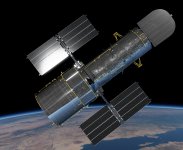
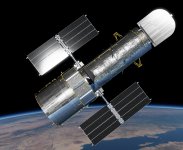
Here's the shader with modifications, attached as a zip file. I duplicated and modified the existing lighting implementation. Changes are clearly marked in the shader.

If no spec texture is present, all lighting effects are generated using diffuse, metal, and rghn, like normal.
If a spec texture is present, a new lighting effect is added which is independent of diffuse, metal, and rghn.

It also shines (haha) when used for bare metal foil surfaces like Hubble. Image with brighter metal is with spec.
 

Attachments

  • Metalness.zip
    Metalness.zip
    4.2 KB · Views: 10
  • hubble1.jpg
    hubble1.jpg
    399.4 KB · Views: 45
  • hubble2.jpg
    hubble2.jpg
    417.9 KB · Views: 47
I think this is the right thread to report this in. I've noticed something ever since I installed this add-on: Boca Chica Base and that is that the terrain at KSC/CCAFS has vanished and the surface textures is vibrating like crazy. If I disable terrain flattening, everything is as it should be. Re-enable terrain flattening and the issue is back.

Orbiter is 2016 release with D3D9Client R.4.19.
 
Here's the shader with modifications, attached as a zip file. I duplicated and modified the existing lighting implementation. Changes are clearly marked in the shader.
Sorry about the delay. I have now uploaded the modification into the SVN. Yes, the one with a specular map does indeed look much better. Thanks about that.

If nobody oppose, I will remove the "Specular" shader intended for a typical specular PBR workflow just to simplify things and reduce work load.
 
I think this is the right thread to report this in. I've noticed something ever since I installed this add-on: Boca Chica Base and that is that the terrain at KSC/CCAFS has vanished and the surface textures is vibrating like crazy. If I disable terrain flattening, everything is as it should be. Re-enable terrain flattening and the issue is back.
Orbiter is 2016 release with D3D9Client R.4.19.

Is anyone else able to reproduce that ? Is there a problem in the client or is this something else ?
 
I think this is the right thread to report this in. I've noticed something ever since I installed this add-on: Boca Chica Base and that is that the terrain at KSC/CCAFS has vanished and the surface textures is vibrating like crazy. If I disable terrain flattening, everything is as it should be. Re-enable terrain flattening and the issue is back.

Is the addon *.flt file the only one in the /Textures/Earth/Flat/ directory? If not, could it be that another file is present that changes the KSC area?
 
Is the addon *.flt file the only one in the /Textures/Earth/Flat/ directory? If not, could it be that another file is present that changes the KSC area?
Only file in there.
 
I've seen "surface texture vibration" in multiple scenarios, too. Terrain flattening is enabled.
Usually it disappears when I zoom out and zoom in. (using mouse wheel)
 
I got this weird difference in shading on the SRM segments. The shader is Metalness and I have the Light glow post-processing selected. Again, this with D3D9Client R4.19 and Orbiter 2016.
 

Attachments

  • D3D9Client_different_shading_on_SRM_segments.jpg
    D3D9Client_different_shading_on_SRM_segments.jpg
    877.7 KB · Views: 35
looks like messed up vertices.
 
I got this weird difference in shading on the SRM segments. The shader is Metalness and I have the Light glow post-processing selected. Again, this with D3D9Client R4.19 and Orbiter 2016.

I have uploaded R4.20 does that fix the issue there ?
Also, I tested the Boca Chica base and couldn't detect any flickering issues.
 
I have uploaded R4.20 does that fix the issue there ?
Also, I tested the Boca Chica base and couldn't detect any flickering issues.
The issue remains with R4.20. And the terrain and flickering problems are at KSC with the BC add-on installed.
 
Looks like the SRM is composed from a several independent mesh segments, so, are there simply different settings applied to a different segments ? I couldn't see anything unusual when tested material settings there.
 
The problem with the SRMs seems to be gone now after I deleted the original GC cfgs for them and re-set up the materials.
 
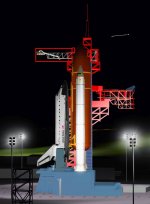
Now, the only problem seems to be that instead of a flat grey, the GOX Vent Arm has this weird yellow color. I've attached a photo of how it supposed to look.
 

Attachments

  • D3D9Client_yellow_GVA.jpg
    D3D9Client_yellow_GVA.jpg
    627.3 KB · Views: 40
  • DF-ST-86-12045.jpg
    DF-ST-86-12045.jpg
    736.5 KB · Views: 39
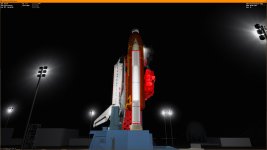
Another item: A code sample that shows the shows the "SpecialFX" parameter in action. Felix24 posted his heatmap texture in post for the default Atlantis so it could be a good starting point.
 
The issue remains with R4.20. And the terrain and flickering problems are at KSC with the BC add-on installed.
I now experience it at BC as well. I can reliably reproduce the problem by just using the "BocaChica 10km Hop" scenario from this add-on: https://www.orbithangar.com/showAddon.php?id=f134e80a-f13e-4599-93e7-50ba8e744f01
Another part of the same problem is that base elements are floating midair.

Edit:
After just moving the ground observer location down to absolute ground level and reloading the (Current state) scenario, the issue is gone, even in the "BocaChica 10km Hop" scenario. This is on a fresh Orbiter 2016 installation, with the high-res Earth package installed.
 
Last edited:
A couple of issues I'm having:

1. I'm having trouble again with the Reload Textures button. This time the textures aren't reloading while Orbiter is running. The simulation does hang for 3 seconds which is normal, but the textures don't change at all. But the textures do update if I close and restart the scenario. I am experimenting with BrianJ's Crew Dragon DM-2 (https://www.orbithangar.com/showAddon.php?id=06e64e6a-53e0-45ba-8aa4-2adf6a7fa792). I confirmed that the texture reload button does work with the DeltaGlider.

2. When using the D3D9 Debug Controls on a vessel that has no materials config file, setting the default shader to Metalness and then clicking "Save materials" doesn't save the setting. It creates a new materials config file with a single line that says
CONFIG_VERSION 3

The shader setting is not remembered when restarting Orbiter. However, when I set the default shader and then change a random material property and then click "Save materials", it saves everything correctly. So it seems that changes in the default shader setting don't get saved, but do if you also change something else in the same meshgroup in the same session.

CONFIG_VERSION 3 ; ============================================= MESH DG\deltaglider_ns SHADER Metalness SAFEGUARD 0 ; --------------------------------------------- MATERIAL 11 SMOOTHNESS 1.000000 1.000000

Any ideas?
 
A couple of issues I'm having:
1. I'm having trouble again with the Reload Textures button......
2. When using the D3D9 Debug Controls on a vessel that has no materials config file, setting the default shader to Metalness and then clicking "Save materials" doesn't save the setting.....

Thanks for the reports, I will look into it.
 
Another item: A code sample that shows the shows the "SpecialFX" parameter in action. Felix24 posted his heatmap texture in post for the default Atlantis so it could be a good starting point.
C++:
gcCore *pCore = gcGetCoreInterface();
if (pCore) {
    COLOUR4 value = { heat, 0, 0, 0 };
    pCore->MeshMaterial(hMesh, material_idx, MESHM_SPECIALFX, &value, true);
}

The "COLOUR4" will be replaced with "FVECTOR4" in the near future.
See API_Guide.pdf for further details. (page 14, "re-entry flames")
 
Back
Top