SSU Crawler Transporter development

Looks sweet Dave, I wonder if we'll get more than a slide show when the SSU is finished ?

That is only a problem, that can be fixed, in the worst case by reducing the number of polys by rendering stuff on textures. Also I think, when SSU is finished we will have DX10 rendering in Orbiter. :lol:
 
The highest poly areas right now is the shoe belts, 28k polys each! I'm not sure how to get the poly count down on those.
 
The highest poly areas right now is the shoe belts, 28k polys each! I'm not sure how to get the poly count down on those.

What about using less details on the shoes? I see that you made the whole shoe 3D, but you could sure reduce each shoe to two boxes with textures. allow the shoes to overlap.
 
What about using less details on the shoes? I see that you made the whole shoe 3D, but you could sure reduce each shoe to two boxes with textures. allow the shoes to overlap.
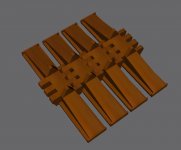
How would you do it? I attached a screenshot of 4 shoes connected to each other to give an idea of how they look and is connected to each other.
 

Attachments

  • CT_shoes_connected.jpg
    CT_shoes_connected.jpg
    141.8 KB · Views: 824
1. Remove the overlapping teeth connecting the shoes. Make them just overlap as mesh groups.

2. Remove the details on the wide parts of the shoe - they are only visible from one direction and never that close that you will have to worry about the effect.

3. maybe remove the upwards pointing triangular teeth. They are only visible for small points.


Another possibility is: Keep the track like it is, and we do LOD. You make the basic crawler mesh without the tracks and we add the tracks as extra meshes at different levels of detail, by you making a low res track and keep the current as high res. The high-res tracks are only shown when really close to the tracks (For example 10m from the track)
 
1. Remove the overlapping teeth connecting the shoes. Make them just overlap as mesh groups.

2. Remove the details on the wide parts of the shoe - they are only visible from one direction and never that close that you will have to worry about the effect.

3. maybe remove the upwards pointing triangular teeth. They are only visible for small points.
1: Going to try it now. But I have done some calculations. There's no way I can get the poly level down to anything reasonable with any reasonable amount of detail.

There's 57 shoes/belt so you do the math like I did and you are going to ind that the only way to bring the down the poly level is by including no detail at all.

2: Not much change, just about 10 polys each.

3: Those teeth is for the drive sprockets, they fit into slots which makes it function just like a cog.


Summary: It looks like the best option from a FPS POV is to include no detail at all.
 
That's the art of modeling. Making it look the best you can, with less.
 
how about using textures for the shoos ?
 
That's the art of modeling. Making it look the best you can, with less.
Just to gather some input: How would you do them? The maximum poly ceiling for one shoe(they're identical) is set to about 100.

100x57x8(max poly x shoes/belt x total number of belts on CT)=45600, about the same as the main chassis where the cab windows are the worst poly offenders as they have rounded edges.

That's what I have to work with, so some tips would be helpful.
 
Less would be better.

I think 100 is still a lot of only one shoe.

Just remember: by the pure size of the shoe relative to the size of the crawler, 100 faces is a lot of concentration of detail.
 
Less would be better.

I think 100 is still a lot of only one shoe.

Just remember: by the pure size of the shoe relative to the size of the crawler, 100 faces is a lot of concentration of detail.
One box = 12 polys. So, not much to play with. Even if I go down as low as 50 polys, the total amount = 22800 polys.

That will allow me to play with 4 boxes/shoe as it is just under 50 polys(48 polys).
 
make the top and bottom of the track all one shape. Make the texture how you made the shoes, one at a time, then put them together.
 
make the top and bottom of the track all one shape. Make the texture how you made the shoes, one at a time, then put them together.
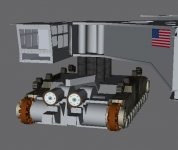
Could you maybe create an example of what you mean? Currently the pad is on hold due to lack of reference materials, so I have decided to return to this project. Maybe you could also create the VC panels.
 
Nearly done with the drive trucks. So, Donamy any help you could give on the shoes would be greatly appriciated!
 

Attachments

  • CT_7A.jpg
    CT_7A.jpg
    56 KB · Views: 782
What are you upto, about a million faces in that pic? :lol:
 
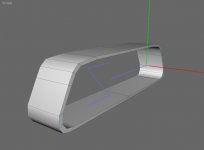
I would draw a line the shape of the tread side view, then extrude the thickness of the tread, the extrude again the width, close up the other side, then texture.
 
I would draw a line the shape of the tread side view, then extrude the thickness of the tread, the extrude again the width, close up the other side, then texture.
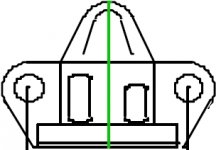
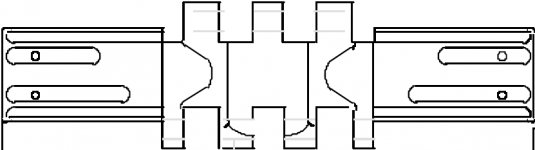
Could you show with the drawings below in which order you would do them?

1: Side
2: Front/Back
3: Top
 

Attachments

  • Crawler shoe side.jpg
    Crawler shoe side.jpg
    20 KB · Views: 681
  • Crawler shoe front.jpg
    Crawler shoe front.jpg
    19.7 KB · Views: 638
  • Crawler shoe top.jpg
    Crawler shoe top.jpg
    31.8 KB · Views: 731
Like this
 

Attachments

  • tread.jpg
    tread.jpg
    21.1 KB · Views: 676
Back
Top