Thanks, I suspected it's somewhere in MM202, but what is "in SM mode"?Yes, following the actual procedures in the Post-Insertion/Generic De-Orbit Prep FDFs for the PLBDs are now required. OPS 202 PRO on CRT4 in SM mode to load the PL BAY DOORS software and then ITEM 1 EXEC to enable enable AC power to the MMCAs that control the door actuators and then ITEM 3 EXEC to enable AUTO MODE. Then two PL BAY DR SYS switches on R13L to ENA. Then PL BAY DR switch to OPEN until TB "OP". Then PL BAY DR to STOP, followed by the two PL BAY DR SYS to DSBL. Then on CRT4, ITEM 2 EXEC to disable AC power again and then OPS 201 PRO to mode back to SM 201 ANTENNA for further on-orbit ops.

-
ORBITER-FORUM will be temporarily closed at 2026-07-23 18:00 UTC while we complete some OF maintenance tasks. The amount of downtime is expected to take up to one hour, but probably less.
You are using an out of date browser. It may not display this or other websites correctly.
You should upgrade or use an alternative browser.
You should upgrade or use an alternative browser.
Project Space Shuttle Vessel
- Thread starter GLS
- Start date

So, eventually the PAMs will be implemented in SSV (I actually have some things already), and they will talk to the GPCs, and it will be possible to have 3 in a mission (still don't know if that was the actual limit or just what happened to be the maximum flown in the 80s). For now, they will have to be implemented as custom vessels attached to the PLB, and the user will have to control them somehow. As ASEs aren't deployed, they could/should be considered "Passive Payloads".Actually I had another question before this: I just looked at 51-G mission - there were 3 PAM-D + satellites, and fourth active payload is SPARTAN. but seems only 3 active payloads are supported (as suggested by A6U "rotary" payload latch switch "1-MONITOR-2-MONITOR-3").
The "Active Payloads" are the ones that are deployed and/or retrieved, directly from the PLB, with the RMS. Although there were a few "hacks" along the way, 5 should be the maximum number of such payloads, as there are 15 latches and each payloads needs at least 3 of them, so 15 / 3 = 5 payloads. Most payloads actually need 5 latches, so that gives 3 much payloads, and that is why the switch has 3 positions.
It is a problem I recognized long ago, but short of implementing Orbiter inside Mission Editor, things have to be checked in Orbiter itself. I don't know the mass, size, orientation, configurations, etc of the payloads, so there isn't much I can do in Mission Editor. This OPF ideia might be interesting....P.S. I even imagined optional "scenario" exporter, where shuttle is in "OPF" type position with open payload bay, otherwise it is hard to check payload position. Actually it is how it started, launched, quickly to orbit, and wanted to open PB to see what is right or wrong with payloads...
Next to the keyboard there is a Major Function switch, which controls which display is shown in the CRT/MDU.Thanks, I suspected it's somewhere in MM202, but what is "in SM mode"?

- Joined
- Feb 6, 2008
- Messages
- 38,938
- Reaction score
- 3,937
- Points
- 203
- Location
- Wolfsburg
- Preferred Pronouns
- Sire
I think the OPF version is really the best solution to test and change a payload setup, since it couldn't introduce any interface incompatibilities, e.g. a mission editor using a different definition of the attachment point positions. Also, new features in SSV would be instantly available for testing in the OPF, so it also supports agile development.
Of course, a simplified 2D drawing board could also do it, especially for the COG calculations. But then the add-ons would need to be simple enough or interact with the payload editor or provide an low poly "engineering" mesh. Maybe allow a simple "doll house view", where you look on the payload bay from above and can just fit the coarse shape on the payload load bay shape and then refine COG position and other payload factors - maybe with a faux batch mode calculation like in the old days until you see the printout of the system 390 calculations.
Of course, a simplified 2D drawing board could also do it, especially for the COG calculations. But then the add-ons would need to be simple enough or interact with the payload editor or provide an low poly "engineering" mesh. Maybe allow a simple "doll house view", where you look on the payload bay from above and can just fit the coarse shape on the payload load bay shape and then refine COG position and other payload factors - maybe with a faux batch mode calculation like in the old days until you see the printout of the system 390 calculations.
I thought of drawing lines connecting the trunnions in the payload diagram, to help visualize the payload volume, but there is no way of knowing what the payload mesh is, with what offset is was loaded, or what animations it has to fold things. Same goes for the mass and c.g., which will be more important in the future.Of course, a simplified 2D drawing board could also do it, especially for the COG calculations. But then the add-ons would need to be simple enough or interact with the payload editor or provide an low poly "engineering" mesh. Maybe allow a simple "doll house view", where you look on the payload bay from above and can just fit the coarse shape on the payload load bay shape and then refine COG position and other payload factors
The OPF idea is looking better and better by the minute, and I have some early ideas about what it will look like... but it still needs polishing.

As far as PAMS and ASE that what I did. ASE are vessels and attached as passive. The PAM spin table just hard coded into the ASE. So just attach to the shuttle. SAT is attach to ASE and spin away
Quick update!
I preparation for v1.8, I switched gears to the ODS and proved the concept of moving the docking port, to simulate the ring retraction, and it works! Since that I've completed a few corrections to the ODS mesh and animations, as used for the ISS missions. Will now work the APAS circuitry, plus the new logic to more the docking port, so something comes out of this.
I preparation for v1.8, I switched gears to the ODS and proved the concept of moving the docking port, to simulate the ring retraction, and it works! Since that I've completed a few corrections to the ODS mesh and animations, as used for the ISS missions. Will now work the APAS circuitry, plus the new logic to more the docking port, so something comes out of this.

STS
Well-known member
Hello all,
I have a big question, maybe the answer is very simple but I cannot figure it out. I say it´s big because it´s annoying me as I think I have everything set up properly.
How to activate the CCTV system, give power to the monitors, and have a picture on them? When I toggle the power switch on both monitors, the green LED doesn´t turn on, and everything on my panel A7U is off and doesn´t respond to any inputs.
I attach a scenario with the situation I am having.
Best regards,
I have a big question, maybe the answer is very simple but I cannot figure it out. I say it´s big because it´s annoying me as I think I have everything set up properly.
How to activate the CCTV system, give power to the monitors, and have a picture on them? When I toggle the power switch on both monitors, the green LED doesn´t turn on, and everything on my panel A7U is off and doesn´t respond to any inputs.
I attach a scenario with the situation I am having.
Best regards,
Attachments
You need to close the TV circuit brakers on panel R14 (starboard station, lean forward).Hello all,
I have a big question, maybe the answer is very simple but I cannot figure it out. I say it´s big because it´s annoying me as I think I have everything set up properly.
How to activate the CCTV system, give power to the monitors, and have a picture on them? When I toggle the power switch on both monitors, the green LED doesn´t turn on, and everything on my panel A7U is off and doesn´t respond to any inputs.
I attach a scenario with the situation I am having.
Best regards,
STS
Well-known member
You need to close the TV circuit brakers on panel R14 (starboard station, lean forward).
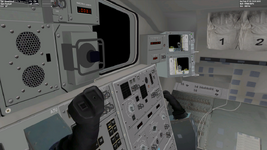
Ah!! Circuit breakers! Thank you very much, it was annoying me, I thought that CB´s were not yet added.
Best regards!


Quick update: ODS work is progressing well so far, although a bit slower than expected, so this won't be a Christmas gift...
Still, after working the external mesh, I did some work on the APDS panel:
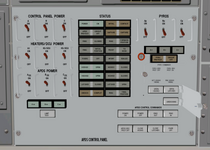
It's currently a hybrid of old and new labels... I might also work that, but it's not that bad as is.
On the logic side: PSU mostly done, PACU almost complete and hooks are moving (their lights already work in the image above), DSCU still a bit empty, and the rest is still not done at all. I still haven't decided if I take the time now to make SPEC 167 (Docking Status), or leave it for after v2.0.... currently inclined to the later option.
Still, after working the external mesh, I did some work on the APDS panel:
It's currently a hybrid of old and new labels... I might also work that, but it's not that bad as is.
On the logic side: PSU mostly done, PACU almost complete and hooks are moving (their lights already work in the image above), DSCU still a bit empty, and the rest is still not done at all. I still haven't decided if I take the time now to make SPEC 167 (Docking Status), or leave it for after v2.0.... currently inclined to the later option.
Last edited:
Hm, I've run into a problem of not being able to close PL DOORS before reentry. Seemingly everything is set up, in PL DOORS software as well (ITEM1 etc...), and switches on R13 as well, K-Band antenna is stowed, but nothing happens. ITEM3 (auto mode) though has no asterisk next to it, should be there one?
Are you following this?Hm, I've run into a problem of not being able to close PL DOORS before reentry. Seemingly everything is set up, in PL DOORS software as well (ITEM1 etc...), and switches on R13 as well, K-Band antenna is stowed, but nothing happens. ITEM3 (auto mode) though has no asterisk next to it, should be there one?
(ignore the camera steps and steps 8 and 9)
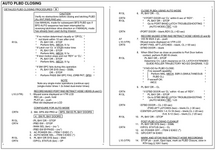
Those are the PLB Door switch override ITEMs, which backup the switch. But the switch should work.Thanks, I managed to close them. I entered ITEM14 EXEC, then ITEM 16 EXEC and then ITEM3 AUTO mode worked (asterisk appeared).
And then ITEM 17 EXEC...

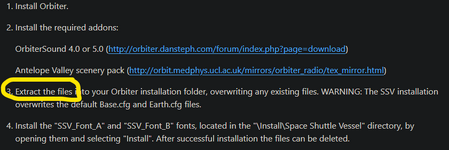
Exactly.Question. In the install instructions, is number 3 the SSV files? So the sequence is Orbiter base game, sound, antelope, then SSV.
View attachment 36180
I'll clarify that step in future versions.
- Joined
- Feb 4, 2008
- Messages
- 9,758
- Reaction score
- 1,028
- Points
- 203
GLS: Do you think you could implement a key-press trigger for the HUD de-cluttering? I'd like to assign that to one of the buttons on my X-52 so I can focus on flying the orbiter. An actual CDR would have the benefit of using the left hand for HUD management, which is a bit of a hassle since we have to make do with a mouse.
It is possible, but I'd have to check.GLS: Do you think you could implement a key-press trigger for the HUD de-cluttering? I'd like to assign that to one of the buttons on my X-52 so I can focus on flying the orbiter. An actual CDR would have the benefit of using the left hand for HUD management, which is a bit of a hassle since we have to make do with a mouse.
One thing I'll eventually change in the switches (which will firstly affect the ones currently with hacks: gear, chute and SSME shutdown) is having a "fake call" to the mouse click callback, with the coordinates of a switch, so that all the normal switch processing (and animation) happens, as if the user clicked on the switch. The source of this "fake call" could be a key shortcut or, more interestingly, a script.
I've no idea when this will happen... maybe in a v1.9 version, which is very likely to happen, due to the mountain of work still to do for the v2.0 version.
Quick update about v1.8: progress slowed down a lot in the past weeks, with me having a small rest, the remaining parts DSCU logic being a bit complex, and other things having to be done. For now, I'm still expecting this to be complete this month.
- Joined
- Feb 4, 2008
- Messages
- 9,758
- Reaction score
- 1,028
- Points
- 203
GLS: Is there anyway to tweak the atmospheric FCS gains? The orbiter is very sensitive to inputs in pitch but roll response is almost nonexistent. I have to put in a near full command in the roll axis in order for the FCS to execute any sort of roll while pitch is so sensitive that you could breath on the RHC and it will respond.
Similar threads

- Replies
- 0
- Views
- 2K
- Replies
- 5
- Views
- 2K
- Replies
- 36
- Views
- 13K

- Replies
- 153
- Views
- 37K

- Replies
- 4
- Views
- 2K
