OS WARS MEGA THREAD (Now debating proprietary vs. open-source!)

No, I'm actually fairly sure that the majority of users expect the control to go to where they click when they click on an explicit location on a slider-like control. See: media player seek control.

While I've never used the Windows volume control in the way he describes, it does not violate my expectations. I expect clicking within the slider track to set the slider to where I click, and for the slider to follow the mouse when I drag, but I expect clicking outside of the slider track (for instance, above or below, as he describes) to be implementation defined, although if it's not marked it might not be very discoverable. A scroll bar is an example of a slider that behaves exactly the way he describes, and is marked as doing such.
 
I'm not upgrading to Windows 10 until I get DirectX 12 capable hardware, which I'm probably not gonna get until nVidia GeForce 1000 series comes out and gets established.


I'd still be on XP if it supported DirectX 11.

What graphics card do you have? Nvidia cards from the 400 series onwards and AMD cards from the 6000 series onwards are DX12 compatible since they are DX11 compatible (i.e. they'll be able to run DX12 games without problems, lacking some of the more advanced features, but still taking advantage of the reduced CPU overhead, for example).
 
Sorry, but there is one important difference between "gathering data all the time" and "politely asking for data for a post-mortem analysis". Especially since you can easily gather too much data for your actual purpose. And more so, since existing data creates demands by anti-democratic forces (To quote a supreme judge from here: "Where there is a trough, there will be pigs").

Only few people really have a problem with sending Microsoft a bug report, even if it includes the application log - as long as they are politely asked and the reason why this data is really helpful is explained. Psychologically, what Microsoft does now is calling for resistance. Microsoft is not communicating with the customer and is not treating the customer as responsible and capable of reason. Of course this will result in people reacting strongly against Microsoft.

And that maybe even for a good reason.
But how often do you want to be asked if it's okay to send a bug report? Every single time something goes wrong behind the scenes? There are a lot of errors and situations on which telemetry is being reported that are less severe than crashes--just where something didn't work as expected, for example. The code in question may handle the error and display a suitable error message ("Something went wrong"), but it didn't crash, so it wouldn't trigger the type of crash report you're talking about.

If Microsoft instead asked the user's permission for every little thing, users would quickly get annoyed. Instead, the user's permission is asked once, at install.

---------- Post added at 09:40 ---------- Previous post was at 09:38 ----------

While I've never used the Windows volume control in the way he describes, it does not violate my expectations. I expect clicking within the slider track to set the slider to where I click, and for the slider to follow the mouse when I drag, but I expect clicking outside of the slider track (for instance, above or below, as he describes) to be implementation defined, although if it's not marked it might not be very discoverable. A scroll bar is an example of a slider that behaves exactly the way he describes, and is marked as doing such.
He's not talking about clicking outside of the slider track--he's talking about clicking within the slider track, but above or below the slider thumb.
 
I haven't had much time with the Windows 10 calculator because I removed it pretty quickly. Although I can get it back, I think the Windows 7 calculator is at least as good and smaller.

So you ditched something you didn't even try? Why would you think the Win7 calculator is better?

To me it's like you're choosing to play Orbiter 2006 over 2010 because "it does the same thing, and is smaller".
Here the calculator opens in milliseconds, calculates as much stuff as the Win7 one does, and is better because it fits the general Windows 10 experience with the graphics. The old one was quite ugly to be honest, and needed much of an overhaul.

But then again you might like it better for some reason, which is why I'm asking.
 
But how often do you want to be asked if it's okay to send a bug report? Every single time something goes wrong behind the scenes?

I wasn't aware of Windows 10 being that buggy. Personally, I don't have a problem with telemetry as long as it is used to improve a system stability. But I am worried about the direction we are going. How many NEW loopholes the Windows 10 has that hackers/nations could exploit to do something nasty.

I have installed Windows 10 on my Windows 8.1 laptop when it came available and I am a bit annoyed about stupid looking tiny one color icons in a start menu on a large flat square background. Also, plain white widows aren't really so cool. I am shocked to see that Microsoft is unable to offer more themes or customization options. I have been running Windows 7 with a default aero-theme that comes with it. I am perfectly happy with Windows 7 and it is the best OS that I know of, and now I have a chance to upgrade to something that is less tempting. Well, right now, I am going to wait with the upgrade because I have a lot of software installed in my computer and I don't want to take any risks anything going wrong with a needless upgrade at this point. Probably later when Windows 10 is in a better shape.
 
Give the world a few years and you will read a leaked document about how the NSA uses Microsoft telemetry for hacking the private computers of foreign or domestic politicians.

This is exactly what scares the hell out of me about Windows 10. Organizations like the NSA are out of control right now, let alone with the ability to request information disclosures like this from every Windows PC in service around the world.
 
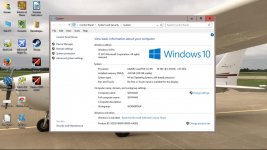
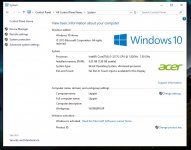
I just realized I'm running Windows 10 Pro. That shouldn't have happened. I was running Windows 7 Home Premium.

According to the Windows 10 Specifications, Upgrade Editions section, I should have upgraded to Windows 10 Home.

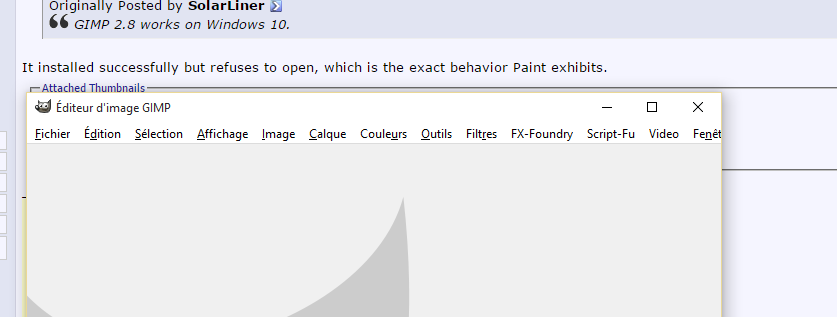
Unfortunately I am unable to post a screenshot, as the Paint app appears to be broken. Going to see if there's a compatible version of Gimp or Paint.NET yet, then will post.
 
Paint is working fine here, but in any case you can take a screenshot directly by pressing WIN+PRINT. They will then be stored in your default "Pictures" folder.
 

Attachments

  • Screenshot (1).jpg
    Screenshot (1).jpg
    107.1 KB · Views: 35
That is...strange. Also your window close and minimize buttons look a bit off.

I have the display settings set to best performance + only a few other items enabled. Perhaps this is the difference?

At any rate, I was able to get Gimp 2.8 running by setting it to run as Administrator for all users.
 
I have the display settings set to best performance + only a few other items enabled. Perhaps this is the difference?

The windows that I am seeing in Windows 10 are stupid looking plain white boxes with no borders or anything else. Without a background picture I might thought Windows running in two color mode. Maybe the Windows 10 will get a nickname "Windows Two Colors" or Windows TC :lol:

Any ideas from where I can change the appearance ?
 

Attachments

  • dummy.jpg
    dummy.jpg
    127.5 KB · Views: 19
Last edited:
Ah, ok. I see that when I switch to the 'Windows' or either of the 'Windows 10' themes.

It appears in my case it just recreated the theme I had configured in Windows 7 (Classic theme) the best it could in Windows 10 - which pretty much looks like the Windows 8 version of the Classic theme.
 
Windows 7 keeps on surprising me...

Drive | Size
System/SSD|120 GB
HDD|880 GB
Recovery|50 GB
________|_____
Size of Windows backup|900 GB

WTF?

How does it calculate that?
 
Windows 7 keeps on surprising me...

Drive | Size
System/SSD|120 GB
HDD|880 GB
Recovery|50 GB
________|_____
Size of Windows backup|900 GB

WTF?

How does it calculate that?

Must be the new math.
:lol:
 
Windows 7 keeps on surprising me...

Drive | Size
System/SSD|120 GB
HDD|880 GB
Recovery|50 GB
________|_____
Size of Windows backup|900 GB
WTF?

How does it calculate that?
I assume your HDD is not 100% used, neither might be your System/SSD nor the Recovery "Partition".
After all the "Size of the backup" might also just be the "zipped" size.
Your simple sum-up is the problem, not the OS
 
Installed Windows 10 and started Orbiter.

I've found that Orbiter dialog boxes don't have the "x" displayed on them, but they do close if I click where the "x" should be:

Q5oc5uz.png
 
They went missing a long time ago - on Windows 7 they were already missing.

As for the window border colour, it doesn't seem to appear stuck on white:
10673f2e8d8b2c6fb0770bed40d14150.png

(email app)

So either it's automagically added, or there's an entry on the WINAPI that has been added.

And GIMP loads fine for me; but I already had it installed prior to the update:
3e1915a1b477df3c4c1aefa1412645b2.png
 
They went missing a long time ago - on Windows 7 they were already missing.
I think you mean on Windows 8. They have been displayed there just fine in Windows 7.
 
Back
Top