OS WARS MEGA THREAD (Now debating proprietary vs. open-source!)

It's also worth noting that the telemetry is how Microsoft knows what's working and what isn't. If you run into a bug but have turned off telemetry, Microsoft has no way of knowing about it--and it's a bit difficult to fix bugs you don't know about.
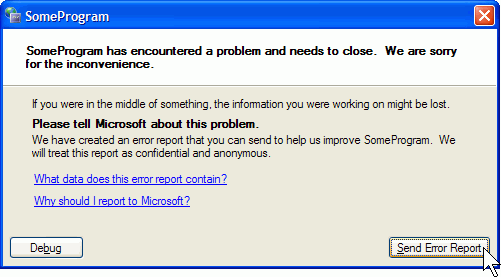
Ah yes, because automatic error reporting in Windows has solved sooooo many issues

wer.gif
 
Last edited:
Ah yes, because automatic error reporting in Windows has solved sooooo many issues

wer.gif
I get that you're trying to be sarcastic, but I'm not really sure what about. Those error reports can indeed be very valuable.
 
How can I trust the windows 10 platform?

ADDED:
For me and the wife to adopt 10 at home we'll need to feel comfortable and secure with it. Right now that isn't happening. We may be slow and behind the times. But we enjoy tried and true solutions.
 
Last edited:
I, for one, am extremely happy with the 10 update.

I have yet to upgrade my Win7 machine at home, but my Win8 laptop is now upgraded and I am very happy about it.

What's up with the Calculator and the new volume settings? The new calculator works just fine, the UI is different because it fits the new Windows Style guidelines, but it works, it calculates, it does everything the old one did.
As for the volume, I don't exactly know why the new one is bad, and why the old one was better. Is it because you prefer vertical sliders?

The calendar and email apps are awesome. Why using an internet browser when you can have notifications of your next appointment, can read emails as they arrive, and have to wait 5 seconds instead of having to navigate to the website and logging in?

The only downside is that the Email app isn't Inbox, but oh well, can't have everything ^^

The Tablet mode is surprisingly usable with mouse and keyboard. It basically converts any window into a fullscreen, "Windows 8 app" style app, that you can switch back and forth, put side by side with another app ...

Speaking of that, the desktop version of that feature had a nice overhaul; when you "hit" a window against the left or right side of the screen, you can choose what window will fill the other side. Very very useful.
9242b4980e96382e5e67695fd1229c85.png


And at long last, a proper notification center.

As for Cortana, nothing really exciting, as I already am a Google Now user. I have yet to chat with her though.

So far, my only complaint is how Windows seems to treat me, as if I just entered the world and needed to be treated like a child, going through the different aspects of Windows 10. Then again, it's because I already knew and didn't need that. Opinions may differ.
Also, I have yet to find the option to create a new virtual desktop.

So, if you're wondering if you should upgrade, then do it! Yes, the UI changes, yes, things are different, but it's way worth the change.

---------- Post added at 13:11 ---------- Previous post was at 13:03 ----------

I'll also add that I tested Microsoft Edge.
79fa7633e90d3b81d4c5c70712351e3d.png


It's nice and quite fast, although it obviously misses extensions support (Browsing the Internet without AdBlock? Nonono), and apparently you can only search from Bing (can't add Google nor any other search engines). But it is definitely less RAM-hungry than Chrome, and definitely faster than Firefox. I'll try again after it gains extensions support (this fall AFAIK), but it definitely looks good, and is a nice step forward from IE's general badness.
 
You can add other search engines, including but not limited to Google.

To do so first open Google.com, then navigate to the browser's settings-->advanced settings and in the list of available search engines click on "Add new". Google.com should now be visible, along any other recently visited website with a search engine supporting Open Search.
 
From my experience so far, I may declare later on that dual-booting Windows 10 and a Linux distribution of your choice (Linux Mint for me) is the dream-couple of the OS world. :P

Did you dual-booting set up beforehand?

I currently have windows 8.1 and LM also dual booted.

After the fun of dealing with Secure Boot, I got it working with the new UEFI setup.

Are there any problems with the update to Windows 10? It is using UEFI, so it shouldn't wipe out the bootloader like it used to do.
 
Microsoft has no way of knowing about it--and it's a bit difficult to fix bugs you don't know about.
Great. Let the clients betatest the software. A new normal.

I currently have windows 8.1 and LM also dual booted.
After the fun of dealing with Secure Boot, I got it working with the new UEFI setup..
Mate, I had so much more fun doing the same on a laptop with Linux on a secondary SSD disk, which is normally unbootable on this laptop brand. I ended up having an USB stick with /boot mount point constantly plugged in.
 
Great. Let the clients betatest the software. A new normal.
Lots of clients (something like 5 million?) willingly signed up to betatest Windows 10 before release. At this point, it's no longer beta software, but that doesn't mean that data about issues you run into isn't valuable.

My point stands that if you run into some kind of unique issue, if you've turned off the telemetry reporting, Microsoft won't know about it, and it's a little hard to fix bugs you don't know about.

So the conversation ends up like this:
"Why haven't you fixed this bug?"
"We've never seen that before; have you uploaded the telemetry and crash dumps?"
"No, I turned those off because I don't want you knowing what happens on my computer."
"...."
 
I had a terrifying encounter a couple weeks ago with KDE 5 Plasma. Took me about 8 hours to get rid of it and revive my old KDE.

I really should have known something was up when I was told there were about 1,500 updates:facepalm:
 
What's up with the Calculator and the new volume settings? The new calculator works just fine, the UI is different because it fits the new Windows Style guidelines, but it works, it calculates, it does everything the old one did.
As for the volume, I don't exactly know why the new one is bad, and why the old one was better. Is it because you prefer vertical sliders?

I haven't had much time with the Windows 10 calculator because I removed it pretty quickly. Although I can get it back, I think the Windows 7 calculator is at least as good and smaller. Regarding the volume, the horizontal slider on Windows 10 does not let me monitor the audio levels when I click it. That's a very important feature to me, along with having a button for the volume mixer and being able to adjust the loudness quickly in increments of 20 by clicking above or below the slider. I find the Windows 10 calendar to be similarly inefficient for desktop use, scrolling across months is not precise, and I simply prefer the old format.
 
Regarding the volume, the horizontal slider on Windows 10 does not let me monitor the audio levels when I click it.
Uh...mine does on Windows 10. It's not the same "beep" it used to be, but it definitely makes noise when I click it.

...along with having a button for the volume mixer...
It's still on the right-click menu of the volume icon in the taskbar.

and being able to adjust the loudness quickly in increments of 20 by clicking above or below the slider.
No, instead, it jumps directly to where you click, which is how sliders are supposed to work...

I find the Windows 10 calendar to be similarly inefficient for desktop use, scrolling across months is not precise, and I simply prefer the old format.
You can just click the little arrows--it doesn't get much more precise than that.
 
I'm not upgrading to Windows 10 until I get DirectX 12 capable hardware, which I'm probably not gonna get until nVidia GeForce 1000 series comes out and gets established.


I'd still be on XP if it supported DirectX 11.
 
Uh...mine does on Windows 10. It's not the same "beep" it used to be, but it definitely makes noise when I click it.
That's not an audio level meter. This is:
kLgdaeE.png


To clarify, it's not the beep when I change the volume, but being able to continuously monitor audio levels when I open the volume control.

It's still on the right-click menu of the volume icon in the taskbar.
I was aware of that, but it's more inconvenient for me, and I usually prefer to have just the master volume slider.

No, instead, it jumps directly to where you click, which is how sliders are supposed to work...
In your opinion.

You can just click the little arrows--it doesn't get much more precise than that.
I prefer scrolling, which I find to be just as precise and faster.

I'm not upgrading to Windows 10 until I get DirectX 12 capable hardware, which I'm probably not gonna get until nVidia GeForce 1000 series comes out and gets established.
There's also not any games supporting DX12 at the moment, and the only one I know so far that will use it is Deus Ex: Mankind Divided.
 
Last edited:
That's not an audio level meter. This is:

To clarify, it's not the beep when I change the volume, but being able to continuously monitor audio levels when I open the volume control.
Got it. It's still on the mixer panel, for advanced users like you.

In your opinion.
No, I'm actually fairly sure that the majority of users expect the control to go to where they click when they click on an explicit location on a slider-like control. See: media player seek control.

I prefer scrolling, which I find to be just as precise and faster.
So if it's just as precise as something that's perfectly precise, what's the issue?

I would burn in hell for all eternity before I ever went back to Windows.
Your useful and constructive contribution to the thread is noted. Thanks.

"Not using Windows" is certainly a valid option for those people who don't like modern video games, or using any of the extensive collection of programs written for Windows. Like Orbiter.

Wait, why are you here, then?
 
"Not using Windows" is certainly a valid option for those people who don't like modern video games, or using any of the extensive collection of programs written for Windows. Like Orbiter.

Wait, why are you here, then?

Wine. :-)
 
Got it. It's still on the mixer panel, for advanced users like you.
However, all I usually want is the master volume meter, which is why I reverted to the old volume control.

No, I'm actually fairly sure that the majority of users expect the control to go to where they click when they click on an explicit location on a slider-like control. See: media player seek control.
Most users may prefer one thing, but that's called an opinion. I have a different opinion. And I except the volume control slider to work differently.

So if it's just as precise as something that's perfectly precise, what's the issue?
I prefer using the older calendar because scrolling on that is precise and tactile.
 
Last edited:
So the conversation ends up like this:
"Why haven't you fixed this bug?"
"We've never seen that before; have you uploaded the telemetry and crash dumps?"
"No, I turned those off because I don't want you knowing what happens on my computer."
"...."

Sorry, but there is one important difference between "gathering data all the time" and "politely asking for data for a post-mortem analysis". Especially since you can easily gather too much data for your actual purpose. And more so, since existing data creates demands by anti-democratic forces (To quote a supreme judge from here: "Where there is a trough, there will be pigs").

Only few people really have a problem with sending Microsoft a bug report, even if it includes the application log - as long as they are politely asked and the reason why this data is really helpful is explained. Psychologically, what Microsoft does now is calling for resistance. Microsoft is not communicating with the customer and is not treating the customer as responsible and capable of reason. Of course this will result in people reacting strongly against Microsoft.

And that maybe even for a good reason.

Give the world a few years and you will read a leaked document about how the NSA uses Microsoft telemetry for hacking the private computers of foreign or domestic politicians.

I know that Microsoft improved in Windows 10 the possibilities to manage your privacy. Sadly, mostly for enterprise versions. And more so, you still can't trust Microsoft to not gather data that is not accounted.
 
Back
Top