Project Orbiter Navigator

And im excited at the thought of having something like this for use in orbiter.
That was actually what I meant when I asked wheather the app was running in an Orbiter dialogue Window.

As mentioned before, my whole Orbiter Galaxy project is currently running in a dialogue window inside orbiter (thanks to Face), accessible by ctrl+F4 (which I rarely use, because I can start it up by pushing a button on my MFD). It uses a completely different graphics engine than Orbiter, in its own thread, and is giving no trouble whatsoever.

So I think the only thing that would have to be changed in the code in order to implement the whole thing is the message handling, which in case of a complete implementation can be handled by a simple data type, since the MFD and the application would be sharing the same memory space...

However, the actual benefits vs. a complete external aplication would pretty much be limited to what I wrote in my last post above, except maybe for some added immersion (and some much easier coding to communicate between the planner and the MFD).
 
Hmmm looks like the Orbiter Dialog Window crowd is growing in numbers. :)
I'm not sure how hard it would be to interface a .NET app with Orbiter. I know Face did this already with his Orbiter .NET project so it seems doable.
Another option might be to recode the thing in C++ using OpenGL or something like the Irrlicht engine (i think thats what you're using in the Orbiter Galaxy Project Jedidia right ?). I guess i'll see about all that later. For now i will concentrate on getting the first release done.

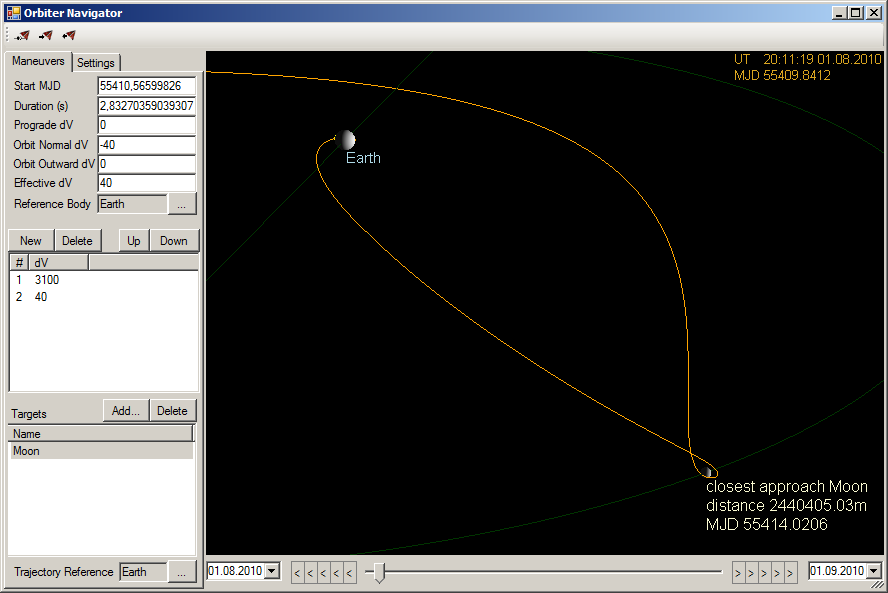
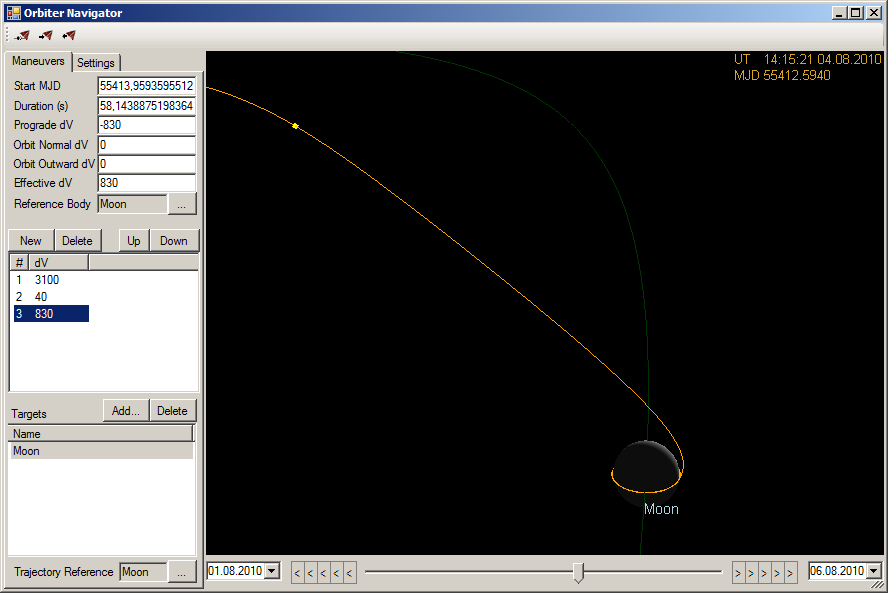
Short update: I finished the trajectory reference body selection yesterday, that makes planning earth-moon hops much more intuitive...
earthmoon.png


mooninsertion.png
 
I'm not sure how hard it would be to interface a .NET app with Orbiter.

I'm not sure how much that would actually hurt. I mean, as long as you keep it in it's own thread, the only thing that "interfaces" with Orbiter is the data type you use to send between the two. When I look at my Code, what Face did was "simply" create a new thread, passing it the window handle and a pointer to the message type, and relaying the mouse events. However, You'll have .NET code and C++ code in the same project, and I don't know how well Visual Studio manages that...

i think thats what you're using in the Orbiter Galaxy Project Jedidia right ?

Yeah, but switching the whole engine would be quite a pain in the but, I could imagine.

For now i will concentrate on getting the first release done.

That's gooooood! :tiphat:
 
.NET has a something like an "interop services" thing among it's libraries.... i've never really tried using it, but i read that's exactly what it's for - to get a .NET app talking to a win32 native other...


but you shouldn't even need it, i think... if you spawn the process from inside Orbiter, i think you can get your handle without the .NET side even caring about it....
 
However, You'll have .NET code and C++ code in the same project, and I don't know how well Visual Studio manages that...

Creating managed Orbiter plugins with Visual Studio is just as easy as with unmanaged plugins. The tricky part is getting the mixed-mode assembly loaded and interfacing with the core.
But for both problems I have working code in OMP, so if Mindblast is willed to let me take a stab on the code, I can try to do for Orbiter Navigator what I did for Orbiter Galaxy.

BTW: This is really a nice project, its interface looks much like NavMFD. And to be honest, NavMFD is my all-time favourite when it comes to navigating the void. It is really sad it never got as much attention as IMFD and TransX.

regards,
Face
 
Wahey Face.. be my guest ! :)
I will make the code open source anyway at some point so this can become a joint project of the orbiter community. I didn't plan to do this before the first release though..
I'll pm you the current code for now.
 
What about handling multiple ships in one time? Is it possible for the program?

No currently not. Only the data of the active vessel are exported to the app and used for the planning. Might be a feature for later..

For now you could plan and do a maneuver with one vessel, then switch to another one reconnect Orbiter Navigator so the data of the new vessel get exported and plan for that vessel. Then switch back to the first, reconnect.. and so on. I will add functions for saving planned maneuvers to a file so you can reload the planned maneuvers for the vessels.
 
WOW! This is just what I need! I have to admit I was sad when I saw the other 3D nav project fall off the map. I do hope this will be more active obviously.

Looking at that Lunar trajectory just makes me rub my hands in anticipation question tho and pardon if I failed to understand the concept.

Is it possible with this to use the moon as a "Stage" in the overall process? For instance if I wanted to use the moon to sling to mars.
 
Is it possible with this to use the moon as a "Stage" in the overall process? For instance if I wanted to use the moon to sling to mars.

from what i understand - i think that's the whole point! :thumbup:
 
good point - i'd like to know that as well
 
Is it possible with this to use the moon as a "Stage" in the overall process? For instance if I wanted to use the moon to sling to mars.

Well.. there are no stages here really like we know them from TransX. The switching of the trajectory view between different reference bodies only serves the purpose of giving the user a more intuitive view on things, depending on what he is planning in that moment. So for your sling to mars you would probably start out with earth as the reference for the trajectory view and plan an escape maneuver that brings you in behind the moon for a sling. Once this is setup you'd switch to sun as the trajectory reference to see how the trajectory after passing the moon brings you over to mars.
Hmmm.. i don't know if that clears it up a bit. I'll try to plan something like this later today and post some screenies..

---------- Post added at 10:52 PM ---------- Previous post was at 05:43 PM ----------

Ok here we go.. i didn't quite succeed in planning a complete Earth-Moon-Mars Transfer because i didn't choose a good launch window for the Mars trip.. should've used Pipers Pork Chop Plot Planner first. :)
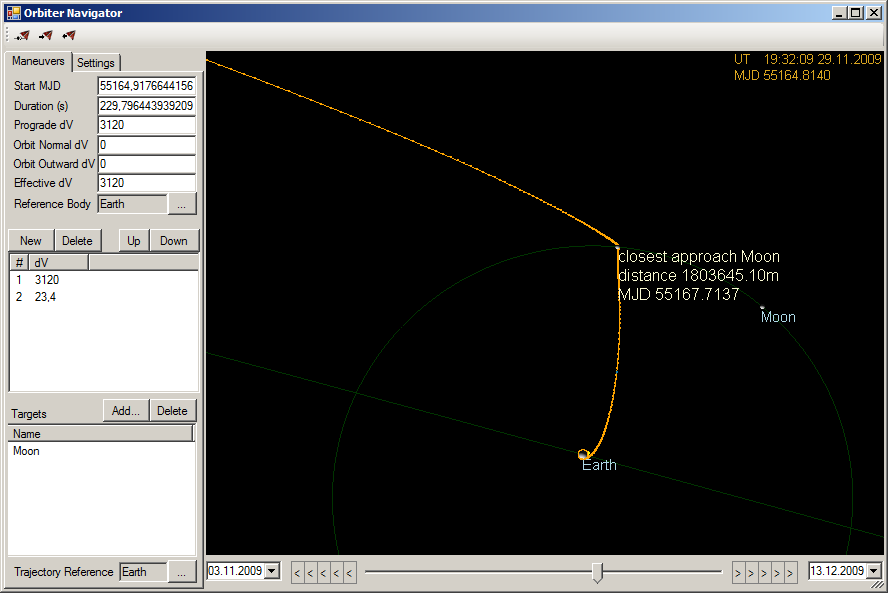
However as i mentioned, the first step would be to plan the moon sling using an earth relative trajectory view..
moonsling.png


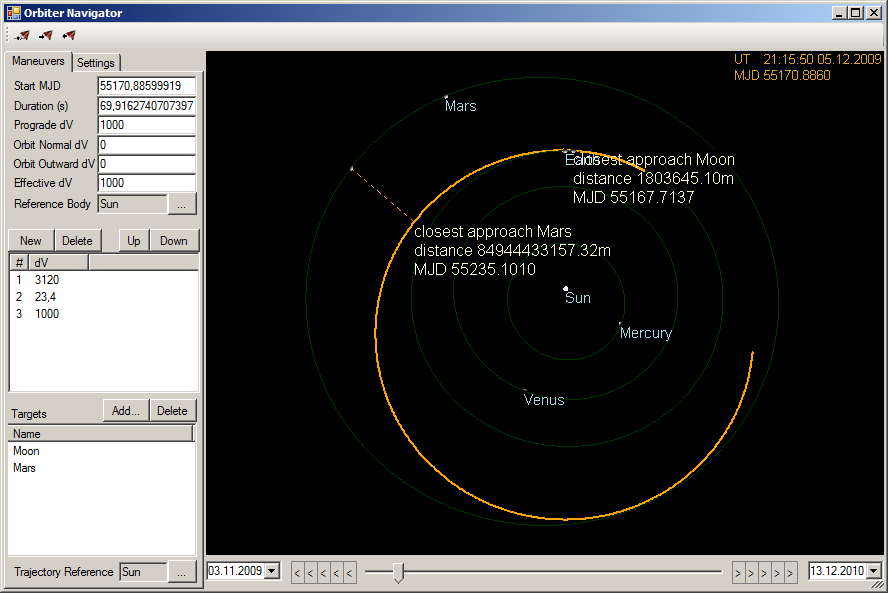
Then switch the Trajectory Reference to sun and increase the time window to see how things look for the earth-mars transfer orbit...

earthmoonmars.png


I've added another 1000 m/s prograde maneuver here to get the transfer orbit to "touch" the mars orbit. Now if i had chosen a proper launch window, Mars would've been there too.. :)

The overall dv used here suggests that it would be better to escape from earth directly without the moon sling. With 4120 m/s dv i could have achieved a direct transfer orbit easily. I probably got the sling wrong.. should've used a higher dv at earth directly but overall i somehow doubt there is much dv to gain from a moon sling.
 
awesome! thanks for the examples!

now... would it not be a great addition if this wonderful tool of yours were able to calculate launch windows as well? :lol: - i say this because it would be truly a blast to have an all-in-one buzz lightyear suite :hmm:
 
It's looking awesome. I love the free return screenshot!
 
Amazing!

After I flew the Genesis mission, I became addicted to Lagrange Points. Do you think that they also could be choosen as trajectory reference?
 
Mindblast thank you for taking my question so seriously!

No there is indeed little you can gain by using a moon sling. However I found the concept quite interesting especially after Flytandems use of the moon to do amazing things such as Polar orbit to Geosync orbit.

Also Nozomi

http://en.wikipedia.org/wiki/Nozomi_(probe)

Another question if I may. Have you tried to do a high speed transfer with your program (1G burns for hours to reach velocities that make transfers in days or weeks rather than months or years) If so would it be possible to calculate the "Arrival" burn?
 
If so would it be possible to calculate the "Arrival" burn?

If it can do so for low thrust, it shouldn't have any trouble with high thrust either...

This is really going to be a mind blasting add-on! (pun intended) :cheers:
 
now... would it not be a great addition if this wonderful tool of yours were able to calculate launch windows as well? :lol: - i say this because it would be truly a blast to have an all-in-one buzz lightyear suite :hmm:

Sure but i'll concentrate on the more essential things for now. :) I thought about adding a Lambert Solver and Pork Chop Plots too already but this is still far away.

---------- Post added at 09:53 PM ---------- Previous post was at 09:51 PM ----------

After I flew the Genesis mission, I became addicted to Lagrange Points. Do you think that they also could be choosen as trajectory reference?

Hmmm.. this would be interesting for sure. I guess i have to start a feature wishlist. :)

---------- Post added at 10:05 PM ---------- Previous post was at 09:53 PM ----------

Another question if I may. Have you tried to do a high speed transfer with your program (1G burns for hours to reach velocities that make transfers in days or weeks rather than months or years) If so would it be possible to calculate the "Arrival" burn?

I haven't tried this yet, do we have addons capable of this ?
Also staying at 1G would probably require to adjust the thrust continuously to compensate weight loss due to burned fuel. This is currently not possible with the tool. It always uses full thrust.
 
Back
Top