Project Multistage2015 - Development Thread

I noticed this too and got around it by renaming "multistage2015.dll" to "multistage2.dll" and overwriting the original.

Guaranteed to use the multistage2015 code for everything.
;)
 
I noticed this too and got around it by renaming "multistage2015.dll" to "multistage2.dll" and overwriting the original.

Guaranteed to use the multistage2015 code for everything.
;)

Wanna run that by me again. :huh:
 
Wanna run that by me again. :huh:
Simple: Delete the old multistage2.dll in Modules and then rename Multistage2015.dll to Multistage2.dll. This way all of the add-ons that rely on multistage2.dll will now use multistage2015 instead.
 
What DaveS said, but I use the Jonesoft Mod enabler.
 
All right guys,

a small update just to let you know that I'm keeping up the job on this...

Updated and generalized multistage peg autopilot seems finally to work fine... general implementation was a huge mess but at the moment the result is quite ok. Final orbit is reached with really good precision and pitch progression is quite smooth so I am happy.

But it's still not perfect though... For some reason I still can't get, even if Nasa's equation of PEG are rigorously followed and calculated I still cannot get complete pitch continuity across staging events. I can see from the progression in calculation that I am close, but not yet reached. I hope to get this soon, because once achieved 99% of the work will be done!

Will keep you updated

Fred
 
New Update:

General Multistage PEG is finally working!!! :woohoo:

There is total continuity across staging and an amazing smooth pitching across ascent, I'm so happy!

The call in the guidance file will be:
Code:
0=orbit(250,180,45)

which means to achieve an orbit of 250km of apogee, 180km of perigee with an inclination of 45° (positive means to launch northward, to go south should be -45)

but there are other two ways of defining this:
Code:
0=orbit(250,180,45,-1)
which means to fly inverted
and
Code:
0=orbit(250,180,45,-1,200)

which mean to target cutoff at 200km (useful for launch vehicles that need particular orbit targeting, like space shuttle, otherwise one of the abisdes is targeted)

What I am currently working on is the following set of new features:

Fairing: a call in guidance file which will specify not only time but also altitude at which jettison fairing - EASY
Azimuth Calculation and inclination targeting: already implemented, trying to solve the glitch for orbit with inclination close to launch latitude but not exactly equal to launch latitude - HARD to solve the glitch even if it happens only in rarely
Optimization of gravity turn - Already implemented but needs to be revised and optimized for generalization purpose - MEDIUM
Live Payloads - Code ready to be inserted in MS2015 - EASY
Rotated Payloads - I think I will make an animation here, but still have to think about this - MEDIUM
HUD information - Want to add some other information like predicted cutoff time during launch and payload name and information - EASY
Attitude control at time acceleration - Needs to be optimized to work smoothly also at low fps and/or high time acceleration - MEDIUM

Let's say that I hope to be ready for the release by next week or something like this!

Cheers Guys :cheers:

Fred
 
You're the man, Fred :)
This is a giant leap in the addon development scene.
 
Last edited:
Great news, Fred! I cannot wait to update the entire FOI fleet of launchers with the new MSG2015!

I would suggest to try the implementation of an usable "spin" command?
Back to the Eridanus development, I was unable to implement this command in the autopilot in an useful way, so I resigned myself to let the stack "upside down" during all the way to the orbit, while the Shuttle at a certain point turns "head up".
 
Last edited:
Great news, Fred! I cannot wait to update the entire FOI fleet of launchers with the new MSG2015!

I would suggest to try the implementation of an usable "spin" command?
Back to the Eridanus development, I was unable to implement this command in the autopilot in an useful way, so I resigned myself to let the stack "upside down" during all the way to the orbit, while the Shuttle at a certain point turns "head up".

Agree with you and already implemented :thumbup: :

you can choose with a (working) Spin command to rotate your craft (for example for yoyos) and in particular for the purpose you mentioned I put a new command called Inverse(). Once called it simply flip the mode from 1 to -1 or vice versa!

for testing the vinka's space shuttle i'm using this simple guidance file:
Code:
-10=orbit(180,180,40,-1,74)
-6=engine(0,100,6)
136=jettison()
145=inverse()

first call: setup of orbit parameters --> perigee and apogee at 180km, target inclination set to 40 so launch northbound, upside down and 74 is the gravity turn initial angle, I will give more details in the following days about this.

at 136 secs SRBs are jettisoned and 10 secs later the shuttle starts to turn from upside down to straight up orientation!
:tiphat:
 
Hey Fred18,did you ever figure out the problem with the timing with the smoke,and effects for the FOI launch pads using multistage2015 yet?
 
Not yet. Actually it should not be related to MS2015, there is no reason why it should be. The idea is that once this is finished I will check that to understand what was missing.

Anyway today I had a lot of time for developing and most of the topics are closed:

Fairing: a call in guidance file which will specify not only time but also altitude at which jettison fairing - EASY -CLOSED
Azimuth Calculation and inclination targeting: already implemented, trying to solve the glitch for orbit with inclination close to launch latitude but not exactly equal to launch latitude - HARD to solve the glitch even if it happens only in rarely -CLOSED
Optimization of gravity turn - Already implemented but needs to be revised and optimized for generalization purpose - MEDIUM - -CLOSED

Live Payloads - Code ready to be inserted in MS2015 - EASY
Rotated Payloads - I think I will make an animation here, but still have to think about this - MEDIUM
HUD information - Want to add some other information like predicted cutoff time during launch and payload name and information - EASY -CLOSED
Attitude control at time acceleration - Needs to be optimized to work smoothly also at low fps and/or high time acceleration - MEDIUM -CLOSED


I would add also Vent and Mach effects easy to implement (instead of using fake boosters as point.

I'm trying to keep my word of next week release :lol:
 
Any way to have VC view ?
 
Any way to have VC view ?

It's not a problem, but I have to say that I don't quite understand this point

What would be the virtual cockpit of a rocket with a satellite into its fairing for example?

Could please just let me understand what do you mean a bit more so I can work on the topic?
 
It's not a problem, but I have to say that I don't quite understand this point

What would be the virtual cockpit of a rocket with a satellite into its fairing for example?

Could please just let me understand what do you mean a bit more so I can work on the topic?

Keep the thing simple.

A virtual cockpit on MSG2015 is pointless for unmanned; can make sense for manned spacecrafts but isn't the priority in my view.
 
Last edited:
It's not a problem, but I have to say that I don't quite understand this point

What would be the virtual cockpit of a rocket with a satellite into its fairing for example?

Could please just let me understand what do you mean a bit more so I can work on the topic?

For manned mission of course.
 
For manned mission of course.

If it's a manned mission you are probably launching a UMMU compatible vessel.
If Multistage can now launch active vessels, loaded at scenario load, it's only a mater of selecting the vessel during launch and letting Multistage take you into orbit.
If not, you can simply set it all up using Velcro.


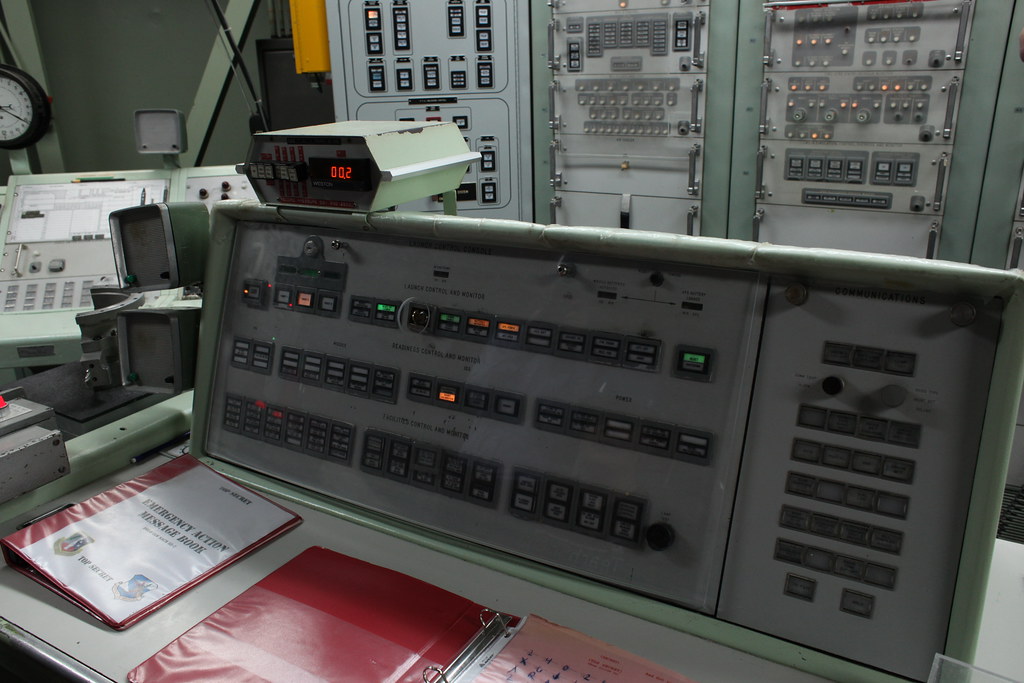
From a purely unmanned / rocket point of view, I see the point of having a VC / telemetry panel.
Here's one for a Titan II:
14116464387_518c02c97b_b.jpg

But how to interact with it? how to set it up?

For now, I'd rather have that as on-screen text that changes to the appropriate colors.
Interaction could be a simple keyboard presses, as we already do (j for jettison).
Status and events can be taken from the guidance and setup files themselves.
 
Last edited:
Back
Top