New Release D3D9Client Development

It gets even worse!
Can someone tell me why this branch (on my orbiter fork at github) is 5 commits ahead and has 10 files changed, although I only changed these 5 files:
Scene.cpp, VObject.cpp, VPlanet.cpp, VVessel.cpp, VObject.h, VPlanet.h & VVessel.h


I fetched & pulled and switched to "main"; then I edited the 5 files; I did a commit into a new branch (called 'd3d9_object_axis_display2') and pushed it to 'origin' (github I assume)...now all those changes from completeley different branches appear in that PR!
 
I didn't checkout you fork, so I might not be seeing the whole picture, but in github it seems you merged orbiter/main into your fork (https://github.com/schnepe2/orbiter/commit/5424cae7363ec96d3fa7d8aac33fbc21dbfc8c89), which might somehow be the issue here... To update my orbiter fork I just open it in github and select the "Sync fork" option, right next to the indication that my fork is behind, and it doesn't need a commit or anything. I do that right before creating a branch for whatever.
 
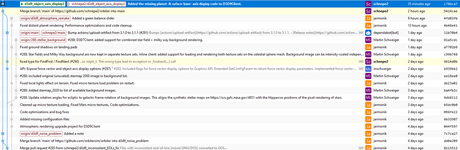
Went ahead and checked out your fork and I think I found the issue:
1667433090884.png
It seems your d3d9_object_axis_display2 branch starts at the d3d9_noise_problem branch and not at main, and so even with merging main into it, you will still have those changes in there.
Probably the cleaner solution is to just forget the d3d9_object_axis_display2 branch (it seems like it is only in your fork), go back to main, if needed sync in github in order to have the latest changes from orbiter/main, then branch from there into a d3d9_object_axis_display3 branch, and just copy-past the changes, test, commit, then PR.
 
It seems your d3d9_object_axis_display2 branch starts at the d3d9_noise_problem branch and not at main, and so even with merging main into it, you will still have those changes in there.
Probably the cleaner solution is to just forget the d3d9_object_axis_display2 branch (it seems like it is only in your fork), go back to main, if needed sync in github in order to have the latest changes from orbiter/main, then branch from there into a d3d9_object_axis_display3 branch, and just copy-past the changes, test, commit, then PR.
I did read something about "rebase" but have never used it. So, could some expert give an example how to rebase "d3d9_object_axis_display2" to top of "main" ? But anyway it's no problem if "d3d9_noise_problem" gets merged along with "d3d9_object_axis_display2".

Git is so much more complex than SVN. I actually patched "d3d9_atmosphere_remake" branch together with "main" locally on my local hard drive using Winmerge before committing the branch. I didn't even bother to try to merge it from my orbiter fork. It was better to do it manually than risk automation to mess it up and the days it would take to resolve it.😆
 
Last edited:
I did read something about "rebase" but have never used it. So, could some expert give an example how to rebase "d3d9_object_axis_display2" to top of "main" ?
I'm far from an expert, but afaik rebasing is something you should only do on local branches, to synch them back up with the remote. Rebasing a remote branch can screw up everybody else, since it rewrites history.
 
Git is so much more complex than SVN. I actually patched "d3d9_atmosphere_remake" branch together with "main" locally on my local hard drive using Winmerge before committing the branch. I didn't even bother to try to merge it from my orbiter fork. It was better to do it manually than risk automation to mess it up and the days it would take to resolve it.😆
For people inside the project, you can just branch from orbiter/main and you don't even need a fork.
 
[...]To update my orbiter fork I just open it in github and select the "Sync fork" option, right next to the indication that my fork is behind, and it doesn't need a commit or anything. I do that right before creating a branch for whatever.
That's something I do every time. My "main" is "in sync". Because I had similar strange behaviours all the time I sync every time orbitersim/orbiter has anything changed.
 
[...]Probably the cleaner solution is to just forget the d3d9_object_axis_display2 branch (it seems like it is only in your fork), go back to main, if needed sync in github in order to have the latest changes from orbiter/main, then branch from there into a d3d9_object_axis_display3 branch, and just copy-past the changes, test, commit, then PR.
That is exactly what I've done! - At least I think I did.
On my local machine I have fetched all branches from "origin" (my github I assume);
then I switched my local working copy to "main" (with I assumed to be "the same" as the sync'd github)...
I even checked, that no changes from "d3d9_noise_problem" were in the source code! Therefore I assumed that my local copy is perfectly sane.

I am always amazed how complicated one simple commit can get with git + github! A 15 minute coding session is followed by 2 days of frustration and uncertainty ;)
I know that it's my fault, 'cause Linus can't be wrong, right?

For people inside the project, you can just branch from orbiter/main and you don't even need a fork.
I am not "inside the project". I use a fork and have to create pull requests from that fork, right?

And regarding "rebase": I will not even try to do something like that, as I have no real idea about what that means ;)
And cherry-picking is much to much hassle here. The changes are very simple - that's why I made the 2nd attempt (d3d9_object_axis_display2), but that looked the same afterwards...
I think I will (again)
  • delete the whole development directory,
  • go to my github web page and sync everything (every cync button I can click on ... ;) )
  • then check-out "origin/main" into a fresh new directory
  • and see whether I can commit into a 3rd newly named branch.
 
While I am not at the machine where I can do the development/git-things: This PR from "computerex" seems to be exactly what I had in mind (y)
so if the doctor (or Jarmo) would like to merge that I am happy with that :D
 
I am not "inside the project". I use a fork and have to create pull requests from that fork, right?
Yes. So to avoid issues merging PRs, you should keep your fork synced, and then just branch as you please in your fork but, to keep things simple, do it from your main and not from another branch (which I think is what happened). Imagine your fork is the repo and don't worry about the orbiter/main. When you are ready to merge, go to github and there should be an option to create a PR and choose you branch.

I am always amazed how complicated one simple commit can get with git + github! A 15 minute coding session is followed by 2 days of frustration and uncertainty ;)
Coming from svn, git is a step in the "complex" direction but the basics are pretty much the same. Github adds another layer of complexity, but IMO the basics weren't too hard to grasp. You just have to be sure what branch you have checked out and which repo it calls origin.
 
While I am not at the machine where I can do the development/git-things: This PR from "computerex" seems to be exactly what I had in mind (y)
so if the doctor (or Jarmo) would like to merge that I am happy with that :D
Thanks - I have now merged the computerex PR. Sorry to hear that git causes problems. I guess the more repositories there are, the easier it is for things to go out of sync. In that respect, my life is probably slightly easier, since my only remote is orbitersim/orbiter. I don't have the additional headache of pulling from one repository and pushing to another ...
 
I'd like to learn Git one day but what I see here scares me a little bit 😅
 
Thank you all for the tips.
Still my local copy behaves very very strange :(
I' go the long way and start from scratch, as I suspect the .git folder to be somehow broken.
Let's hope I have fewer problems next time :D
 
A request for help with implementing a new feature in the D3D9 client:

PR 294 contains a nice new feature to render the bright stars of the Hipparcos and Tycho datasets as a texture map, in addition to the current pixel rendering. I found some very nice high resolution maps here: https://svs.gsfc.nasa.gov/4851. To support this, I have extended the celestial sphere manager (CSphereMgr.{h,cpp}) to render (up to) two background texture sets:
  • the starfield textures for the bright stars
  • and, as before, the background textures for milky way background or special all-sky surveys at particular wavelenghts
If both texture sets are present, they use additive blending.
I have implemented this for the inline and D3D7 clients, but I have too little knowledge about DX9 to do it for the D3D9 client. Any takers? The relevant code for setting up the two texture sets in the D3D7 client is in CSphereManager::Render. I have already added the code for loading the texture sets in D3D9Client, all that's left is the rendering.

In addition, this PR adds a new feature for hot-changing the celestial sphere rendering options in a running simulation via a new Options dialog (F6). This is much cooler than having to set fixed options in the Launchpad dialog before the simulation run. This should work for all graphics clients, with the exception of the "Background stars: show as image" setting in the D3D9 client (see above). I am planning to extend this new Options dialog in the future to include more parameters currently set in the Launchpad dialog. Give it a go!
 
Last edited:
A request for help with implementing a new feature in the D3D9 client:

PR 294 contains a nice new feature to render the bright stars of the Hipparcos and Tycho datasets as a texture map, in addition to the current pixel rendering. I found some very nice high resolution maps here: https://svs.gsfc.nasa.gov/4851. To support this, I have extended the celestial sphere manager (CSphereMgr.{h,cpp}) to render (up to) two background texture sets:

I have taken a look at the code and noticed a small code conflict with the rendering code with "atmosphere_remake" branch which will replace the old FX framework with direct HLSL and constant buffers, that's the architecture that DX11 and Vulkan use, making the D3D9Client easier to translate in the future. I am not sure what's the best way to resolve this.

A) I could add the rendering modifications using the old FX framework to "stellar_background" branch to get it operational and then replace it when "atmosphere_remake" is ready for merge.
B) Or I could pull the changes from "stellar_background" to "atmosphere_remake" and make the rendering code changes in there. But in that case stellar background in D3D9 wouldn't be operational until atmosphere remake is merged. (which is hopefully no more than 7 days.)

I guess it might be easier to go with option (A)
 
Any idea about when we "normal end users" will be able to see these new features?
Once this branch has been merged, you should be able to pick up the corresponding installation image as a build artifact from the github page:
  • go to https://github.com/orbitersim/orbiter
  • click "Actions"
  • select the latest merge action
  • download the Orbiter-x64 and/or Orbiter-x86 artifact.
  • after unpacking, make sure to redirect the planetary texture search path to your existing Orbiter 2016 installation by setting the PlanetTexDir entry in Orbiter.cfg
 
@jarmonik: I just spotted (and hopefully fixed) a bug in the 288 branch: The star background image was bleeding through the atmosphere background colour because it wasn't scaled with the background level. I think I fixed that in all clients including D3D9 with the last commit, but since I don't really know my way around shader code, it's probably best if you double-check.
 
Once this branch has been merged, you should be able to pick up the corresponding installation image as a build artifact from the github page:...
Thanks Martin, do I need to have an account?
I sounds easy, but I can't seem to be able to find (or understand how to find) what you posted.
 
Back
Top