New Release D3D9Client Development

I'll look into it too. No problem.

[...]The only issue I noticed is that the frame axis vectors for celestial bodies and surface bases are not displayed, but I am not sure if that was ever implemented in the D3D9 client.
That never was implemented, so nothing to worry about - another issue/feature request to be addressed ;)
 
So I've managed to do some "real work" - for Orbiter that is ;)
[...]If you can still confirm that "Irrad.Probe" is clean of anomalous flickering pixels at the problem regions[...]
Yes, I can confirm not anomalies in "Irrad.Probe" - solid blackness of space
1667069904289.png


[...]have made few commits to d3d9_noise_problem branch, if you can check if it fixes the problem[...]
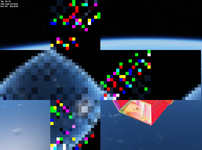
Checked and it did not make any difference. Same as above: "Irrad.Probe" is clean, "IrdPreItg" is full of noise.


[...]then you could change PSPreInteg() code to this. Number of flashing pixels should drop but are they all gone ?
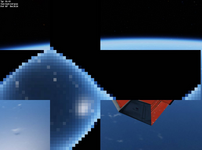
With that shader change the noise (and therefore the flashing) is completely gone!
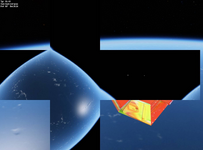
It basically went from (1) noisy to (2) clean:​
1667070810053.png 1667070849901.png

Next assigned work from you will be in the next post :D
 
I've checked the changes from this PR (283-api_forcevector_objectaxis) and all the D3D9Client parts look O.K. (y)
There is an occasional exception @ intptr_t PlanetarySystem::FindNext (intptr_t fh, _finddata_t *fdata, char *fname) of Orbiter Core, but that might be due to the storage and read-back of currently changing visual-helper flags...it looks like it only happens once when I switch between the different branches, so nothing to worry about now.
I might take a look into the "missing feature" of celestial body- and bases-axes. I think moving that code to VObject (like it's done in D3D7Client) is the way to go.
 
Last edited:
Would it possible to implement a way to make D3D9Client use common advanced textures specified in the GC\*.cfg file(s) if your vessel makes use of multiple common diffuse textures.

I'm mainly thinking how SSU/SSV can load different diffuse textures depending on what it is commanded to load through the mission file. Right now you need to create different advanced textures for each diffuse texture when it would be more efficient to just use a common set as the mapping doesn't change.
 
Would it possible to implement a way to make D3D9Client use common advanced textures specified in the GC\*.cfg file(s) if your vessel makes use of multiple common diffuse textures.
After the DX7 is separated from the Orbiter we are likely to dump the "GC\*.cfg" system overboard because it's was very clumsy to begin with. I would prefer a system that would allow to store all mesh related data in the mesh files them-selves. And we could have some kind of mesh editor that would help to manage materials, textures, group-flags, mesh group names, etc.. and save the setting to mesh files directly. Like an advanced version of D3D9Debug controls.

To address the problem you mentioned we could have a function that would allow to load "advanced" textures independently and assign them to a selected diffuse texture. That should be pretty easy and quick to implement. You can create an issue on Orbiter's Git page.
 
Next assigned work from you will be in the next post :D
Could it be that Intel drivers won't tolerate nested loops like that. Could you try this, add the "[unroll]" directives.

C-like:
float4 PSPreInteg(float x : TEXCOORD0, float y : TEXCOORD1) : COLOR
{
    float3 color = 0;
    float2 p = float2(x, y);
    [unroll] for (int j = 0; j < 8; j++) {
        [unroll] for (int i = 0; i < 8; i++) {
            color += tex2D(tSrc, p + (float2(i, j) - 4) * fD).rgb;
        }
    }
    return float4(color * (1.0f/64.0f), 1);
}
 
Could it be that Intel drivers won't tolerate nested loops like that. Could you try this, add the "[unroll]" directives.
No, sorry that did not make any difference. :(

Even "hand unrolling" made no difference:
Code:
float4 PSPreInteg(float x : TEXCOORD0, float y : TEXCOORD1) : COLOR
{
    float3 color = 0;
    float2 p = float2(x, y);

    color += tex2D(tSrc, p + (float2(0, 0) - 4) * fD).rgb;
    color += tex2D(tSrc, p + (float2(1, 0) - 4) * fD).rgb;
    color += tex2D(tSrc, p + (float2(2, 0) - 4) * fD).rgb;
    color += tex2D(tSrc, p + (float2(3, 0) - 4) * fD).rgb;
    color += tex2D(tSrc, p + (float2(4, 0) - 4) * fD).rgb;
    color += tex2D(tSrc, p + (float2(5, 0) - 4) * fD).rgb;
    color += tex2D(tSrc, p + (float2(6, 0) - 4) * fD).rgb;
    color += tex2D(tSrc, p + (float2(7, 0) - 4) * fD).rgb;

    color += tex2D(tSrc, p + (float2(0, 1) - 4) * fD).rgb;
    color += tex2D(tSrc, p + (float2(1, 1) - 4) * fD).rgb;
    color += tex2D(tSrc, p + (float2(2, 1) - 4) * fD).rgb;
    color += tex2D(tSrc, p + (float2(3, 1) - 4) * fD).rgb;
    color += tex2D(tSrc, p + (float2(4, 1) - 4) * fD).rgb;
    color += tex2D(tSrc, p + (float2(5, 1) - 4) * fD).rgb;
    color += tex2D(tSrc, p + (float2(6, 1) - 4) * fD).rgb;
    color += tex2D(tSrc, p + (float2(7, 1) - 4) * fD).rgb;

    color += tex2D(tSrc, p + (float2(0, 2) - 4) * fD).rgb;
    color += tex2D(tSrc, p + (float2(1, 2) - 4) * fD).rgb;
    color += tex2D(tSrc, p + (float2(2, 2) - 4) * fD).rgb;
    color += tex2D(tSrc, p + (float2(3, 2) - 4) * fD).rgb;
    color += tex2D(tSrc, p + (float2(4, 2) - 4) * fD).rgb;
    color += tex2D(tSrc, p + (float2(5, 2) - 4) * fD).rgb;
    color += tex2D(tSrc, p + (float2(6, 2) - 4) * fD).rgb;
    color += tex2D(tSrc, p + (float2(7, 2) - 4) * fD).rgb;

    color += tex2D(tSrc, p + (float2(0, 3) - 4) * fD).rgb;
    color += tex2D(tSrc, p + (float2(1, 3) - 4) * fD).rgb;
    color += tex2D(tSrc, p + (float2(2, 3) - 4) * fD).rgb;
    color += tex2D(tSrc, p + (float2(3, 3) - 4) * fD).rgb;
    color += tex2D(tSrc, p + (float2(4, 3) - 4) * fD).rgb;
    color += tex2D(tSrc, p + (float2(5, 3) - 4) * fD).rgb;
    color += tex2D(tSrc, p + (float2(6, 3) - 4) * fD).rgb;
    color += tex2D(tSrc, p + (float2(7, 3) - 4) * fD).rgb;

    color += tex2D(tSrc, p + (float2(0, 4) - 4) * fD).rgb;
    color += tex2D(tSrc, p + (float2(1, 4) - 4) * fD).rgb;
    color += tex2D(tSrc, p + (float2(2, 4) - 4) * fD).rgb;
    color += tex2D(tSrc, p + (float2(3, 4) - 4) * fD).rgb;
    color += tex2D(tSrc, p + (float2(4, 4) - 4) * fD).rgb;
    color += tex2D(tSrc, p + (float2(5, 4) - 4) * fD).rgb;
    color += tex2D(tSrc, p + (float2(6, 4) - 4) * fD).rgb;
    color += tex2D(tSrc, p + (float2(7, 4) - 4) * fD).rgb;

    color += tex2D(tSrc, p + (float2(0, 5) - 4) * fD).rgb;
    color += tex2D(tSrc, p + (float2(1, 5) - 4) * fD).rgb;
    color += tex2D(tSrc, p + (float2(2, 5) - 4) * fD).rgb;
    color += tex2D(tSrc, p + (float2(3, 5) - 4) * fD).rgb;
    color += tex2D(tSrc, p + (float2(4, 5) - 4) * fD).rgb;
    color += tex2D(tSrc, p + (float2(5, 5) - 4) * fD).rgb;
    color += tex2D(tSrc, p + (float2(6, 5) - 4) * fD).rgb;
    color += tex2D(tSrc, p + (float2(7, 5) - 4) * fD).rgb;

    color += tex2D(tSrc, p + (float2(0, 6) - 4) * fD).rgb;
    color += tex2D(tSrc, p + (float2(1, 6) - 4) * fD).rgb;
    color += tex2D(tSrc, p + (float2(2, 6) - 4) * fD).rgb;
    color += tex2D(tSrc, p + (float2(3, 6) - 4) * fD).rgb;
    color += tex2D(tSrc, p + (float2(4, 6) - 4) * fD).rgb;
    color += tex2D(tSrc, p + (float2(5, 6) - 4) * fD).rgb;
    color += tex2D(tSrc, p + (float2(6, 6) - 4) * fD).rgb;
    color += tex2D(tSrc, p + (float2(7, 6) - 4) * fD).rgb;

    color += tex2D(tSrc, p + (float2(0, 7) - 4) * fD).rgb;
    color += tex2D(tSrc, p + (float2(1, 7) - 4) * fD).rgb;
    color += tex2D(tSrc, p + (float2(2, 7) - 4) * fD).rgb;
    color += tex2D(tSrc, p + (float2(3, 7) - 4) * fD).rgb;
    color += tex2D(tSrc, p + (float2(4, 7) - 4) * fD).rgb;
    color += tex2D(tSrc, p + (float2(5, 7) - 4) * fD).rgb;
    color += tex2D(tSrc, p + (float2(6, 7) - 4) * fD).rgb;
    color += tex2D(tSrc, p + (float2(7, 7) - 4) * fD).rgb;

    return float4(color * (1.0f/64.0f), 1);
}

 
Last edited:
I can't really understand what's going on there. Could the "fD" be nonsense ?

C-like:
// Result flat grey image R128: G128: B128
float4 PSPreInteg(float x : TEXCOORD0, float y : TEXCOORD1) : COLOR
{   
    return float4(fD*64.0f, 0.5f, 1.0f);
}
 
To address the problem you mentioned we could have a function that would allow to load "advanced" textures independently and assign them to a selected diffuse texture.
I agree with adding a function to load an advanced texture.

A somewhat related question that I have some time now: when I load a texture and use it to replace a texture in a mesh, is that replaced mesh texture unloaded or does it stay in memory and maybe causes a performance hit? I'm not reporting a problem, I'm just wondering what happens.
 
I can't really understand what's going on there. Could the "fD" be nonsense ?

C-like:
// Result flat grey image R128: G128: B128
float4 PSPreInteg(float x : TEXCOORD0, float y : TEXCOORD1) : COLOR
{  
    return float4(fD*64.0f, 0.5f, 1.0f);
}
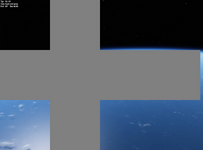
This results in a solid grey env-map (as expected, I think):
1667156672250.png

As I've mentioned further up and as you are wondering about yourself, I would not rule out my Intel graphic-drivers for the whole flashing issue.
 
As I've mentioned further up and as you are wondering about yourself, I would not rule out my Intel graphic-drivers for the whole flashing issue.
Yes, that was correct result. I don't know what I was expecting. Why does the flashing appear in this instance, rendering of "Blur 1" map is almost identical in many ways. Is there a way to downgrade the drivers to older one. I wonder, could the high number of repetitive texture reads cause driver to fail somehow, let's reduce repeat count.
C-like:
float4 PSPreInteg(float x : TEXCOORD0, float y : TEXCOORD1) : COLOR
{
    float3 color = 0;
    float2 p = float2(x, y);
    [unroll] for (int j = 0; j < 3; j++) {
        [unroll] for (int i = 0; i < 3; i++) {
            color += tex2D(tSrc, p + (float2(i, j) - 1) * fD).rgb;
        }
    }
    return float4(color * (1.0f/9.0f), 1);
}
 
I agree with adding a function to load an advanced texture.

A somewhat related question that I have some time now: when I load a texture and use it to replace a texture in a mesh, is that replaced mesh texture unloaded or does it stay in memory and maybe causes a performance hit? I'm not reporting a problem, I'm just wondering what happens.

What kind or graphics hardware you have since you also saw those flickers/flashes ?

The original texture remains in a memory since it could still be used by other vessels of the same class, it's shared. It doesn't cause performance issue of any-kind.
 
Do these ERRORs (from D3D9ClientLog.html) have anything to do with it?
Code:
...
(285: 11.1s 454.04ms)(0x898) Compiling a Shader [Modules/D3D9Client/IPI.hlsl] function [VSMain]...
(286: 11.1s 09.91ms)(0x898) Compiling a Shader [Modules/D3D9Client/EnvMapBlur.hlsl] function [PSBlur]...
(287: 11.2s 90.52ms)(0x898) Compiling a Shader [Modules/D3D9Client/IPI.hlsl] function [VSMain]...
(288: 11.2s 09.37ms)(0x898) Compiling a Shader [Modules/D3D9Client/IrradianceInteg.hlsl] function [PSPreInteg]...
(289: 11.2s 32.30ms)(0x898) Compiling a Shader [Modules/D3D9Client/IrradianceInteg.hlsl] function [PSInteg]...
(290: 11.9s 678.64ms)(0x898) Compiling a Shader [Modules/D3D9Client/IrradianceInteg.hlsl] function [PSPostBlur]...
(291: 18.3s 6419.26ms)(0x898) [ERROR] LOWORD(2058), HIWORD(0x9)
(292: 18.3s 01.89ms)(0x898) [ERROR] LOWORD(2058), HIWORD(0x1)
(293: 18.3s 30.11ms)(0x898) [ERROR] LOWORD(2058), HIWORD(0x9)
(294: 18.3s 01.66ms)(0x898) [ERROR] LOWORD(2058), HIWORD(0x1)
(295: 18.4s 34.50ms)(0x898) [ERROR] LOWORD(2058), HIWORD(0x9)
(296: 18.4s 01.50ms)(0x898) [ERROR] LOWORD(2058), HIWORD(0x1)
(297: 18.4s 61.59ms)(0x898) [ERROR] LOWORD(2058), HIWORD(0x9)
(298: 18.4s 02.04ms)(0x898) [ERROR] LOWORD(2058), HIWORD(0x1)
(299: 19.2s 729.13ms)(0x898) [ERROR] LOWORD(2058), HIWORD(0x9)
(300: 19.2s 02.11ms)(0x898) [ERROR] LOWORD(2058), HIWORD(0x1)
(301: 19.6s 425.77ms)(0x898) [ERROR] LOWORD(2058), HIWORD(0x9)
(302: 19.6s 00.73ms)(0x898) [ERROR] LOWORD(2058), HIWORD(0x1)
(303: 19.7s 90.50ms)(0x898) [ERROR] LOWORD(2058), HIWORD(0x9)
(304: 19.7s 01.52ms)(0x898) [ERROR] LOWORD(2058), HIWORD(0x1)
(305: 20.3s 568.33ms)(0x898) [ERROR] LOWORD(2058), HIWORD(0x9)
(306: 20.3s 01.59ms)(0x898) [ERROR] LOWORD(2058), HIWORD(0x1)
(307: 33.0s 12689.58ms)(0x898) [ERROR] LOWORD(2058), HIWORD(0x9)
(308: 33.0s 01.76ms)(0x898) [ERROR] LOWORD(2058), HIWORD(0x1)
(309: 41.6s 8639.95ms)(0x898) ================ clbkCloseSession ===============
(310: 41.6s 00.09ms)(0x3C2C) TileBuffer::LoadTile thread terminated
(311: 41.6s 00.93ms)(0x24C4) TileLoader::Load thread terminated
(312: 41.6s 01.10ms)(0x898) ================= Deleting Scene ================
...
But I think they only appear when the DebugDialog is open to show the env-map(s).

Edit: I found out myself ;) Those have nothing to do with the original issue
 
What kind or graphics hardware you have since you also saw those flickers/flashes ?
I have the usual embedded Intel GPU plus an NVIDIA GPU, but I can't remember the details of them now... I'll post them later today.
Honestly, most of the times I don't even know which one is being used, since microsoft decided that having the GPU selection in the context menu was too complex for users and decided to bury it inside 4 menus (or whatever number it was). 🤦‍♂️
I'm probably using the NVIDIA, but I might have not configured the new Orbiter executables to use it, so those might actually be using the Intel GPU.


The original texture remains in a memory since it could still be used by other vessels of the same class, it's shared. It doesn't cause performance issue of any-kind.
Thanks! I'll sleep a bit better tonight. :ROFLMAO:
 
[...]There is an occasional exception @ intptr_t PlanetarySystem::FindNext (intptr_t fh, _finddata_t *fdata, char *fname) of Orbiter Core[...]
The issue was a (now) wrong type for the 64 bit build. This PR fixes that.
 
Thanks for the bug fix! Regarding the 283 branch - I am ready to merge that now, unless you wanted to implement the missing D3D9 client frame axis display in that branch.
 
No no, please move on with the merge! I'm pretty sure I would mess it up with my git inexperience :D
That might better go into a seperate PR.
 
As promised: NVIDIA RTX 3050 and Intel UHD Graphics.
 
Grrr how I hate github/git! Please ignore the PR#292 as it seems it has too many commits in it that are totally unrelated to the issue fixed!
I'll try to undo it and try again.
 
Back
Top