New Release D3D9Client Development

What will be the recommended process for creating multi-layer materials?

I find that solar panels (and things with foil surfaces like Hubble) can be made to look very realistic with multi-layer materials. Is it possible to have a shader that defaults to metalness without a specular map, but when a specular map is present, the sun and local light specular reflections are defined by the specular map instead of metal/smoothness? All other lighting and environment reflections would still obey the metalness rules.

I want to switch over to the metalness workflow for developing textures because it'll be easier and faster, but I also want to retain direct control of specular only in situations where I need it.

Sounds good to me. So, let's make it happen. We probably should use "smoothness" instead of "specular power" or what do you think ? You probably have a better understanding of how exactly it should work than I do. So, can you make the modifications to the shader ? I have included a new binary that enables the specular map for the shader.
 

Attachments

Another thing that should addressed is that Earth glow is visible through meshes when it shouldn't be. Example screenshot attached. In it the bottom of the orbiter should be block any Earth glow on elements inside the PLB, but as illustrated on the bottom of the RMS, it isn't.
That is a very tricky thing to fix. Right now I don't have any solution in mind. I'll start thinking about it when I got the time for it.
 
Please don't forget to write up something in the manual about all these (new) features.
 
D3D9ClientR16.10 for Orbiter 2010-P1 Released.

This build restores VC reflections. There is a checkbox added in setup dialog from where the feature can be enabled. The default is off-line since it may cause problems with some add-ons.
 
Yes, probably. I haven't checked how the code is compiled. The above solution might allocate unnecessary temporary object. So, using "this" might be faster. So, yeah, we can make the switch.
I'll commit that changes soon, then.
And yes, there might be a speed-up, but more importantly it fulfills the expectations:
One would not assume that a v1 *= 4; instruction will change the address of v1.
If it runs faster, that's nice too :D
 
Hi,

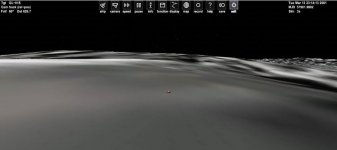
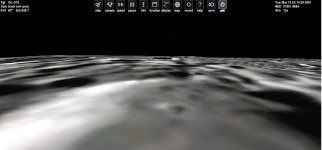
I have found a big issue with elevation rendering on Mercury with the D3D9 client (same issue in Orbiter Beta and with HD textures). With the D3D9 client (last beta release r.1392), the elevation seems to be well detected by the vessel but the texture is not well rendered, like a invisible mountain.

I have tried some options : disable terrain flattening, change mesh resolution, edit the file Mercury.cfg by change the MaxPatchResolution value but nothing change. I have also checked that I have downloaded the right files.

Anyways, the issue seems to be clearly related to the D3D9 client, otherwise I would see the same rendering problem with the D3D7 client.

Below, the configuration file for Mercury :
Code:
; === Configuration file for planet Mercury ===
Name = Mercury
Module = Mercury
ErrorLimit = 1e-5
SamplingInterval = 39          ; interpolation sampling interval [s]
                               ; (interpolation error ~2.8m)

; === Physical Parameters ===
Mass = 3.301880e+23
Size = 2.440e+6                ; mean radius
JCoeff = 0.00006               ; J2 coefficient for gravitational potential
AlbedoRGB = 0.48 0.33 0.15

; === Rotation and precession parameters ===
; ref: see www.orbiter-forum.com/showthread.php?t=8185
PrecessionLAN = 3.981463274
PrecessionObliquity = 0.1224024085
PrecessionPeriod = 995828.2664
LAN = 1.674482844
LAN_MJD = 51544.5
Obliquity = 0.0005931973805
SidRotOffset = 0.2687078469
SidRotPeriod = 5067034.512
;SidRotPeriod (days): 58.64623278
;SidRotPeriod (days - node to node): 58.64968677
;Precession Period (years): 2726.429203
;Obliquity (deg): 0.03398770632
;Ecliptic LAN (rad): 3.986297968
;Ecliptic Obliquity (rad): 0.1223424276
;Ecliptic SidRotOffset (rad): 1.614667355
;Axis RMS Error (deg): 0.304377661
;Lat/Lon RMS Error (deg): 0.00299152648

; === Data for the Visual ===
TileFormat = 2
LabelFormat = 2
MaxPatchResolution = 13         ; highest sphere patch level
HorizonExcess = 0.014   ; prevent mountain tops beyond sphere horizon from disappearing

And I also attached my orbiter.log file (too many characters to display directly in the message).
 

Attachments

  • Orbiter2016_D3D7.JPG
    Orbiter2016_D3D7.JPG
    35.1 KB · Views: 14
  • Orbiter2016_D3D9.JPG
    Orbiter2016_D3D9.JPG
    40.2 KB · Views: 14
  • Orbiter_log.txt
    Orbiter_log.txt
    9.9 KB · Views: 4
Last edited:
I have checked on other planets. The issue that i have talked about only occurs on Mercury, whatever using hd or default textures. I hope that Jarmonik will update the D3D9 client so that we can land on Mercury like on Mars :).

Cheers.
 
Hmmm, the Mercury issue is odd. It seems like the size of the surface-map does not match the size of the elevation-map.
But why only Mercury has this issue is puzzling.
 
Hmmm, the Mercury issue is odd. It seems like the size of the surface-map does not match the size of the elevation-map.
But why only Mercury has this issue is puzzling.
Gravity too strong near the Sun? :ROFLMAO:
 
Hmmm, the Mercury issue is odd. It seems like the size of the surface-map does not match the size of the elevation-map.
But why only Mercury has this issue is puzzling.
Yes. And it is only while using D3D9 client. We don't see the issue with the native/D3D7 client.
 
What's your recommendation for emulating orbiters default "ambient color" feature when using metalnes shader? Right now my stuff all turns pitch black when it goes into earths shadow...
 
Is this for the high-res Mercury textures? I remember the description on those mentioning that they only work with the latest beta. That may have something to do with it.
 
Another question just popped up, since I'm now trying to apply materials adjusted in the debug control as texture maps.

So I created both a _metal and a _rghn dds map for a material, then took the config file out of the picture to confirm that I'm getting equal results. I do, but there's a big BUT: When loading orbiter, the old shader is applied, despite there not being a reflection or specular map (and therefore, understandably, looking ugly). I can switch the shader to metalness shader in the debug controls, and everything looks as it should, but of course that's not that helpful if the shader isn't applied right away.
 
Is this for the high-res Mercury textures? I remember the description on those mentioning that they only work with the latest beta. That may have something to do with it.
Not only for High-res textures. I have the issue with low-res textures too. But both work fine with D3D7. The issue only appear with D3D9 client.
The High-res Mercury textures are supposed to work fine Both with Orbiter 2016 and Orbiter Beta, except for the label.tree file that can be only used with Orbiter Beta.
 
What's your recommendation for emulating orbiters default "ambient color" feature when using metalnes shader? Right now my stuff all turns pitch black when it goes into earths shadow...
This will be fixed in next release.
 
Another question just popped up, since I'm now trying to apply materials adjusted in the debug control as texture maps.
So I created both a _metal and a _rghn dds map for a material, then took the config file out of the picture to confirm that I'm getting equal results. I do, but there's a big BUT: When loading orbiter, the old shader is applied, despite there not being a reflection or specular map (and therefore, understandably, looking ugly). I can switch the shader to metalness shader in the debug controls, and everything looks as it should, but of course that's not that helpful if the shader isn't applied right away.

Have you pressed the "Save Materials" button after selecting the Metalness shader ?

The configuration file should read something like:
Code:
CONFIG_VERSION 3
; =============================================
MESH MeshIdx-0
SHADER Metalness
SAFEGUARD 1

The selected shader should apply automatically but it's possible that bugs may exists. This whole configuration file interface should be reworked if we add configuration parameters for other visual effects in it like, condensation effects, particle effects, engine exhausts etc...

 
Have you pressed the "Save Materials" button after selecting the Metalness shader ?

The configuration file should read something like:
Code:
CONFIG_VERSION 3
; =============================================
MESH MeshIdx-0
SHADER Metalness
SAFEGUARD 1

The selected shader should apply automatically but it's possible that bugs may exists. This whole configuration file interface should be reworked if we add configuration parameters for other visual effects in it like, condensation effects, particle effects, engine exhausts etc...
This has always worked great for me. So there shouldn't be any issues.
 
Back
Top