New Release D3D9Client Development

Here's a new smoothness curve function to try out that adds a Fresnel effect calculated from smoothness. Starting with line 241 in Metalness.fx:

// original function: fSmth = clamp(pow(abs(fSmth), gMtrl.roughness.y) * gMtrl.roughness.x, 0.0005f, 0.9999f);
fSmth = pow(abs(fSmth), gMtrl.roughness.y) * gMtrl.roughness.x;
fSmth = clamp( fSmth + ((1.0f - fSmth) * pow(abs(1.0f - dCN),4.0f)) * pow(abs(fSmth),0.5f), 0.01f, 0.999f);

The third line provides the Fresnel effect. abs(1.0f - dCN) is raised to the 4th power because it gave a good-enough visual result. Fresnel is the most intense where dCN approaches zero, and not in a linear fashion.

This bit * pow(abs(fSmth),0.5f) prevents the Fresnel effect for materials with 0 smoothness. 0.5 as exponent worked good enough.

Question: What is the purpose of clamp()? Is it to avoid a divide-by-zero condition later on?
 
Here's a new smoothness curve function to try out that adds a Fresnel effect calculated from smoothness. Starting with line 241 in Metalness.fx:

// original function: fSmth = clamp(pow(abs(fSmth), gMtrl.roughness.y) * gMtrl.roughness.x, 0.0005f, 0.9999f);
fSmth = pow(abs(fSmth), gMtrl.roughness.y) * gMtrl.roughness.x;
fSmth = clamp( fSmth + ((1.0f - fSmth) * pow(abs(1.0f - dCN),4.0f)) * pow(abs(fSmth),0.5f), 0.01f, 0.999f);

The third line provides the Fresnel effect. abs(1.0f - dCN) is raised to the 4th power because it gave a good-enough visual result. Fresnel is the most intense where dCN approaches zero, and not in a linear fashion.

This bit * pow(abs(fSmth),0.5f) prevents the Fresnel effect for materials with 0 smoothness. 0.5 as exponent worked good enough.
Thanks about that, I have included the modification in the latest build and it's looks good.

Question: What is the purpose of clamp()? Is it to avoid a divide-by-zero condition later on?
Yes, exactly that. I have removed the clamp since it's no longer needed. There was an other div-by-zero issue with dCN that caused some white pixels and geometry clipping. Although, now with-out the clamp if the smoothness is set to 1.0 then the sun reflection will completely disappear at-least from the test Sphere. Not sure if that good or bad.
 
D3D9Client 4.16 is Out

This build fixes a number of bugs and issues from the shading. Irradiance fall-off is made smoother. Felix24's modified smoothness function is included.
 
I have been thinking about this "aerodynamic condensation effect" and I have pieced together half of the plan but still evaluation options on how to provide turbulence. Some sort of Fourier texture has crossed my mind having a frequency, phase and magnitude but it might be too complex.

But there is still one very well known problem "The Interface". So, how is the data passed to the renderer ? Should we have some kind of slider panel on a client side that could be used for creating the effect and test playing it ?

And what about the interface:
OrbiterAPI ?
gcCoreAPI ?'
LUA ?
Configuration file ?
Configuration file + LUA ?
 
A configuration file is the most accessible for everyone. API will reduce the number of testers and possible implementations.

But don't forget about weather in general... condensation depends on atmospheric parameters.
I don't mind some Kerbal like generic eye candy, but to get realistic effects you need to simulate weather ( fog, overcast sky, etc, etc).
You can default to KSC clear sky conditions, but what about Baikonour in the middle of the winter ? It's a complex issue.


( I worry a bit about adding many new functions while previous ones aren't fully implemented.
I'm thinking about the TerrainToolbox incompatibility for example (as far as I know it's not solved) )
 
I have been thinking about this "aerodynamic condensation effect" and I have pieced together half of the plan but still evaluation options on how to provide turbulence. Some sort of Fourier texture has crossed my mind having a frequency, phase and magnitude but it might be too complex.
I think the visible turbulence is just the vehicle flying thru air with different ppH2O, which makes the amount of condensation change. Couldn't this be handled by the texture as it slides?


But there is still one very well known problem "The Interface". So, how is the data passed to the renderer ? Should we have some kind of slider panel on a client side that could be used for creating the effect and test playing it ?

And what about the interface:
OrbiterAPI ?
gcCoreAPI ?'
LUA ?
Configuration file ?
Configuration file + LUA ?
OrbiterAPI || vessel config file || LUA


But don't forget about weather in general... condensation depends on atmospheric parameters.
IMO this could be handled by making the effect random, with a 10-25% chance of happening.
 
And what about the interface:

I'm for OrbiterAPI. From there, someone can make a "Aero FX module" that handles it and then uses .cfg files.
 
For exhaust streams, would it be possible to animate the exhaust by these methods?
  • creating an animation texture with animation "frames" defined in a grid and cycling through the frames
  • creating a single texture that animates by scrolling from top to bottom
And then applying either of those methods to a 2-d billboard texture, or to the surface of a 3-d plume extending out behind the nozzle.
 
For exhaust streams, would it be possible to animate the exhaust by these methods?
  • creating an animation texture with animation "frames" defined in a grid and cycling through the frames
  • creating a single texture that animates by scrolling from top to bottom
And then applying either of those methods to a 2-d billboard texture, or to the surface of a 3-d plume extending out behind the nozzle.
The idea of scrolling texture was briefly discussed a few posts ago. In engine exhausts and "condensation" effect it could bring some small details giving a better impression of movement or flow. This kind of texture alone would probably not work, somekind of mask would be required like a texture or a mesh. In a re-entry effects it could play a major part. So, Yes it would be possible.

I haven't really considered an animation grid. But, Yes it would be possible. I suppose this could enable the exhaust to change it's color after engine start by blending from one texture to an other. Also, if there are utilities those could be used to create an exhaust particle effect and then record it as an animation. That would be interesting :coffee:
 
About engine plumes, the cylinder solution might look good from the side, but what about from the bottom?
 
About engine plumes, the cylinder solution might look good from the side, but what about from the bottom?

Does transparency takes mesh volume into account ? Meaning that a thick mesh should be less transparent than a thin one... Is it possible to achieve that ? Because I have the feeling it is quite critical to render a decent exhaust plume.

And thanks for the 4.16, works like a charm there.
 
About engine plumes, the cylinder solution might look good from the side, but what about from the bottom?
You should not look directly into a burning rocket-engine ?
But seriously: A stack of several cylinders (with flat colored bottom faces) could provide a solution. The shock-diamond cones would be visible through those faces.
But enhancing the "big outer" cylinder by changing its shape at one end might be beneficial - that sketch was just one idea; improvements welcome (y)
 
One thing about the new metalness shader I'm noticing is that if I'm using a normal map, some parts can become transparent from certain angles...
 
One thing about the new metalness shader I'm noticing is that if I'm using a normal map, some parts can become transparent from certain angles...
Does this problem still exists in 4.16 ? Or is the report from older version ?
 
Guys, I have a question regarding some change of viewing specular materials in internal/external view sometime between R14 and R16-5. Yes, that far back.

When I discovered that Vostok's internal reflective surface (in VZOR device) does work in cockpit view in 2010 but not in 2016, I thought there was a big time frame in between to trace that change. However, thanks to Nikogori, we've now narrowed this change down - back to 2010 era, between R14 and R16_5 (latest version for 2010).

Initially I left this request for later, but now this much narrower timeframe makes it easier to find and review, if possible. Was it an accident, that can be fixed? Was it intentional (like, heavy on performance and no one is using it anyway?) I don't know, I don't follow D3D9 code history. But, if it is found, and if it is an easy fix and does not hurt anything - Vostok will hugely benefit from it in 2016. I don't ask to fix it in 2010, as it is always easier to simply downgrade to R14 in 2010, if needed.

Here is the post that illustrates the problem very well (first two photos) in R16_5 in 2010 (exactly the same happens in any client version in 2016). The circular conic mirror is rendered reflective when seen through the window from outside - but is just an empty material when inside cockpit.
 
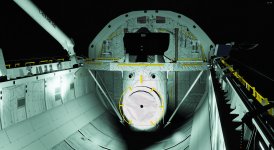
Another issue with the new metalness shader, the ODS isn't lit up by the PLB flood lights for whatever reason.
This issue is still open I'm afraid:
 

Attachments

  • D3D9Client_new_shader9B.jpg
    D3D9Client_new_shader9B.jpg
    1,001.2 KB · Views: 17
Hi,

I have discovered a small glitch with the last version (r1392) of the D3D9 client. I don't know if this bug already exists with previous versions.
Some base objects, especially launchpads, can be seen through the terrain textures and elevations. Otherwise, buildings seem to not be visible through elevation. I have attached a snapshoot with a far view from Brighton base.

Kind regards,
Etienne

1616629529505.png
 
Back
Top