New Release D3D9Client Development

Speaking of conical visualizations, how about some improvements to the exhaust plumes in a vacuum? I've been studying these recently and they should be rather easy to implement. Their visibility all depends on the relative sun or light angle. They're most visible at a high relative light angle (90° +/- ~10°s) with the visibility decreasing rapidly the farther away from a pure perpendicular angle you get.

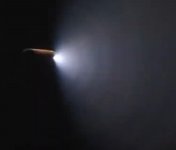
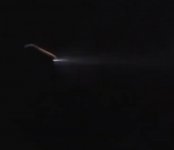
Another factor is the actual thruster level. The more open a valve is the wider the plume is. I've attached two screenshots of the STS-122 External Tank venting gaseous hydrogen from the intertank vent. The first image shows venting at a partial vent valve opening while the second shows venting from a fully open vent valve.
 

Attachments

  • ET_GH2_vent_partial.jpg
    ET_GH2_vent_partial.jpg
    52.2 KB · Views: 9
  • ET_GH2_vent_full.jpg
    ET_GH2_vent_full.jpg
    107.5 KB · Views: 9
Kuddel, There is something very wrong in the 1382 commit. I am not an expert on SVN, so, how is one supposed to undo a commit ?

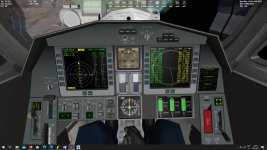
  • DeltaGliders virtual cockpit is completely broken, Broken Horizon, switches/animations not moving, pilots head visible from inside, texts and labels missing, etc...
  • The "Pick" feature isn't working
  • Lots of CTDs

How does the "nullptr" differ from regular "NULL" we have use so-far ?
That's odd...
I see that you've already undone the changes (y)
I only checked with Visual Studio 2017, so maybe there is a difference there...
As those changes were only code-cleanups and no functional changes, it's better to leave them out for now.

The nullptr is just a more type-save null-pointer.
Standard NULL is defined as #define NULL 0, which makes is indistinguishable from integer zero (0).

I doubt that this is the reason for any of the issues - I would blame a 'const' on one method that isn't really 'const' :/
I'll take a look and try to test much more thoroughly, now that I know some of the "effects".
Sorry for the inconvenience.
 
@jarmonik : I've commited r1387, which should not create those issues...[*]
I'm still not sure what happened, as I could not see any issues even on r1382 ?‍♂️
I left the usage of NULL definition instead of nullptr, just to be save ?

/Kuddel

[*] Tested: DeltaGliders virtual cockpit working; The "Pick" feature is working; etc.
 
Ok, no problem. Things like this tend to happen it's kinda part of the job.

I went back to 1382 and took a screen shot from the DeltaGlider VC ("Docked at ISS" scenario.) So far, I have found no reason for the failures.
 

Attachments

  • Shot.jpg
    Shot.jpg
    225.1 KB · Views: 22
@jarmonik : I've commited r1387, which should not create those issues...[*]
I'm still not sure what happened, as I could not see any issues even on r1382 ?‍♂️
I left the usage of NULL definition instead of nullptr, just to be save ?

/Kuddel

[*] Tested: DeltaGliders virtual cockpit working; The "Pick" feature is working; etc.

Yes, I can confirm that 1387 seems to be running fine. Couldn't detect any issues in a test run.
If the "nullptr" doesn't cause any issues on VS2017 then it's likely VS2015 related issue with the "nullptr".
 
Out of curiosity I also tried "Docked at ISS" scenario...no issues,
Only if I change the default shader for the cockpit_vc to any other than "PBR (Old)" the instruments don't show (blank screen).
 
Are there any good reallife videos showing these effects, I would need to study them and think about the rendering options.
Trying to find those seem harder than it sounds...
This one (starts around 2:30 minutes in) is "a classic" one
 
Last edited:
Finally found one from the Shuttle (y)
(starts around 5:50 minutes in)

This one is nice but the perspective is sub-optimal ;)
(starts around 40 soconds in)
 
So, what would be needed:

Seems good to me yes !

Also is there currently a way to dynamically set the transparency (alpha channel) of a mesh in Orbiter D3D9 ? That one would really help me with engine exhaust effects and such things (because, IMHO, the glorious days of 2D exhaust textures have come and gone). Probably can be done with the current D3D9 client but I have no idea how.
 
Seems good to me yes !

Also is there currently a way to dynamically set the transparency (alpha channel) of a mesh in Orbiter D3D9 ? That one would really help me with engine exhaust effects and such things (because, IMHO, the glorious days of 2D exhaust textures have come and gone). Probably can be done with the current D3D9 client but I have no idea how.

You can edit materials in a mesh from the code... works both in MOGE and D3D9.
 
You can edit materials in a mesh from the code... works both in MOGE and D3D9.

Thanks that's a misconception I had, its not the mesh itself that is transparent but its material. The mesh is "only" a set of geometric coordinates. ?
 
Thinking about the dynamic pressure shock effect...maybe a semi-transparent torus as a first try (on cylindrical rockets) that appears and fades away might be a first step
- just to see how it looks.
Making it "more fancy" might not be needed in the first iteration(s).
Just a thought.
 
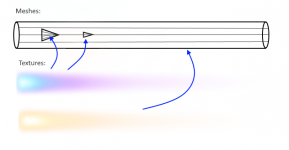
@N_Molson : I think you have to have a mesh(-cone) for the exhaust ...probably even more - one for the outer flame several for the inner mach-diamonds - to make it look right.

Something like this:
Exhaust.png

I've tried some time ago to just place a transparent flame-texture onto a "flame-cone" mesh ...and it looked horrible :/
A multi-mesh solution (see image above) seems to be necessary.
The textures however need to be "just gradients", else you would have that ugly wrap-around effect which I had when I tried the simple approach (y)
 
Last edited:
Yeah! Exactly! Can he provide some coding insights?
 
Back
Top