New Release D3D9Client Development

@jarmonik : Do you plan to leave the Test Sphere in? I'm asking because I plan to update the documentation a bit.
Yes, I was planning to leave it and add a textured cylinder. Might be good idea to wait a bit with documentation updates since some of the things may change a bit.
 
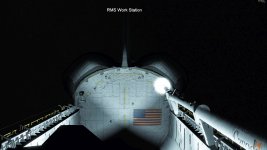
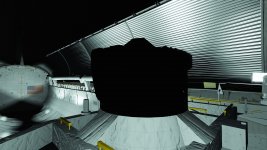
Another Metalness shader issue, local lights light up everything, including the exterior when it shouldn't. And this is just one of the six payload flood lights turned on during full on orbital night.
Could you disable the reflections from the setup dialog and see if the problem still occur ? How does the lighting work with the old shader ?
 
I wanted to throw another important thing - cockpit lighting.
I am aware of poor rendering conditions in a virtual cockpits. There are ways to improve them but they don't come easy. The best known solution for that is awfully complicated and I am not ready to invest that much of time and efforts under current conditions. There might be some other mediocre solutions good enough and do able.

1) A quality cockpit environment would be required.
2) A developer who is willing to do work on the cockpit side would be required.

We have had a capability to support instrument panel background lighting 5+ years already and I have never seen an application to actually use it.
 
Could you disable the reflections from the setup dialog and see if the problem still occur ? How does the lighting work with the old shader ?
This is with reflections disabled:
 

Attachments

  • D3D9Client_new_shader7.jpg
    D3D9Client_new_shader7.jpg
    649.2 KB · Views: 24
We have had a capability to support instrument panel background lighting 5+ years already and I have never seen an application to actually use it.
I was not aware of that.... can you expand a bit? Is it what Martin did in the DG?
While in SSU, I played with (regular) lights in the vc, but the limits on the number of lights make it impractical (turn on a flight deck light and the PLB goes dark). Also, with with the lights off during the day, it was a bit too dark... it didn't seem to have the reflections to spread the natural light around. Other than that, the next obstacle was button lighting.
 
We have had a capability to support instrument panel background lighting 5+ years already and I have never seen an application to actually use it.
The SpaceX DM-2 crew Dragon capsule that brianj, Donamy and I worked on has instrument panel lighting. It requires the dll to switch between floodlit emissive textures and dark emissive textures. Or maybe you are referring to another method entirety?

The light was spread around the interior using Cycles raytracing in Blender then baked to the texture and exported.
 
While on the subject of local lights, is there anyway of implementing a visible cone that shows the illumination zone of local lights?
 
The SpaceX DM-2 crew Dragon capsule that brianj, Donamy and I worked on has instrument panel lighting. It requires the dll to switch between floodlit emissive textures and dark emissive textures. Or maybe you are referring to another method entirety?
No, that is exactly what I was talking about. :)
 
This is with reflections disabled:
OK, Looks like I need to switch back to previous Earth shine model. Or try to figure how to fix that.
 
OK, Looks like I need to switch back to previous Earth shine model. Or try to figure how to fix that.
Just to make sure there's no confusion: that's not Earth shine, that's the result of a single local light. Or are you saying that the Earth shine and local lights share the same lighting model?
 
In this experiment Earth shine comes from the environment map (reflection map) which can contain parts of the vessel itself lit by local lights. If the "FullScene" option is selected. So, through the env map local lights can contribute to global ambient light. This experiment would still require some work to get it to behave properly.
 
In this experiment Earth shine comes from the environment map (reflection map) which can contain parts of the vessel itself lit by local lights. If the "FullScene" option is selected. So, through the env map local lights can contribute to global ambient light. This experiment would still require some work to get it to behave properly.
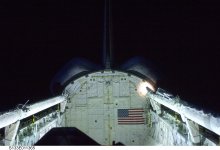
I understand. Another local light question which I brought up earlier: is there any way to get rid of the fogginess of local lights using the metalness shader? I've attached a photo from STS-133 with a comparison screenshot taken from a similar position and angle. As you can probably tell, the lights in D3D9Client has a very foggy look to them, while the ones in the real photo are clear.

The screenshot has reflections disabled.
 

Attachments

  • s133e011365.jpg
    s133e011365.jpg
    1.8 MB · Views: 36
  • s133e011365_comparison.jpg
    s133e011365_comparison.jpg
    1.7 MB · Views: 35
Last edited:
I understand. Another local light question which I brought up earlier: is there any way to get rid of the fogginess of local lights using the metalness shader? I've attached a photo from STS-133 with a comparison screenshot taken from a similar position and angle. As you can probably tell, the lights in D3D9Client has a very foggy look to them, while the ones in the real photo are clear.
Do you mean the camera at the end of the robotic arm ? That's a result from the "Light Glow" post processing. The purpose is to make the light look brighter but in that particular case it doesn't work too well, so, some shader calibrations are required. What would happen if the light attenuation parameter att0 is set somewhere between 0.25 and 1.0 that should make the light less bright from a such a close range.

s1-jpg.24201
 
Do you mean the camera at the end of the robotic arm ? That's a result from the "Light Glow" post processing. The purpose is to make the light look brighter but in that particular case it doesn't work too well, so, some shader calibrations are required. What would happen if the light attenuation parameter att0 is set somewhere between 0.25 and 1.0 that should make the light less bright from a such a close range.
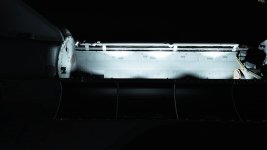
Well, that and the PLB flood lights. If you look closely, you can see the detail of the PLB vent filter screens and the PLB itself is almost washed out. I think the attached screenshot shows it pretty well.
 

Attachments

  • D3D9Client_new_shader8.jpg
    D3D9Client_new_shader8.jpg
    942.5 KB · Views: 21
Well, that and the PLB flood lights. If you look closely, you can see the detail of the PLB vent filter screens and the PLB itself is almost washed out. I think the attached screenshot shows it pretty well.
I think the washed-out effect is from the light beams simply adding together where they are overlapping. This addition doesn't seem to be gamma-correct (I think it's gamma, correct me if I'm wrong). To our eyes, two overlapping lights of the same brightness don't look twice as bright, but more like 1.5 times as bright. Something like that.

Or, maybe the brightness falloff with distance from the light source is incorrect?
 
I think the washed-out effect is from the light beams simply adding together where they are overlapping.
No such luck as shown by the attached screenshot where only one light is active.
 

Attachments

  • D3D9Client_new_shader8B.jpg
    D3D9Client_new_shader8B.jpg
    559.6 KB · Views: 20
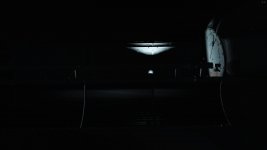
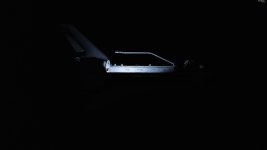
Another issue with the new metalness shader, the ODS isn't lit up by the PLB flood lights for whatever reason.
 

Attachments

  • D3D9Client_new_shader9.jpg
    D3D9Client_new_shader9.jpg
    1.7 MB · Views: 15
Back
Top