New Release D3D9Client Development

So, there are transparent gaps in the texture ? I suppose a division by zero could feed some NaN's to the pipeline and cause the transparency if that's what it is.
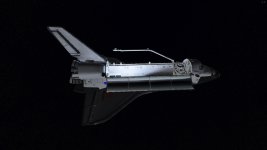
Yes. And it seems to be the normal map that is at fault as I just renamed it to check a hypothesis I had after looking more closely at things. With the normal map "disabled", there's no see-through effect and everything is as it should.
 
It would be difficult for a client to know when to render the frost and when not to. So, it would need to be application controlled. I don't know the capabilities of Spacecraft.dll or VesselBuilder if they can swap a texture.
I think it could be handled based on existing particle streams. When the stream touches the mesh, we could add a frost texture.
 
Yes. And it seems to be the normal map that is at fault as I just renamed it to check a hypothesis I had after looking more closely at things. With the normal map "disabled", there's no see-through effect and everything is as it should.
Are you able to tell if the see-through effect is a mirror image? Because it might be an environment reflection which only appears when the normal map angle for those pixels is extreme.
 
I think it could be handled based on existing particle streams. When the stream touches the mesh, we could add a frost texture.
Frost buildup on rockets is usually gradual as a result of propellant loading and comes from the surrounding air. Are you talking about frost buildup from clouds of condensation touching the rocket?
 
Are you able to tell if the see-through effect is a mirror image? Because it might be an environment reflection which only appears when the normal map angle for those pixels is extreme.
Not a mirror effect, pure see-through as you can see the elevons and flipper doors. If it was reflection, only the payload bay and Earth would be visible as that's how the environment cam on SSU is configured.
 
One idea that came into my mind is a use of LUA script. Would it be possible to run LUA script side by side with Spacecraft.dll or VesselBuilder based vessel ?
I have have zero experience about LUA but unless I am mistaking Kuddel is familiar with it.
 
"familiar" is a bit optimistic here ;) But, yes I did some work on interfacing Lua and Orbiter-API.
Running a Lua script in parallel should be no problem (a vessel and the script that should run in one scenario).
But I am not sure whether it is convenient to get vessel specific information from the Spacecraft.dll- rsp. VesselBuilder-vessel.
All the information the script can get are "sqeezed" through the vessel-API calls.
Any specific information from Spacecraft.dll or VesselBuilder vessels are not implemented (yet).
The coders of those DLLs have to provide the Lua interface DLLs for that to happen.

If the information provided via the standard Orbiter-API is enough however, I see no problem.
 
could be useful for re-entry heating effects too.
Re-entry heating effects would be awesome. I've done some thinking about it, and think it could be done with a grayscale heatmap texture that we can call _heat.dds. Lighter values mean hotter temperatures, darker values mean colder. Black means no heating at all. When the spacecraft experiences heating, the heatmap determines which parts get hot first and how hot they get as the overall temperature increases.

The calculated temperature of a pixel would then be converted to a black-body radiation color and applied as an emissive value.

This would also be really neat to use for rocket nozzles like the MVac on the Falcon 9 second stage, the OMS nozzles on the Space Shuttle, and even small RCS thrusters. Of course, all of this assumes that we can figure out a way to tell the graphics client how hot a material is getting.

If you can add a heatmap texture to the shader, I can work on coding the heat glow effect.
 
Another small idea:

Is it possible for the D3D9 client to reload the shader without having to relaunch the scenario?
 
Of course, all of this assumes that we can figure out a way to tell the graphics client how hot a material is getting.
That really doesn't sound like a job for the graphics client. The reasonable thing would be to provide a shader that takes an emission map and some convenient way to control its alpha channel, then vessel developers could implement the nozzle glow by themselves. I did something similar with radiators once, though those are easier because they change their color uniformly and so just playing with the emissive property of the entire material was enough.
 
Re-entry heating effects would be awesome. I've done some thinking about it, and think it could be done with a grayscale heatmap texture that we can call _heat.dds. Lighter values mean hotter temperatures, darker values mean colder. Black means no heating at all. When the spacecraft experiences heating, the heatmap determines which parts get hot first and how hot they get as the overall temperature increases.
That sounds like a great idea. I have set the texture ready for you and there is a SpecialFX material property to control the heat value. It's currently mapped in range 0 to 1.
I have also added a "Shader Reload" button in debug controls. It takes about 2-3 seconds to recompile the shader.

There is one additional possibility regarding a texture blending. Let's say that you have two 1024x1024 textures for a vessel, then those two could be combined into a single 1024x2048 texture array. Of course, in that case texture "wrap" function would not work along x-axis. If two texture index numbers and a blend factor is provided for a renderer then blending would be possible between multiple textures.
 

Attachments

Can't really tell as Earth glow has now disappeared for me when using the Metalness shader. There's another issue with it as you can see the NASA logo on the left wing through the aft payload bay bulkhead as seen in the second attached screenshot.
OK, just took a look at this again, with R4.14 and now I can tell that the color of the Earth glow does indeed change as the orbiter is passing over land and ocean.
 
I wanted to throw another important thing - cockpit lighting. I know there was a thought about it. I once saw cockpit mesh in a ship looking from outside. There was a window: I saw sunspot on the floor, and realized - switching to a cockpit view there isn't sunspot anymore... Cockpit seem quite static, "unalive". I just looked at "Reentry" program's interiors and, hm, they were quite impressive.
 
I can only imagine the math that have to go into sunshine, earthshine, moonshine and interior reflections. Not to mention interior lighting.
 
I can only imagine the math that have to go into sunshine, earthshine, moonshine and interior reflections. Not to mention interior lighting.
No moonshine, earthshine, just sun - and that is not, I say I saw sunspots in mesh from the outside, so problem is that cockpit rendering is different. Interior lighting also is not top priority, just just basic shading, I would prefer darker environment...
 
Another Metalness shader issue, local lights light up everything, including the exterior when it shouldn't. And this is just one of the six payload flood lights turned on during full on orbital night.
 

Attachments

  • D3D9Client_new_shader6.jpg
    D3D9Client_new_shader6.jpg
    1.8 MB · Views: 23
@jarmonik : Do you plan to leave the Test Sphere in? I'm asking because I plan to update the documentation a bit.
 
It's taking me a while to understand how the new shader works- I'm used to how the older PBR and earlier shaders calculated things.
 
It's taking me a while to understand how the new shader works- I'm used to how the older PBR and earlier shaders calculated things.

Its worth it. That new shader feel much more real, especially with metallic parts which are what most spacecraft are made of ?
 
It's taking me a while to understand how the new shader works- I'm used to how the older PBR and earlier shaders calculated things.

The sun light behavior is based on Cook-Torrance Model. The main equation that combines "Distribution", "Geometric Attenuation" and "Fresnel" C_spec = D()*G()*F() / (4*dLN*dCN).
Is simplified in a form:
float3 cS = (fD * cF * fG) * 0.25f; // / (4.0f*dLN*dCN) removed to avoid division by zero, compensation in GSF

The environment reflections works very much the same way as in the old shader.
 
Back
Top