New Release D3D9Client Development

May I ask for this https://www.orbiter-forum.com/threads/area-flattening-experiment-success.37074/post-570818 to be incorporated into the official D3D9 ?

Local terrain flattening defined by configs is well suited for addons covering small areas.
Editing the entire terrain tree is overkill when you just want a few meters of flat terrain to land or to place a landed mesh.

I don't see any undesired side effects, or any compatibility problems. It would only work on the client, but we already have some client only features (ex: microtextures) so I don't think that's a problem.
 
Just to add my two cents worth ... I agree on 4throck on this one. I believe it needs to be added. It is a very useful tool.
 
There is a new build 4.8 uploaded with this feature (for Orbiter 2016). I guess that the code hack wouldn't work with beta. I haven't done any extensive testing but it did create a flat circle on the moon, so, I guess it's working.

- There is on/off toggle in the setup/config dialog.
 
Thanks for putting it in. I remember that the hooking failed in beta Orbiter versions, but if there is a specific version that most people use, I can try to check the numbers for that as well. I don't think that the code changed significantly at that position, only the absolute addresses might be off.
 
There is a new build 4.8 uploaded with this feature (for Orbiter 2016). I guess that the code hack wouldn't work with beta. I haven't done any extensive testing but it did create a flat circle on the moon, so, I guess it's working.

- There is on/off toggle in the setup/config dialog.

Thank you ! I'll try to put together a some test scenarios so that we are all looking at the same place ;)
 
Last edited:
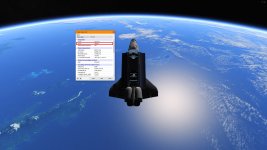
So got a question about reflections. I have the reflector of the shuttle set to reflect. But it seems it reflects the back side. If you have the reflectors shut in the shuttle. It really should reflect the inside. But it reflects the outside
 
So got a question about reflections. I have the reflector of the shuttle set to reflect. But it seems it reflects the back side. If you have the reflectors shut in the shuttle. It really should reflect the inside. But it reflects the outside
Are you talking about the radiator panels? If so, in order for them to reflect the interior properly, you need to have the following in config file named whatever the class name of your vessel is with the suffix _ecam in the Config/GC subfolder:
Code:
BEGIN_CAMERA 0
LPOS 0.0 0.0 0.0
DO_NOT_OMIT_FOCUS
END_CAMERA
So, since the class name for SSU is SpaceShuttleUltra, the name for the config file is "SpaceShuttleUltra_ecam.cfg". But then you get this since D3D9Client only uses one source for the reflections: https://www.orbiter-forum.com/threads/d3d9client-development.16787/post-262882
 
Last edited:
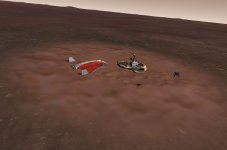
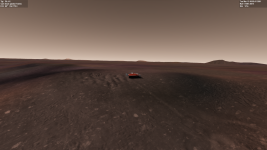
Here's a test scenario for terrain flattening.

It requires VesselBuilder for the landed mesh of Mars Pathfinder and surrounding area.
The lander displays as expected centered on the flattened area (if used with moderation flattening can be is seamless).

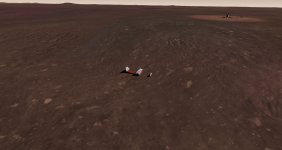
I added a DG to test driving around and the logical terrain drops of quite fast, not following the visual display.
Yet at the center the DG does climb into the flat area.

Clipboard01.jpg

Other than that is seems to work!
The pathfinder mesh is free to use for more tests or to include on the D3D9 package as an example.
 
I added a DG to test driving around and the logical terrain drops of quite fast, not following the visual display.
Yet at the center the DG does climb into the flat area.

Other than that is seems to work!

It would be interesting to see how it is without the flattening. Would the DG then stay level with the visual terrain? What happens if you change the falloff percentage towards zero?

I noticed that the implementation changed to use float instead of integer for the visual part. Perhaps this is affecting the visual vs. logical relation.
 
Thanks for putting it in. I remember that the hooking failed in beta Orbiter versions, but if there is a specific version that most people use, I can try to check the numbers for that as well. I don't think that the code changed significantly at that position, only the absolute addresses might be off.
Revision 90. It's from September 14th 2019, so 'kind of stable and people using the BETA would always take the HEAD revision (which is rev. 90).
 
I looked into that and found some problems:
Code:
Ellipse -3659 -33.220001 19.129999 2000 2000
Xllipse -6182 -33.220001 19.129999 200 200  0 50

The elevation -6182 ? Where is this coming from ? Isn't the -3659 more correct ?

Since there are no high resolution tiles, the physics engine doesn't go any higher than the highest available tile resolution which is 9 if I recall. At that resolution 200m circle is too small to be meaningful.

I have also detected some issues with int16 to float conversion... will look into it tomorrow.
 
Ok, here's new build. Does this work any better ? BTW, check that "linear interpolation" is selected. The "cubic" doesn't work.
 

Attachments

Revision 90. It's from September 14th 2019, so 'kind of stable and people using the BETA would always take the HEAD revision (which is rev. 90).
I have checked that binary and found the hook point again. However, the implementation changed from using the ALU to MMX registers, so I need to refactor the trampoline code a bit. Other than that it shows the same structure, so chances are good that it will work with the beta as well. Would be nice to have a proper callback there, though. The FilterElevation signature is a good starting point, I think.
 
Ok, here's new build. Does this work any better ? BTW, check that "linear interpolation" is selected. The "cubic" doesn't work.
Thanks!
Some test results:

» Changed elevation to -6172 to make the flat area more visible (about 10 meters higher than the existing terrain). Slight adjustment to Pathfinders's location.
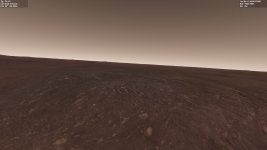
Correct visual altitude at the center of the area, incorrect visual as you move off center (drop off).
Clipboard02.jpg


» Changed falloff from 50 to 100.
Displayed terrain above the logical terrain.

1598021196297.png

» Changed falloff to 0. Slight adjustment to Pathfinders's location.
Same as the first test. Correct visual altitude at the center of the area, incorrect visual as you move off center (drop off).

1598021381973.png


The mismatch seems to be affect displayed terrain only.
On all cases the DG drives around the same: climbs to center of the raised area, then drops gently. No noticealbe change to computed terrain when I changed falloff.

I understand that tile level (resolution) might be a factor here. Will test with larger ellipses.


__________________________________________________________________________________________________


» Changed syntax to Ellipse -6172 -33.220001 19.129999 2000 2000 (are drop off and angle values not used ?)
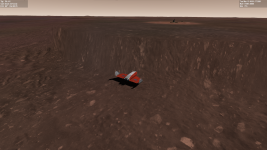
Good match between visual and computed altitude (DG is at the edge of the ellipse, Pathfinder is in the distance to the right)!
Works as expected :hailprobe:

1598022991333.png


PS: -6172 is the altitude in meters, shown on the DG MFDs
 
Last edited:
so in the scn:
STS-49:Shuttle2016Bearly

So i made a cfg folder:
Shuttle2016BEARLY_ecam
CONFIG_VERSION 2

BEGIN_CAMERA 0
LPOS 0.0 0.0 0.0
DO_NOT_OMIT_FOCUS
END_CAMERA
I have a file Shuttle2016BEARLY also in the GC folder
It has the mesh and settings,....
Code:
CONFIG_VERSION 2
; =============================================
MESH 2016SPACESHUTTLE\Challenger\Challengerlate2016H2
; ---------------------------------------------
MATERIAL 2
REFLECT 0.866667 0.866667 0.866667
ROUGHNESS 1.00000000

But I see the edwards base on the inside of the bay
FVEsyMK.jpg
 
Lose the CONFIG_VERSION 2 part and only have what I posted in the cfg file. To see what your vessel's class name is, when in game press Ctrl-I to bring up the Vessel Information window. Under Designation you should see the "Class" field, it will tell you the vessel class name you need to use as the file name prior to the _ecam suffix.
 

Attachments

  • VesselInfo.jpg
    VesselInfo.jpg
    1.7 MB · Views: 9
» Changed syntax to Ellipse -6172 -33.220001 19.129999 2000 2000 (are drop off and angle values not used ?)

The simple parser allows for the last three values to be optional. You could even skip the last 2000 there, because the default for the minor dimension is the major dimension (making it a circle in the ellipse case and a square in the rectangle case). The defaults for the angle and falloff are both zero. A falloff of zero means a hard edge, though "hard" depends on the resolution level, of course. In essence, the FilterElevation function "draws" over the elevation pixels. It would be interesting to know what levels the function gets from the Orbiter collision core when you zoom in, so we would know what level the elevation is at vs. the level of the visual grid.

I'll need to get a working DX9 SDK environment again to check that for my own, unfortunately the machine I used last year is gone already.
 
Could you post the actual scenario in question? I have few suspicions but I want to confirm them before posting them.
 
Here it is.

Code:
BEGIN_DESC
Current scenario state


Contains the latest simulation state.
END_DESC

BEGIN_ENVIRONMENT
  System Sol
  Date MJD 48758.9566071473
  Help CurrentState_img
END_ENVIRONMENT

BEGIN_FOCUS
  Ship STS-49
END_FOCUS

BEGIN_CAMERA
  TARGET STS-49
  MODE Cockpit
  FOV 56.00
END_CAMERA

BEGIN_HUD
  TYPE Surface
END_HUD

BEGIN_MFD Left
  TYPE HSI
  NAV 0 1
  OBS 5.76 5.76
END_MFD

BEGIN_MFD Right
  TYPE Surface
  SPDMODE 1
END_MFD

BEGIN_VC
END_VC

BEGIN_SHIPS
STS-49:Shuttle2016Bearly
  STATUS Landed Earth
  POS -117.8756941 34.9099651
  HEADING 240.62
  ALT 5.242
  AROT -64.385 60.511 -114.040
  RCSMODE 0
  AFCMODE 7
  NAVFREQ 524 94
  CONFIGURATION 3
  GEAR 1 1.0000
  HATCH 0 0.0000
  ADTA 0 0.0000
  SSMES 0 0.0000
  PETD 1 1.0000
  SETD 1 1.0000
  OV 105
  SPIN0 
  RMSARM 
  ARM_STATUS 0.5000 0.0000 0.0000 0.5000 0.5000 0.5000
  Armtilt 0 0.0000 0 0.0000
  PLB_CAM 0.0010 -0.0020 0.0000 0.0000 0.0000 0.0000 0.0000 0.0000 -0.0010 0.0020
  PL1_OFS 0.0000 -1.5000 5.4800
  PL1_DIR 0.0000 1.0000 0.0000
  PL1_ROT 0.0000 0.0000 1.0000
  PL2_OFS 0.0000 0.0000 0.0000
  PL2_DIR 0.0000 1.0000 0.0000
  PL2_ROT 0.0000 0.0000 1.0000
  PL3_OFS 0.0500 0.7000 -2.2800
  PL3_DIR 0.0000 1.0000 0.0000
  PL3_ROT 0.0000 0.0000 1.0000
  PL4_OFS -2.0000 2.0000 -4.0000
  PL4_DIR 0.0000 1.0000 0.0000
  PL4_ROT 0.0000 0.0000 1.0000
  PL5_OFS 0.0000 0.0000 0.0000
  PL5_DIR 0.0000 1.0000 0.0000
  PL5_ROT 0.0000 0.0000 1.0000
  PL6_OFS 1.8500 8.0200 3.9550
  PL6_DIR 0.0000 1.0000 0.0000
  PL6_ROT 0.0000 0.0000 1.0000
  PL7_OFS 0.0000 6.2200 -7.7950
  PL7_DIR 0.0000 1.0000 0.0000
  PL7_ROT 0.0000 0.0000 1.0000
  PL8_OFS 0.0000 6.2200 -7.7950
  PL8_DIR 0.0000 1.0000 0.0000
  PL8_ROT 0.0000 0.0000 1.0000
  PL9_OFS 0.0000 0.0000 0.0000
  PL9_DIR 0.0000 1.0000 0.0000
  PL9_ROT 0.0000 0.0000 1.0000
  pl10_OFS 0.0000 0.0000 0.0000
  pl10_DIR 0.0000 1.0000 0.0000
  pl10_ROT 0.0000 0.0000 1.0000
  ft_pad_att_pos 0.0000 0.7000 11.3210
  ft_pad_att_dir 0.0000 1.0000 0.0000
  ft_pad_att_rot 0.0000 0.0000 -1.0000
  ft_pad_att1_pos 0.0000 0.7000 11.3210
  ft_pad_att1_dir 0.0000 1.0000 0.0000
  ft_pad_att1_rot 0.0000 0.0000 -1.0000
  ft_pad_att2_pos 0.0000 0.7000 11.3210
  ft_pad_att2_dir 0.0000 1.0000 0.0000
  ft_pad_att2_rot 0.0000 0.0000 -1.0000
  ft_pad_att3_pos 0.0000 0.7000 11.3210
  ft_pad_att3_dir 0.0000 1.0000 0.0000
  ft_pad_att3_rot 0.0000 0.0000 -1.0000
  KEEL_CAM 0.1452 -1.5000 -1.3560
  FLOOD1 0
  FLOOD2 0
  FLOOD3 0
  FLOOD4 0
  FLOOD5 0
  FLOOD6 0
  DOCK_LIGHT 0
  AFT_LIGHT 0
  RMSLIGHT 0
END
PAYLOADBAY:STS49
  STATUS Landed Earth
  POS -117.8756712 34.9099757
  HEADING 240.62
  ALT 3.415
  AROT 0.000 -0.000 0.000
  ATTACHED 0:2,STS-49
  AFCMODE 7
  NAVFREQ 0 0
  XPDR 0
END
MPESS:MPESS49
  BOX1 0 0.0000
  BOX2 0 0.0000
  RAIL1 0 0.0000
  RAIL2 0 0.0000
  ASEM 0
  STATUS Landed Earth
  POS -117.8757448 34.9099417
  HEADING 60.62
  ALT 2.839
  AROT 0.000 -0.000 0.000
  ATTACHED 0:0,STS-49
  AFCMODE 7
  NAVFREQ 0 0
  XPDR 0
END
RMSPFR:RMSPFR
  YAWARM 0.0033
  ROTATION 0.5000
  PITCH 1.0000
  STATUS Landed Earth
  POS -117.8758064 34.9099081
  HEADING 60.62
  ALT 5.616
  AROT 0.000 -0.000 0.000
  ATTACHED 0:0,PAYLOADBAY
  AFCMODE 7
  NAVFREQ 0 0
  XPDR 0
END
ASEM:STS_Payloads\ASEM
  ASEM 0
  STATUS Landed Earth
  POS -117.8757450 34.9099416
  HEADING 60.62
  ALT 2.837
  AROT 0.000 -0.000 0.000
  ATTACHED 0:5,STS-49
  AFCMODE 7
  NAVFREQ 0 0
  XPDR 0
END
RAILPFR:RAILPFR
  YAWARM 0.5000
  ROTATION 0.5040
  PITCH 0.9938
  CPITCH 0.5000
  STATUS Landed Earth
  POS -117.8757408 34.9099320
  HEADING 60.62
  ALT 6.082
  AROT 0.000 -0.000 0.000
  ATTACHED 0:0,MPESS
  AFCMODE 7
  NAVFREQ 0 0
  XPDR 0
END
TUBEPFR:TUBEPFR
  YAWARM 0.4731
  ROTATION 0.5000
  PITCH 0.5512
  CPITCH 0.5000
  STATUS Landed Earth
  POS -117.8757529 34.9099495
  HEADING 60.62
  ALT 6.082
  AROT 0.000 -0.000 0.000
  ATTACHED 0:1,MPESS
  AFCMODE 7
  NAVFREQ 0 0
  XPDR 0
END
END_SHIPS

BEGIN_Attachment Manager
END
 
Back
Top