New Release D3D9Client Development

I am still using D3D9 R2.1 because it seems a more stable version to me. Recently I tried the most recent one. One of the things I ran into was the FPS counter of my screen capture software being displayed in the top-left corner of the right MFD instead of the corner of the screen.
 
Because Orbiter 2016 (and 2010) looks much beautiful and runs much more smoothly.

My FPS was reducing when I was using D3D9 on Orbiter 2016. Since then, I am using the native client and works smoothly. Although, I am using D3D9 R17 on Orbiter 2010.
 
I see the opposite with my hardware, but I have an old GTX 660 Ti. I also use a fps limiter (200 fps).
 
Windows 7 64 bit. No significant changes since 2016. The problem is that with the new D3D9 version I see the FPS display (RivaTunerStatisticsServer) flashing near the center of the window, like D3D9 is repeatedly opening and closing a new window. Anyway, is not a problem, an old version will be good for me.


I am still using D3D9 R2.1 because it seems a more stable version to me. Recently I tried the most recent one. One of the things I ran into was the FPS counter of my screen capture software being displayed in the top-left corner of the right MFD instead of the corner of the screen.


I have collected a list of older builds from R2.1 to R3.4 into the first post. What is the latest build that works properly ?


Also if you change "PresentLocation" parameter from "1" to "0" from D3D9Client.cfg, does it make any difference in R3.9 release ? Also have you tried without post processing effects ?

---------- Post added at 21:06 ---------- Previous post was at 16:56 ----------

There is a new build published in an attempt to address the "framerate display" issue. If the problem still exists then reply to the questions above.
 
I'll check R3.9 and report back. Thanks for your efforts.

Edit: R3.10 I see
 
Last edited:
My FPS was reducing when I was using D3D9 on Orbiter 2016. Since then, I am using the native client and works smoothly. Although, I am using D3D9 R17 on Orbiter 2010.

What graphics hardware and system configuration do you have?
I get 20-50fps using built-in dx7 client in Orbiter 2016, and 100-500 fps using dx9 client.

Dx9 client is better than built in dx7 in almost every way, only missing features being solar-arrays, monorail and hangrail base objects, and dropped support for rendering irregularly shaped celestial objects using .msh files
 
My specs are i5 6500 GTX 970

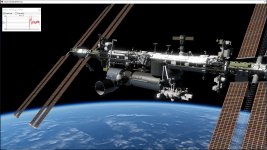
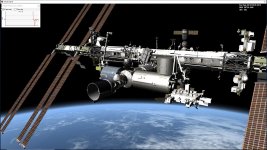
Full ISS
 

Attachments

  • Dx7 FPS.jpg
    Dx7 FPS.jpg
    349.3 KB · Views: 58
  • Dx9 3.10 FPS.jpg
    Dx9 3.10 FPS.jpg
    321.4 KB · Views: 51
There is a new build published in an attempt to address the "framerate display" issue. If the problem still exists then reply to the questions above.

I downloaded the 6-Sep-2019 version; same problem.

I downloaded a very old version (2016) as suggested by Kuddel; problem solved, for me.
 
Unfortunately no. The atmosphere rendering should be complitely reimplemented. The current one is a very simpple physics model that's been pushed to fovor orbital rendering with the cost of twilight/sunset/rise conditions.
Current focus is pretty much in a development tools regarding surface bases, virtual cockpit lighting, mesh utilities. But, of course, a new atmospheric model would be important.
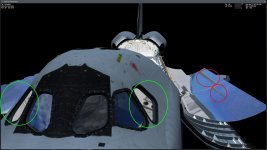
First of all, a belated thank you for this reply. Another thing that should be on that list is the implementation of a more realistic handling of reflections. With that I mean that there should be several "environment cams" and not just one so you get proper reflections.
I've attached a screenshot that shows the limitations of the current implementation of a single "environment cam". The green circles shows what shouldn't be seen from that particular angle (part of the payload bay) and the red circles show broken/interrupted reflections of the vertical stabilizer in the two forward radiator panels.
 

Attachments

  • PLB_reflections_in_FWD_windows.jpg
    PLB_reflections_in_FWD_windows.jpg
    141.2 KB · Views: 46
I downloaded the 6-Sep-2019 version; same problem.

I downloaded a very old version (2016) as suggested by Kuddel; problem solved, for me.
Can you post the exact version that is working?
Out of curiosity I would like to check whether that version was possibly the last version without SSE/SSE2 enabled by default...(just a guess)
 
I see "R1 [Aug 30 2016]".

Thanks for the info, unfortunately that didn't shed any light onto your issue...
That build already had the SSE2 enhanced instruction-set enabled, so that's not responsible.

cristiapi, would you mind running a release one version younger than the working one?
That one should not work, but I hope it generates some log data (Orbiter.log and/or Modules\D3D9Client\D3D9ClientLog.html).
If you would be so kind and post those "crash"-logs (as a ZIP preferably).
 
New binary for testing the recorder FPS issue

Here's a new binary for testing the reported issue with screen recording utilities. It's a DLL only to be intalled on a top of 3.10 in /Modules/Plugin/
 

Attachments

Thanks for the info, unfortunately that didn't shed any light onto your issue...


I have a feeling that the issue could be related to a commit r.1019 in which case 3.2 should work and 3.4+ not but that's just my best guess. If that's the case then it should be fixed from the package/attachment above. I am not really expecting anything to show-up in the logs but who knows.

---------- Post added at 20:57 ---------- Previous post was at 20:51 ----------

With that I mean that there should be several "environment cams" and not just one so you get proper reflections.


I have some plans for an advanced mesh editor and it would also include the possibility to setup and configure multible "env cams" to improve the reflections. It's a bit difficult to configure them properly without a proper editor application.
 
Here's a new binary for testing the reported issue with screen recording utilities. It's a DLL only to be intalled on a top of 3.10 in /Modules/Plugin/

I overwritten the old installation with "D3D9ClientR3.10-forOrbiter2016(r1162).zip", then I overwritten the DLL with your new zip; worked for me. :thumbup:

EDIT: do you plan to upload a release version of that DLL?


---------- Post added at 11:12 ---------- Previous post was at 11:08 ----------

cristiapi, would you mind running a release one version younger than the working one?

jarmonik's DLL solved the problem, but if you still need that test, no problem for me. Do you have a link?
 
Last edited:
jarmonik's DLL solved the problem, but if you still need that test, no problem for me. Do you have a link?
No thanks, not needed anymore :thumbup:
Glad to hear your issue is fixed.
 
Are we ready for 3.11 release or are there something that should be addressed before that ?
 
Back
Top