New Release D3D9Client Development

anyway you are surely right that having a client which stands in between Orbiter core and the planetary textures would be a very good organization. Actually the point would all be there: put something in the middle between the hard drive files and orbiter to override the terrain definition when (where) needed. I was thinking about creating temporary files that orbiter will then parse and acquire, but I don't know if that is feasible

If you put some area definitions into a text file, you can parse it and use the information at the end of "bool SurfTile::LoadElevationData ()" inside of Surfmgr2.cpp to manipulate the "elev" field in the tile, which is nothing but an 259x259 array of INT16. It is what the renderer will eventually put on screen.

So there you can iterate over all the shape definitions, check if they are relevant for the tile at hand (tile boundaries), then project the shape onto the tile and set the covered pixel to the altitude value you want.

It will not make the collision thing work, but it will demonstrate what the idea could accomplish in terms of developer experience. It will also demonstrate the impact on the frame-rate.
 
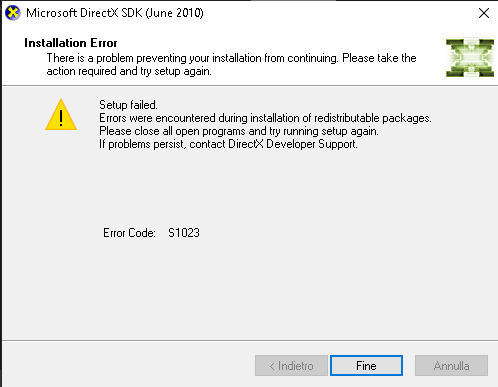
Thank you, I will surely try this, I am very curious to see where it does end up. I have an issue anyway: I can't compile the D3D9 client, it seems that I don't have the right redistributables, but if I try to install them I get the error s1023 or something like that which means that I have a newer set. I use VS community 2019. Anyone knows a workaround?
 
To compile D3D9Client, the redistributables are not enough! You need the DirectX SDK.
See Orbitersdk\D3D9Client\README.txt for further details.


[*] ...some points in that document are not very up to date I must say :blush:, it was last updated May 2014!
Let's see if I can find the SDK Link for you...
This should be it:
https://www.microsoft.com/en-us/download/details.aspx?id=6812
 
Last edited:
To compile D3D9Client, the redistributables are not enough! You need the DirectX SDK.
See Orbitersdk\D3D9Client\README.txt for further details.


[*] ...some points in that document are not very up to date I must say :blush:, it was last updated May 2014!
Let's see if I can find the SDK Link for you...
This should be it:
https://www.microsoft.com/en-us/download/details.aspx?id=6812

thank you very much but that is what I was talking about:

S1023.png
 
It looks like I have to do a whole new chapter on "how to setup & build D3D9Client" ;)

yes, please... I managed to get the dxsdk but then I had to do this:

https://stackoverflow.com/questions/17015088/missing-files-directx-sdk-d3dx9-lib-d3dx9-h

And now I am fighting against the NVAPI because I get a bunch of lnk2019 errors relevant to that but he is winning...

---------- Post added 13th Apr 2019 at 00:00 ---------- Previous post was 12th Apr 2019 at 23:56 ----------

I did it, adding the nvapi.lib file to the project...
 
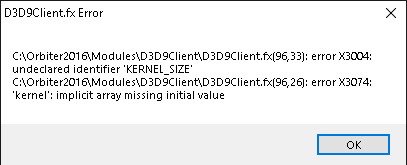
anyway, even if I manage to compile the code, when I try to run it I get this error

d3d9kernelpng.png


---------- Post added at 00:21 ---------- Previous post was at 00:19 ----------

from orbiter.log
Code:
000000.000: **** Creating simulation session
000000.000: D3D9: [DirectX 9 Initialized]
000000.000: D3D9: 3D-Adapter = NVIDIA GeForce GTX 1080
000000.000: D3D9: MaxTextureWidth........: 16384
000000.000: D3D9: MaxTextureHeight.......: 16384
000000.000: D3D9: MaxTextureRepeat.......: 8192
000000.000: D3D9: VolTexAddressCaps......: 0x3F
000000.000: D3D9: NumSimultaneousRTs.....: 4
000000.000: D3D9: VertexDeclCaps.........: 0x30F
000000.000: D3D9: XNA Math Support.......: Yes
000000.000: D3D9: Vertex Texture.........: Yes
000000.000: D3D9: Shadow Mapping.........: Yes
000000.000: D3D9: D3DFMT_A16B16G16R16F...: Yes
000000.000: D3D9: D3DFMT_A32B32G32R32F...: Yes
000000.000: D3D9: D3DFMT_D32F_LOCKABLE...: Yes
000000.000: D3D9: D3DFMT_A2R10G10B10.....: Yes
000000.000: D3D9: D3DDTCAPS_DEC3N........: No
000000.000: D3D9: D3DDTCAPS_FLOAT16_2....: Yes
000000.000: D3D9: D3DDTCAPS_FLOAT16_4....: Yes
000000.000: D3D9: Available Texture Memory = 4059 MB
000000.000: D3D9: [3DDevice Initialized]
000000.000: D3D9: ERROR: D3D9Effect.cpp Line:252 Error:-2147467259 D3DXCreateEffectFromFileA(pDev, name, macro, 0, D3DXSHADER_NO_PRESHADER, 0, &FX, &errors)
000000.000: D3D9: ERROR: Effect Error: C:\Orbiter2016\Modules\D3D9Client\D3D9Client.fx(96,33): error X3004: undeclared identifier 'KERNEL_SIZE'
C:\Orbiter2016\Modules\D3D9Client\D3D9Client.fx(96,26): error X3074: 'kernel': implicit array missing initial value
 
anyway, even if I manage to compile the code, when I try to run it I get this error


KERNEL_SIZE is a macro defined in D3D9Effect.cpp line 324 (Orbiter 2016 branch). Why the effect compiler doesn't recognize it is unknown. Could it be some kind of codepage/charset thing ? You can replace the KERNEL_SIZE with value 27 and see if the compiler hangs into an other macro.
 
Thank you, I will surely try this, I am very curious to see where it does end up. I have an issue anyway: I can't compile the D3D9 client, it seems that I don't have the right redistributables, but if I try to install them I get the error s1023 or something like that which means that I have a newer set. I use VS community 2019. Anyone knows a workaround?

No clue. On that note, I only managed to get the 2015 solution to compile in recent versions. All others have either some weird platform problems or right out crash the appropriate VS version.
 
KERNEL_SIZE is a macro defined in D3D9Effect.cpp line 324 (Orbiter 2016 branch). Why the effect compiler doesn't recognize it is unknown. Could it be some kind of codepage/charset thing ? You can replace the KERNEL_SIZE with value 27 and see if the compiler hangs into an other macro.

actually the D3D9Effect.cpp that I have in the package have the following lines as 323,324 and 325:

Code:
eTuneEnabled  = FX->GetParameterByName(0,"gTuneEnabled");
// General parameters -------------------------------------------------- 
eSpecularMode = FX->GetParameterByName(0,"gSpecMode");
 
actually the D3D9Effect.cpp that I have in the package have the following lines as 323,324 and 325:

Code:
eTuneEnabled  = FX->GetParameterByName(0,"gTuneEnabled");
// General parameters -------------------------------------------------- 
eSpecularMode = FX->GetParameterByName(0,"gSpecMode");


This isn't right. You must have an old version. The latest are 1138 and 1137. From where did you got it ?
This is where you should get it: svn://mirror.orbiter-radio.co.uk/D3D9client/trunk
 
Last edited:
Any reason why you don't use the SVN repo?

I'm not very accustomed to it, since there is a website I usually get the files from there. Anyway I never thought there was a needing to use svn in this case. I just opened the svn repo and downloaded the updated files. Now I have to setup the project to make it compile again, but at least i checked and there are the macros needed.
 
Last edited:
I'm not very accustomed to it, since there is a website I usually get the files from there. Anyway I never thought there was a needing to use svn in this case. I just opened the svn repo and downloaded the updated files. Now I have to setup the project to make it compile again, but at least i checked and there are the macros needed.

I see.

Do you already have an idea for a text file format to specify shapes? I think defining circles with lat/lon-midpoint with radius and height should be sufficient for a first cut, right?

---------- Post added at 10:59 ---------- Previous post was at 10:55 ----------

Sorry, we don't have sources in the distribution backage. Other than some example projects. I can attach the sources into a post. Which one do you need 2016 or Beta ?

Just to throw this in here: I keep a reasonably close fork of the SVN repo in Bitbucket, where you have the possibility to gather ZIP archives of every OVP state.

The 2016 version is this: https://bitbucket.org/face/ovp/get/D3D9Client/2016.zip
 
I see.

Do you already have an idea for a text file format to specify shapes? I think defining circles with lat/lon-midpoint with radius and height should be sufficient for a first cut, right?

The first tentative I want to make is directly code wise, I decide an area and plug in the values directly into the code. If that works, I'll pass to the text file definitions.

Anyway I don't know if I'll do this right away. There is an increasing interest on the VesselBuilder project which is almost finished and I absolutely want to finish and publish that soon
 
The first tentative I want to make is directly code wise, I decide an area and plug in the values directly into the code. If that works, I'll pass to the text file definitions.

Well, as a first test you could plug in this:
Code:
if (elev) for(auto i=0;i<ndat;i++)
{
	elev[i] = 0;
}
before
Code:
return (elev != 0);

This will flatten the whole world.
 
Well, as a first test you could plug in this:
Code:
if (elev) for(auto i=0;i<ndat;i++)
{
	elev[i] = 0;
}
before
Code:
return (elev != 0);

This will flatten the whole world.

yep, I coded the same with just 1000 instead of 0 to see the effect of a custom height on the whole world... But I can't get it to compile due to project setup yet...
 
Back
Top