New Release D3D9Client Development

Ah! The "Self Shadows" option "Vessel Mapping" did the trick.
The "None" setting seems to fix the tiger-stripes!
Or setting the "Filter options" to "9 samples".
That might be something that only Jarmo can help with. Or it might be fixed already as we speak ;) So let's wait for any feedback from him.
 
Last edited:
removed post (contained only lies ;) )
 
Last edited:
But the D3D9 R16 is not working well with some of the addons I have. Therefore I need the D3D9 R15. I've tried out both.


What exactly is wrong with R16.5 ? There is a new build coming for O2010-P1, so, Now is the time to report any problems related to it.

---------- Post added at 05:21 ---------- Previous post was at 05:06 ----------

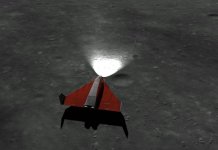
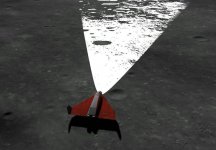
The tiger-stripes is a common problem in a self-shadowing. It's usually more intense when sun angle is low. Also the shadow-map resolution setting in D3D9Client.cfg may effect to the results. I'll try to make some adjustments to reduce the stripes.

Also the ramp on a foreground in the screen shot is a way too big for the self-shadows to work, it's only designed for relative small vessels like the space shuttle. A simple shadow projection would work better for the ramp but right now it's not available for vessels, only for surface base buildings.

---------- Post added at 05:29 ---------- Previous post was at 05:21 ----------

Does our cloud renderer fail with the LVL10 textures, causing a memory to leak ? If the texture format DXT5 as it should be ? I guess I have to download and see how it works.
 
Does our cloud renderer fail with the LVL10 textures, causing a memory to leak ? If the texture format DXT5 as it should be ? I guess I have to download and see how it works.

Do you mean [ame="https://www.orbithangar.com/searchid.php?ID=6964"]this one[/ame]? They are DXT5! Or is there any more recent one available?
 
Last edited:
Ah O.K. but even with those I don't have any unusual memory increase.
And the log(s) don't show any issues.
But I've only zoomed and panned around for about 5 minutes...

Oh, just noticed that I've tested those L10 clouds with r1117...I will check r1089 tomorrow.
 
Last edited:
Speaking of cloud rendering, have the cloud micro texture rendering bug been fixed? There's also a bug where clouds lose their shadows over water. This bug can seen here: https://www.dropbox.com/s/gubc37t8v3j56m8/D3D9Client_no_cloudshadows_over_water.jpg?dl=0


The micro texture issues is not exactly a bug it's just not implemented. It would require some design and thinking, It's not as easy as flipping a switch. But I look into it when I got time. There are many things on a schedule.


There are cloud shadows over an open waters but the shadows just don't show very well on a blue background. I have changed the shader to increase shadow strength over a blue background. So, this should be fixed now.
 
It's intended to work like that. In reality, shadows are pretty sharp close to a caster but becomes more blurred edged farther a way. In our case the amount of blurriness in fixed.

You can reduce the kernel size to make the edges less blurry.
#define KERNEL_RADIUS 3.0f

from /Modules/D3D9Client/PBR.fx

Also if performance is not a problem then higher resolution shadow maps will also sharpen the edges:

ShadowMapSize = 2048

in D3D9Client.cfg. Max size in 4096
Where can one change this in recent releases? It seems to be missing in all of the recent D3D9Client releases.
 
The KERNEL_RADIUS definition has moved to /Modules/D3D9Client/Common.hlsl
ShadowMapSize still is in D3D9Client.cfg
 
There seems to be an issue with local lights in D3D9Client, that they cause VC oversaturations. I have attached a screenshot of this issue, showing the panels being completely washed out with the PLB lights turned on.
 

Attachments

  • D39DClient_overexposed_panels.jpg
    D39DClient_overexposed_panels.jpg
    159.7 KB · Views: 46
^^^ This comes in light (ba-dum-tis) of this ticket.

Nevertheless I find the current lights implementation (D3D9Client trunk) a bit over saturated as well.

Might be a simple fix in Modules\D3D9Client\Common.hlsl, but as I have no experience in those rendering techniques, I recommend Jarmo to look at this :thumbup:

The attached images use the "Moon Micro Textures", so your visuals might vary.
 

Attachments

There seems to be a strange issue with bodies with an atmosphere when viewed from a distance, namely, the horizon haze seems to appear on the dark side of the body as well, albeit in a "twinkling" manner, which is especially notable when the camera is moving. This only seems to occur in post-R2.1 D3D9 releases (I tested multiple ones, including the latest stable 3.7 release, and the issue seems to persist). Strangely, this does not occur if the body is viewed from the virtual cockpit, but only in the standard glass cockpit and external view.

I can't post a screenshot as it's very difficult to capture the issue, but in case someone is looking to replicate it, it's most obvious when observing earth from the moon. I'm not certain if this issue has been mentioned before so please excuse me if that's the case.
 
I can't post a screenshot as it's very difficult to capture the issue, but in case someone is looking to replicate it, it's most obvious when observing earth from the moon. I'm not certain if this issue has been mentioned before so please excuse me if that's the case.

You could provide a scenario[*], setup so that we can immediately try to move the camera.


[*] Preparing such "entry-points" to reproduce an issue helps a lot so developers can start looking at the issue without the hassle of first trying to set up the environment to even reproduce it.:thumbup:
 
You could provide a scenario[*], setup so that we can immediately try to move the camera.


[*] Preparing such "entry-points" to reproduce an issue helps a lot so developers can start looking at the issue without the hassle of first trying to set up the environment to even reproduce it.:thumbup:

Here's the .scn file, and thanks for the tip!
 

Attachments

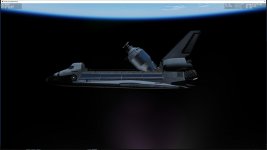
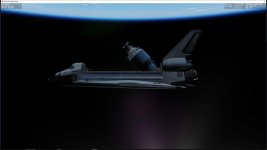
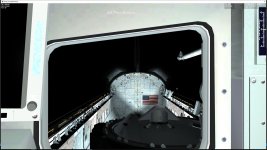
There's something going on with the reflections. This is something I've noticed for a while. At certain camera angles, the reflections abruptly turns black. This can be reproduced over and over just by moving between camera angles.

I've attached two screenshots showing this. The first screenshot shows the reflections in their normal state. The second one shows them blackened. Look at the Centaur in the payload bay and the side hatch window.
 

Attachments

  • D3D9Client_reflections_nominal.jpg
    D3D9Client_reflections_nominal.jpg
    67.9 KB · Views: 27
  • D3D9Client_reflections_dark.jpg
    D3D9Client_reflections_dark.jpg
    67.2 KB · Views: 27
There's something going on with the reflections. This is something I've noticed for a while. At certain camera angles, the reflections abruptly turns black. This can be reproduced over and over just by moving between camera angles.

I've attached two screenshots showing this. The first screenshot shows the reflections in their normal state. The second one shows them blackened. Look at the Centaur in the payload bay and the side hatch window.

Could you be above the light sources limit? :shrug:
If so, some lights will turn off at certain ranges and angles.
 
Could you be above the light sources limit? :shrug:
If so, some lights will turn off at certain ranges and angles.
I doubt that as the only light sources are Earth and the Sun, all the lights on the orbiter are turned off.
 
There's something going on with the reflections. This is something I've noticed for a while. At certain camera angles, the reflections abruptly turns black. This can be reproduced over and over just by moving between camera angles.

I've attached two screenshots showing this. The first screenshot shows the reflections in their normal state. The second one shows them blackened. Look at the Centaur in the payload bay and the side hatch window.


Ok, Thanks. It looks like the shuttle will dissappear from the Centaur's reflection environment for some unknown reason. I would need to be able to reprocude the issue so that I can monitor the object states and get a real time data out of the client.

I can try to reproduce the issue with stock Atlantis & payload. If that fails, then I would need your help to setup the scenario.
 
Back
Top