
-
ORBITER-FORUM will be temporarily closed at 2026-07-23 18:00 UTC while we complete some OF maintenance tasks. The amount of downtime is expected to take up to one hour, but probably less.
You are using an out of date browser. It may not display this or other websites correctly.
You should upgrade or use an alternative browser.
You should upgrade or use an alternative browser.
New Release D3D9Client Development
- Thread starter jarmonik
- Start date


I have a little problem with R11: When the spacecraft main engines are on, those faces that are lit by the engine flames, are flickering, (the faces getting inverted, or it's just becomes black, i don't know, i can't really see as it happens fast, and randomly). Why is that?
I have the same problem in R10 and R11 (R9 works):
GPU: ATI Mobility Radeon HD 5650
Disconnect
New member
Isn't d3d9 client support terrain normal maps, or there is a setting needed to enable it?
I've been having some FPS issues with D3D9 Client since I started using Vsync to hold my FPS under control. Ever since I upgraded my PC and started using D3D9 (currently R10), my FPS have been around 900~1400, sometimes peaking 3000!
They were really smooth, but this huge FPS ends up making my GPU temperature rise up to 75º Celsius. I know this is an OK temperature for heavy loads and modern GPUs, and I get similar temperatures running Arma 2 and other modern games, but I think that's a bit too much for Orbiter.
Using Vsync, my FPS is capped at 60, and my temperatures stay at 40º max. But I noticed that there was a lot of stuttering, and my FPS was sometimes dropping below 55, sometimes going as low as 50.
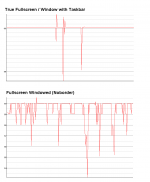
I was using the Fullscreen Windowed mode (borderless), and when I tried switching to True Fullscreen mode or Fullscren with Taskbar, my FPS were locked at 60, with no drops at all, everything was incredibly smooth.
I used the built-in Orbiter Performance Meter in the same scenario and got the following graphs to show my problem with Fullscreen Window (please note that the scale is different between graphics):
Is there a fix for this? Like a way to set a maximum FPS without relying on Vsync? Or maybe is something that can be changed in the D3D9 Code? Or even something wrong with my hardware?
EDIT: Updating this post so I don't have to create another, and perhaps it may help someone that find this through Search in the future. Thanks to Orb reply, I started searching for an FPS Limiter, and found a software called "Nvidia Inspector" (there are similar softwares for AMD users). Using it, I could choose the maximum FPS for my GPU. I set it to 120 max and it worked perfectly on Orbiter. No more overheating!
For more info on these, here's a link.
They were really smooth, but this huge FPS ends up making my GPU temperature rise up to 75º Celsius. I know this is an OK temperature for heavy loads and modern GPUs, and I get similar temperatures running Arma 2 and other modern games, but I think that's a bit too much for Orbiter.
Using Vsync, my FPS is capped at 60, and my temperatures stay at 40º max. But I noticed that there was a lot of stuttering, and my FPS was sometimes dropping below 55, sometimes going as low as 50.
I was using the Fullscreen Windowed mode (borderless), and when I tried switching to True Fullscreen mode or Fullscren with Taskbar, my FPS were locked at 60, with no drops at all, everything was incredibly smooth.
I used the built-in Orbiter Performance Meter in the same scenario and got the following graphs to show my problem with Fullscreen Window (please note that the scale is different between graphics):
Is there a fix for this? Like a way to set a maximum FPS without relying on Vsync? Or maybe is something that can be changed in the D3D9 Code? Or even something wrong with my hardware?
EDIT: Updating this post so I don't have to create another, and perhaps it may help someone that find this through Search in the future. Thanks to Orb reply, I started searching for an FPS Limiter, and found a software called "Nvidia Inspector" (there are similar softwares for AMD users). Using it, I could choose the maximum FPS for my GPU. I set it to 120 max and it worked perfectly on Orbiter. No more overheating!
For more info on these, here's a link.
Last edited:

- Joined
- Oct 30, 2009
- Messages
- 14,018
- Reaction score
- 4
- Points
- 0
You could try running Orbiter with FPS Limiter or similar software.Is there a fix for this? Like a way to set a maximum FPS without relying on Vsync?
I've recently started using the d3d9client; and I am astounded at the increase in performance and visual quality.
I just want to know...how? How does it do it? I have no understanding of programming or computer science but I am utterly boggled.
Flying the G42 into orbit is astonishingly smooth (in terms of frame rate; passing mach 15 though 30,000m is bone-jarringly rough - and Orbiter_ng accomplishes it beautifully.)
AMSO takes on a whole new level of realism. I just don't understand - how does this alternate...whatever...make Orbiter so much better? I thought that adding processes to your computer's output limit it's resources; but this seems to add many processes - and the output is ten times smoother and more accurate than normal Orbiter. I love it, but don't understand it. Can anyone use baby talk to tell me how it actually works?
I just want to know...how? How does it do it? I have no understanding of programming or computer science but I am utterly boggled.
Flying the G42 into orbit is astonishingly smooth (in terms of frame rate; passing mach 15 though 30,000m is bone-jarringly rough - and Orbiter_ng accomplishes it beautifully.)
AMSO takes on a whole new level of realism. I just don't understand - how does this alternate...whatever...make Orbiter so much better? I thought that adding processes to your computer's output limit it's resources; but this seems to add many processes - and the output is ten times smoother and more accurate than normal Orbiter. I love it, but don't understand it. Can anyone use baby talk to tell me how it actually works?

- Joined
- Jun 2, 2008
- Messages
- 2,299
- Reaction score
- 447
- Points
- 98
- Location
- Valmorea
- Website
- www.fabri91.eu
I know nothing about graphics programming, but as far as I understood it, using DirectX 9 (or 10 or 11) makes it possible to offload more calculations to the GPU instead of having to keep them on the CPU, while being more efficient in the process. This is what makes extra headroom available on the CPU, enabling a smoother experience.
OK...I think I see. The program shunts much of the calculations involved with the Orbiter 3D environment to DX9 (again I'm in trouble; since I have no real idea what DirectX actually does; it's just something I download every year or two); leaving the CPU free to handle the graphics processing. Is that close?
Edit: OK; I guess this is a new learning possibility - gonna Wikipedia DirectX. Might as well know what it actually does.
Edit Mk.2: OK, I read it. It lost me somewhere around the second paragraph. Me caveman - me out of depth on Internet like Og was when Og hunted fish. Me like really simple explanations. Me get nervous when seeing words like 'logarithm'. Me wish world could be easy like hitting yaks on head with sticks.
(Chuckle) Not too far from the truth; I am constantly reminded of how much I don't know about even the most basic principles of modern computing. Oh well - I can live with it. My expertise is Printing and in that field I'm unmatched. Even so I'd love to learn why Orbiter_ng works so well and why it seems to not include things like runway lights or other certain ground features. Baby talk is appreciated.
Edit: OK; I guess this is a new learning possibility - gonna Wikipedia DirectX. Might as well know what it actually does.
Edit Mk.2: OK, I read it. It lost me somewhere around the second paragraph. Me caveman - me out of depth on Internet like Og was when Og hunted fish. Me like really simple explanations. Me get nervous when seeing words like 'logarithm'. Me wish world could be easy like hitting yaks on head with sticks.
(Chuckle) Not too far from the truth; I am constantly reminded of how much I don't know about even the most basic principles of modern computing. Oh well - I can live with it. My expertise is Printing and in that field I'm unmatched. Even so I'd love to learn why Orbiter_ng works so well and why it seems to not include things like runway lights or other certain ground features. Baby talk is appreciated.
Last edited:

Hmm in the old days (before DirectX) when you were writing a program/game etc you'd have to code support for every hardware you'd like to support.
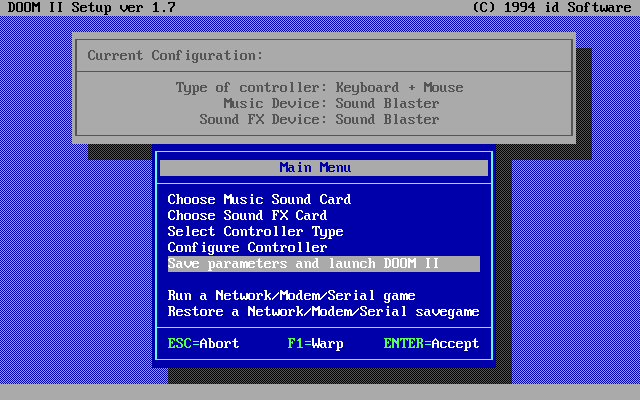
For example with old dos games you have to choose what type of soundcard your computer have in order to actually play sound in the game.
Example config screen for Doom II:
Similar with graphich cards you'd have to code it for most commonly used then (EGA, CGA, VGA and finally SVGA cards).
and then:
DirectX - which in simplest words works like that:
Game designer codes game to work with DirectX and Hardware manufacturer makes his hardware to work with DirectX.
DirectX makes sure it works.
Then game developer doesn't have to worry that his game won't work on DirectX compatibile hardware.
For example with old dos games you have to choose what type of soundcard your computer have in order to actually play sound in the game.
Example config screen for Doom II:
Similar with graphich cards you'd have to code it for most commonly used then (EGA, CGA, VGA and finally SVGA cards).
and then:
DirectX - which in simplest words works like that:
Game designer codes game to work with DirectX and Hardware manufacturer makes his hardware to work with DirectX.
DirectX makes sure it works.
Then game developer doesn't have to worry that his game won't work on DirectX compatibile hardware.
OK - I remember those old config screens; the 80's and 90's games were famous for them. So DirectX provides an overall graphics platform that controls all a computer's requisite hard and software? So rather than having to configure a game to an individual computer a developer codes it to DX and DX insures the computer can process it?
(chuckle) 'Oversimplified' is about the most advanced I can understand at this level. But I sense my questions are not appropriate for this thread; I'll stop asking them. Let me merely express my admiration and gratitude for the development of the d3d9Client software. Truly impressive work.
Let me merely express my admiration and gratitude for the development of the d3d9Client software. Truly impressive work. - Joined
- Mar 28, 2008
- Messages
- 2,707
- Reaction score
- 881
- Points
- 128
I have the same problem in R10 and R11 (R9 works):
GPU: ATI Mobility Radeon HD 5650
Are the surfaces normal mapped or not ?
Disconnect
New member
Are the surfaces normal mapped or not ?
Nope
jbsheridan
New member
- Joined
- Jan 10, 2011
- Messages
- 46
- Reaction score
- 0
- Points
- 0
I am having image flickering, (looks black), every 3 or 4 seconds. Especially obvious on space ship.
Running Win XP D3D9.
Any ideas?
jb
Running Win XP D3D9.
Any ideas?
jb

- Joined
- Apr 1, 2008
- Messages
- 2,167
- Reaction score
- 663
- Points
- 113
Hi jarmonik,
in case you want to update your SVN Client to Version 1.8, I recommend to not do this
It seems that the new TortoiseSVN client (version 1.8.0) has problems in "talking" to the codeplex server ("XML parsing failed: (400 Bad Request) Error")
With the previous version (1.7.14) everything seems to work O.K.
It is not 100% clear whether the client is to blame or the server.
Unfortunately I've updated all my working copies to 1.8-Version and there is no "downgrade" option So I had to re-checkout all of them again...
Just in case you planned to upgrade your cSVN-lient...
As soon as there is news on this issue I'll post again.
/Kuddel
in case you want to update your SVN Client to Version 1.8, I recommend to not do this
It seems that the new TortoiseSVN client (version 1.8.0) has problems in "talking" to the codeplex server ("XML parsing failed: (400 Bad Request) Error")
With the previous version (1.7.14) everything seems to work O.K.
It is not 100% clear whether the client is to blame or the server.
Unfortunately I've updated all my working copies to 1.8-Version and there is no "downgrade" option
So I had to re-checkout all of them again...Just in case you planned to upgrade your cSVN-lient...
As soon as there is news on this issue I'll post again.
/Kuddel
- Joined
- Mar 28, 2008
- Messages
- 2,707
- Reaction score
- 881
- Points
- 128
I am having image flickering, (looks black), every 3 or 4 seconds. Especially obvious on space ship.
Does it occur if the environment mapping is disabled. By setting: Video Tab->Advanced->Environment Mapping->Rendering Mode to "Disable" ?
---------- Post added at 13:13 ---------- Previous post was at 13:12 ----------
Hi jarmonik,
in case you want to update your SVN Client to Version 1.8, I recommend to not do this
Thanks for the warning. Haven't updated the client yet. I'll be skipping the update then.

in case you want to update your SVN Client to Version 1.8, I recommend to not do this
It seems that the new TortoiseSVN client (version 1.8.0) has problems in "talking" to the codeplex server ("XML parsing failed: (400 Bad Request) Error")
With the previous version (1.7.14) everything seems to work O.K.
It is not 100% clear whether the client is to blame or the server.
I strongly suspect that the Codeplex server is doing something outside the SVN specification there, because repos on Codeplex always need the "stupid" mode in my HG client, whereas other SVN remotes (Sourceforge, @work) never had that need.
- Joined
- Apr 1, 2008
- Messages
- 2,167
- Reaction score
- 663
- Points
- 113
me too, but that doesn't change my recommendation :lol:I strongly suspect that the Codeplex server is doing something outside the SVN specification there...
If you search the net for this issue, it seems that it has to do with some changes in the HTTP client library ('serf' instead of' neon') but that is way over my head.
Whether codeplex fixes/changes something or tortoiseSVN fixes/changes something is more or less irrelevant for me now :-/
Nevertheless, the 1.7.x client does most of the job anyway.
Whether codeplex fixes/changes something or tortoiseSVN fixes/changes something is more or less irrelevant for me now :-/
Yeah, but that's why I've mentioned that a dissimilar implementation in a different VCS environment struggles with the same issues. Just more evidence for it being the server, not TortoiseSVN.
Isn't the underlying system at Codeplex TFS? I guess the bridging to SVN is the culprit, then. Is anybody of you actually using it via TFS?
Similar threads

- Sticky
- Replies
- 6
- Views
- 10K

- Replies
- 10
- Views
- 4K


- Replies
- 1
- Views
- 4K


- Replies
- 7
- Views
- 4K