New Release D3D9Client Development

Thank you, those are very helpful. Could you take a close-up shot from the ladder. (Let's say 2-3 meter distance using 2048x2048)

From this camera distance there are no problem but I am worried about the close-up shots when the camera is near the vessel. Also should be remembered that we can't use as advanced filters as the 3DS Max does. (Maybe 2x2 PCF)

There is an open source train simulator, which is using cascaded shadow maps+ shadow edge blur (i think it's always necessary to prevent jagged shadow eges, and i see it in every dynamic shadow implementations), and there 1024*1024 shadow map resolution(default) is enough for the most of the cases, it's good enough to shadow so thin shapes like pantograph arms, however shadow map resolution is usually can be changed by user, either by directly setting the resolution or presets like "low, medium, high".
 
I,m getting a error. When clearly the mesh is found and showing in Orbiter.
Only relates to some SC3 mods.

Finished initialising status
Finished initialising camera
Finished initialising panels
Finished setting up render state
**** WARNING: Mesh not found: .\Meshes\.msh
D3D9Client: [Scene Initialized]
D3D9Client: [Session Closed. Scene deleted.]
**** Closing simulation session
VistaBoost 1.0: font smoothing re-enabled.

May not be a D3D9 error though.
 
The warning message is a standard message generated by SC3.dll as it can't load a mesh for the VC. Unless a mesh is specified in the ini file it will attempt to load a undefined mesh file which Or inter can't find so it generates the warning message in the log. It's harmless and can safely be ignored.
 
Last edited:
DaveS, many thanks for your answer. Ken.:thumbup:
 
Transparent Textures?

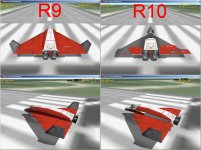
Hello orbinauts. I'm seeing something weird post R9: parts of vessel skins are transparent as the exterior camera is rotated around the vessel. It seems to be related to the angle of sunlight, i.e. with the sun behind the camera most of the vessel skin is transparent; with the sun in front of the camera most of the vessel skin is visible. The transparency kind of slides in/out as the camera rotates around the vessel. I'm seeing this on all vessels.

I first saw this after installing R10 (happens with R11 as well). Changing the advanced settings "Enable advanced texture maps" and "Disable near clip plane compatibility mode" appears to have no effect.

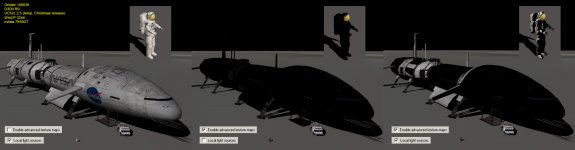
On a potentially related side note, I need to have advanced texture maps disabled so that Dansteph's latest UCGO Arrow and UMMU 2.5 do not show up completely black (as someone mentioned earlier in this thread). Not sure what's going on there - old hardware maybe?

I reproduced this on a newer 2nd PC with vanilla Orbiter 100830 installs (separate installs for R9 and R10). Both PCs are running WinXP SP3 32bit with DirectX runtime Jun2010. PC1 uses an Nvidia GeForce 7950GT, PC2 uses an NVIDIA Quadro FX 540. Video drivers are recently updated. Data in this post is from the 2nd PC with the test vanilla installs (all settings left at defaults). The scenario is Orbiter\Scenarios\Checklists\Quickstart.scn.

Any ideas or suggestions?

D3D9_Transparency.jpg
 

Attachments

Hi jswift
I had same thing with broken meshes when I first installed d3d9 andproblem was also in other games for me..
And it was cause my pc installed some faulty drivers for graphics himself.
Hope it hepls. :thumbup:
 
On a potentially related side note, I need to have advanced texture maps disabled so that Dansteph's latest UCGO Arrow and UMMU 2.5 do not show up completely black (as someone mentioned earlier in this thread). Not sure what's going on there - old hardware maybe?
What is this ? Is anyone else getting this or is it just an other driver/hardware failure.
 
I,m not getting this at all. I use an Ati card also. In fact all is perfect.
Jarmonik, please consider Version 11 again, as it,s far superior.
 
No, I am not seeing that. I have used the Arrow, DGIV quite a bit. Use the UMMUs almost all the time, never had any issues with them looking black. With any D3D9 releases.
 
Hello orbinauts. I'm seeing something weird post R9: parts of vessel skins are transparent as the exterior camera is rotated around the vessel. It seems to be related to the angle of sunlight, i.e. with the sun behind the camera most of the vessel skin is transparent; with the sun in front of the camera most of the vessel skin is visible. The transparency kind of slides in/out as the camera rotates around the vessel. I'm seeing this on all vessels.

I first saw this after installing R10 (happens with R11 as well). Changing the advanced settings "Enable advanced texture maps" and "Disable near clip plane compatibility mode" appears to have no effect.
[...]
I reproduced this on a newer 2nd PC with vanilla Orbiter 100830 installs (separate installs for R9 and R10). Both PCs are running WinXP SP3 32bit with DirectX runtime Jun2010. PC1 uses an Nvidia GeForce 7950GT, PC2 uses an NVIDIA Quadro FX 540. Video drivers are recently updated. Data in this post is from the 2nd PC with the test vanilla installs (all settings left at defaults). The scenario is Orbiter\Scenarios\Checklists\Quickstart.scn.

Any ideas or suggestions?
Hi JSwift,

first of all: thanks for the detailed issue report!

I've tried the Scenario (Scenarios\Checklists\Quickstart.scn) with the current D3D9Client on my machine and can not reproduce the 'transparency' issue. :shrug:
Although I must say, that my setup might be very different from yours ;)
I for example don't have an Nvidia card and I don't use R9 or R10.
Nevertheless, I checked against both Orbiter Versions (Orbiter v100830 and Orbiter current trunk).
Maybe I'll find something later. Or the upcoming R12 fixes this :thumbup:

Regards,
Kuddel
 
Thanks for the feedback.

...And it was cause my pc installed some faulty drivers for graphics himself...
...can not reproduce the 'transparency' issue. :shrug:
Although I must say, that my setup might be very different from yours...

Regarding the transparency thing, I tried it again on a 3rd PC yesterday with Win7 and an on-board video card and everything was fine. I'm not really surprised if my older hardware has minor issues - sometimes it's a quick fix. R9 still works fine. :thumbup:


What is this ? Is anyone else getting this or is it just an other driver/hardware failure.

As for those black textures, it sounds pretty rare. The attached picture is a summary of what I've seen. I didn't see this effect with UCGO 2 and I don't remember loading any UCGO stuff when I had D3D9 R10 installed so I can't comment on that at the moment. I haven't seen it on any other vessels yet either but I don't have much beyond the XR fleet installed.
 

Attachments

  • UCGO_Black_Textures.jpg
    UCGO_Black_Textures.jpg
    272.5 KB · Views: 55
Last edited:
As for those black textures, it sounds pretty rare. The attached picture is a summary of what I've seen. I didn't see this effect with UCGO 2 and I don't remember loading any UCGO stuff when I had D3D9 R10 installed so I can't comment on that at the moment. I haven't seen it on any other vessels yet either but I don't have much beyond the XR fleet installed.

That's very odd especially if the local light sources are effecting like that.

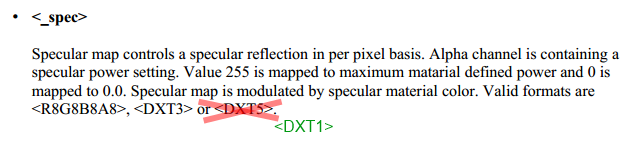
One thing that should be checked and the documentation updated. Is that U8V8 and DXT5nm normal maps are no-longer dupported by the client. Since, the shader complexity had to be simplified. R8G8B8, DXT1 and DXT3 are fine.
 
Hi Jarmo,
...One thing that should be checked and the documentation updated. Is that U8V8 and DXT5 normal maps are no-longer dupported by the client. Since, the shader complexity had to be simplified. R8G8B8, DXT1 and DXT3 are fine.
Does that apply to the <_spec> section of the "Advanced Texture Maps" ?
I'll change that if the answer is YES.
 

Attachments

  • docChange.png
    docChange.png
    19.3 KB · Views: 27
Does that apply to the <_spec> section of the "Advanced Texture Maps" ?
The D3D9ClientSurface::LoadTexture has only condition checking for normal maps and bump maps, and reflection maps are loaded in A8R8G8B8, and other maps in any format from file, according to the code of the module (I haven't checked shaders). Additionally using V8U8 for normal maps doesn't log error, but only sets gNormalType to 0.
 
Hi Jarmo,
Does that apply to the <_spec> section of the "Advanced Texture Maps" ?
I'll change that if the answer is YES.

No, specular map requires an alpha channel that is missing from DXT1. DXT5 format is fine. Actually DXT5 format would work for normal maps as long as it isn't DXT5nm (which is a special format or a special use of the format)

---------- Post added at 01:00 ---------- Previous post was at 00:54 ----------

The D3D9ClientSurface::LoadTexture has only condition checking for normal maps and bump maps, and reflection maps are loaded in A8R8G8B8, and other maps in any format from file, according to the code of the module (I haven't checked shaders). Additionally using V8U8 for normal maps doesn't log error, but only sets gNormalType to 0.

gNormalType is no longer used by shaders. The switch/case section of the code should be removed and the format should be loaded as stored in the file. In which case any format having RGB channels would work.
 
Last edited:
i'm getting these errors at start since some days:

**** Creating simulation session
D3D9Client: [DirectX 9 Initialized]
D3D9Client: Sytem has XNA math support
D3D9Client: [3DDevice Initialized]
D3D9Client: [Compiling Effects for Shader Model 3.0]
.\D3D9Effect.cpp Line:273 Error:-2147467259 D3DXCreateEffectFromFileA(pDev, name, macro, 0, 0, 0, &FX, &errors)
Effect Error: f:\Gamez\Orbiter\Modules\D3D9Client\D3D9Client.fx(344,13): warning X3205: conversion from larger type to smaller, possible loss of data
f:\Gamez\Orbiter\Modules\D3D9Client\D3D9Client.fx(345,13): warning X3205: conversion from larger type to smaller, possible loss of data
f:\Gamez\Orbiter\Modules\D3D9Client\D3D9Client.fx(350,13): warning X3205: conversion from larger type to smaller, possible loss of data
f:\Gamez\Orbiter\Modules\D3D9Client\D3D9Client.fx(373,14): warning X3205: conversion from larger type to smaller, possible loss of data
f:\Gamez\Orbiter\Modules\D3D9Client\D3D9Client.fx(378,14): warning X3205: conversion from larger type to smaller, possible loss of data
f:\Gamez\Orbiter\Modules\D3D9Client\D3D9Client.fx(431,18): warning X3205: conversion from larger type to smaller, possible loss of data
f:\Gamez\Orbiter\Modules\D3D9Client\D3D9Client.fx(432,18): warning X3205: conversion from larger type to smaller, possible loss of data
f:\Gamez\Orbiter\Modules\D3D9Client\D3D9Client.fx(433,15): warning X3205: conversion from larger type to smaller, possible loss of data
NormalMap.fx(65,11): warning X3206: 'mul': implicit truncation of vector type
NormalMap.fx(65,9): warning X3206: implicit truncation of vector type
NormalMap.fx(69,40): error X3004: undeclared identifier 'gCamOff'

Why is this?
 
I was just messing about with a scenario file, and all of a sudden, it stopped loading so far everything I try. The scenario I was working on, older quick saves.

It gives me this:

Code:
Finished initialising status
Finished initialising camera
Finished initialising panels
Finished setting up render state
Orbiter Version 100830
D3D9Client Build [May 12 2013]
Exception Code=0xC0000005, Address=0x00472AC9
EAX=0x00000000 EBX=0x06BAF808 ECX=0x00000000 EDX=0x06BA38E0 ESI=0x127560A0 EDI=0x00D7A4C0 EBP=0x00000000 ESP=0x009FF178 EIP=0x00472AC9
I:\ORBITER-Win7\modules\server\orbiter.exe EntryPoint=0x004ACFAC, Base=0x00400000, Size=2097152
Critical exception in Scene::AddVisualRec(0xD7A4C0) (Mercury)(4)
!!! Abnormal Program Termination !!!


---------- Post added at 08:00 PM ---------- Previous post was at 07:49 PM ----------

Well, I found some other quicksaves from a bit earlier that work, and then was able to time skip ahead and reload them no problem. Something that happened in that one thread of scenarios just really borks up Orbiter, and I have never seen such a thing in an Orbiter.log before.
 
i'm getting these errors at start since some days:
NormalMap.fx(69,40): error X3004: undeclared identifier 'gCamOff'
Why is this?

It would seems that you have failed to install the client properly. Executables and shaders do not match.

---------- Post added at 14:44 ---------- Previous post was at 14:35 ----------

I was just messing about with a scenario file, and all of a sudden, it stopped loading so far everything I try. The scenario I was working on, older quick saves.......

It seems to be failing at planet creation and that doesn't really make much sence. Could there exists a vessel called "Mercury" already in scenario ?

Could you create a trace log (D3D9ClientLog.html) using a debug build of the client and debug level 4
 
Back
Top