New Release D3D9Client Development

Let's take one step at a time. If you observe the surface (while landed) during one full lunar day cycle, is it properly lit by sunlight ? In Beta19 and 19c ?

Edit: What _B and _C textures you are using ?
Those from the V1.3 pack ... zipped again below.
I also tried modded ones, with b channel set to 0x7F7F7F as suggested by you earlier, but to no avail.
Attn: the video with the "radical" microtex.cfg settings has been supplemented to the previous post. I cannot be online today any longer, and tomorrow it might be late until I can respond regarding the surface lighting ...
Take care & thx - Rob
 

Attachments

though in experimenting with the scale I had CTDs and VC++ faults popping up when nearing the before-mentioned radically changed microtex.cfg pixels/meter settings.

Those setting are away off from anything practical I can think of. Also, a hardware has an upper limit in texture wrap/repeat. In my case 8192. In a terms of (pixels/meter) that would be something like 40-160. There is a way to reduce the HW requirements and repeat counts.

I'll take a look if I can reproduce the CTD, that shouldn't happen.

---------- Post added 29-02-16 at 00:32 ---------- Previous post was 28-02-16 at 23:03 ----------

Of course, entirely a different approach to the normal problem would be a use of a micro elevation. Micro elevation map blended with a global elevation map and rendered at level 18-20 could produce interesting results.

I suppose, elevation data could be written in a texture and applied to the mesh in run-time but that would also mean generating normals at run-time...
 
Results with a tweaked concrete texture using settings;

BODY Moon
NORMALS 1
LEVEL 0 D3D9Moon_A.dds 20.0
LEVEL 1 D3D9Moon_A.dds 8.0
LEVEL 2 D3D9Moon_A.dds 1.0


orbiter_2016-02-29_08-32-30-22.jpg
orbiter_2016-02-29_08-38-27-96.jpg
orbiter_2016-02-29_08-11-08-70.jpg
orbiter_2016-02-29_08-11-45-22.jpg
 
New version for testing.

Texture pack includes two versions of _A texture smoother and little harder one. Toggle from MicroTex.cfg. Surface.fx includes a few options that can be toggled:

PHP:
// OPTIONAL TEXTURE BLEND EQUATIONS -------------------------------
//float3 cFnl = (cFar+0.5f) * (cMed+0.5f) * (cLow+0.5f);
//float3 cFnl = (cFar + cMed + cLow) * 0.6666f;
  float3 cFnl = max(0, min(2, 1.33333f*(cFar+cMed+cLow)-1));
//float3 cFnl = pow(abs(cFar*cMed*cLow), 0.33333f) * 2.0f;

// INTERESTING RESULTS
//float3 hi = max(cFar, max(cMed, cLow));
//float3 lo = min(cFar, min(cMed, cLow));
//float3 cFnl = (hi-0.5 > 0.5-lo ? hi : lo) * 2;

Only one like can be enabled at a time (except the last one requires all three enabled)


PHP:
// NORMAL BLEND EQUATIONS ---------------------------------
float2 cMix  = (cFar.rg+0.5f) * (cMed.rg+0.5f) * (cLow.rg+0.5f);	// SOFT BLEND
//float2 cMix  = cFar.rg * cMed.rg * cLow.rg * 8.0f;				// HARD BLEND

There are two optional normal blend choices: First one gives softer less contrasted result and the second one gives harder more contrasted results.

I have kept the textures uncompressed to allow editing without a loss of quality. Also, DXT1,3,5 are not designed to handle normal maps. So, the quality would be bad.

....Looks like I need to upload texture pack elsewhere.

Here: http://users.kymp.net/p501474a/Orbiter/MicroTextures.zip
.
 

Attachments

Last edited:
What about the D3D9Moon_C.dds by rstr?
Is it to be considered disabled?

Code:
// BODY [<string> BodyName]
// NORMALS [<bool> 0-1]
// LEVEL [<int> 0-2] [<string> texture name] [<float> resolution pixels/meter]

BODY Moon
NORMALS 1
LEVEL 0 D3D9Moon_A.dds 20.0
//LEVEL 0 D3D9Moon_A2.dds 20.0
LEVEL 1 D3D9Moon_B.dds 4.0
LEVEL 2 D3D9Moon_B.dds 0.5
 
YES! THIS IS IT... the same feel like in earliest textures. A, B levels are naturally illuminated in the evening and in the morning as well.
I looked at textures in PAINT.NET, they look more similar to the first textures.
P.S. The only thing is that I think such rocky surface more belongs to Mars, that concrete texture was not bad at all, it was like regolith dust...
I tried it as LEVEL 0 and it looks OK also.
rstr`s B textures had better pattern\look itself, but without this format like in these Jarmonik's provided ones, usage is problematic.

---------- Post added at 10:43 PM ---------- Previous post was at 10:24 PM ----------
 
Last edited:
Look at this shot how good is this early evening view, dust\concrete texture even shows 3D effect of B texture (blending with it) (shadowed slope of crater on the right side).
I would be satisfied with this. Anyone can always make some textures in proper format, but I think it's OK.
Something else is still there - flickering of 3d terrain if in lunar orbit, if closer than 100-150m to vessel...
 

Attachments

  • Moon11.jpg
    Moon11.jpg
    225.4 KB · Views: 80
Last edited:
Look at this shot how good is this early evening view, dust\concrete texture even shows 3D effect of B texture (blending with it) (shadowed slope of crater on the right side).

What addon is that? Is there any Apollo addon compatible with Orbiter Beta?
 
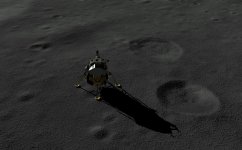
That's my adaptation of ProjectApollo and some other existing meshes, using multistage2015+spacecraft3. Works pretty well... not perfect though, but it took a lot of time to adjust attachments, etc....
 
The concrete with crater texture.

BODY Moon
NORMALS 1
LEVEL 0 D3D9Moon_A.dds 20.0
LEVEL 1 D3D9Moon_B.dds 8.0
LEVEL 2 D3D9Moon_B.dds 1.0


orbiter_2016-02-29_14-26-04-94.jpg


Here is the concrete tex.
 

Attachments

Beta19d + uTs from #3546

Beta19D with default microtex.cfg / surface.fx + texture link from post #3546 solved all my issues from #3541. Mountain slopes look realistic, no noticable repetition, gradual transitions.

In a nutshell: * W * O * W * :yes:.

Here's a 15 minute video >>> Approach to Rima Hadley <<< updated to the setup as described above; minute 6:00 and further shows the gradual blending-in of the uTs. Enjoy.

And congrats - very good job done, jarmonik :thumbup: :thumbup:
 
Last edited:
I like it very much, too!
This is with Hard Blending enabled and D3D9Moon_A2.dds.

ssUvIWi.png


Brighton Beach is just on the vertical of the left rudder.
 
What about the D3D9Moon_C.dds by rstr?
Is it to be considered disabled?

It's not really disable you can use it but it would require some editing. The texture pack I uploaded contains 3 experimental textures and it's not an "official" package of any kind.

The question would be how to properly implement a large scale micro textures. One possibility is a Micro elevation and a use of orbiter's current elevation model. Cape Canaveral goes locally up to a level 19 and so could the Moon globally via micro elevation maps. One problem is consistency with the Orbiter's physics model so that micro elevation would be taken in account in surface collision/interaction. Only Martin can make those changes. Also, a micro elevation would be a good close range solution but it wouldn't work from distance, so, a distant tiles would need to be rendered with compatible/accurate normal maps.

---------- Post added at 01:19 ---------- Previous post was at 01:06 ----------

The concrete with crater texture.
Here is the concrete tex.

It's a nice texture but it produces some anomalous lighting effects near sunset/sunrise.

Current texture channel uses are:

Red: Normal Map X-axis
Green: Normal Map Y-axis
Blue: Surface albedo
 
Quick question - I've got latest 19d and the A, A2, B from the same post - and still got the recent C in my textures folder. Do I still need the C and should I replace the A with the one from T1234? Thanks . . .

(or should I just not worry about the textures and just let you experts tell me/us? (I have enough troubles using channels etc with flight sim aircraft textures, not able to program in Orbiter . . .))
 
Last edited:
...
Red: Normal Map X-axis
Green: Normal Map Y-axis
Blue: Surface albedo
Today I suddenly remembered that in one of the colorblind threads we had quite some time ago (here) Orb said that Orbiter's MFDs use BGR color coding, and not the more usual RGB.
So, what if these brightness/contrast tweaking difficulties originated from a different color coding?

Please excuse me if I'm saying something plain wrong (probably I am), this is clearly not my field. I don't have any background or clue to say that BGR is applied anywhere else in Orbiter.
It just came to my mind and I wanted to share it.

:cheers:
 
Last edited:
That wouldn't be a problem as the texture is loaded into memory as is by D3D9, and then processed with the shaders jarmonik wrote. There you can do pretty much anything, but the most important is that the texture is never processed until it is called by the shader.

While I could also be wrong, I think it's pretty much how it works.
 
Orbiter's MFDs use BGR color coding, and not the more usual RGB. So, what if these brightness/contrast tweaking difficulties originated from a different color coding?
Unrelated. The BGR order is used just in a (text) configuration file, which may be interpreted by people in different ways, because there is no field or comment which states in which order the color components are saved. Color channels in a texture are returned where they should be, whether it's raw coded as S3TC (DXTn), ARGB, XRGB, ABGR, XBGR, RGBA, etc. There's a field which specifies the format/encoding.
 
For those less familiar with normalmaps, here's an example:

Actual lunar Heightmap (also know as bumpmap) - on this case 0 lower, 255 higher:
height.png


Corresponding Normalmap:
normal.png
 
Please, could someone state what are the correct moon A,B,C .dds to be used with the beta D3D9 as per my earlier post. Or doesn't it make any difference? I would really appreciate it. Thanks
 
Back
Top