- Joined
- Jul 16, 2008
- Messages
- 53
- Reaction score
- 0
- Points
- 0
UPDATE: new improved "A" microtexture available for download
Rob
---------- Post added at 02:44 PM ---------- Previous post was at 12:55 AM ----------
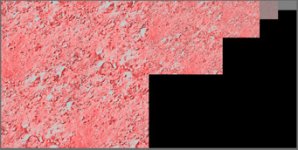
Here's a first screenshot for a replacement A texture (D3D9Moon_A.dds X240) where seamless / mipmap / normal map was applied.

IMHO this is a very realistic texture, obtained from the Apollo 15 mission image archives (AS15-89-12144HR.jpg at ALSJ), with shadows removed by area cloning, and processed to allow seamless tiling.
This "A" microtexture version X240 is attached below. Just copy this variant of D3D9Moon_A.dds into your Texture folder, replacing the previous one.
4throck, I am not very experienced in texture making, so despite reading about normal maps I am quite unsure if I did the correct processing. I used Gimp to generate the DTX5 mipmaps, and then just applied the filter=>map=>normalmap processing, with a scale of +5. But as of now I am lost in how to define and adjust the albedo on a normalmap so it doesn't look all reflective white; only kludge I have found was to switch-on option Swap RGB to achieve the above result. Any hint welcome as googling didn't help me in catching the idea .. I am still learning. And secondly, I still have doubts whether a normal map / heightmap makes sense for the 0..60 meters altitude AGL at all for depicting just small scattered rocks, and whether this normalmapping is even supported by the microtexture feature in D3D9 shader program. Thx for your lenience with a newbie's dumb questions in texturing.
oki - will be done in the next release when that insidious "Moon_A texture stripes" effect has been analyzed and fixed. Thx for the hint.Can you please put your Microtextures doc files into a proper ..\doc\Microtextures subfolder?
... much much more credit for the initiative goes to jarmonik and other D3D9Client developers / idea givers ... I was only supplementing a few hi-res seamless textures for his D3D9Client and achieving official free re-usage grant to resources in the NASA ALSJ image library for Orbiter add-on developers.Hi rstr and congrats on the initiative!
Rob
---------- Post added at 02:44 PM ---------- Previous post was at 12:55 AM ----------
Thx for your hints. My first attempt for an "A" microtexture normal map is done right now ...You need to create normalmaps and use those photos only to get albedo information...
Here's a first screenshot for a replacement A texture (D3D9Moon_A.dds X240) where seamless / mipmap / normal map was applied.
IMHO this is a very realistic texture, obtained from the Apollo 15 mission image archives (AS15-89-12144HR.jpg at ALSJ), with shadows removed by area cloning, and processed to allow seamless tiling.
This "A" microtexture version X240 is attached below. Just copy this variant of D3D9Moon_A.dds into your Texture folder, replacing the previous one.
4throck, I am not very experienced in texture making, so despite reading about normal maps I am quite unsure if I did the correct processing. I used Gimp to generate the DTX5 mipmaps, and then just applied the filter=>map=>normalmap processing, with a scale of +5. But as of now I am lost in how to define and adjust the albedo on a normalmap so it doesn't look all reflective white; only kludge I have found was to switch-on option Swap RGB to achieve the above result. Any hint welcome as googling didn't help me in catching the idea .. I am still learning. And secondly, I still have doubts whether a normal map / heightmap makes sense for the 0..60 meters altitude AGL at all for depicting just small scattered rocks, and whether this normalmapping is even supported by the microtexture feature in D3D9 shader program. Thx for your lenience with a newbie's dumb questions in texturing.
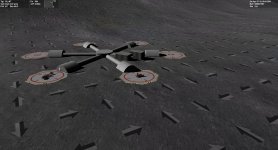
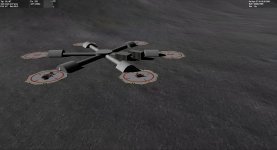
There appears to be some visible stripes between 200m-3k. ... Those are likely coming in from the _A texture.
IMHO it is a side effect from the repetitive tiling of the A texture; if there is any pattern in the texture that has a unique feature like being even slightly brighter than other areas then the repetitive tiling will convice the eye that there are two stripes along each tiling axis. Now, any interesting texture must differ from dull uniform grey .. which means that no matter how seamless the texture is we will always see some feature being recognizably repeated endlessly in two directions. As of now the A texture is 2048x2048 but even this size cannot avoid the stripe effect. Suggestions very welcome.There is a rasterizing effect present, almost drawing a grid of lines on the surface at a certain distance. I think it's coming from a shadowed border of the low-altitude tiles
Attachments
Last edited: