New Release D3D9Client Development

I cannot boast to be an expert either, but back in the days of Orulex I was able to create a seemless surface texture pattern replacement that made low altitude flight a bit more realistic. But that was a simple exchange of dds files. For D3D9Client I assume it needs more than just to swap D3D9Moon_A.dds, D3D9Moon_B.dds, and D3D3MicroBlend.dds for some seemless texture images, does it ?

There's nothing else than creating textures and fine tuning a few lines of shader code. Nothing really complicated.

The texture file it-self contains a normal map in .r and .g channels. And a surface luminosity is stored in a .b channel. The luminosity is simply a grey-scale image of the terrain. It's important that 'brightness' is centered at 0.5f otherwise the micro texture would lighten or darken rendered results.

In Beta 17f - version we had two textures _A and _B those were mixed with MicroBlend.dds to hide the repetitive pattern. There also exists two layers of micro textures. The first one kicks in somewhere around 10k and the second one below 500m. Both layers have equal texture in 17f which is probably not a good idea.

In Beta 18 the rendering was changed a bit so that _A is a close up micro texture (<100m) and _B is a high altitude micro texture (100m-10k). In Beta 18 _A texture is simply noise nothing more.

So, the questing would be how to create these textures and how to mix them to get a good results. Do we need separate low and high altitude textures ? Of course, it would be possible to bring in a _C texture if two are not enough.
 
I think the Beta 17f state was best; I don't think there is a need for a low-altitude and a high-altitude microtexture. Then again, I have all the high-res maps so it may be useful there.
 
The XR1-5 vessels do not display MFDs on the 2D cockpit in dx9 but works fine in dx7.

Working fine now, in the configuration I turned off Pow2 texture size and it is now working.
 
Last edited:
The XR1-5 vessels do not display MFDs on the 2D cockpit in dx9 but works fine in dx7.

I am getting the same response in DX9 and DX7 so could you confirm that ?

With forced pow2 MFD screens XR2 is not working here but this problem probably doesn't require any actions. Since, it only appears if user enables pow2 setting.

Code:
(2020: 11.37s 483306172486us)(0x1C8C) New RenderTargetTexture 0x7E14090 (clbkCreateSurfaceEx) (256,256)
(2021: 11.37s 483306172551us)(0x1C8C) New RenderTargetTexture 0x7E141B8 (clbkCreateSurfaceEx) (256,256)
(2022: 11.37s 483306172565us)(0x1C8C) Clear Surface 0x7E14090 (clbkCreateSurfaceEx)(256,256)
(2023: 11.37s 483306172588us)(0x1C8C) Creating D3D9 SketchPad for surface (0x7E14090)...
(2024: 11.37s 483306172603us)(0x1C8C) ...D3D9 SketchPad Released
(2156: 11.38s 483306180182us)(0x1C8C) StretchRect 0x7E14090 (clbkCreateSurfaceEx) -> 0x7E141B8 (clbkCreateSurfaceEx) (256,256)

(3775: 11.52s 483306322573us)(0x1C8C)[WARNING] Source Rect (0,0,290,290) (w=290,h=290) HANDLE=0x7E14090 (clbkCreateSurfaceEx)
(3776: 11.52s 483306322581us)(0x1C8C)[WARNING] Target Rect (1574,718,1864,1008) (w=290,h=290) HANDLE=0x7E2DB68 (BackBuffer)

The last two lines shows out-of-bounds blit into a backbuffer. The source surface is only 256x256 but the source rectangle is 290x290. So, it looks like forced pow2 setting fixes and causes some problems.
 
Last edited:
Well, the XR2 probably just has its MFDs set to a non-power of 2 ratio, then. But I really don't quite see why anyone would still turn that option on nowadays. The performance gains are minimal at our levels of computing power.
 
D3D9 Microtextures

There's nothing else than creating textures and fine tuning a few lines of shader code. Nothing really complicated.

...

So, the questing would be how to create these textures and how to mix them to get a good results. Do we need separate low and high altitude textures ? Of course, it would be possible to bring in a _C texture if two are not enough.

(Follow up to http://orbiter-forum.com/showthread.php?p=527515&postcount=3463 and http://orbiter-forum.com/showthread.php?p=527500&postcount=6802)

Hi Jarmonik,
Following up our previous discussion, I tried out a few quick-and-dirty modifications to D3D9Moon_B.dds, D3D9Moon_A.dds, and D3D9Microblend.dds, along with Marg's change of the shader-program SURFACE.FX (#3459 in this thread). Both A and B textures are new, and made seamless by GIMP to avoid the grid-like impression the original textures showed off.

Here is a comparision (I put the screenshots onto Google drive, as Gallery did not allow to appropriately zoom-in for the texture details):

Original D3D9 Texture at 4 km altitude:
https://drive.google.com/file/d/0B_lJ8zRbeAbQeG14ODF6NXZaTUE/view?usp=sharing

My new Texture at 4 km altitude:
https://drive.google.com/file/d/0B_lJ8zRbeAbQY1Y5aUk5WmFOQWs/view?usp=sharing

Original D3D9 Texture at ground level:
https://drive.google.com/file/d/0B_lJ8zRbeAbQcEpUQmJWQzlZUDA/view?usp=sharing

My new Texture at ground level:
https://drive.google.com/file/d/0B_lJ8zRbeAbQU0FfOUptOElCMG8/view?usp=sharing

For comparision a ground level picture of NASA's AS17-136-20689HR (I know, I should have referenced an image from the Apollo 15 mission when depicting the Rima Hadley area :lol: .. will replace this later):
http://history.nasa.gov/alsj/a17/AS17-136-20689HR.jpg
referenced from Eric M. Jones' Apollo Lunar Surface Journal


By "quick-and-dirty" I mean I did not yet pay attention to brightness-center, mipmaps, ..., and I did not replace the A texture by a Povray-generated texture. A and B replacement textures were made to be seamless via Gimp.
IMHO, my replacement high-altitude B texture looks fine. The A texture needs more refinement (Povray-generated) to bring the impression closer to the AS17 "real" view. I'm not sure about the Microblend file's function in respect to my modified A and B textures, so I left it as is for the time being, aside from making it also seamless. Anyway, I'm open to any comment about the changed view my replacement textures have.

Before putting in more effort to finally improve my replacement textures, I just want to ask whether the above preliminary results would justify any effort of mine. Personally, I am very much in favor of microtexture levels.
Also IMHO, in addition to Marg's SURFACE.FX modification, I would strongly suggest to add a C texture that kicks in between altitude 4 km and 20 km, and to support larger texture sizes for microtextures, e.g. at 1024x1024, to further reduce the impression of repetitiveness of the terrain while flying near the high altitude borders of A and B ranges. Maybe some Mipmap technique might also be "mis-used" to reduce the impression of repetitiveness at high altitude by intentionally adding more blurr the higher one flies. Plz comment whether these suggestions would be feasable in D3D9.

P.S.: I haven't yet published the A and B replacement texture files, as parts of these files stem from old published work of either "jtiberius" and/or "rodion" for Apollo missions ... so if we decide to move along this path, we need to ask first for permission to include their dds-files, or rather modified ones based on their originals, into a future public D3D9Client release. Hope they read this, and kindly comment !

Thanks - Rob
 
Last edited:
Before putting in more effort to finally improve my replacement textures, I just want to ask whether the above preliminary results would justify any effort of mine. Personally, I am very much in favor of microtexture levels.
Also IMHO, in addition to Marg's SURFACE.FX modification, I would strongly suggest to add a C texture that kicks in between altitude 4 km and 20 km, and to support larger texture sizes for microtextures, e.g. at 1024x1024, to further reduce the impression of repetitiveness of the terrain while flying near the high altitude borders of A and B ranges. Maybe some Mipmap technique might also be "mis-used" to reduce the impression of repetitiveness at high altitude by intentionally adding more blurr the higher one flies. Plz comment whether these suggestions would be feasable in D3D9.

Looks good. It's difficult to say before hand what could be archived with mipmap 'mis-use' without experimenting with a high quality textures. Mipmaps of the D3D9Ocean.dds have been edited give less contrasted results when viewing from distance. It should be safe to increase the texture resolution up to 2048x2048 if needed. But we are unlikely going to add textures like that to every Beta package we publish. So, we would need an additional texture package. That's not really a problem.

So, with the _C texture added there would be no need for D3D9MicroBlend anymore ?
 
Beta 19 for Orbiter Beta Rev 50

I have added the _C texture support in this build. All three textures must be present for micro texturing to work. (textures NOT included)
 

Attachments

UPDATE Moon Microtextures: Beta V1.3 + Approval of NASA ALSJ to Re-use HiRes Images

So... where can I get some to test? :P
As written in #3469, I am still awaiting for allowance from Rodion resp. JTiberius so that I can re-use some of their "Lunar Surface Textures" they published back in 2002. The images I've shown on #3469 were generated by a replacement of the original D3D9Client textures by my modifications of Rodion's/JTiberius' moon*.dds textures .. but I don't think I can publish my mods for the D3D9 microtextures without their prior okay for re-use of their work.
As both fellow Orbinauts have not been seen around for some time in this forum, as an alternative I am in parallel looking for similar "free" textures / surface images by requesting permission to re-use some LRO / Apollo mission pictures from Eric M. Jones' Lunar Surface Journal. I've found some great images there ideal for textures; first pictures of usage in D3D9 Beta19 to be posted soon .. it looks very promising. Hope to close this issue within a week's timeframe, after which I will upload those microtextures.
Rob

---------- Post added at 07:50 AM ---------- Previous post was at 07:46 AM ----------
As written in #3469, I am still awaiting for allowance from ...

Good news:
We have approval to utilize images from the NASA Apollo Lunar Surface Journal, e.g. for creating the microtextures for D3D9Client.
The ALSJ has a wealth of high resolution pictures, including not just historic ones, but also from LROC et al that will allow to generate crisp textures for Orbiter moon missions.

I will start right away with creating fine replacement D3D9Moon_A...C.dds files, and make these available asap.


FYI below plz find the mail exchange. Please strictly adhere to the request to include the originator's credits for any ALSJ pictures you might use for own Orbiter / D3D9Client textures.

Regards - Rob


----------------------------------
On 23 Feb 2016, at 2:27am, Eric M. Jones wrote:

Guten Tag Rob,

Please use any images from the Journal that will be of value in Space Flight Simulator ORBITER. I see that John Pfannerstill scanned a portion of Pan Carmera frame 9430 to produce a15.pan9430.jpg and ought to be credited to NASA/ALSJ/John Pfannerstill. Similarly for other images. For example, scans from the original film by the LROC people folks at Arizona State University should be credited to NASA/JSC/Arizona State University.

And thanks for the link to the lovely SFS screenshot of the approach to Hadley.

All the best,
Eric

On 22 Feb 2016, at 9:14pm, rstr wrote:

Dear Eric,
it's been quite a while since you so kindly accepted my panorama picture of Gene's Station 4 Color Pan for the ALSJ. Hope you are fine.

Today I would like to ask you for permission to utilize 3 pictures in the ALSJ as a template for creating moon surface textures for the non-commercial Space Flight Simulator ORBITER, a freeware Windows program ( https://en.m.wikipedia.org/wiki/Orbiter_(simulator) ).
Here is an example of the kind of pictures I would like to use: http://history.nasa.gov/alsj/a15/a15.pan9430.jpg. These image contents will allow to make moon's surface in the simulator look more realistic while flying at altitudes below 50 km.

To give you an impression of what ORBITER allows, here please enjoy a screenshot of the Space Flight Simulator in action ( actually taken from an approach towards Rima Hadley: https://drive.google.com/file/d/0B_lJ8zRbeAbQZFdqUFdvRDF2NGc/view?usp=sharing ). While the larger terrain formations like Mt. Hadley are generated from elevation data, the finer details, e.g. little craters on the surface, are just
simulated texture tiles based on the picture contents I am asking for.

Eric, I do very much hope that my polite request can be granted. Judging from your background, I suppose you can imagine how much this realtime space flight simulator motivates people to get interested in NASA's historic as well as current achievements.

Best Regards - Rob


---------- Post added at 08:00 AM ---------- Previous post was at 07:50 AM ----------

It's important that 'brightness' is centered at 0.5f

Can you briefly expand on this .. I did not understand "0.5f" ... how do you measure this ?
Thx - Rob

---------- Post added at 02:42 PM ---------- Previous post was at 08:00 AM ----------

So... where can I get some to test? :P

BETA RELEASE
Content: Microtexture enhancements for D3D9Client / Orbiter2015 beta
Author: rstr http://orbiter-forum.com/member.php?u=1183
Release: V1.3 (stripeless seamless highpass-filtered contrast-re-enhanced_A microtexture)
Release State: Beta
Download: https://drive.google.com/file/d/0B_lJ8zRbeAbQNFFjSkJ2aW1wVmM/view?usp=sharing
ToDos: some adaptations to jarmonik's D3D9Client shader program Surface.fx need to be made / luminosity balance not yet done

Description:
These are replacement microtextures for D3D9Client Beta 19 for Orbiter Beta r.50, to be deployed in the Textures folder. They will not work with earlier versions of D3D9Client. As of 2/27/2016, do not use Beta 19B for these V1.3 uTs (see post #3525).
D3D9Moon_A.dds is showing off small rocks while landed
D3D9Moon_B.dds / D3D9Moon_C.dds is showing off some detail craters for low resp. medium flight altitudes, as determined by jarmonik's D3D9Client shader program Surface.fx

Plz note the "credits" section in Doc/D3D9Client_New-Microtextures_README.txt for NASA ALSF / LROC source images used.

Screenshots for comparision of "old" D3D9Client microtextures and these replacement textures:

Old microtextures on ground:


New microtextures on ground (V1.3 update):


Old microtextures at 4 km altitude:


New microtextures at 4 km altitude:


Comments / suggestions welcome. Plz note the "ToDo"s above !
Enjoy - Rob
 
Last edited:
Well, I have only one thing to comment: It looks awesome! Landing at Hadley–Apennine with Orbiter 2016 and these new microtextures is something very special. Thank you and Jarmonik and Dr. Schweiger for all your work! Landing there one day with a NASSP Lunar Module will surely become my greatest Orbiter experience. The landing video of Apollo 15 was always my favourite and now we can experience that in Orbiter.
 
Looks nice but you have highlights and shadows on the textures.
That's a problem when they don't line up the solar illumination direction:
0010.png

You need to create normalmaps and use those photos only to get albedo information...

Perhaps you can use LROC NAC DTMs such as this to get the normalmaps...: http://pdsimg.jpl.nasa.gov/data/lro/lroc/rdr/lrolrc_2001/extras/browse/nac_dtm/virtanen2/NAC_DTM_VIRTANEN2_E180N1810.PYR.jpeg


Other than that, the textures look quite nice.

I'm trying to compute the actual size of the area covered by each microtexture.
Any help there would be welcome.

Also, I can get them to work on Mars, but not on Earth or Venus...
Any advice there?
 
Last edited:
Can you briefly expand on this .. I did not understand "0.5f" ... how do you measure this ?
Thx - Rob

Looks very good. There appears to be some visible stripes between 200m-3k. Also visible in lower left corner of 4throck's screen shot. Those are likely coming in from the _A texture. Flattening some of the mipmaps to flat grey could fix the problem. Also we need to include the necessary credits to NASA/JSC/Arizona State University in the client.

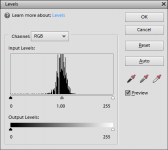
The albedo should be scaled so that 128 would be the most common value in the texture. Centered on a middle of the spectrum. See the attached screen shot. I didn't notice any problems when testing them. So, they appear to be fine already. Except the missing normals of course.

If DXT3 or DXT5 is used then the albedo could be stored in alpha channel for better quality. Also, uncompressed 1024x1024 is also an option.
 

Attachments

  • Levels.png
    Levels.png
    7.1 KB · Views: 15
Also, I can get them to work on Mars, but not on Earth or Venus...
Any advice there?

Micro textures should work on any planet or moon (except Earth) that is using the new tileformat 2. If you copy/rename D3D9Moon_A, _B, _C.dds to D3D9Venus_A, _B, _C.dds then you should have micro textures on venus in theory. But Venus is likely not yet upgraded to tile format 2. I am not sure if Martin has intention to do that.

Micro textures "should" currently "work" in these places:
Deimos
Dione
Enceladus
Iapetus
Mars
Mimas
Moon
Rhea
Tethys
Vesta
 
Last edited:
Also we need to include the necessary credits to NASA/JSC/Arizona State University in the client.
These were already listed in the README I've enclosed in the download "Doc" folder provided with the microtextures; if you want to add the credits also in the D3D9Client, plz just copy&paste from there:

D3D9Moon_C.dds:
processing applied: cropped/made seamless/mipmap
original: http://www.hq.nasa.gov/alsj/a15/a15-090713M102128467R.tif credit: LROC NASA/JSC/Arizona State University
image information: 13 July 2009 12:46:39 UTC; image M102128467R; Solar El/Az 10.8/264.9; Full-image center Lat/Long 26.02/3.76; sub-LRO Lat/Long 26.01/4.84; LRO altitude 145 km, resolution 1.48 m/pixel)
published at Apollo Lunar Surface Journal by Eric M. Jones http://www.hq.nasa.gov/alsj/a15/images15.html

D3D9Moon_B.dds:
processing applied: cropped/made seamless/mipmap
original: http://www.hq.nasa.gov/alsj/a14/M11...l_2X_deconvolved_gamma_final_0dot25meters.tif credit: LROC NASA/JSC/Arizona State University
image information: 28 November 2009 16:15:38 UTC deconvolved, gamma-corrected, 0.25 m/pixel Solar El/Az 32.1/89.1; LRO altitude 46 km, resolution 0.50 m/pixel (width) 0.55 m/pixel (height) The raw LROC image is M114064206L
published at Apollo Lunar Surface Journal by Eric M. Jones http://www.hq.nasa.gov/alsj/a14/images14.html

D3D9Moon_A.dds:
cropped/made seamless/removed shadows
original: http://www.hq.nasa.gov/alsj/a15/AS15-84-11282HR.jpg Credit: Kipp Teague NASA/Johnson
image information: frames taken by Dave Scott at Station 2, during EVA-1 image AS15-84-11282 original film 300dpi
published at Apollo Lunar Surface Journal by Eric M. Jones http://www.hq.nasa.gov/alsj/a15/images15.html#Maps


There appears to be some visible stripes between 200m-3k. ... Those are likely coming in from the _A texture.
There is a rasterizing effect present, almost drawing a grid of lines on the surface at a certain distance. I think it's coming from a shadowed border of the low-altitude tiles
I noted these too, but the effect has me puzzled as the original texture has been modified to be seamless. The original image was a photo shot taken at 45 degrees with 300 dpi resolution by the astronaut, but I don't think this non-vertical recording will have such an impact as to create this striping.. at least this was the only picture I found which allowed simulated rocks on ground, though I had to eliminate many shadows casted by the stones. The method I applied to judge any faults in seamlessness was to fill a whole screen with the texture tile ... but I could not see any stripes there !?!?? I'll have another look into this.

Looks nice but you have highlights and shadows on the textures. ... You need to create normalmaps and use those photos only to get albedo information...
Perhaps you can use LROC NAC DTMs such as this to get the normalmaps
Good point. I will work on this. Thx for the reference.

Cheers - Rob
 
Last edited:
Very nice work! :thumbup:

There is a rasterizing effect present, almost drawing a grid of lines on the surface at a certain distance. I think it's coming from a shadowed border of the low-altitude tiles (they look really cool otherwise, just perfect). Once that is balanced out, it'll be truly great!

Now, somebody get me DanSteph on the phone. I want those cars and astronauts made compatible ASAP! :lol:
 
Video of Hadley Approach using the New Microtextures for D3D9Client

Landing at Hadley–Apennine ... is something very special.

I fully agree, indy91 !
Here is a mp4 video excerpt of my landing approach at Hadley, made with the new Orbiter Beta r50 plus D3D9Client Beta 19 plus OrbiterSound plus my new low altitude microtextures with a 3-monitor surround configuration.
It's a rather "gung ho" :lol: touchdown, and most certainly far from an expert navigation :facepalm:, as I was just recording this for testing purposes of the microtextures at flight levels below 10 km and at AGL 0.

https://drive.google.com/file/d/0B_lJ8zRbeAbQeEpkLUI0dkIza2s/view?usp=sharing

Enjoy anyway - Rob
 
Last edited:
Hi rstr and congrats on the initiative!
Can you please put your Microtextures doc files into a proper ..\doc\Microtextures subfolder?
 
Back
Top