
You are using an out of date browser. It may not display this or other websites correctly.
You should upgrade or use an alternative browser.
You should upgrade or use an alternative browser.
New Release D3D9Client Development
- Thread starter jarmonik
- Start date
- Joined
- Mar 28, 2008
- Messages
- 2,708
- Reaction score
- 881
- Points
- 128
I can't tell, my software sees nothing there. I once had a payed security suite and it gave me a tons of false alarms. Felt like it was trying to cause panic. Would be good idea for people to make a scan of it to be sure. It's the same package that's been available for a year already. No recompile, no re-zipping.I also had this bitDefender warning form Orbiter2016 version d3d9client.dll like "Gen:Variant.Babar.108092" I suppose it is false?
- Joined
- Mar 28, 2008
- Messages
- 2,708
- Reaction score
- 881
- Points
- 128
Hosting service provider quit providing service. The page could become a live but not in that address. Right now, there's no plant to bring it back.So, is
forever gone?Code:http://users.kymp.net/~p501474a/D3D9Client/
So I assume it wasn't new "atmospheric" version...I can't tell, my software sees nothing there. I once had a payed security suite and it gave me a tons of false alarms. Felt like it was trying to cause panic. Would be good idea for people to make a scan of it to be sure. It's the same package that's been available for a year already. No recompile, no re-zipping.

Orbiter 2016 D3D9Client won't be getting the new atmosphere remake. That's only for OpenOrbiterSo I assume it wasn't new "atmospheric" version...
Yes, I understood. It would be good to get some d3d9 release (compiled) at some moment later for OpenOrbiter.Orbiter 2016 D3D9Client won't be getting the new atmosphere remake. That's only for OpenOrbiter
AFAIK, D3D9Client is now integrated into OpenOrbiter, atleast in the d3d9_atmo_remake branch. Some time ago that branch was merged into mainYes, I understood. It would be good to get some d3d9 release (compiled) at some moment later for OpenOrbiter.
Unfortunately I do not see how to download artifacts from #324 merge pull request (that seems latest). No link.Latest binary package for OpenOrbiter can be obtained with these instructions: Post

Jordan
Well-known member
As martins said "select the latest merge action"Unfortunately I do not see how to download artifacts from #324 merge pull request (that seems latest). No link.
https://github.com/orbitersim/orbiter/actions/runs/3812741828
Oops, I just was logged out of gitHub, but now it's OK. Hm, new atmosphere is really impressive, nothing bad to say.As martins said "select the latest merge action"
https://github.com/orbitersim/orbiter/actions/runs/3812741828
Only the sun's glare is not perfect (sun also shines through terrain and non-vessel objects), but it seems like a work is in the progress. Interesting when I accelerated time before sunrise, Shuttle Atlantis was suddenly erraticaly got lit by sunlight ON\OFF.
- Joined
- Feb 4, 2008
- Messages
- 9,753
- Reaction score
- 1,024
- Points
- 203
You don't have to have a GitHub account to download the latest release. You can do so from here: https://github.com/orbitersim/orbiter/releases and clicking on "Assets".
I downloaded the latest release artifact from the orbiter repo on GitHub, then followed the process for installing a working copy of OpenOrbiter, which is
Get a working copy of Orbiter 2016 with all the high res textures
Then extract OpenOrbiter to another folder
Specify the PlanetTex dir in the configuration file
OpenOrbiter runs fine, but whenever I enable the planet surface markers and base and vessel markers, there seems to be a glitch with rendering of vessels in D3D9Client
There is a flickering of reflective surfaces like the solar panels of the ISS, and the retro thruster doors of the DG look inside out. There is also a black shimmering patch on the radiator doors on the back of the DG. If I disable the markers using Alt-F9, the problem goes away
Again enabling the markers causes reappearance of the issue
I have not changed any of the default settings on d3d9.cfg and when markers are disabled everything works as it should
Get a working copy of Orbiter 2016 with all the high res textures
Then extract OpenOrbiter to another folder
Specify the PlanetTex dir in the configuration file
OpenOrbiter runs fine, but whenever I enable the planet surface markers and base and vessel markers, there seems to be a glitch with rendering of vessels in D3D9Client
There is a flickering of reflective surfaces like the solar panels of the ISS, and the retro thruster doors of the DG look inside out. There is also a black shimmering patch on the radiator doors on the back of the DG. If I disable the markers using Alt-F9, the problem goes away
Again enabling the markers causes reappearance of the issue
I have not changed any of the default settings on d3d9.cfg and when markers are disabled everything works as it should
- Joined
- Mar 14, 2015
- Messages
- 258
- Reaction score
- 142
- Points
- 58
- Location
- Osaka
- Website
- orbinautjp.github.io
Sorry for asking off-topic question. (I have asked the same question twice but didn't get answer)
@jarmonik Do you plan to re-upload IMFD and LTMFD?
Manual53.pdf says You may not sell or redistribute this software.
A few years ago I wrote IMFD tutorial for Japanese. I'd be grateful if you made them available again.
@jarmonik Do you plan to re-upload IMFD and LTMFD?
Manual53.pdf says You may not sell or redistribute this software.
A few years ago I wrote IMFD tutorial for Japanese. I'd be grateful if you made them available again.
- Joined
- Mar 28, 2008
- Messages
- 2,708
- Reaction score
- 881
- Points
- 128
Sorry for asking off-topic question. (I have asked the same question twice but didn't get answer)
@jarmonik Do you plan to re-upload IMFD and LTMFD?
Sorry, The so called "reallife" been keeping me busy and haven't had time to visit the forums. I have managed to upload IMFD 4.2.2 and 5.7 but failed to upload LTMFD. I'll try again later as the error message told me to. I'll combine all tutorials I got into a single package and upload it.
- Joined
- Mar 14, 2015
- Messages
- 258
- Reaction score
- 142
- Points
- 58
- Location
- Osaka
- Website
- orbinautjp.github.io
Thank you!  I have successfully downloaded both IMFD and LTMFD.
I have successfully downloaded both IMFD and LTMFD.EDIT: Oh!! Sorry! I didn't realise the site had gone!! Never mind 
Hi,
if I follow the download link on the 1st post to "Project Site", it now redirects me to:

Is it just me? Is this the correct site ??
Cheers,
BrianJ
if I follow the download link on the 1st post to "Project Site", it now redirects me to:
Elisan asiakaspalvelu - Elisa
Elisan asiakaspalvelun ohjeiden avulla saat ratkaistua useimmat asiat sekä löydät ohjeita laskuihin, liittymiin, laitteisiin ja asetuksiin.
elisa.fi
Is it just me? Is this the correct site ??
Cheers,
BrianJ
Last edited:

misha.physics
Well-known member
- Joined
- Dec 22, 2021
- Messages
- 1,484
- Reaction score
- 2,230
- Points
- 128
- Location
- Lviv
- Preferred Pronouns
- he/him
I'm wondering what parameter corresponds to the surface brightness. I launched the same scenario in Orbiter 2016 (left) and OpenOrbiter (right), and the first one is much brighter:
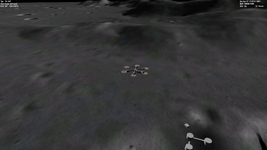
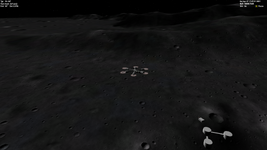
So, is it possible to make the right one brighter?
And what are these colored spots on the surface? Do they related to the D3D9 MicroTexture Pack 1.0?
So, is it possible to make the right one brighter?
And what are these colored spots on the surface? Do they related to the D3D9 MicroTexture Pack 1.0?
- Joined
- Mar 28, 2008
- Messages
- 2,708
- Reaction score
- 881
- Points
- 128
The colored spots are related to micro textures, likely a compression problem. Surface brightness can be adjusted from the atmospheric control panel. Is the darkness due to low sun angle or is the Moon globally dark ?

n72.75
Seize the means of computation
Orbiter Contributor
Addon Developer
Tutorial Publisher
Donator
- Joined
- Mar 21, 2008
- Messages
- 2,873
- Reaction score
- 1,716
- Points
- 128
- Location
- Saco, ME
- Website
- mwhume.space
- Preferred Pronouns
- he/him
Interesting bit of info: I recently ran through the default windows monitor calibration, which had me adjust the gamma by quite a bit (12%ish, up iirc).
I have since reset the D3D9 client gamma correction to the default. If anyone finds they need to correct the default gamma or color settings in D3D9 client, it's probably worth running through the basic monitor calibration first.
I have since reset the D3D9 client gamma correction to the default. If anyone finds they need to correct the default gamma or color settings in D3D9 client, it's probably worth running through the basic monitor calibration first.
Similar threads

- Sticky
- Replies
- 6
- Views
- 9K

- Replies
- 10
- Views
- 4K


- Replies
- 1
- Views
- 4K


- Replies
- 7
- Views
- 4K