Orbiter is now open source

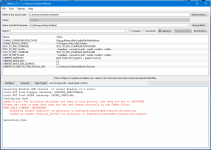
I managed to compile the Orbiter and Orbiter_ng with VS2015 and both seems to be running. Although, I had to remove HtmlHelp(). It appears to be third party software that's not mentioned on dependencies. If that's the "MS Html Help Workshop" then it appears to be no longer available. The download link gave 404. Could it be included in the repository ?

Also, the DLL's ending up in a "Dubug" sub-folder is a bit annoying. I moved them manually in the right place. Is there a script to do that ? One possibility is to write a software to browse through the project files and remove the "Debug" sub-folder from <OutDir>

Also, could "x64" option added in the configurations in addition to "Debug", "Release", "MinSizeRel" and "RelWithDebInfo" ? I am still new to CMake and don't know how to add it yet.
 

Attachments

  • Fail.png
    Fail.png
    306.3 KB · Views: 16
Also, the DLL's ending up in a "Dubug" sub-folder is a bit annoying. I moved them manually in the right place. Is there a script to do that ? One possibility is to write a software to browse through the project files and remove the "Debug" sub-folder from <OutDir>

Also, could "x64" option added in the configurations in addition to "Debug", "Release", "MinSizeRel" and "RelWithDebInfo" ? I am still new to CMake and don't know how to add it yet.
I think this is the difference between the Ninja generator and the Visual Studio generator. If you use the CMake tool, you get a VS solution, right? This would be the Visual Studio generator if I am not mistaken, which generates those sub-folders.
In my tests, I used the Ninja generator that is integrated in Visual Studio. With this the source directories won't be polluted, instead a separate workspace folder is created, and every build artifact lands there. In my case it was /out/build/x64-Debug/.
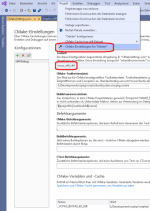
In addition, the CMake configuration integrated in Visual Studio allows for toolset selection. There I've switched to x64 chain. No clue how that works with the VS generator, though.
This is what the config setting looks like for me (sorry for the german language setting):
1627572341562.png
 
I know I haven't done much with Orbiter in a while but thanks for doing this and I wish you good health and all the best! Orbiter has brought me and other many hours of enjoyment as well as learning a lot about spaceflight.
 
No clue how that works with the VS generator, though.

It worked well. I just had to select x64 from the platform options and it generated a new set of project files for x64.
 

Attachments

  • cmake.png
    cmake.png
    200.2 KB · Views: 15
It took me years to make an orbiter forum account and then it took me another 8 years to write my first comment but here it is. Thank you Dr. Martin Schweiger for making this glorious simulator open source as I think it will increase development significantly with such a talented community. The future of orbiter is looking bright.
 
Really glad to see so many "first time I've commented in years" post. Hopefully, Orbiter going open source can attract more people to the best space sim once again!
 
I have created a PR yesterday adding GitHub Actions build in both x64 and x86 - this should help both to validate incoming PRs to the repo and iterate on x64 build. Wonder if unit tests are possible
 
Nice one, started playing this back when I was a teenager, will be good to get my hand on the code...

Going to have a dig around and see how massive an undertaking a Linux port would be.
 
I have created a PR yesterday adding GitHub Actions build in both x64 and x86 - this should help both to validate incoming PRs to the repo and iterate on x64 build. Wonder if unit tests are possible
It's C++, no reason we shouldn't be able to test it
 
From an user/add-on dev perspective what I would like to see above all is for the current handling of docking events to be changed to a more realistic one that incorporates the two stages of a docking sequence which are the initial soft capture (AKA "soft-dock") and the later hard capture ("hard-dock"). Currently only the second stage is simulated, somewhat. The first stage is critical as it serves actually capture the opposing docking mechanism and allow the relative velocities to dampen out as you have one vehicle more or less slamming into another and if things aren't entirely right, can lead to either a bounce off (best case scenario) or damage to either mechanism (worst case scenario) which would prohibit any future attempts at docking.
Found this where the worst case scenario actually happened in real life (Soyuz-10 docking to Salyut-1): http://www.russianspaceweb.com/soyuz10.html
 
I managed to compile the Orbiter and Orbiter_ng with VS2015 and both seems to be running. Although, I had to remove HtmlHelp(). It appears to be third party software that's not mentioned on dependencies. If that's the "MS Html Help Workshop" then it appears to be no longer available. The download link gave 404. Could it be included in the repository ?
I thought that the html help compiler (hhc.exe) is part of the VS toolset so everybody has it (at least for me, find_package seems to find it in a Windows toolkit). But maybe that isn't true for all VS installations? In that case I'll add it to the requirements for compiling the docs. Does the error still occur if you disable building the docs? Note you may have to pull the latest master to apply Face's fix to some docs even built with the flag unset.
Also, the DLL's ending up in a "Dubug" sub-folder is a bit annoying. I moved them manually in the right place. Is there a script to do that ? One possibility is to write a software to browse through the project files and remove the "Debug" sub-folder from <OutDir>
Yes, this is a "feature" of the VS generator. As Face mentioned, you can avoid this by using the Ninja generator (built into the latest VS) instead. It should also be possible to use Ninja with standalone CMake, but I've been unsuccessful with that so far. One quick fix if you just want a working Orbiter installation is to build the "INSTALL" target. This copies all Orbiter components into the specified installation folder with the correct directory structure. Note that you may want to change the INSTALL_PREFIX entry in your CMake settings (the default is c:\program files (x86)
Also, could "x64" option added in the configurations in addition to "Debug", "Release", "MinSizeRel" and "RelWithDebInfo" ? I am still new to CMake and don't know how to add it yet.
That isn't really part of the CMake config files themselves. It is something you specify when calling CMake on an empty cache (I think it may be the -T option) to set the flags for a specific toolset. Or if you are using cmake-gui, pick it from the list of toolset options. Essentially, you have to configure the build for either the x64 or the Win32 toolset, but you can't do both simultaneously to pick inside VS. Note that I am no expert on CMake myself. I've been picking it up mostly over the last two weeks. Once you get the hang of it, it seems relatively painless compared to other makefile systems.
 
I thought that the html help compiler (hhc.exe) is part of the VS toolset so everybody has it (at least for me, find_package seems to find it in a Windows toolkit). But maybe that isn't true for all VS installations? In that case I'll add it to the requirements for compiling the docs. Does the error still occur if you disable building the docs? Note you may have to pull the latest master to apply Face's fix to some docs even built with the flag unset.
We used to use this in work, but we moved away from it because it forced us to use a full desktop edition Windows server to compile the docs with (it uses the IE web engine to render the HTML).

There's a chocolatey package for it here; https://community.chocolatey.org/packages/html-help-workshop, with an important caveat:

UPDATE: The official Microsoft download link for HTML Help Workshop is no longer online. Since version 1.32.1, this package downloads from archive.org.
 
Looks like the humble html workshop dosn't get any love from Microsoft and is on the way out. Is there a replacement?
We used to use this in work, but we moved away from it because it forced us to use a full desktop edition Windows server to compile the docs with (it uses the IE web engine to render the HTML).
Does this refer to the compiler or the viewer? I always thought all the compiler did was zipping all source files into a single chm and adding a table of contents.
 
Looks like the humble html workshop dosn't get any love from Microsoft and is on the way out. Is there a replacement?

Does this refer to the compiler or the viewer? I always thought all the compiler did was zipping all source files into a single chm and adding a table of contents.
In our project we use Doxygen. For the Tutorials we can just use Markdown and deploy it on a website or use gh-pages.
IMO it seems simpler.
 
I would say, the most portable ways for any documentation would be HTML or PDF right now. These should also work on Linux machines without issues.
 
Wonder if unit tests are possible
They are of course, but in my experience unit tests in C++ are a real pain in the butt. There's no mocking framework, so getting the proper isolation for some tests in something like orbiter can be a ridiculous amount of work. And getting proper logging for your tests is, while not complicated, again extremely tedious because everything works with w_char_t as far as I remember. It was a very upleasant experience overall, and only useful for isolated logic. Anything that needed a wider ecosystem to instantiate was just simply not worth it, and I have a feeling that orbiter wasn't exactly written with testability as a design criterium...
 
Looks like the humble html workshop dosn't get any love from Microsoft and is on the way out. Is there a replacement?

Does this refer to the compiler or the viewer? I always thought all the compiler did was zipping all source files into a single chm and adding a table of contents.
No the compiler, trying to run it on a server core kicked out an error because it couldn't find iexplore.exe - it's actually rendering the HTML source files into that .CHM
 
Just to double-check, we will use Visual Studio 2019 to build the new Orbiter, correct? I'm asking because I'm moving XRSound 3.0 to Git as we speak, and I'm updating it to use dynamic linking instead of static linking due to the irrKlang sound engine license requirements -- the irrKlang Pro license prohibits redistributing its static build library, and obviously we won't require developers to purchase irrKlang Pro in order to build XRSound 3.0, so it will use the free irrKlang version. Currently I'm using VS 2019 for the new XRSound build.
 
Just to double-check, we will use Visual Studio 2019 to build the new Orbiter, correct? I'm asking because I'm moving XRSound 3.0 to Git as we speak, and I'm updating it to use dynamic linking instead of static linking due to the irrKlang sound engine license requirements -- the irrKlang Pro license prohibits redistributing its static build library, and obviously we won't require developers to purchase irrKlang Pro in order to build XRSound 3.0, so it will use the free irrKlang version. Currently I'm using VS 2019 for the new XRSound build.
I'd think so, at least this is what I used to compile the sources. I also use VS2019 to build D3D9Client now.
 
Back
Top