New Release D3D9Client Development

Try renaming Shuttle2016Bearly_ecam.cfg to PAYLOADBAY_ecam.cfg. If what I'm suspecting is correct, then that should work. The problem could be that you're using this external vessel as the actual payload bay interior and not the main shuttle vessel itself. And make sure that the file extension really is .cfg and not .txt. To check this, in Windows Explorer, click on Display and then make sure File extensions is checked.
 
So in the scn The payload is just the extra stuff. like GAS,.... The Shuttle2016Bearly is the whole shuttle exterior, interior. Yes the ext is .cfg
 
Just thought of something else. In SetMeshVisibilityMode make sure that EXT_PASS is enabled. The entire line should read as follows: SetMeshVisibilityMode(mesh_orbiter, MESHVIS_EXTERNAL | MESHVIS_VC | MESHVIS_EXTPASS);
 
Code:
mesh_orbiter = AddMesh(hOrbiterMesh);//mesh 1
    SetMeshVisibilityMode(mesh_orbiter, MESHVIS_EXTERNAL | MESHVIS_VC | MESHVIS_EXTPASS);
    
    
    If it matters the view is from the vc looking into the bay
 
Then I don't know what might be wrong.
 
PS: -6172 is the altitude in meters, shown on the DG MFDs

Ok, thanks. In my case the instruments show -3659 meters. I am downloading the latest elevation and texture maps. It seems that I got the "stock" (default) maps only for Mars in this installation. I saw 3km depth hole in the ground with -6172. I wonder how good idea it is to relay in a fixed value, would it be better to sample the elevation from the center of the ellipse or try to average it somehow ?
 
It would be interesting to know what levels the function gets from the Orbiter collision core when you zoom in, so we would know what level the elevation is at vs. the level of the visual grid.

Code:
(220: 4.7s 35.18ms)(0x3F34) FilterElevation[Physics][Mars]: Level=7, ilat=54, ilng=31
(250: 5.7s 06.33ms)(0x3F34) FilterElevation[Physics][Mars]: Level=5, ilat=12, ilng=26
(251: 5.7s 00.80ms)(0x3F34) FilterElevation[Physics][Mars]: Level=5, ilat=12, ilng=26
(267: 5.9s 05.80ms)(0x3F34) FilterElevation[Physics][Mars]: Level=5, ilat=12, ilng=26
-------
(397: 7.2s 450.52ms)(0x2320) FilterElevation[Graphics][Mars]: Level=0, ilat=0, ilng=0
(398: 7.2s 00.08ms)(0x2320) TileCreatedFromFile: Level=0, ilat=0, ilng=0
(399: 7.5s 330.22ms)(0x2320) FilterElevation[Graphics][Mars]: Level=1, ilat=0, ilng=1
(400: 7.5s 00.09ms)(0x2320) TileCreatedFromFile: Level=1, ilat=0, ilng=1
(401: 8.0s 479.81ms)(0x2320) FilterElevation[Graphics][Mars]: Level=2, ilat=1, ilng=3
(402: 8.0s 00.08ms)(0x2320) TileCreatedFromFile: Level=2, ilat=1, ilng=3
(403: 8.4s 369.49ms)(0x2320) FilterElevation[Graphics][Mars]: Level=3, ilat=3, ilng=6
(404: 8.4s 00.08ms)(0x2320) TileCreatedFromFile: Level=3, ilat=3, ilng=6
(405: 8.5s 104.64ms)(0x2320) FilterElevation[Graphics][Mars]: Level=3, ilat=2, ilng=6
(406: 8.5s 00.06ms)(0x2320) TileCreatedFromFile: Level=3, ilat=2, ilng=6
(407: 8.6s 51.40ms)(0x2320) FilterElevation[Graphics][Mars]: Level=4, ilat=6, ilng=12
(408: 8.6s 00.13ms)(0x2320) TileCreatedFromFile: Level=4, ilat=6, ilng=12
(409: 8.6s 51.91ms)(0x2320) FilterElevation[Graphics][Mars]: Level=4, ilat=6, ilng=13
(410: 8.6s 00.10ms)(0x2320) TileCreatedFromFile: Level=4, ilat=6, ilng=13
(411: 8.8s 154.33ms)(0x2320) FilterElevation[Graphics][Mars]: Level=5, ilat=12, ilng=26
(412: 8.8s 00.12ms)(0x2320) TileCreatedFromFile: Level=5, ilat=12, ilng=26
(413: 8.8s 52.43ms)(0x2320) FilterElevation[Graphics][Mars]: Level=5, ilat=12, ilng=25
(414: 8.8s 00.09ms)(0x2320) TileCreatedFromFile: Level=5, ilat=12, ilng=25
(415: 9.0s 153.43ms)(0x2320) TileInterpolatedFromParent: Level=6, ilat=25, ilng=52
(416: 9.1s 101.97ms)(0x2320) TileInterpolatedFromParent: Level=7, ilat=50, ilng=104
(417: 9.2s 154.03ms)(0x2320) TileInterpolatedFromParent: Level=8, ilat=100, ilng=208
(418: 9.3s 103.08ms)(0x2320) TileInterpolatedFromParent: Level=9, ilat=201, ilng=417
(419: 9.4s 102.83ms)(0x2320) TileInterpolatedFromParent: Level=10, ilat=403, ilng=834
(420: 9.5s 50.49ms)(0x2320) TileInterpolatedFromParent: Level=10, ilat=403, ilng=835
(421: 9.5s 51.40ms)(0x2320) TileInterpolatedFromParent: Level=11, ilat=806, ilng=1669
(422: 9.6s 50.88ms)(0x2320) TileInterpolatedFromParent: Level=11, ilat=806, ilng=1670
(423: 9.6s 00.65ms)(0x2320) TileInterpolatedFromParent: Level=12, ilat=1612, ilng=3339
(424: 9.6s 51.16ms)(0x2320) TileInterpolatedFromParent: Level=12, ilat=1612, ilng=3340
(425: 11.3s 1710.41ms)(0x2320) TileInterpolatedFromParent: Level=6, ilat=25, ilng=51
(426: 11.5s 153.32ms)(0x2320) TileInterpolatedFromParent: Level=6, ilat=24, ilng=52
(427: 13.5s 2019.60ms)(0x2320) TileInterpolatedFromParent: Level=10, ilat=402, ilng=835
(428: 16.4s 2926.07ms)(0x2320) TileInterpolatedFromParent: Level=10, ilat=402, ilng=834
(429: 17.8s 1373.17ms)(0x2320) TileInterpolatedFromParent: Level=12, ilat=1612, ilng=3340

 
Thanks for the info, Jarmonik. This looks like both physics and graphics filter level 8 at last (the level value obviously needs 3 added to represent the literature level value).
What I don't get: if level 8 is the last tile it filters for the visual grid, you have approx. 1,5km per elevation pixel on Mars at ca. 56° in there. Why is there actually a visual pancake with the 200m radius zero falloff example, then?
 
What I don't get: if level 8 is the last tile it filters for the visual grid, you have approx. 1,5km per elevation pixel on Mars at ca. 56° in there. Why is there actually a visual pancake with the 200m radius zero falloff example, then?

That screen shot is likely from the previous version where the filter was applied to the interpolated (lvl 12-14) results as well. This problem should be fixed from the zip I attached a few post earlier (i.e. yesterday)
 
Ah, that makes sense, yes. Level 14 would be 22m, which would explain the visible curvature of the pancake.
 
That screen shot is likely from the previous version where the filter was applied to the interpolated (lvl 12-14) results as well. This problem should be fixed from the zip I attached a few post earlier (i.e. yesterday)

For the screenshots and tests I used the latest one. On loading Orbiter indicates R4.8 (Aug 20 2020)
 
...sample the elevation from the center of the ellipse... ?

Being able to define desired elevation relative to the center of the ellipse would be good. And simpler to use.
Other calculations like area average, minimum or maximum altitude would also be useful. But only of they don't take time to implement.
I prefer a single functionality that works well and is well tested.
 
There is a new build 4.9 out for Orbiter 2016 containing some fixes and adjustments to the terrain flattening.
It did pass all of my test scenarios pretty well. The deviation between physics and graphics should be no more than a few centimeters.
With very high resolution elevation (lvl 14-17) there seems to be some unknown issues. Also tiles where the "scale" factor is less than 1.0 are problematic since the physics seems to round it to nearest full meters.
 
There is a new build 4.9 out for Orbiter 2016

Thanks! Works fine here :salute:

Tried with Ellipse -6162 -33.220001 19.129999 200 200 0 1
I'm raising terrain here about 10m so that we can see the results better.
Had to move the Pathfinder mesh a bit to match the flat area. That's expected because of coordinate / terrain point rounding.

Visual/physical surface match perfectly. I can drive around with no problems, and stop easily on the flat surface.

No complaints here, seems solid ;)
It's seamless if one uses realistic altitudes. Will be very useful for realistic terrain tweaks on the Apollo landing sites....


1598188979135.png
 
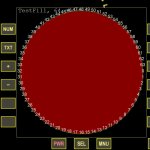
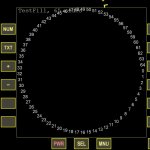
The graphics client MFD sketchpad seems to only support polygons up to 64-gons (skp->Polygon()), while the inline graphics seems to be unlimited.
Is the same possible for the D3D9 client? Or can the maximum at least be increased? (I need an approx 600-gon :geek:)

D3D9 64-gon:
D3D9-64gon.jpg

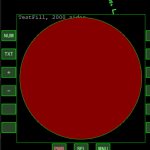
D3D9 65-gon:
D3D9-65gon.jpg

Inline client 2000-gon:
Inline-2000gon.jpg

The demo MFD is attached, if you want to experiment yourself.
 

Attachments

The graphics client MFD sketchpad seems to only support polygons up to 64-gons (skp->Polygon()), while the inline graphics seems to be unlimited.
Is the same possible for the D3D9 client? Or can the maximum at least be increased? (I need an approx 600-gon :geek:)

Yes, it's been limited to 64-gon since it's a pretty heavy process to triangulate a polygon for a hardware rendering. What exactly are you doing that requires a polygon ? Would it be possible to use ellipse instead ? Of course, I can increase the limit to 1024-gon but I have no idea how it's going to work. D3D9 Has a "CreateTriangles()" function for more efficient drawing and "void SetWorldTransform(const FMATRIX4 *pWT = NULL)" also exists.
 
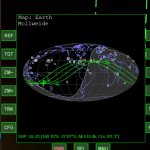
I'm using skp->Polygon for making the daylight fill in a non-rectangular map.
MollweideInline.jpg

Thanks for the hint about CreateTriangles. Do you know of any samples I could look at for implementing? Never heard about it before, and I find it difficult to understand from the API (I'm not a professional programmer ;)).

--------------------------------

I also see that there is the CreatePoly function. I tried to implement it, using:
C++:
#include "gcAPI.h"
#include "Sketchpad2.h"

bool MyMFD::Update(oapi::Sketchpad* skp)
{
    double radius = double(W / 2) * 0.95; // almost fill MFD, but not quite.

    oapi::Sketchpad2* skp2 = (oapi::Sketchpad2*)skp;
    oapi::FVECTOR2 myPolygon[MAX_POLYGON_SIDES];

    for (int i = 0; i < numberOfSides; i++)
    {
        myPolygon[i].x = W / 2 + radius * cos(double(i) / double(numberOfSides) * PI2);
        myPolygon[i].y = H / 2 + radius * sin(double(i) / double(numberOfSides) * PI2);
    }

    HPOLY myPoly = gcCreatePoly(NULL, myPolygon, numberOfSides);
    skp2->QuickBrush(0xA0000088);
    skp2->QuickPen(0xA000FF00);
    skp2->DrawPoly(myPoly);
}
But I don't get anything in the MFD.
Should be noted that I get the compile error: C:\Orbiter2016\Orbitersdk\include\gcConst.h(466,1): error C2440: 'return': cannot convert from 'oapi::FVECTOR4' to 'oapi::FVECTOR4 &', which references the code block
C++:
inline FVECTOR4& operator*= (float f)
{
    return FVECTOR4(x * f, y * f, z * f, w);
}
So I simply commented it out. Not sure if that's allowed, though. ?
 
Last edited:
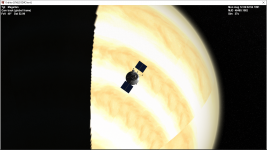
Hello, I have a problem: Whenever I open Orbiter in D3D9 mode, I notice that the clouds on Venus have trouble rendering properly (screenshot below). Any ideas?
D3D9.png
 
I'm using skp->Polygon for making the daylight fill in a non-rectangular map.
That's a lot more complicated that I ever though. I have attached a new DLL (place to /Plugins/) into the post where n-gon limit should be increased to 1024. It's an N^2 process so with 600-gon the inner loop that will process the "ears" will run 360'000 times. At least the stock MapMFD is causing a performance impact, there is a small freeze every time when the MFD is updated.

A Modern method to draw something like that would be a solution that would allow the source data to remain constant. Only a projection parameters would change over time. GPU can do trigonometric calculations without problems, so, pretty complex projections are possible. One problem would be dis-continuities, for an example if the vessel remains centered and the background map rotates and the coastal lines are continuous, then some horizontal lines would appear where the coastal line jumps from left edge to right edge. But if the map would be a 3D having a front and back sides meaning that coastal geometry would repeat twice so technically full circle would be 720 degrees.

I have never given much thought for a map rojections like that, you might have more insight, would it be possible to keep the source data constant and do projection calculations on a shader/client side with the GPU ?


Thanks for the hint about CreateTriangles. Do you know of any samples I could look at for implementing? Never heard about it before, and I find it difficult to understand from the API (I'm not a professional programmer ;)).

I used a following code the create a color picker seen over here: https://www.orbiter-forum.com/threads/d3d9client-development.16787/post-262584

C++:
float a = 0.0f;
float s = float(PI2/6.0);

oapi::TriangleVtx Vtx[8];
oapi::FVECTOR2 Pol[6];

for (int i = 0; i < 6; i++) {
    Pol[i].x = cos(a);
    Pol[i].y = sin(a);
    Vtx[i + 1].pos.x = Pol[i].x;
    Vtx[i + 1].pos.y = Pol[i].y;
    Vtx[i + 1].color = gcColor(&HUEtoRGB(a));
    a += s;
}

// Center vertex
Vtx[0].pos.x = 0.0f;
Vtx[0].pos.y = 0.0f;
Vtx[0].color = 0xFFFFFFFF;    // White
Vtx[7] = Vtx[1];

hPoly[0] = gcCreateTriangles(NULL, Vtx, 8, PF_FAN);


gcCreatePoly function only creates polylines it doesn't create filled polygon. I see nothing wrong in the code except object allocation, one "global" object should be used but it doesn't explain the lack out output. I need to run some tests...

EDIT: There is one example program located in OrbiterSDK/samples/DrawOrbits/ which will use gcCreatePoly() pre-created "unit" Orbit templates to draw orbital lines in a planetarium view.

C++:
#include "gcAPI.h"
#include "Sketchpad2.h"

HPOLY g_myPoly = NULL;   // Allocate one global object

bool MyMFD::Update(oapi::Sketchpad* skp)
{
    double radius = double(W / 2) * 0.95; // almost fill MFD, but not quite.

    oapi::Sketchpad2* skp2 = (oapi::Sketchpad2*)skp;
    oapi::FVECTOR2 myPolygon[MAX_POLYGON_SIDES];

    for (int i = 0; i < numberOfSides; i++)
    {
        myPolygon[i].x = W / 2 + radius * cos(double(i) / double(numberOfSides) * PI2);
        myPolygon[i].y = H / 2 + radius * sin(double(i) / double(numberOfSides) * PI2);
    }

    g_myPoly = gcCreatePoly(g_myPoly, myPolygon, numberOfSides);
    skp2->QuickBrush(0xA0000088);
    skp2->QuickPen(0xA000FF00);
    skp2->DrawPoly(myPoly);
}
 

Attachments

Last edited:
Triangle strip PF_STRIP layout should be following: (this is probably one of those feature that's never been tested)

Code:
0---2---4---
| \ | \ | \
1---3---5---

or

1---3---5---
| \ | \ | \
0---2---4---
 
Back
Top