
-
ORBITER-FORUM will be temporarily closed at 2026-07-23 18:00 UTC while we complete some OF maintenance tasks. The amount of downtime is expected to take up to one hour, but probably less.
You are using an out of date browser. It may not display this or other websites correctly.
You should upgrade or use an alternative browser.
You should upgrade or use an alternative browser.
New Release D3D9Client Development
- Thread starter jarmonik
- Start date

- Joined
- Apr 1, 2008
- Messages
- 2,167
- Reaction score
- 663
- Points
- 113
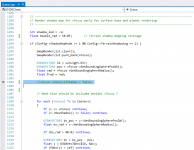
@Jarmo: I could make the shadow re-appear by removing the initial falsification of bStencilShadow in Scene::RenderMainScene().

But it seems a bit odd...is this really the reason for not rendering shadows at higher altitudes?
Could you please double-check (Scenario included)
I'll hold back that commit until we're convinced
But it seems a bit odd...is this really the reason for not rendering shadows at higher altitudes?
Could you please double-check (Scenario included)
I'll hold back that commit until we're convinced
Attachments
yitianetie
Member
Hi,
Sorry to come back but I have found, by looking some planets, a new bug related to cloud layer above Titan while using D3D9 client.
Normally, with high-res textures in default dxd7 orbiter client, you have this appearance (with cloud layer and cloud shadows enabled) :
https://drive.google.com/open?id=1KaRVrcTEs36nFVnF6-s1kHjnfiBNDHF5
But if you use D3D9 client (last stable version, but same problem with previous stable r1224), I have this view :
https://drive.google.com/open?id=1T5d0cn8PcSBUs1R9vnT45L0xWPuxICYS
The color becomes like fade beige and we don't see any relief. It seems that the cloud layer is badly interpreted by the D3D9 client.
The log says nothing more :
So how can I solve that issue ? Or maybe it is not an issue and that is the real rendering with atmospheric/cloud layer. But I have the same kind of difference with Venus. Venus atmosphere seems very heavy with D3D9 client, and rather light with default D3D7 (But I had read that this one is actually a radar picture).
Venus in Orbiter (D3D7) : https://drive.google.com/open?id=1VTRWdj254l-FJpOWkVOK0LSy_jVGsnNh
Venus in OrbiterNG (D3D9) : https://drive.google.com/open?id=164uWvcaYQhGqLysew0QEAOuHa-IvrmIY
I think I need some explanations because I am maybe wrong .
.
Kind regards,
Etienne
---------- Post added at 11:36 PM ---------- Previous post was at 10:39 PM ----------
I have disabled cloud shadows but kept cloud layer enabled and the result seems better. Do you usually use cloud shadows in Orbiter ?
Sorry to come back but I have found, by looking some planets, a new bug related to cloud layer above Titan while using D3D9 client.
Normally, with high-res textures in default dxd7 orbiter client, you have this appearance (with cloud layer and cloud shadows enabled) :
https://drive.google.com/open?id=1KaRVrcTEs36nFVnF6-s1kHjnfiBNDHF5
But if you use D3D9 client (last stable version, but same problem with previous stable r1224), I have this view :
https://drive.google.com/open?id=1T5d0cn8PcSBUs1R9vnT45L0xWPuxICYS
The color becomes like fade beige and we don't see any relief. It seems that the cloud layer is badly interpreted by the D3D9 client.
The log says nothing more :
Code:
**** Orbiter.log
000000.000: Build Aug 28 2016 [v.160828]
000000.000: Timer precision: 1e-007 sec
000000.000: Found 0 joystick(s)
000000.000: Module AtlantisConfig.dll .... [Build 160828, API 160828]
000000.000: Module AtmConfig.dll ......... [Build 160828, API 160828]
000000.000: Module DGConfigurator.dll .... [Build 160828, API 160828]
000000.000: ---------------------------------------------------------------
BaseDir    : D:\Orbiter\Orbiter2016\
ConfigDir  : D:\Orbiter\Orbiter2016\Config\
MeshDir    : D:\Orbiter\Orbiter2016\Meshes\
TextureDir : D:\Orbiter\Orbiter2016\Textures\
HightexDir : D:\Orbiter\Orbiter2016\Textures2\
ScenarioDir: D:\Orbiter\Orbiter2016\Scenarios\
000000.000: ---------------------------------------------------------------
D3D9 DLLs  : C:\WINDOWS\SYSTEM32\d3d9.dll [v 10.0.18362.387]
           : C:\WINDOWS\SYSTEM32\d3dx9_43.dll [v 9.29.952.3111]
000000.000: ---------------------------------------------------------------
000000.000: Module D3D9Client.dll ........ [Build 200418, API 160828]
000000.000:
000000.000: **** Creating simulation session
000000.000: D3D9: [DirectX 9 Initialized]
D3D9: 3D-Adapter.............. : NVIDIA GeForce GTX 950M
D3D9: MaxTextureWidth......... : 16384
D3D9: MaxTextureHeight........ : 16384
D3D9: MaxTextureRepeat........ : 8192
D3D9: VolTexAddressCaps....... : 0x3F
D3D9: NumSimultaneousRTs...... : 4
D3D9: VertexDeclCaps.......... : 0x30F
D3D9: MiscCaps................ : 0x2FCEF2
D3D9: XNA Math Support........ : Yes
D3D9: Vertex Texture.......... : Yes
D3D9: Separate AlphaBlend..... : Yes
D3D9: Shadow Mapping.......... : Yes
D3D9: D3DFMT_A16B16G16R16F.... : Yes
D3D9: D3DFMT_A32B32G32R32F.... : Yes
D3D9: D3DFMT_D32F_LOCKABLE.... : Yes
D3D9: D3DFMT_A2R10G10B10...... : Yes
D3D9: D3DFMT_L8............... : Yes
D3D9: D3DDTCAPS_DEC3N......... : No
D3D9: D3DDTCAPS_FLOAT16_2..... : Yes
D3D9: D3DDTCAPS_FLOAT16_4..... : Yes
D3D9: Runs under WINE......... : No
D3D9: D3D9Build Date.......... : 200418
D3D9: Available Texture Memory : 4088 MB
000000.000: D3D9: [3DDevice Initialized]
000000.000: D3D9: [Loading Constellations]
000000.000: D3D9: [D3D9Client Initialized]
000000.000: Module Sun.dll ............... [Build 160828, API 160828]
VSOP87(E) Sun: Precision 1e-006, Terms 554/6634
000000.000: Module Mercury.dll ........... [Build 160828, API 160828]
VSOP87(B) Mercury: Precision 1e-005, Terms 167/7123
000000.000: Module Venus.dll ............. [Build 160828, API 160828]
000000.000: Module VenusAtm2006.dll ...... [Build 160828, API 160828]
VSOP87(B) Venus: Precision 1e-005, Terms 79/1710
000000.000: Module Earth.dll ............. [Build 160828, API 160828]
000000.000: Module EarthAtmJ71G.dll ...... [Build 160828, API 160828]
VSOP87(B) Earth: Precision 1e-008, Terms 2564/2564
000000.000: Module Moon.dll .............. [Build 160828, API 160828]
ELP82: Precision 1e-005, Terms 116/829
000000.000: Module Mars.dll .............. [Build 160828, API 160828]
000000.000: Module MarsAtm2006.dll ....... [Build 160828, API 160828]
VSOP87(B) Mars: Precision 1e-005, Terms 405/6400
000000.000: Module Phobos.dll ............ [Build ******, API 060425]
000000.000: Module Deimos.dll ............ [Build ******, API 060425]
000000.000: Module Galsat.dll ............ [Build 160828, API 160828]
000000.000: Module Jupiter.dll ........... [Build 160828, API 160828]
VSOP87(B) Jupiter: Precision 1e-006, Terms 1624/3625
000000.000: Module Io.dll ................ [Build 160828, API 160828]
000000.000: Module Europa.dll ............ [Build 160828, API 160828]
000000.000: Module Ganymede.dll .......... [Build 160828, API 160828]
000000.000: Module Callisto.dll .......... [Build 160828, API 160828]
000000.000: Module Satsat.dll ............ [Build 160828, API 160828]
000000.000: Module Saturn.dll ............ [Build 160828, API 160828]
VSOP87(B) Saturn: Precision 1e-006, Terms 2904/6365
000000.000: Module Mimas.dll ............. [Build 160828, API 160828]
SATSAT Mimas: Terms 113
000000.000: Module Enceladus.dll ......... [Build 160828, API 160828]
SATSAT Enceladus: Terms 33
000000.000: Module Tethys.dll ............ [Build 160828, API 160828]
SATSAT Tethys: Terms 101
000000.000: Module Dione.dll ............. [Build 160828, API 160828]
SATSAT Dione: Terms 59
000000.000: Module Rhea.dll .............. [Build 160828, API 160828]
SATSAT Rhea: Terms 68
000000.000: Module Titan.dll ............. [Build 160828, API 160828]
SATSAT Titan: Terms 100
000000.000: Module Iapetus.dll ........... [Build 160828, API 160828]
SATSAT Iapetus: Terms 605
000000.000: Module Uranus.dll ............ [Build 160828, API 160828]
VSOP87(B) Uranus: Precision 1e-006, Terms 1827/5269
000000.000: Module Miranda.dll ........... [Build ******, API 060425]
000000.000: Module Ariel.dll ............. [Build ******, API 060425]
000000.000: Module Umbriel.dll ........... [Build ******, API 060425]
000000.000: Module Titania.dll ........... [Build ******, API 060425]
000000.000: Module Oberon.dll ............ [Build ******, API 060425]
000000.000: Module Neptune.dll ........... [Build 160828, API 160828]
VSOP87(B) Neptune: Precision 1e-006, Terms 391/2024
000000.000: Finished initialising world
000000.000: Module DeltaGlider.dll ....... [Build 160828, API 160828]
000000.000: Module LuaInline.dll ......... [Build 160828, API 160828]
000000.000: Module ShuttleA.dll .......... [Build 160828, API 160828]
000000.000: Finished initialising status
000000.000: Finished initialising camera
000000.000: Finished setting up render state
000000.000: D3D9: [Scene Initialized]
000000.000: Finished initialising panels
000008.050: D3D9: [Session Closed. Scene deleted.]
000008.050: D3D9: [Destroy Render Window Called]
000008.050: **** Closing simulation session
So how can I solve that issue ? Or maybe it is not an issue and that is the real rendering with atmospheric/cloud layer. But I have the same kind of difference with Venus. Venus atmosphere seems very heavy with D3D9 client, and rather light with default D3D7 (But I had read that this one is actually a radar picture).
Venus in Orbiter (D3D7) : https://drive.google.com/open?id=1VTRWdj254l-FJpOWkVOK0LSy_jVGsnNh
Venus in OrbiterNG (D3D9) : https://drive.google.com/open?id=164uWvcaYQhGqLysew0QEAOuHa-IvrmIY
I think I need some explanations because I am maybe wrong
.Kind regards,
Etienne
---------- Post added at 11:36 PM ---------- Previous post was at 10:39 PM ----------
I have disabled cloud shadows but kept cloud layer enabled and the result seems better. Do you usually use cloud shadows in Orbiter ?
Last edited:
- Joined
- Mar 28, 2008
- Messages
- 2,707
- Reaction score
- 881
- Points
- 128
@Jarmo: I could make the shadow re-appear by removing the initial falsification of bStencilShadow in Scene::RenderMainScene().
No, that's not really the issue. We have two different kind of ground shadows and Stencil shadows is just one of them (the backup) if the first one fails for reason.
Fix commited to 2016 branch.
---------- Post added at 04:53 ---------- Previous post was at 04:27 ----------
Hi,
Sorry to come back but I have found, by looking some planets, a new bug related to cloud layer above Titan while using D3D9 client.
I have disabled cloud shadows but kept cloud layer enabled and the result seems better. Do you usually use cloud shadows in Orbiter ?
Yes I have cloud shadows enabled. But I haven't been on a Titan for a while, it's usually the Earth and Mars that's being used for testing. Titan looks better in O2016 but it's broken in Beta, also it would appear that the atmospheric configuration controls are not responding at all on Titan. So, something is wrong. Also Venus is missing configuration files completely.
Will look into it.. Hopefully soon.
- Joined
- Apr 1, 2008
- Messages
- 2,167
- Reaction score
- 663
- Points
- 113
yitianetie
Member
Hi again,
I have 2 thoughts and questions about some graphic options :
1. Do should I use cubic or linear interpolation for the elevation ? Several addons that feature surface activities (like GeneralVehicle, AMSO and maybe oMMU) seems to work much better with linear interpolation. But in the past, some users said that linear interpolation would be more instable than cubic, by reading this post : https://www.orbiter-forum.com/showthread.php?t=36637&page=10. But it seems to be more related to Orbiter beta than the official one.
2. Finally, it seems that set mesh resolution for terrain on 64 does not shows real differences than set on 32, especially on Moon or Mars while using High resolutions textures and elevations provided by Martin. The only thing I have noticed is the fact that shadows are less blurry but more pixelated when setting mesh resolution on 64, especially with linear interpolation. Do shoud we see real improvements instead ?
Best regards,
Etienne
I have 2 thoughts and questions about some graphic options :
1. Do should I use cubic or linear interpolation for the elevation ? Several addons that feature surface activities (like GeneralVehicle, AMSO and maybe oMMU) seems to work much better with linear interpolation. But in the past, some users said that linear interpolation would be more instable than cubic, by reading this post : https://www.orbiter-forum.com/showthread.php?t=36637&page=10. But it seems to be more related to Orbiter beta than the official one.
2. Finally, it seems that set mesh resolution for terrain on 64 does not shows real differences than set on 32, especially on Moon or Mars while using High resolutions textures and elevations provided by Martin. The only thing I have noticed is the fact that shadows are less blurry but more pixelated when setting mesh resolution on 64, especially with linear interpolation. Do shoud we see real improvements instead ?
Best regards,
Etienne
Last edited:
- Joined
- Mar 28, 2008
- Messages
- 2,707
- Reaction score
- 881
- Points
- 128
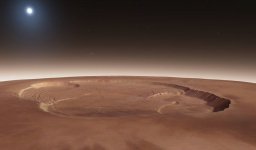
While looking at other things I noticed something odd:
That's a know issue. The surface texture is just a photograph and the light is often coming from a different direction when the photo have been taken than the current light direction in the Orbiter. In theory it should be possible to reverse-engineer the lighting. But even to attempt that we would need to have information about the light direction when each of those individual photos were taken and we don't have that for a surface textures. I believe the database that's containing all those surface photos would have the information available.
---------- Post added at 11:50 ---------- Previous post was at 11:40 ----------
Hi again,
I have 2 thoughts and questions about some graphic options :
1. Do should I use cubic or linear interpolation for the elevation ? Several addons that feature surface activities (like GeneralVehicle, AMSO and maybe oMMU) seems to work much better with linear interpolation. But in the past, some users said that linear interpolation would be more instable than cubic, by reading this post : https://www.orbiter-forum.com/showthread.php?t=36637&page=10. But it seems to be more related to Orbiter beta than the official one.
2. Finally, it seems that set mesh resolution for terrain on 64 does not shows real differences than set on 32, especially on Moon or Mars while using High resolutions textures and elevations provided by Martin. The only thing I have noticed is the fact that shadows are less blurry but more pixelated when setting mesh resolution on 64, especially with linear interpolation. Do shoud we see real improvements instead ?
Right now the "cubic" gives a better terrain quality but it fails on terrain collisions, so, objects those are landed may be floating above the terrain or sink into it. The "linear" mode should have very accurate terrain collisions but the quality is little less.
Terrain mesh resolution 32/64 setting should have very little effect in anything except memory consumption. I don't know why shadows are effected by the setting, they shouldn't be I haven't looked into that yet. I'll always keep it at 32.
- Joined
- Feb 4, 2008
- Messages
- 9,758
- Reaction score
- 1,028
- Points
- 203
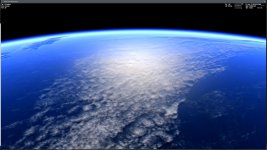
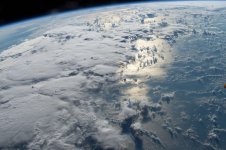
Is there any way that the water layer specular reflections could be disabled for the cloud layer? Also how hard would it be to implement a bump or normal map for the cloud layer? This would give the clouds some depth.
Attachments

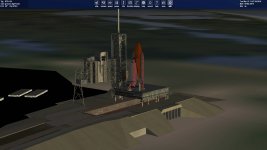
When I move the mouse to the left or right edges of the window, gray menu-like boxes slide into view, but nothing is in them... new stuff?
- Joined
- Apr 1, 2008
- Messages
- 2,167
- Reaction score
- 663
- Points
- 113
Short answer: Yes... new stuff?
Little more detailed answer: gcGUI is (currently experimental) announced here https://www.orbiter-forum.com/showthread.php?p=600950&postcount=5062
Short answer: Yes
Little more detailed answer: gcGUI is (currently experimental) announced here https://www.orbiter-forum.com/showthread.php?p=600950&postcount=5062
Ok, thanks!
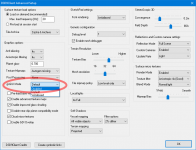
And by the way, in case it confuses you, you can of course disable it:

As it was showing empty, I thought I messed something due to recent changes on my end.
Thanks again!
- Joined
- Mar 28, 2008
- Messages
- 2,707
- Reaction score
- 881
- Points
- 128
Is there any way that the water layer specular reflections could be disabled for the cloud layer? Also how hard would it be to implement a bump or normal map for the cloud layer? This would give the clouds some depth.
Will look into the specular issue... I did think about normal mapped clouds several years ago but it would be very difficult to obtain a proper normal maps and it would still be flat.
An other possibility is a mesh based clouds where a mesh would provide some real 3D. Of course, those would need to be covered by particles when viewed from up-close to bringing some detail and volume. Different kind of clouds could have a different altitudes. But that's just an idea, there's lot of design and work required to actually become implemented and I am not an artist so that's a road-block no:1.
Any other ideas for better clouds ?
- Joined
- Feb 4, 2008
- Messages
- 9,758
- Reaction score
- 1,028
- Points
- 203
Any idea how FSX did the clouds? Those look awesome and very realistic. Even by today's standards they hold up very well. Not sure how much they tax a GPU though.Any other ideas for better clouds ?
- Joined
- Mar 28, 2008
- Messages
- 2,707
- Reaction score
- 881
- Points
- 128
New Build
New builds are out for 2016 and Beta.
- Changed a default setting of gcGUI not to open side window docks.
- Fixed Olympus vessel shadow issue.
- Cloud layer "specular" rendering improved.
---------- Post added at 06:20 ---------- Previous post was at 06:14 ----------
No, not really, haven't used much FSX so I don't know how they look like. I fly with X-Plane. I tried FSX once but the controls were so awkward that I cave up.
New builds are out for 2016 and Beta.
- Changed a default setting of gcGUI not to open side window docks.
- Fixed Olympus vessel shadow issue.
- Cloud layer "specular" rendering improved.
---------- Post added at 06:20 ---------- Previous post was at 06:14 ----------
Any idea how FSX did the clouds?
No, not really, haven't used much FSX so I don't know how they look like. I fly with X-Plane. I tried FSX once but the controls were so awkward that I cave up.
- Joined
- Feb 4, 2008
- Messages
- 9,758
- Reaction score
- 1,028
- Points
- 203
I can confirm that the clouds look better now that they don't reflect the sunlight. And as for how clouds looks like in FSX, do an a Google Image search for "FSX clouds" and it should bring up plenty of screenshots that shows how they look.New builds are out for 2016 and Beta.
- Changed a default setting of gcGUI not to open side window docks.
- Fixed Olympus vessel shadow issue.
- Cloud layer "specular" rendering improved.
---------- Post added at 06:20 ---------- Previous post was at 06:14 ----------
No, not really, haven't used much FSX so I don't know how they look like. I fly with X-Plane. I tried FSX once but the controls were so awkward that I cave up.
- Joined
- Mar 28, 2008
- Messages
- 2,707
- Reaction score
- 881
- Points
- 128
I can confirm that the clouds look better now that they don't reflect the sunlight. And as for how clouds looks like in FSX, do an a Google Image search for "FSX clouds" and it should bring up plenty of screenshots that shows how they look.
They look very similar in X-Plane. The clouds are particles very much like the smoke/reentry trails we see in Orbiter.
In the Orbiter the clouds from a close up distance would need to be coherent with the clouds/weather patterns seen from orbit. For an example when zooming from surface level through cloud layer to orbital view. This kind of requirement makes the implementation more problematic in Orbiter than in X-Plane or FSX.
Can you view the Earth from orbit in FSX ?

4throck
Enthusiast !
- Joined
- Jun 19, 2008
- Messages
- 3,489
- Reaction score
- 1,012
- Points
- 153
- Location
- Lisbon
- Website
- orbiterspaceport.blogspot.com
It's "simple" - use the global cloud textures to generate your particle placement and density :thumbup:
Similar threads

- Sticky
- Replies
- 6
- Views
- 10K

- Replies
- 10
- Views
- 4K


- Replies
- 1
- Views
- 4K


- Replies
- 7
- Views
- 4K