New Release D3D9Client Development

An issue with the R3b.
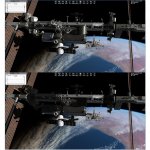
I took a shot of the same scene with the R3 and R3b.
The R3b version has many meshes that are not lit by sunlight. The R3 (top) shot is after I reinstalled the R3 over the R3b and the reflections work, with all the vessels lit. With a few frame rate decrease.
 

Attachments

  • R3_R3b.jpg
    R3_R3b.jpg
    204.3 KB · Views: 80
Last edited:
I found the problem for this bug I posted about earlier.

Not sure if this is a documented bug or not, but with all clients for the official Orbiter 2016 build after R2-Beta1, the atmosphere looks like this (this is a clean install).
attachment.php

The problem is the integrated Intel graphics card. When I run it on our new computer which has a dedicated graphics card it looks amazing. As soon as I run it on one with an integrated card the problem reappears.
 
The vessel self shadowing is so beautiful. Now I realise what is it that Orbiter was missing so long.

The shadow cast by the vessel is projected onto the base objects. Can the base objects cast shadows onto other base objects?

Also, can someone please explain the various options under the self shadows section in the d3d9 client advanced tab? And what those various local light source options do?

And how to add reflectivity to vessels like the deltaglider?
 
Can the base objects cast shadows onto other base objects?

Currently, no. Base objects have some problems preventing a proper shadowing. Only objects those are compact enough can be shadowed with current technique.

Configuration settings:

Top-Left:
This will control how many vessels will receive shadowing feature, varying from "None" to "All visible" vessels.

Top-Right:
That will select filtering for shadow maps. "9 Samples" is the fastest setting for older computers and "27s Dither" is the best that is currently available. Better filtering produces a smoother (better) edges for shadows. The difference becomes more visible when zooming the camera into a shadows.

Bottom-Left:
This setting will choose the shadowing mode for planetary surface and base-objects. "Stensil" is the legacy mode that's been there for ages. "Projective" produces more realistic surface shadows for the focus (i.e. currently active) vessel but doesn't effect in any other vessel (all the other vessels are using Stensil shadows). In this mode the focus vessel can cast shadows on base objects. This shadowing option doesn't work well if the vessel is inside a base object.

Local light sources:
That will simply select the maximum number of light sources that can emit light at the same time on the same mesh. Each mesh can have a different set of light sources casting light on them. So, you can see light sources on screen lot more than just 4 or 8.

"Partial light" settings only perform diffuse light computations, no specular reflections from light sources. "Full light" also performs specular light computations.

 
Last edited:
Hehe, thanks for the "hint" Jarmo :thumbup:

I take that as a request to update the documentation...;)
Some things have already been done (trunk rev.958), but as the Dialog has undergone a lot of changes some more tweaking has to be done.
Stay tuned!
 
Great job with the shadows Jarmonik, thanks!

I just downloaded the latest version for O2016 and noticed the boundary between light and shadow looks kind of fading instead of a clear cut line

You can see here how the Orbiter mid body projects its shadow over the wing
View attachment 15792

is this a normal feature or maybe I have some wrong settings?
 
Last edited:
is this a normal feature or maybe I have some wrong settings?

It's intended to work like that. In reality, shadows are pretty sharp close to a caster but becomes more blurred edged farther a way. In our case the amount of blurriness in fixed.

You can reduce the kernel size to make the edges less blurry.
#define KERNEL_RADIUS 3.0f

from /Modules/D3D9Client/PBR.fx

Also if performance is not a problem then higher resolution shadow maps will also sharpen the edges:

ShadowMapSize = 2048

in D3D9Client.cfg. Max size in 4096

---------- Post added at 16:25 ---------- Previous post was at 16:19 ----------

Also, should be noted that sharper shadows will more likely produce shadowing artifacts (problems) when the light is coming from a shallow angle to a surface.
 
In reality, shadows are pretty sharp close to a caster but becomes more blurred edged farther a way.

Does that actually hold true in a vacuum? I thought that was mostly due to scattering...
 
Does that actually hold true in a vacuum? I thought that was mostly due to scattering...
That was my understanding of the physics involved as well that shadows in any sort of tangible atmosphere would scatter (IE appear diffuse) due to light scattering. In space this wouldn't be true as there wouldn't be anything to scatter the light.
 
A shadow cast onto a surface in space will not be diffused by atmosphere, but still will not have an absolute clear boundary as the light source (sun) is not a point source!
I expect that some wave-function will describe the actual boundary in some way, but that's something that's over my head ;)
 
I doubt there would exist a clear analytical solution that would be nice to look at, or would let you draw conclusions about what's happening from it - but modeling a non-point sources is just a convolution of a bunch of point-sources.

In not so little words:
So lets say we're looking at a flat plane with a shadow on it cast by the Sun which you have modeled as a point source. Let's say you've gotten some kind of flux-vs-position relationship from that point-source model to your surface.
To upgrade that model to a non-point source like model:
1) you would model a lot of point sources in the shape of a disk where each point would approximate the SED of that part of Sun's disk,
2) you would convolve all of those point sources together,
3) and then plug that into the same flux-vs-position relationship you had originally.
You can imagine this as saying that every part of Sun's disk is contributing differently to total flux at some point xy depending on the SED that modeled part of the Sun has.

So the math per say isn't that difficult to establish I'd imagine, but would definitely not be something that would be solvable "by hand".
 
Looking at some hi res pics of the Shuttle in LEO it seems there is no blur at all, at least when the shadows are casted on a flat surface.


Here is an example:
View attachment 15805


It looks pretty different from the effect that D3D9 gives
 
Last edited:
As Jarmonik explained:

In reality, shadows are pretty sharp close to a caster but becomes more blurred edged farther a way. In our case the amount of blurriness in fixed.

So the payload doors are close to the wings and cast a very sharp shadow.
A more distant object would cast a softer shadow.

But I don't see much problem with the current default value.
It looks good and even better than some commercial games.
 
Here are a couple of ISS/shuttle images showing blurry shadows while on orbit. In both cases there is a big distance between the object casting the shadow and the object receiving it.

ISS_%26_Endeavour_Shadow_STS-127_2.jpg


5480781411_9e965a75c4_o.jpg
 
Question - Orbiter 2010 D3D9 sunset tweak

Hi there, people! Is there a way to tweak the D3D9 client for orbiter 2010 so that the sunset looks similar to the one in orbiter 2016 with D3D9 client?
 
Any chance of seeing the GDI compatibility issue fixed with the most recent D3D9 client for Orbiter 2010 or has the 2010 version been abandoned in favor of Orbiter 2016? I also noticed that GDI compatibility also doesn't work in the latest version of the client for Orbiter 2016. For Orbiter 2010, to fly the Shuttle Fleet shuttle with the altitude in feet vs. airspeed in knots display in the glass cockpit view, I had to dig through my archives to find an earlier version of the client where the GDI compatibility worked.
 
Hi there, people! Is there a way to tweak the D3D9 client for orbiter 2010 so that the sunset looks similar to the one in orbiter 2016 with D3D9 client?

It would require so much of work that it doesn't really qualify as "tweaking". So, the answer is no. Sorry.

---------- Post added at 22:15 ---------- Previous post was at 22:01 ----------

Any chance of seeing the GDI compatibility issue fixed with the most recent D3D9 client for Orbiter 2010 or has the 2010 version been abandoned in favor of Orbiter 2016? I also noticed that GDI compatibility also doesn't work in the latest version of the client for Orbiter 2016. For Orbiter 2010, to fly the Shuttle Fleet shuttle with the altitude in feet vs. airspeed in knots display in the glass cockpit view, I had to dig through my archives to find an earlier version of the client where the GDI compatibility worked.

The GDI has been causing a lot of headache in D3D9. DX7 is a GDI friendly API and it's working there pretty well but it doesn't fit well into a multi-threaded environment of a newer APIs like DX9. DX10 and OpenGL doesn't support the GDI at all as far as I can tell.

What is the version number of the Client where the GDI compatibility is still working ?

Would it be possible to create an addon to display that information in the glass-cockpit using sketchpad ? I wonder.
 
I know it's difficult to characterize a bug with no examples or screenshot, but here goes:

If you have colored lights and then add white spotlights, the spotlights will sometimes shine with colors! Those colors change with distance / intensity.
Also you see some sort of z-fighting between the lights.
I've discovered this while coding spotlights onto my Altair lander. So there's a chance of an error no my code. But on the inline client all it well.

Has anyone encountered such issues?
 
Back
Top