New Release XR2 Ravenstar 1.0 / XR1 1.5 / XR5 Vanguard 1.2 Released

Your idea with the font sizes is very hard to do. Also the ship itself does not know if you scale the panel or not, that is all done by orbiter. Unfortunately orbiter does not do that very nicely (as you have seen). So even scaling up is not a real beauty.
I recomend not scaling the panel and using the arrow keys to scroll the panel.
And of course you could always just use the smaler panel, but I can defenitely understand if you don't want to do this.

Happy Orbiting
 
Yea, I guess if it was easy somebody would have done it by now. I'll just deal with it. Thanks for the response.
 
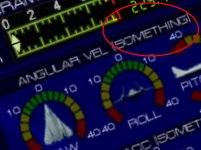
I was looking at the XR2's VC and I noticed this (see attached). Can anyone tell me why it reads what it does? :P
 

Attachments

  • Clipboard02.jpg
    Clipboard02.jpg
    37.3 KB · Views: 172
I was looking at the XR2's VC and I noticed this (see attached). Can anyone tell me why it reads what it does? :P

That's classified information.;)

:cheers:
 
What does XR stand for?
 
It is a designation, nothing more, nothing less...
 
"Xtra Relish."


-----Post Added-----


I was looking at the XR2's VC and I noticed this (see attached). Can anyone tell me why it reads what it does? :P

when i was filling in the panel markings, i couldn't make out what that said on the xr1's panel, or something heh. it was so long ago now i can't really remember... it's a goof on my part essentially
 
Possible bug report?

I was doing a little fictional cargo run from KSC to Prosper International. All was well until I landed, rolled into a hangar (no doors on it, but as Orbiter doesn't really handle collisions, I figured it would be no harm, and sorta be as if the doors closed behind it), and I opened the hatch, the fuel doors, and started taking on fuel. Then I figured I'd let Kara stretch her legs a little while Lee watched over the re-fueling, so I opened the nose, both air locks, and then EVA'd her. Suddenly I lost the skin, it was pure white as soon as she popped out. I had been on the Angel White skin demo-mission.

Nothing really serious, but odd....
 
Unfortunately what you are seeing is a bug in the Orbiter core that can occur whenever the vessel's visual is re-created (i.e., when you switch between vessels). What happens is that Orbiter's internal vessel texture tables can get out-of-sync, and so the core applies the wrong texture to the vessel in the oapiSetTexture call. I reproduced the bug awhile back with the default DeltaGlider using a custom skin; the bug has been reported in the Orbiter Beta Forum. (Beta team: details here: http://orbiter-forum.com/showthread.php?t=3331)
 
SR-71

Cool spacecraft!!
She can shine!!!
Coolhand, Is it inspired from the SR-71 Blackbird??
sr71a.jpg
 
I get a parsing error when I set the XR5's main fuel ISP setting to maximum in it's preferences config file

# 7 = Massive (Jupiter+ w/full payload) [549377]

It only works up to 6. The XR2 works perfectly with 7.
 
I get a parsing error when I set the XR5's main fuel ISP setting to maximum in it's preferences config file

# 7 = Massive (Jupiter+ w/full payload) [549377]

It only works up to 6. The XR2 works perfectly with 7.

That's a good catch -- it is indeed a bug. It will be fixed in the next XR5 release. For now, a workaround is to set the following [CHEATCODE] parameter at the bottom of the config file:

MainFuelISP=549377
 
I don't know if it's your hosting provider or my ISP, but I'm getting apalling speeds (40kbs tops) on the downloads and hitting a 'Size Mismatch' error at 51.1MB of the XR2 download, that's happened three times now.

Any chance of an alternate mirror?
 
The slow speed is still an issue with the large addons. Any suggestion? It is only with this particular site.
 
I just re-tested the XR2 download here and I'm still getting a rock-solid 8-9 megabits per second, as is normal. Since it works for myself and others, it is highly likely that the problem is with your ISP and/or Internet connection. As TS said, just download the separate 2-MB RAR pieces and extract the files with WinRAR. Then if you still have download corruption just re-download the corrupted RAR piece(s) and try the extraction again.
 
In my experience GoDaddy has a really crappy overseas connection. Speeds vary from time to time. I never had corrupt packages though.
Since the problem with corrupt downloads is pretty persistent for some users for years now, I recommend putting up a few .par files. I recommend QuickPar.
 
Back
Top