Space Shuttle Ultra development thread

For the pad stuff: I intend to make this in the Pad A post-2007 configuration.
That means no hammerhead crane remains on top the FSS and the RSS will look shiney and clean, compared to the FSS/RSS at Pad B!
 
Of course, before committing, you have to checkout the project at least once on your PC. Make a folder, checkout the trunk (use the URL from myles) and copy your files into the new created folder structure - or copy the folders into your development orbiter install...
 
Do I have to download TortoiseSVN first ??
 
Donamy: Yes. Its the best tool you can get for working with Subversion under Windows. It integrates into the context menu of your Windows explorer.

For the pad stuff: I intend to make this in the Pad A post-2007 configuration.
That means no hammerhead crane remains on top the FSS and the RSS will look shiney and clean, compared to the FSS/RSS at Pad B!

Its OK for me. maybe we can do a historical version later. How about a subproject to add all buildings around the crawler way as simple orbiter base objects?

For the scenario structure: What about having the following scenario folders:

Space Shuttle Ultra/Training
Simple Training scenarios, based on teaching operations and aborts
Space Shuttle Ultra/Training (Surprise mode)
Does the same as the training folder, but you don't know at the beginning of the scenario which kind of failure you have to deal with. You have to find out and solve it yourself
Space Shuttle Ultra/Film Room
Replays of missions and mission phases, explaining some basics
Space Shuttle Ultra/Missions (historic)
Space Shuttle Ultra/Missions (fictional)
 
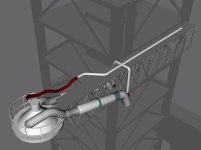
Nearly completed GOX Vent Arm:
 

Attachments

  • SSU_FSS_2A.jpg
    SSU_FSS_2A.jpg
    51 KB · Views: 588
Dennis you have mail.
 
Dennis you have mail.

Got it, but i think I will keep the current repository version for a moment - the labels and material names from your converter are pretty ugly, it will take a moment to make them robust again.

"LABEL 13 ssmeL" for example would result in the constant GRP_13 when i process it, which is counter productive - the label "SSMEL" is better.

Also, the current labels for the ET umbilical doors are "ETUMBDOORR" and "ETUMBDOORL".
 
I'm working on the PASS TRAJ display and panel A8 (which has the RMS controls). I'm not sure if anyone knows how to code this, but I'd really like to improve the RMS controls so you can change the pitch, yaw and roll of the grapple point.
 
I'm working on the PASS TRAJ display and panel A8 (which has the RMS controls). I'm not sure if anyone knows how to code this, but I'd really like to improve the RMS controls so you can change the pitch, yaw and roll of the grapple point.

Well, we have two ways:
- We wait for Redburne to finish the API for Flybywire.
- We query joystick and keyboard events ourself and bypass orbiter.
 
Urwumpe: By pitch, yaw and roll, I was referring to the RMS IK.
Also, has anyone tried to open AtlantisVC.msh with MeshWizard? When I try to load the mesh, it give an error 'Subscript out of range'.
Finally, does anyone know the altitude and velocity ranges for which the triangle icon is visible on the PASS TRAJ display?
 
Last edited:
Also, has anyone tried to open AtlantisVC.msh with MeshWizard? When I try to load the mesh, it give an error 'Subscript out of range'.

I have seen that occur when the mesh is too large for MeshWizard to handle. I don't know of any workaround...
 
Urwumpe: By pitch, yaw and roll, I was referring to the RMS IK.

I meant the same. Instead of using the keyboard/joystick for controlling the spacecraft attitude, we could use it for controlling the end effector.

Finally, does anyone know the altitude and velocity ranges for which the triangle icon is visible on the PASS TRAJ display?

I have calculated the altitude and velocity range by the reference data from STS-122. I have the calculations somewhere here. I think the lowest altitude you can display with it was 20 miles. If you want, I can prepare you a spreadsheet with the velocity data and an altitude/velocity plot.

From my plot data: the right most line (nominal trajectory) goes from SRB seperation (5350 fps/155.5 kft) to 10000 fps/347 kft

The rest of the plot goes to negative velocity values.
 
I just wondered: what would be needed to implement rollout ops into Space Shuttle Ultra? We could hold-off on implementing support for vehicle stacking in the VAB.

I'm thinking mesh-wise here.

Edit:
I also want to know how deep you want to go with the LC-39 animations(FSS/RSS and MLP).
 
I just wondered: what would be needed to implement rollout ops into Space Shuttle Ultra? We could hold-off on implementing support for vehicle stacking in the VAB.

Should be possible. I just have to add a child->parent attachment on the MLP, so it can be carried by a crawler or get attached to the FSS/RSS vessel later (which would mean we can avoid strange logic behind defining the MLP touchdown points.

FSS->MLP->Shuttle

This would also have the advantage BTW, that the alignment of MLP and FSS is defined...

For assembly, we would need to define negative vessel states (=assembly stages), which start at the SRB segments and end with the shuttle in prelaunch configuration. Also we would need a way to install the payloads into the shuttle over the RSS. That sounds complex.

I also want to know how deep you want to go with the LC-39 animations(FSS/RSS and MLP).

First only the big visual stuff, later we can concentrate on adding more details, I would say.
 
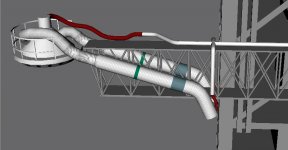
LC-39 FSS items in work:
-Heated GN2 tubing of the Gaseous Oxygen Vent Arm.
-Rotary mechanisms for the Gaseous Oxygen Vent Arm and OPrbiter Access Arm.
-Access stairs from 255 ft level of the FSS and Gaseous Oxygen Vent Arm.
 
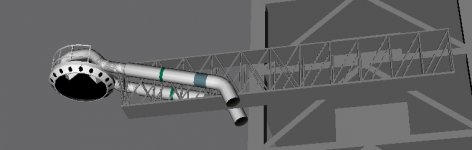
Here's the current state of the GOX Vent Arm. The heated GN2 tubing is clearly visible on the top of the vent arm truss entering the vent hood.
 

Attachments

  • SSU_FSS_3A.jpg
    SSU_FSS_3A.jpg
    147.4 KB · Views: 563
  • SSU_FSS_3B.jpg
    SSU_FSS_3B.jpg
    101 KB · Views: 564
Do you have already an idea how to animate the flexible part of the GN2 tubing? Without being able to rotate the cap up, we can't retract it well.
 
Back
Top