- Joined
- Jan 7, 2008
- Messages
- 5,813
- Reaction score
- 869
- Points
- 203
- Location
- Earth
- Website
- orbides.org
- Preferred Pronouns
- she/her
It's recreational.one thing really baffles me
Some people just like holywars.

It's recreational.one thing really baffles me

It's recreational.
Some people just like holywars.

Of course not, my previous post before was... :uhh: a personal attack to Bill Gates, of course... What did you understand?Hey, please don't let any amount of good sense come in the way of a good, old-fashioned ideology-based conflict!

TOS=True OS?

My simple reasons for liking Macs:
- the OS and the computer are made by the same company. None of that "oops, this bit of hardware won't work with your computer/software/whatever" stuff. Also, this cuts out all that irritating BS about who you go to when you have a problem.
[*]They're reliable. The only problems I've ever had with Macs have been my fault.
[*]They're quite intuitive, and I like the Terminal thingey.
[*]When installing a programme, I don't have to worry about dragging X file to Y folder and A file to A folder and B file to A folder and A, B and C files to Z folder.
What's a Mac?
I ever seen one in exhibitions and for sale at ludicrous cost.
It's basically Unix, right?
Do Wine run there, or does it take a different translator to make the all-pervasive Windows apps to run?

Mac OS X is a registred UNIX system, along with Solaris, AIX, HP/UX, SCO, Tru64 etc. It's not a UNIX-like OS or a UNIX clone (like Linux), it's a real UNIX operating system.
What's a Mac?
I ever seen one in exhibitions and for sale at ludicrous cost.
It's basically Unix, right? Do Wine run there, or does it take a different translator to make the all-pervasive Windows apps to run?
TOS=True OS?

This thread in the Orbiter forums (forums about a simulator only running natively under Windows OS) is so wonderfully pointless. And that's a good thing, because it is entertaining. :thumbup:
Please proceed...
Ten seconds of searching: http://www.wired.com/gadgetlab/2009/01/another-mac-vir/I beg to differ. Yes, Mac OS X can get malware if you really want to, but not just like PC. And running antivirus on Mac OS X is really a joke. No one really needs it.
What changes are those? Changes are being made to your operating system while you're running it? That's strange.I'm beginning to hate windows now, because of all the changes being made just to make changes for "make work" sake.
Wait, are you talking about Windows or Linux? Because Windows does all that stuff automatically...AND it would seem the hardware on a mac works better. Take for instance the power saving modes and standby, sleep, hibernate, apm and acpi, duty cycle and throttle stuff on a pc. Does any of it really work seamlessly and bug free?? For chrissakes! I have to use 3 different utilities to correctly support speed and voltage switching for the cpu and powering down drives to sleep mode after a little while. And the inconsistencies are just a horrid nightmare! Not all drives support apm and when when they do, the control bits are different for each.
Sure there's cheap stuff out there, but you can ignore them and only go for high-end parts. You can build a PC out of pretty much the exact same parts that go into that Mac, and it'll be less expensive, too. At least with the PC you have choices. Lots and lots of choices that you don't have with Macs.Yah!! When I go into tiger direct I feel like I'm wadding through a dumpster full of low-tier garbage. A mac, well now, that *is* different. You got a clean store with everything layed out nicely, and knowledgeable staff.
WMP is not intended to be Microsoft's entry into the "music management" space. It's Windows Media PLAYER, not Windows Media MANAGER. That's what the Zune software is intended for. You're comparing a software product designed to organize music with one designed to play it (with some barebones management features tacked on). Of course the one that's designed to do a given job will beHere, for example, I had looked around for many months, for a good music program. Something to manage a list of thousands of mp3 files. And on the PC I must have "evaluated" 5 or 7 different programs. I'd switch each time I found a shortcoming, and those shortcomings were significant, like lack of drag'n'drop support, or right-clicking for file info. Or not reporting the time/length correctly on a VBR file. Then I found iTunes, And it just simply worked! With a clean interface too.
And I've had iTunes as my main music player for years now. Just compare the elegant simplicity of iTunes to WindowsMediaPlayer(wmp). WMP is just an over-busy mess when it comes to synchronisation. You have no idea what is what and where anything is. NOTHING IS CONSISTENT, nor is it logically layed out. Wmp has way way too much useless info being displayed. iTunes does not, in fact you can customize iTunes way more than wmp. And it looks nice in the base configuration too.
Zune software worked just fine for that for me...I won't tell you how many ripper and burner programs I went through either.
Bad apps do bad things. Plus, how tiny is your drive that you have to go "mop up" leftover 1kb ini files?And when uninstalling programs, why do they leave garbage and empty directories and .ini files behind.. I thought I said to unstall something ?!?!?!!?!! FRAK!!! I still have to manually mop up the trash.
There's nothing random or magic about it. Drive letters are assigned in the order they're available to removable devices. If you gave "F" to some other drive, of course your flash drive will have to go up to G.Or what about all the shifting drive letters, sometimes, not often, but at random, assigning drive letters to removable devices doesn't always stick, I can plug in something and call it drive "F", and then 3 weeks later it automagically shifted to drive "G". Why?? GARBAGE GARBAGE GARBAGE!!!!
There's a single volume control available. You only need to look into the other ones if you actually care, which you clearly don't, so stop looking and just use the main one.Or why do we have 6 sets of volume controls, a wave, synth, master, application, and discrete hardware. None of which is consistent from application to application. Wouldn't it be best to stick with ONE "1" *H*E*L*L*O* "ONE SINGLE" volume control?? A typical PC looks worse than a HOARDER's garage. Trashy stuff everywhere!
Uh, what? I've ripped several CDs and never had to deal with correction modes. If you don't want to deal with settings...don't go looking for them.I gotta tell you though, the technical learning curve for windows is terrible compared to the mac. If you wanna have stuff that "just works", go mac. Too many things in the pc to go wrong. I could care less about the error correction modes like C2 in my cd rom drive. Just rip the music and make it sound good!
Overclockers want that kind of control so they can do fine-tuning. Some motherboards from the past few years also offer "easy" overclocking options that just set everything for you. Overclocking isn't designed to be something that the average user does.The amount of BLOAT in windows is just hideous, beyond horrid!! GOOD GOD!! And what's this glorification of fan speed and temp monitoring, from the overclocking scene.?? We should not have to worry about voltages and fan speeds and stuff like that. This sort of thing should be transparent, behind the scenes, automatically catered to. This is *NOT* elegant computing by any stretch of the imagination.
Wait so you downloaded a bad application which did bad things and screwed up another program and you blame it on the operating system?And the other day we spent 4 hours trying to figure out why a program, x-plane, would not connect to the network and update itself. A secondary malfunction was that it would crash-to-desktop on exit. X-plane is a well written and stable program, much like Orbiter is. So why all of a sudden would it not work. It turns out that I had a tiny utility to manage which windows stay on top of each other. I just put this on here, and lo and behold it somehow screwed up x-plane's ability to detect a network address!! FRAK ME!!! What does this have to do with network sockets and tcp/ip?? I have absolutely no idea, but removing made x-plane work again, and putting it back made it fail. Back and forth we went characterizing this mode of failure. AND it only did it on one of our systems, not others! I have absolutely HAD IT with pc's..!! They are so full of technical distractions it is beyond belief how the world can function.
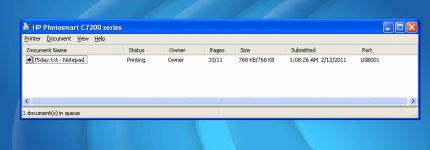
I've never seen anything remotely like this. What program were you doing this in, can you screenshot an example?yeh and another thing why can't windows get the page counts right!! Yes! When I go to print something, it says like printing page 6 of 2, or 9 of 7 or something equally idiotic! This is not busted borg designations, this is supposed to be be serious computing and not stupids stuff going on.. windoze is so stupid it can't even count right!
Good luck getting it down to 256mb on-disk, and if that doesn't work for you, let me know how it works out for that mac of yours.I'm gonna put this pc on a big honk'n diet and remove one application or utility everyday till this this os is stripped down to 256mb on-disk. Then I'm gonna rebild it lean and mean. and if that don't fix it but good I'm guhnna go buy a mac! So there!
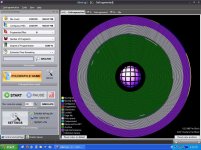
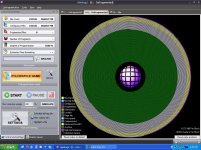
First off, what kind of ancient hardware are you running that you need to have files lined up in order for access times to be decent? Plus, for a journal, lightning-fast reads aren't exactly necessary, and if you're concerned about speed, why compress? You're not really making sense.And ONE more thing. I had my personal journal directory files all nice and lined up like soldiers on the outer edge of the disk (for ready action and fast access). And I went to do the ntfs compression thing and it took those nicely organized files and strewed them all over the disk with hundreds of fragments per file!! You call that efficient????? Ohh yeh man it sure compressed them alright, yes it did, but it just made a big mess in the process. Now I have like 40 thousand fragments for a directory containing 3000 files. Absolutely ridiculous! So now I have to uncompress them and put them back in order. I could leave them compressed and organize them that way. But that would take like 3 hours since ntfs has to uncompress the file, write the file, THEN let your application read the file. Then yo' app reads the file, makes a change then writes it. THEN ntfs reads it again, and compresses it, then writes it back!! Because the applications can only work with uncompressed files - ntfs has to make uncompressed temporary shadow copies of what it's working with. This is getting dumber and dumber by the moment!
I'll post a screenshot of what i mean one stuff settles down here.
---------- Post added at 07:42 PM ---------- Previous post was at 06:54 PM ----------
Update! When I compressed my 10 GB Personal Journal directory I ended up with 60,000 file fragments on a disk that had 0 fragments!
Can you imagine the amount if I compressed the whole entire disk of 400GB of pictures and mp3's and emulation and orbiter stuff?? OMG!!!
---------- Post added at 07:54 PM ---------- Previous post was at 07:42 PM ----------
So, NOW, I'm well on my way to getting these files correctly and properly organized. BACK TO THE FRONT! hey wasn't there a heavy metal song with that in their lyrics? ..back to the front!
Forget the screenshots. We can all imagine what 60,000 pieces of files all over the disk looks like.
But my point was is that there is no reason for ntfs to scatter files like it does. Mac doesn't do that, right?