OS WARS MEGA THREAD (Now debating proprietary vs. open-source!)

Hey, please don't let any amount of good sense come in the way of a good, old-fashioned ideology-based conflict!
Of course not, my previous post before was... :uhh: a personal attack to Bill Gates, of course... What did you understand?
 
TOS=True OS?

I think it was no true acronym, but a backronym for "Tramiels OS"

Also, today, the OS is now called MiNT, which means MiNT is now TOS.
 
This thread in the Orbiter forums (forums about a simulator only running natively under Windows OS) is so wonderfully pointless. And that's a good thing, because it is entertaining. :thumbup:

Please proceed...
 
My simple reasons for liking Macs:
  • the OS and the computer are made by the same company. None of that "oops, this bit of hardware won't work with your computer/software/whatever" stuff. Also, this cuts out all that irritating BS about who you go to when you have a problem.


  • This has its ups and its downs. It can also make some rather nasty business practices possible.

    [*]They're reliable. The only problems I've ever had with Macs have been my fault.

    This is generally true of OEM installs of NT versions of Windows (NT and up for business editions, XP and up for home editions), and OEM installs of Linux (granted, it's hard to find OEMs that offer pre-installed Linux on their machines, but they exist, and I'm quite happy with my System76 machine).

    My reasons for using Linux rather than using Windows or buying a Mac have more to do with my opinion of the business practices of Apple and Microsoft than with any hard-and-fast technical superiority of Linux over Windows or MacOS.

    That and the fact that Macs are overpriced and that modern user interface design makes me sick, and while Windows and Linux (or at least the distribution I use) have fairly easy ways of falling back to more sensible GUI's, MacOS has no fallback that I'm aware of, and is the worst of the lot.

    [*]They're quite intuitive, and I like the Terminal thingey.

    Wow. I rarely hear many users of *any* system say they like the terminal.

    [*]When installing a programme, I don't have to worry about dragging X file to Y folder and A file to A folder and B file to A folder and A, B and C files to Z folder.

    This hardly resembles the installation process of any program I'm aware of on Windows or any other system.

    What's a Mac? :)
    I ever seen one in exhibitions and for sale at ludicrous cost.

    It's basically Unix, right?

    Since Mac OS X came out, yes. Before OS X Mac OS was a completely different animal that Apple had written from scratch.

    And, of course, a distinction has to be made between the Mac hardware (which, since the switch to the x86, can run anything that will run on a PC) and the operating system, both produced by Apple.

    Do Wine run there, or does it take a different translator to make the all-pervasive Windows apps to run?

    I believe there is a Wine port for OS X, though I'm not sure it's as functional as the Linux port. It works, of course, only on Intel Macs (any produced since 2006 or so).
 
And i like the one i made.
 
Mac OS X is a registred UNIX system, along with Solaris, AIX, HP/UX, SCO, Tru64 etc. It's not a UNIX-like OS or a UNIX clone (like Linux), it's a real UNIX operating system.

You didn't bother reading how real UNIX this Opengroup certification is? Damn, my old Commodore C16 OS could pass that one.
 
What's a Mac? :)
I ever seen one in exhibitions and for sale at ludicrous cost.

It's basically Unix, right? Do Wine run there, or does it take a different translator to make the all-pervasive Windows apps to run?

TOS=True OS?

TOS officially means The Operating System. At least according to Atari.

---------- Post added at 02:18 PM ---------- Previous post was at 02:13 PM ----------

I'm beginning to hate windows now, because of all the changes being made just to make changes for "make work" sake.

---------- Post added at 02:50 PM ---------- Previous post was at 02:18 PM ----------

I'm beginning to hate windows now, because of all the changes being made just to make changes for "make work" sake.

AND it would seem the hardware on a mac works better. Take for instance the power saving modes and standby, sleep, hibernate, apm and acpi, duty cycle and throttle stuff on a pc. Does any of it really work seamlessly and bug free?? For chrissakes! I have to use 3 different utilities to correctly support speed and voltage switching for the cpu and powering down drives to sleep mode after a little while. And the inconsistencies are just a horrid nightmare! Not all drives support apm and when when they do, the control bits are different for each.

Yah!! When I go into tiger direct I feel like I'm wadding through a dumpster full of low-tier garbage. A mac, well now, that *is* different. You got a clean store with everything layed out nicely, and knowledgeable staff.

Here, for example, I had looked around for many months, for a good music program. Something to manage a list of thousands of mp3 files. And on the PC I must have "evaluated" 5 or 7 different programs. I'd switch each time I found a shortcoming, and those shortcomings were significant, like lack of drag'n'drop support, or right-clicking for file info. Or not reporting the time/length correctly on a VBR file. Then I found iTunes, And it just simply worked! With a clean interface too.
And I've had iTunes as my main music player for years now. Just compare the elegant simplicity of iTunes to WindowsMediaPlayer(wmp). WMP is just an over-busy mess when it comes to synchronisation. You have no idea what is what and where anything is. NOTHING IS CONSISTENT, nor is it logically layed out. Wmp has way way too much useless info being displayed. iTunes does not, in fact you can customize iTunes way more than wmp. And it looks nice in the base configuration too.

I won't tell you how many ripper and burner programs I went through either. And when uninstalling programs, why do they leave garbage and empty directories and .ini files behind.. I thought I said to unstall something ?!?!?!!?!! FRAK!!! I still have to manually mop up the trash.

Or what about all the shifting drive letters, sometimes, not often, but at random, assigning drive letters to removable devices doesn't always stick, I can plug in something and call it drive "F", and then 3 weeks later it automagically shifted to drive "G". Why?? GARBAGE GARBAGE GARBAGE!!!! Or why do we have 6 sets of volume controls, a wave, synth, master, application, and discrete hardware. None of which is consistent from application to application. Wouldn't it be best to stick with ONE "1" *H*E*L*L*O* "ONE SINGLE" volume control?? A typical PC looks worse than a HOARDER's garage. Trashy stuff everywhere!

I gotta tell you though, the technical learning curve for windows is terrible compared to the mac. If you wanna have stuff that "just works", go mac. Too many things in the pc to go wrong. I could care less about the error correction modes like C2 in my cd rom drive. Just rip the music and make it sound good! The amount of BLOAT in windows is just hideous, beyond horrid!! GOOD GOD!! And what's this glorification of fan speed and temp monitoring, from the overclocking scene.?? We should not have to worry about voltages and fan speeds and stuff like that. This sort of thing should be transparent, behind the scenes, automatically catered to. This is *NOT* elegant computing by any stretch of the imagination.

And the other day we spent 4 hours trying to figure out why a program, x-plane, would not connect to the network and update itself. A secondary malfunction was that it would crash-to-desktop on exit. X-plane is a well written and stable program, much like Orbiter is. So why all of a sudden would it not work. It turns out that I had a tiny utility to manage which windows stay on top of each other. I just put this on here, and lo and behold it somehow screwed up x-plane's ability to detect a network address!! FRAK ME!!! What does this have to do with network sockets and tcp/ip?? I have absolutely no idea, but removing made x-plane work again, and putting it back made it fail. Back and forth we went characterizing this mode of failure. AND it only did it on one of our systems, not others! I have absolutely HAD IT with pc's..!! They are so full of technical distractions it is beyond belief how the world can function.

HELP!!!
 
Last edited:
Define simple.
Define clean.
Define comfortable.

A billion definitions for each, at least. How are one supposed to make something to fit them all?

I hate installers, someone else hate looking for a thing to run directly.
How would you combine that in ONE file?

Find the tool that work for you, make the tools that fit you, or shape the existing tools to fit you.
2 and 3 seems to be rare traits in people, hence come non-recreational holywars. Hence people choose to be unhappy.
 
This thread in the Orbiter forums (forums about a simulator only running natively under Windows OS) is so wonderfully pointless. And that's a good thing, because it is entertaining. :thumbup:

Please proceed...

See, the nice part about having this thread is that forces all the OS Holywar Garbage into one nice neat place, rather than spreading it around every which way. Also, +1 on the amusement. :lol:
 
yeh and another thing why can't windows get the page counts right!! Yes! When I go to print something, it says like printing page 6 of 2, or 9 of 7 or something equally idiotic! This is not busted borg designations, this is supposed to be be serious computing and not stupids stuff going on.. windoze is so stupid it can't even count right!

I'm gonna put this pc on a big honk'n diet and remove one application or utility everyday till this this os is stripped down to 256mb on-disk. Then I'm gonna rebild it lean and mean. and if that don't fix it but good I'm guhnna go buy a mac! So there!

And ONE more thing. I had my personal journal directory files all nice and lined up like soldiers on the outer edge of the disk (for ready action and fast access). And I went to do the ntfs compression thing and it took those nicely organized files and strewed them all over the disk with hundreds of fragments per file!! You call that efficient????? Ohh yeh man it sure compressed them alright, yes it did, but it just made a big mess in the process. Now I have like 40 thousand fragments for a directory containing 3000 files. Absolutely ridiculous! So now I have to uncompress them and put them back in order. I could leave them compressed and organize them that way. But that would take like 3 hours since ntfs has to uncompress the file, write the file, THEN let your application read the file. Then yo' app reads the file, makes a change then writes it. THEN ntfs reads it again, and compresses it, then writes it back!! Because the applications can only work with uncompressed files - ntfs has to make uncompressed temporary shadow copies of what it's working with. This is getting dumber and dumber by the moment!

I'll post a screenshot of what i mean one stuff settles down here.

---------- Post added at 07:42 PM ---------- Previous post was at 06:54 PM ----------

Update! When I compressed my 10 GB Personal Journal directory I ended up with 60,000 file fragments on a disk that had 0 fragments!

Can you imagine the amount if I compressed the whole entire disk of 400GB of pictures and mp3's and emulation and orbiter stuff?? OMG!!!

---------- Post added at 07:54 PM ---------- Previous post was at 07:42 PM ----------

So, NOW, I'm well on my way to getting these files correctly and properly organized. BACK TO THE FRONT! hey wasn't there a heavy metal song with that in their lyrics? ..back to the front!

Forget the screenshots. We can all imagine what 60,000 pieces of files all over the disk looks like.

But my point was is that there is no reason for ntfs to scatter files like it does. Mac doesn't do that, right?
 
Last edited:
Alright this makes it simple:
there are more games which are made for windows OS then games made for mac OS.
for me, thats enough said :P
 
I beg to differ. Yes, Mac OS X can get malware if you really want to, but not just like PC. And running antivirus on Mac OS X is really a joke. No one really needs it.
Ten seconds of searching: http://www.wired.com/gadgetlab/2009/01/another-mac-vir/
The "common knowledge" that macs are immune to viruses by some magical bubble imposed by Jobs himself is a myth.

I'm beginning to hate windows now, because of all the changes being made just to make changes for "make work" sake.
What changes are those? Changes are being made to your operating system while you're running it? That's strange.

AND it would seem the hardware on a mac works better. Take for instance the power saving modes and standby, sleep, hibernate, apm and acpi, duty cycle and throttle stuff on a pc. Does any of it really work seamlessly and bug free?? For chrissakes! I have to use 3 different utilities to correctly support speed and voltage switching for the cpu and powering down drives to sleep mode after a little while. And the inconsistencies are just a horrid nightmare! Not all drives support apm and when when they do, the control bits are different for each.
Wait, are you talking about Windows or Linux? Because Windows does all that stuff automatically...

Yah!! When I go into tiger direct I feel like I'm wadding through a dumpster full of low-tier garbage. A mac, well now, that *is* different. You got a clean store with everything layed out nicely, and knowledgeable staff.
Sure there's cheap stuff out there, but you can ignore them and only go for high-end parts. You can build a PC out of pretty much the exact same parts that go into that Mac, and it'll be less expensive, too. At least with the PC you have choices. Lots and lots of choices that you don't have with Macs.

Here, for example, I had looked around for many months, for a good music program. Something to manage a list of thousands of mp3 files. And on the PC I must have "evaluated" 5 or 7 different programs. I'd switch each time I found a shortcoming, and those shortcomings were significant, like lack of drag'n'drop support, or right-clicking for file info. Or not reporting the time/length correctly on a VBR file. Then I found iTunes, And it just simply worked! With a clean interface too.
And I've had iTunes as my main music player for years now. Just compare the elegant simplicity of iTunes to WindowsMediaPlayer(wmp). WMP is just an over-busy mess when it comes to synchronisation. You have no idea what is what and where anything is. NOTHING IS CONSISTENT, nor is it logically layed out. Wmp has way way too much useless info being displayed. iTunes does not, in fact you can customize iTunes way more than wmp. And it looks nice in the base configuration too.
WMP is not intended to be Microsoft's entry into the "music management" space. It's Windows Media PLAYER, not Windows Media MANAGER. That's what the Zune software is intended for. You're comparing a software product designed to organize music with one designed to play it (with some barebones management features tacked on). Of course the one that's designed to do a given job will be

I won't tell you how many ripper and burner programs I went through either.
Zune software worked just fine for that for me...

And when uninstalling programs, why do they leave garbage and empty directories and .ini files behind.. I thought I said to unstall something ?!?!?!!?!! FRAK!!! I still have to manually mop up the trash.
Bad apps do bad things. Plus, how tiny is your drive that you have to go "mop up" leftover 1kb ini files?

Or what about all the shifting drive letters, sometimes, not often, but at random, assigning drive letters to removable devices doesn't always stick, I can plug in something and call it drive "F", and then 3 weeks later it automagically shifted to drive "G". Why?? GARBAGE GARBAGE GARBAGE!!!!
There's nothing random or magic about it. Drive letters are assigned in the order they're available to removable devices. If you gave "F" to some other drive, of course your flash drive will have to go up to G.

Or why do we have 6 sets of volume controls, a wave, synth, master, application, and discrete hardware. None of which is consistent from application to application. Wouldn't it be best to stick with ONE "1" *H*E*L*L*O* "ONE SINGLE" volume control?? A typical PC looks worse than a HOARDER's garage. Trashy stuff everywhere!
There's a single volume control available. You only need to look into the other ones if you actually care, which you clearly don't, so stop looking and just use the main one.

Also, Windows 7 gives you the ability to adjust volume by application--so, for example, if you never want your browser to make sounds, just mute it.

I gotta tell you though, the technical learning curve for windows is terrible compared to the mac. If you wanna have stuff that "just works", go mac. Too many things in the pc to go wrong. I could care less about the error correction modes like C2 in my cd rom drive. Just rip the music and make it sound good!
Uh, what? I've ripped several CDs and never had to deal with correction modes. If you don't want to deal with settings...don't go looking for them.

The amount of BLOAT in windows is just hideous, beyond horrid!! GOOD GOD!! And what's this glorification of fan speed and temp monitoring, from the overclocking scene.?? We should not have to worry about voltages and fan speeds and stuff like that. This sort of thing should be transparent, behind the scenes, automatically catered to. This is *NOT* elegant computing by any stretch of the imagination.
Overclockers want that kind of control so they can do fine-tuning. Some motherboards from the past few years also offer "easy" overclocking options that just set everything for you. Overclocking isn't designed to be something that the average user does.

And the other day we spent 4 hours trying to figure out why a program, x-plane, would not connect to the network and update itself. A secondary malfunction was that it would crash-to-desktop on exit. X-plane is a well written and stable program, much like Orbiter is. So why all of a sudden would it not work. It turns out that I had a tiny utility to manage which windows stay on top of each other. I just put this on here, and lo and behold it somehow screwed up x-plane's ability to detect a network address!! FRAK ME!!! What does this have to do with network sockets and tcp/ip?? I have absolutely no idea, but removing made x-plane work again, and putting it back made it fail. Back and forth we went characterizing this mode of failure. AND it only did it on one of our systems, not others! I have absolutely HAD IT with pc's..!! They are so full of technical distractions it is beyond belief how the world can function.
Wait so you downloaded a bad application which did bad things and screwed up another program and you blame it on the operating system?
:facepalm:

Bad applications can do bad things regardless of what OS you're on.

yeh and another thing why can't windows get the page counts right!! Yes! When I go to print something, it says like printing page 6 of 2, or 9 of 7 or something equally idiotic! This is not busted borg designations, this is supposed to be be serious computing and not stupids stuff going on.. windoze is so stupid it can't even count right!
I've never seen anything remotely like this. What program were you doing this in, can you screenshot an example?

I'm gonna put this pc on a big honk'n diet and remove one application or utility everyday till this this os is stripped down to 256mb on-disk. Then I'm gonna rebild it lean and mean. and if that don't fix it but good I'm guhnna go buy a mac! So there!
Good luck getting it down to 256mb on-disk, and if that doesn't work for you, let me know how it works out for that mac of yours.

And ONE more thing. I had my personal journal directory files all nice and lined up like soldiers on the outer edge of the disk (for ready action and fast access). And I went to do the ntfs compression thing and it took those nicely organized files and strewed them all over the disk with hundreds of fragments per file!! You call that efficient????? Ohh yeh man it sure compressed them alright, yes it did, but it just made a big mess in the process. Now I have like 40 thousand fragments for a directory containing 3000 files. Absolutely ridiculous! So now I have to uncompress them and put them back in order. I could leave them compressed and organize them that way. But that would take like 3 hours since ntfs has to uncompress the file, write the file, THEN let your application read the file. Then yo' app reads the file, makes a change then writes it. THEN ntfs reads it again, and compresses it, then writes it back!! Because the applications can only work with uncompressed files - ntfs has to make uncompressed temporary shadow copies of what it's working with. This is getting dumber and dumber by the moment!

I'll post a screenshot of what i mean one stuff settles down here.

---------- Post added at 07:42 PM ---------- Previous post was at 06:54 PM ----------

Update! When I compressed my 10 GB Personal Journal directory I ended up with 60,000 file fragments on a disk that had 0 fragments!

Can you imagine the amount if I compressed the whole entire disk of 400GB of pictures and mp3's and emulation and orbiter stuff?? OMG!!!

---------- Post added at 07:54 PM ---------- Previous post was at 07:42 PM ----------

So, NOW, I'm well on my way to getting these files correctly and properly organized. BACK TO THE FRONT! hey wasn't there a heavy metal song with that in their lyrics? ..back to the front!

Forget the screenshots. We can all imagine what 60,000 pieces of files all over the disk looks like.

But my point was is that there is no reason for ntfs to scatter files like it does. Mac doesn't do that, right?
First off, what kind of ancient hardware are you running that you need to have files lined up in order for access times to be decent? Plus, for a journal, lightning-fast reads aren't exactly necessary, and if you're concerned about speed, why compress? You're not really making sense.

As for your complaint about "scattering files" when compressing, ten seconds on a search engine gave me the answer--it does it so it can then later uncompress the files in-place. The space is certainly free and available so if you need it otherwise it's there, but it's designed to allow you to later uncompress the files quickly.
 
I should have been more specific. Changes of the user interface and drivers over the years. I'm glad I didn't get too cozy with win95/98. I did with xp. I'm referring to left and right click conventions, pull-down menu differences. AND my pet peeve, differences in the basic Explorer menu. I frequently work with hundreds of files across many directories and I am quite set in my ways on how things are done. The differences between Windows-7 Explorer and Windows-XP Explorer are maddening! Way too much busy-ness in Win7 for me to handle.

Pffaaaghh on the power-saving modes. Windows, in theory, is supposed to handle all that, but in reality, I've seen a number of systems not like to come out of standby/hibernation, or screensavers not engage correctly, or drives not spinning down when they are supposed to. Or they spindown, then come right back up. Worse than a porn star I tell you!

Ok, I'll give you that you can buy premium parts and make a nice machine. And while it is great to have choices, you do indeed need to be informed about those choices. It is the sheer number of versions and varieties of hardware that makes the whole PC a double-edged sword. And it gets worse with freeware/trialware/shareware utilities, not to mention some commerical software. I've been messing with systems since before the Apple II+ days. And I've seen good and bad software. And to be honest, a lot of folks say if you pay for software you are getting a good deal, it has to be good because they charge for it. BS! I SAY!! You needn't look any further than Orbiter to find an example. Or perhaps something like FreeFileSync, or WinDirStat, or CCleaner, if you're a utility kinda-guy. Good solid schtuff!

Now, with Windows Media Player, it was (in retrospect) completely and totally intended to manage all your music and videos. Just look under the library tag, there are library options, some sort of playlist editor, a funky sync option that likes to put music on my digital camera (on one of my older systems), some sort of rudimentary connection/affiliation with the defunct Napster, or some "wanna-be" beginnings of a iTunes-like music store. And before I got into the iTunes sphere I gave WMP an honest to goodness run. At the time it WAS INDEED a music management package. This was pre-Zune, but that is still no excuse because iTunes was out years before that anyways. The whole WMP thing was (and still is) way to complex for me to have a complete understanding. All the nuances clogged my head everytime I tried to use the thing. I find Orbiter much more intutive and simpler, actually.

Little things in WMP are annoying, like if I right click on a song and ask to open an explorer window, it will do so. But, if I do that in iTunes, it will do so as well AND it will scroll to and highlight the file. Just those sort of details make Apple software so cool. Or at least iTunes.

So, in the end, I leave WMP to playing a/v files. Might as well kill off the library stuff. Now, I have tried some really finky stuff for music management, but the second-best option I used a while back was WINAMP. It worked ok in the day, and I used it for 3 years, till I needed better integration with my spank'n new iPod.

When I refer to burner programs, I mean things like working with iso images and copying cd's, in addition to ripping stuff. I've settled on CDBURNERXP and IMGBURN for those duties. They are freeware, work decent, and do everything I need. I like the customizability of dbPOWERAMP for ripping hard-to-rip or damaged cd's. Otherwise iTunes rips good enough for me.

My drive is very small, my most-often used computer is a laptop, so I have a 2.5" drive! haha. Its a 160GB PATA Samsung HM160HC - the fastest PATA laptop drive in town. Now, I use this on a really reliable system that gets me 6+ hours battery life. It is mainly for note taking and e-book reading and stuff like that, basic Excel and Word ops too. I suppose it's sentimental value, because the system has been with me on polar cap expeditions and everywhere else. It hasn't failed once. My other home systems are homebuilt hexcore speed demons - just so you know.

I gotta "thing" about having leftover files and crap. In practice, I don't think 1kb ini files will cause much of a hangup. However, I have not had to re-install windows on this system in over 3 years. It's a tight ship this little laptop is, I tell you. And it doubles up for some digital photography stuff in the field from time to time. It is critical that my data be secure and reliably stored.. I have many utilites and things set-up just perfect. I don't want to be changing things around, because when I work with computers I like stuff to be as transparent and as familiar as possible. So cleaning up after trying a new software package is a OCD-like thing I gotta do. (see my next post on disk optimization).

I went on assignment one time, and, it was a requirement that after shooting photos, I download them to a hard disk and mail that drive to myself. AND another one to the client, at the end of each day, for 4 days straight. She said I could keep the drives when the project was over. But this little ol'lappy was a system I could trust. I know all the quirks and shortcuts when it comes to manhandling tons of photos and stuff.
:camera:

The drive letter thing, on occasion, for whatever reason, my drive E:\ becomes a drive F:\ and so on. But I digress, I'm sure it's related to what's available at the time of boot-up. Like you say. An annoying quirk I'm familiar with.

I tend to leave the master volume alone, and the hardware (external speaker volume pod) alone, and adjust application volume individually. More and more nowadays.

I've compared rips from one program to another and ended up with different filesizes and quality of sound. So eventually I settled on dbPOWERAMP ripping suite. I also have (had) some cd's that were pretty bad, and the C2 error correction thingy helped out. But for frakks sake! All the options! I *HAVE* to play with them, because I know more than whoever selected the default options. I digress..

And overclocking, I've grown beyond that childish game. I moved on up to eco-clocking. Yes, there was a time I decorated and spiffed up a box to make it look fast and awesome. But now, in my old-age, why bother?!? I just buy last-year's top-of-the-line stuff and it invariably performs better than any overclock anyone could do. It's that simple, really. And, besides, a quiet system and stability is PARAMOUNT now for me anyways.

Yep! It was a bad application. That's what Sux0rz about pc's, there's no authority on making sure software behaves itself. Anyways, I removed the offending app and all is well. Blessed Bliss!! But *I* think the o/s should have popped up a flag saying the program I was running did not use standard programming practices or some other warning. It could have at least helped us troubleshoot the problem. Here is a link to the x-plane forum detailing my adventures. It's boring and full of log dumps.. http://forums.x-plane.org/index.php?showtopic=50394&pid=557452&st=0&#entry557452
:beathead:

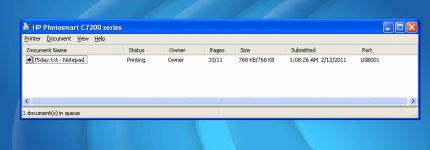
As far as the printer goes, I'm talking about the windows/hp drivers. When you right click on the print job in progress to get a status on the queue, it will say printing 33 of 11 .. I tried printing an 11 page document, and it does indeed print all 11 pages, single-sided. This is the little printer icon/queue that Windows puts in the tray next to the clock. Standard stuff on all WinXP systems. This was an 11 page text-only assignment writeup done in basic notepad.
print-count.jpg

Supposedly a bare-bones winXP install can function in 250mb of disk space. This could become an onging experiment. And a fun one at that.

As far as disk optimizing. I like to get as much performance as possible out of my old (and trusty) hardware. See the next half of this post. It's a good, genuine kick-butt post about making that old hard drive run much much faster. It is good enough that I gave thought to calling the local tv station and asking them to air a new series called "This Old PC"..

I gave up on the compression thing, there is just simply way too much disk overhead involved. I'll be better of compressing files into .RAR's and .ZIP's .. The compression affair turned out to be nothing more than a one week fling. I'd much prefer to have my files in order. And in this era of big disks I suppose compression has little-to-no value. Part of obsessivly keeping files ordered and organized means much less wear and tear and faster access times. Udefrag3 knocked 6 seconds off my Orbiter load time, 9 seconds off boot time, and milliseconds off of when I load my Atari2600 game roms into the emulator. Each rom is like 2kb or sometimes 4 or 8kb for the more complex games. It got me 1 second load times for M$ Office Apps like Word and Excel. And less than 20-seconds for Photoshop with a full XR5 bay-full of plugins. So, yeh, I'M A BIG FAN OF MECHANICAL DISK OPTIMAZTION. For SSD's?? Well now, don't bother.

When folks go to use my old system, in the field, they are totally surpised and shocked at how responsive it is. I upgraded the ram, years ago, to 2GB. And it has a 2.5GHz CPU, and that is cool, both ways. Cool that it could take an upgrade to begin with. AND cool that I undervolted it, it runs at .6V when idling at 7MHz to 250MHz, then at 598MHZ it goes to .7V and has many steps inbetween all the way to 2.5GHz, where it sucks down 1.16V at full-tilt. I suppose the minimum power consumption is around 4 or 5 watts, and maximum is about 25-33, for the whole system depending what's going on. When taking notes and using Office, it runs around 6 watts and the battery lasts all day long. I've charted and graphed it out and used professional FLUKE equipment spliced into the power circuitry to characterize everything. So I know it's good. I also ran Prime-95 and MemTest and other "burn-in" programs for days, at each power setting. And for 1 week, I did daily usage, and played games, including Orbiter, at each of the "speed-step" levels. The system never crashed or BSD'd on me. And I did this in the summertime, and now in Chicago's cold-snap we just had. Just to be sure. Now that's "eco-clocking"!! It was far more rewarding doing this than just trying to get 5 more fps from the latest fps!

The key here is a good hand-selected processor that is not bogged down by running garbage background tasks. I only have 25 or so, and each process is used specifically for something I need. And if you have your data in order and lined up nice, you can get to it quickly. It all comes together synergistically. I thought compression would allow for less data to be transfered across the PATA interface. But it turns out that 3x as much is transfered. And the constant referencing of the meta-files got totally out of control.

The next half of this posting deals with disk optimizing in style.. :tiphat:

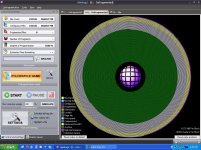
This is Ultimate Defrag, one of the best defraggers in town for single use personal workstations or hobby computers.
This is a screenshot of my main winXP drive C:
drive-c.jpg
Note the VIOLET band that contains all my operating system stuff like C:\Windows and C:\Program Files is placed at the outer edge of the platter(s) for fastest access with the fastest linear read speeds. And also keep in mind that the head doesn't have to traverse all over the whole disk surface, a lot of distance, to reach any program. That is called "seek confinement", head movements are kept to a minimum. Or perhaps you could call it a poor-man's method of partitioning. The very outer band is where the Windows o/s resides, and some startup files can be arranged according to Layout.ini, so they are in sequence, meaning that the head really moves even less and just has to wait for the requested startup files to rotate under it. Later on I may move some of the NTFS meta-files closer to the center of the VIOLET band, to ensure that all the "high-performance" data is more or less equidistant to the low-level $LogFile, $MFT, $Bitmap, $AttrDEF etc..etc. stuff. I would need to do an analysis to see if the extra seek time for some files and less seek time for other files coupled with the meta-files having a slightly slower linear read rate would be beneficial. Because, right now, I have the metafiles manually positioned just so, so that the "natural" resting position of the head brings them "around through" every rotation of the disk. Any attempt to read a file does not result in the head assembly flying off in 20 directions at once. You can't beat that!
:coffee:

There are a few PALE GREEN, BLUE, YELLOW, and GREY blocks, those are directories and $MFT and other NTFS disk-related things.

The large chunk of GREEN in the center is a bunch of rarely accessed files, like game .iso images, and .zips of downloaded trialware and utilities, notes, copies of my installed applications and stuff, internet crap, etc. Like a backup, but not an OFFICIAL backup. A ready reference. A toolkit! Ebooks!

You might notice the AQUA and GREY bands embedded in the GREEN "Archive" section, that is the HIBERNATION FILE and SWAP FILE. Rarely used and not speed critical.

The band of WHITE stuff is free space. Contiguous and ready to use.

There is one other file, the OUTLOOK.PST file for my e-mail stuff, that I manually put off to the side a little. It's the VIOLET strip at 7 o'clock. I manually put it there to allow it to grow without fragmentation. And damn!! It loads Faaaasstt!

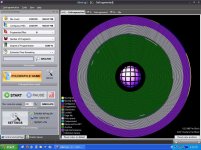
This is one of my removable USB drives, E:\
drive-e.jpg
It contains pictures and all my emulation stuff and .mp3's and journal and photoshop projects. My journal and Photoshop working data set is on the outside, and my pictures and .mp3 and emulation collection is on the inside. None of the stuff here is speed-critical, but why not give a working data-set an advantage. Anyways, when accessing .mp3 files, once the file is loaded it's loaded. Same thing with pictures. And when working with my emulation collection, the drive can often find the stuff faster than I can decide what and where to click on. And of course, the drive is much faster than the USB interface, so optimizing for speed here is not important. Optimizing for file continuity and 0-fragments is, more or less.

The YELLOW band is for $MFT reserved space, I should shrink that down next run. Though if the space is needed, NTFS would make it available immediately.

Note that there is no fragmentation on either drive. If there was, the affected files would show as RED. You can do quite a bit with the program as far as organizing a disk just the way you want. Keep in mind, that this is for mechanical drives only, and would not have any effect on an SSD.

I get all my Office apps to load in like 1 second, maybe 2, tops! Photoshop almost snaps open, less than 15 seconds. And my boot time is about 20-25 seconds (from power on). Perhaps that is not super-spectacular in today's 2011 computing environment, but this is a 2004 laptop with a 5,200 RPM hard drive. I tried timing how long it takes to load Slot Racers and Missile Command 2600 roms with a stopwatch. Well that turned out to be stupid. So I set up a timer. And got results ranging from 1ms to 2.5ms! Not too shabby, eh?? a few 8k roms clocked in at 2.74ms to 3.02ms.
:10sign:

Ohh yeh, One more thing, I remember back in the Apple II+ days I did indeed write a disk optimizer program to make all the files contiguous and have 0 fragments. Back then, on a floppy, some of the 130-190 sector BRUN single-file games could somehow get segmented up into 10 or 15 parts, none of which were in sequence. It depended on what other data you had going on the disk, but, still!! I recall it was done mostly in AppleSoft and called upon RWTS to actually read and write the files to and from the disk. All logic of deciding what went where was done in BASIC. I used that Beagle Bros. utility to allow use of a 64k memory expansion card, if you had it, to knock off some minutes from an optimizing job. I'll have to dig that out and have another look-see at it!
 
Last edited:
OMG you do love long posts.

Anyway, as I said before, if you like Macs, then it's your trouble, seriously, I don't care about your favorite operating system, it does not affect me in any way. But this whole pointless conflict is entertaining, so go on! :thumbup:
 
I can just agree with Artlav. The best operating system is the one that I will code.

The problem is just - I lack the hardware for it. :lol:
 
Back
Top