

-
ORBITER-FORUM will be temporarily closed at 2026-07-23 18:00 UTC while we complete some OF maintenance tasks. The amount of downtime is expected to take up to one hour, but probably less.
You are using an out of date browser. It may not display this or other websites correctly.
You should upgrade or use an alternative browser.
You should upgrade or use an alternative browser.
Project MMSEV Orbiter2016
- Thread starter Buck Rogers
- Start date

Buck Rogers
Major Spacecadet
- Joined
- Feb 26, 2013
- Messages
- 1,234
- Reaction score
- 1,654
- Points
- 128
YES! -looking sweet!
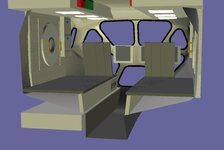
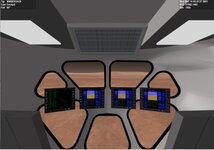
Now we something like this.
Thing maybe to do or not?
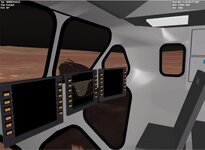
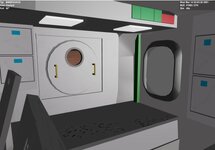
Around the windows on the outside are lights. On the VC should you see them and the extension of the vessel. I have the main mesh set as external else it conflicts with the VC
Thing maybe to do or not?
Around the windows on the outside are lights. On the VC should you see them and the extension of the vessel. I have the main mesh set as external else it conflicts with the VC
Attachments

barrygolden
Well-known member
that looks super
Buck Rogers
Major Spacecadet
- Joined
- Feb 26, 2013
- Messages
- 1,234
- Reaction score
- 1,654
- Points
- 128
Like said in conv., I'll make the window lights in the tex., than it's not a problem. I can seperate parts of the ex. for in int. if necc.
VC is also on ext.?
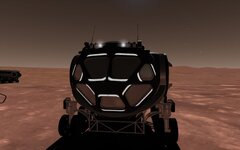
VC is also on ext.?
Last edited:
Luke Reichelt
Well-known member
So, when are you going to post your updates on the B5 vessels thread? In particular, I'd like to see some screenshots of your progress on the lifeboat and the Nova-class dreadnought.
Buck Rogers
Major Spacecadet
- Joined
- Feb 26, 2013
- Messages
- 1,234
- Reaction score
- 1,654
- Points
- 128
Need a little help on the VC
I have a panel that shows the speed and turn angle. That works. But it only changes if the mfd button are pressed. Really it just needs to change as speed and turn angle change.
I have a panel that shows the speed and turn angle. That works. But it only changes if the mfd button are pressed. Really it just needs to change as speed and turn angle change.
bool LTV::clbkVCRedrawEvent(int id, int event, SURFHANDLE surf)
{

    bool return_value = false;
    if (id == ALL_MFD_BUTTONS) {

        PaintMFDButtons(surf);
        RedrawPanel_SPEEDstatus( surf,  id);
        return_value = true;
    }


        RedrawPanel_SPEEDstatus(surf, id);


    return return_value;
}
barrygolden
Well-known member
I might would get this to just 3 screens because the two on the outside seem to block the 2 smaller windows. I might put one over head
Every interior has those 4 screens. I think sitting the side windows are good to see from.
I need to figure out how to tell it to redraw when the speed or turn angle changes?
I have looked at the Shuttle A code and still not sure. No need to click on it.
I need to figure out how to tell it to redraw when the speed or turn angle changes?
I have looked at the Shuttle A code and still not sure. No need to click on it.
I am stumped. the LER and MMSEV both can rotate the wheels 360 degrees.
But I want a key to zero out the angles. The animation proc is TURN_proc So it should be 0 to 1, right
We have this code:
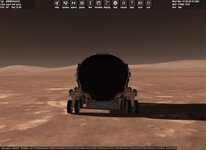
I did a screen shot of debug of TURN_proc.
and get weird numbers.
But I want a key to zero out the angles. The animation proc is TURN_proc So it should be 0 to 1, right
We have this code:
void LTV::ROTATELEFT(void) {
    double simdt = oapiGetSimStep();
    double db = simdt * .05;
    TURN_proc -= db;
    if (TURN_proc < 0) TURN_proc += 1;
}
void LTV::ROTATERIGHT(void) {
    double simdt = oapiGetSimStep();
    double db = simdt * .05;
    (TURN_proc += db);
    if (TURN_proc > 1) TURN_proc = (TURN_proc - 1);
}
I did a screen shot of debug of TURN_proc.
sprintf(oapiDebugString(), " steer:%04d TURN:%lf", CurrentSterzo, TURN_proc);and get weird numbers.
Attachments
barrygolden
Well-known member
Seems to work fine for me
I can figure why WHEELROTATE_proc is greater than 1. WHEEL ROTATE_PROC SHOULD BE BEWEEN 0 AND 1
void LTV::ROTATELEFT(void) {
    double simdt = oapiGetSimStep();
    double db = simdt * .05;
    WHEELROTATE_proc -= db;
    if (WHEELROTATE_proc < 0) WHEELROTATE_proc += 1;
}
void LTV::ROTATERIGHT(void) {
    double simdt = oapiGetSimStep();
    double db = simdt * .05;
    (WHEELROTATE_proc += db);
    if (WHEELROTATE_proc > 1)WHEELROTATE_proc = (WHEELROTATE_proc - 1);
}
Fixed. I ran the debug and the wheel Roates was truly 0 to 1. I the sprint screen setting was wrong. Now press a key and wheel go back to straight ahead
I having issues with the interior. Basically what I did is took the exterior model and cut everything away from the black window frames. Then connected the frames and extended. But it has shadows,......
I might take a cylinder the same diameter and squeeze it on the y axis. To get the shape and then connect the windows to it.
The side window is an issue. from the interior shots the side window maybe flat while the exterior it slants in.
I might take a cylinder the same diameter and squeeze it on the y axis. To get the shape and then connect the windows to it.
The side window is an issue. from the interior shots the side window maybe flat while the exterior it slants in.
Stumped.
But the external camera mast view can be from the cockpit view. So the main body has to be set at cockpit otherwise you see the cockpit mesh
BUT in the VC mode it is seen blocking the windows.
As I understand it in the VC mode just the VC mesh is seen unless you make the other meshes
rover_mesh = oapiLoadMeshGlobal("MMSEVUACS/MMSEVUACS4");
    SetMeshVisibilityMode(AddMesh(rover_mesh, &mesh1ofs), MESHVIS_EXTERNAL | MESHVIS_COCKPIT);


    solar_mesh = oapiLoadMeshGlobal("MMSEVUACS/MMSEVsolarpanel");
    SetMeshVisibilityMode(AddMesh(solar_mesh, &mesh1ofs), MESHVIS_EXTERNAL);

    VCMESH = oapiLoadMeshGlobal("MMSEVUACS/MMSEVUACSvc2");
    SetMeshVisibilityMode(AddMesh(VCMESH, &mesh1ofs), MESHVIS_VC );
But the external camera mast view can be from the cockpit view. So the main body has to be set at cockpit otherwise you see the cockpit mesh
BUT in the VC mode it is seen blocking the windows.
As I understand it in the VC mode just the VC mesh is seen unless you make the other meshes
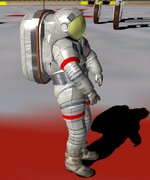
Something to think about. First this project was discontinued. This was the LER eva guy I had. He had the backpack/hatch.
So this would be correct for when the LER/MMSEV was active.
But now if we want to use it now. Should the suit be update to the XEMU colors?
So this would be correct for when the LER/MMSEV was active.
But now if we want to use it now. Should the suit be update to the XEMU colors?
Attachments

MarkWatney2015
The Desktop Orbinaut
- Joined
- Oct 14, 2016
- Messages
- 1,276
- Reaction score
- 1,632
- Points
- 128
- Location
- San Jose Del Monte, Bulacan
- Preferred Pronouns
- He/him
Since the MMSEV is technically adapted into the Artemis program, I think the suits should also adapt the XEMU colours as well
Similar threads

- Replies
- 67
- Views
- 17K

- Replies
- 1
- Views
- 9K


- Replies
- 1
- Views
- 2K


- Replies
- 4
- Views
- 4K
