New Release D3D9Client Development

Why this:
D3D9: ERROR: Base Object 0x6A3A62B8 = 'Alcantara' not cataloged
D3D9: ERROR: Base Object 0x6A3A6640 = 'Al Anbar' not cataloged
D3D9: ERROR: Base Object 0x6A3A69C8 = 'Baikonur' not cataloged
D3D9: ERROR: Base Object 0x6A3A3BE0 = 'Barent Sea' not cataloged
D3D9: ERROR: Configuration file not found for object 0x6A39EE30
I don't remember the story behind those errors but you can ignore them. I will try to solve it during the coming API cleanup.
 
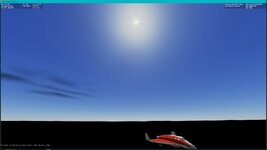
The moon isn't visible in front of the sun during an eclipse (this is of tomorrow's eclipse as seen from San Antonio, Texas):
 

Attachments

  • OpenOrbiter_D3D9Client_no_moon_eclipse.jpg
    OpenOrbiter_D3D9Client_no_moon_eclipse.jpg
    32 KB · Views: 17
  • (Current state).scn
    (Current state).scn
    3.3 KB · Views: 1
The moon isn't visible in front of the sun during an eclipse (this is of tomorrow's eclipse as seen from San Antonio, Texas):
Viewing an eclipse within an atmosphere is not yet supported. Currently eclipses can be viewed only from space.
 
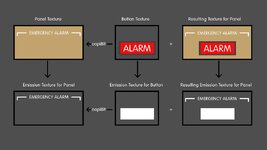
@jarmonik Example, we have a texture for a panel and a texture for a button and the button texture is blitted into the panel texture using oapiBlt, but at the same time we have an emission texture for this panel texture and we also have an emission texture for this button texture, is it possible, if not can it be implemented, so that the emission texture from the button is blitted into the emission texture for the panel?


Explan.jpg
 
Font question: in D3D9 are all chars printed? My custom font has symbols located in positions usually assigned to "non-printing" chars, and they are not showing up. GDI shows them without problems. I'm using a D3D9 for Orbiter 2016 and still haven't tested in the new Orbiter...
 
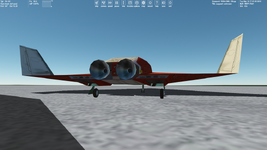
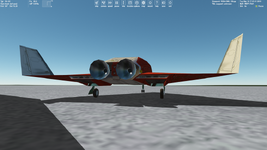
I'm interested in the "Self Shadows" options located in the advanced D3D9 settings. The "Vessel mapping" is "All visible objects" (1st picture) and "None" (2nd picture). There's the difference in ladders and shadow height:

s1.pngs2.png
 
Font question: in D3D9 are all chars printed? My custom font has symbols located in positions usually assigned to "non-printing" chars, and they are not showing up. GDI shows them without problems. I'm using a D3D9 for Orbiter 2016 and still haven't tested in the new Orbiter...
The first 32 charters are skipped. I can undo the skip.
 
@jarmonik Example, we have a texture for a panel and a texture for a button and the button texture is blitted into the panel texture using oapiBlt, but at the same time we have an emission texture for this panel texture and we also have an emission texture for this button texture, is it possible, if not can it be implemented, so that the emission texture from the button is blitted into the emission texture for the panel?

I'll add an API function to blit multiple layers.
 
I made some additional tests. It seems that such objects like runways, landing pads, hangars, and so on, are visible through the ground due to shadows from these objects. I placed the VAB mesh in the mountains, chose the texture Runway2.dds for this mesh and tried three cases:

View attachment 36349

Results:

View attachment 36350

In the first case the mesh with its texture isn't shining through the ground. So, maybe we should just make a flat mesh (I just haven't learned how to do it yet) with the texture of a runway, if we want the runway (and other objects) not to be visible through the terrain? It just sounds so simple :D Or not, and this idea won't work? :unsure:
Sorry for replying to a 7 month old post, but I just came across it. I just wanted to know where you got the dialog "Add Mesh" from?
 
I'll add an API function to blit multiple layers.
Thanks. That would be great. I am currently forced to split the mesh into multiple groups and the mesh will become larger accordingly in terms of poly count.
 
Hi everyone,
Sorry to bump this topic, I have been browsing the last few pages. With the availability of the RC1 version of OpenOrbiter, is there somewhere a working D3D9 zip file which I can use to test ? The last few zips I got in this topic had lots more files (including older orbiter.exe) than the usual releases.
Thank you !
 
Hi everyone,
Sorry to bump this topic, I have been browsing the last few pages. With the availability of the RC1 version of OpenOrbiter, is there somewhere a working D3D9 zip file which I can use to test ? The last few zips I got in this topic had lots more files (including older orbiter.exe) than the usual releases.
Thank you !
If you're using the OpenOrbiter builds off of github, there is no need to install D3D9 client, it comes prebundled with Orbiter, same for XRSound.
 
Suggestion for OpenOrbiter D3D9Client: Move the surface texture mip-mapping to the actual loading process so that you don't have to actually see the mip-mapping process happen in real time.
 
Another suggestion is to add vessels to the Twilight section of the Atmospheric Controls window and not just terrain and buildings.
 
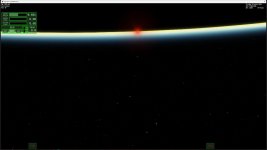
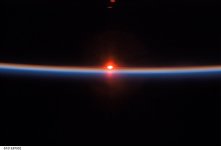
The atmosphere colors are still not quite right as shown the attached screenshot (left). The right is a photo taken during the STS-121 Return To Flight mission in July 2006.
 

Attachments

  • OpenOrbiter_D3D9Client_sunset_quite_not_right.jpg
    OpenOrbiter_D3D9Client_sunset_quite_not_right.jpg
    35.1 KB · Views: 30
  • s121e07932~orig.jpg
    s121e07932~orig.jpg
    32.2 KB · Views: 30
So going forward, what is the plan for D3D9Client? Keep it and continue improving things since we should not be bound to the old DX7 client anymore or go with something newer like DX12?
 
By the way I have some crucial propositions for D3D9 Client that I'm sure should improve Orbiter graphics. Generally I mean:
  • vessel shadows (including exhaust shadows) that shine through objects
  • sun and moon shine through the ground
  • water micro textures (I described it on GitHub)
  • making micro textures for other planets and moons, and increasing the distance at which these micro textures are displayed
  • fixing the issue with terrain flattening (FLT files) and cubic interpolation for elevations
  • something else
I could write it in detail.
 
Back
Top