New Release D3D9Client Development

Could you explain what do these "uninitialized members" mean? And how it can be that some people can see the issue, but others don't.
Consider this code:
C++:
int a;
int b;

b = a + 3;
What will be the value of b? It depends on what is in a... but as we don't define the content of a, it will depend on what is in that particular memory location: your pc might have 74, mine might have 943, and somebody else's might have -9872186. Plus, next time you run it, it might have a different value. And this is how sometimes the same code does different things in different computers. 🤦‍♂️
That's why it is a good practice to initialize variables (variables inside classes are called member variables). Still, we humans tend to miss things. 😅
 
The soft-dock code is very much Martin's code that's modified. Yeah, that tile problem is a real mystery. I kinda bugs me that the reason for the failure is yet unknown. Physics and graphics elevations are very much separate systems and the problem effects them both in a same way. Have to move on.
If I'm not mistaken the soft docking stuff was added to the base VESSEL class, won't it kill any chance for 2016 modules to be compatible? Maybe it's already the case that a recompile is mandatory anyway?
 
If I'm not mistaken the soft docking stuff was added to the base VESSEL class, won't it kill any chance for 2016 modules to be compatible? Maybe it's already the case that a recompile is mandatory anyway?
It probably would be good to test this against some Orbiter 2016 vessels. I believe there have been several other small VESSEL class changes (including one I'm responsible for); and if I'm not mistaken, at least one or two core/API/base class changes occurred prior to Orbiter becoming open source.

I wouldn't recommend not including this feature though; I think it's going to be very important for SSV and NASSP. Hopefully all the symbols still line up. I'm kind of, of the mind that at a certain point, not having a new version is more impactful to the community than losing support for older versions.
 
Just wanted to confirm that the last 240315 build works fine. The elevation issue doesn't occur. And these new water settings are amazing. Thanks!
 
If I'm not mistaken the soft docking stuff was added to the base VESSEL class, won't it kill any chance for 2016 modules to be compatible? Maybe it's already the case that a recompile is mandatory anyway?
Existing functions still operate the same was as before. Compatibility isn't effected. Compatibility breaks down only if virtual functions are added/removed.
 
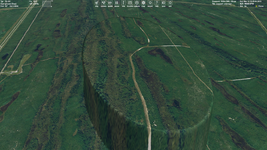
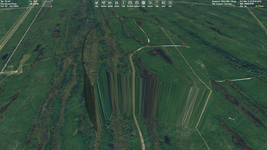
By the way regarding elevations. I made tests with the last build, and I always notice the cubic interpolation + D3D9 terrain flattening issue I mentioned before. Maybe someone could confirm this. You could just create the file in the last Orbiter build directory:

Textures/Earth/Flat/CapeFlatTest.cfg

Then add the line:
ELLIPSE 250 -80.6745 28.6268 500 300 130 10
And look at your Cape Canaveral.

The linear interpolation works fine:

linear.png

But the cubic one have the gap (for the same camera position). It happens then the camera follows the area:

cubic.png

I was going to create a corresponding issue on GitHub (since I haven't seen similar issues), but maybe it will be better if you do this.

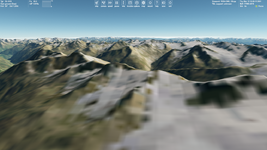
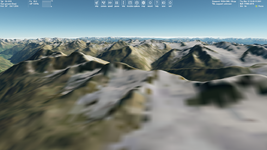
It's for a future development, just not to forget this. Maybe it could be fixed before the Orbiter 2024 release, but not necessary. There's no difference between linear and cubic interpolation for surface elevation at high altitudes, only near elevations (see attached pictures).
 

Attachments

  • linear2.png
    linear2.png
    569.5 KB · Views: 15
  • cubic2.png
    cubic2.png
    564.4 KB · Views: 16
try to get my Eagle to work and get get:
D3D9: ERROR: D3D9Client::clbkReleaseSurface() Input Surface is NULL

Not sure all these bases not catalogued?

D3D9: ERROR: Base Object 0x34955A8 = 'Alcantara' not cataloged
D3D9: ERROR: Base Object 0x3495918 = 'Al Anbar' not cataloged
D3D9: ERROR: Base Object 0x34A6EB0 = 'Baikonur' not cataloged


For drawing on a Texture should we be using Sketchpad and not older HDC graphics?
 
I have no clue. My Eagle freezes when I exit I get this as the start screen,
Here is the log:
000084.918: D3D9: [Session Closed. Scene deleted.]
D3D9: ERROR: D3D9Client::clbkReleaseSurface() Input Surface is NULL
000084.918: D3D9: [Destroy Render Window Called]
D3D9: ERROR: [Failed to Reset DirectX Device] (Likely blocked by undeleted resources)
000084.918: **** Closing simulation session

for 2016

if I remove these lines it seems to work
oapi::Font* font = oapiCreateFont(15, true, "Arial");
skp->SetFont(font);
What this does is changes the font in the UACS hud. oapi::Font* font = oapiCreateFont(15, true, "Arial"); skp->SetFont(font); int x = HIWORD(skp->GetCharSize()); int rightX = hps->W - x; int startY = int(0.215 * hps->H); int y = startY; int space = LOWORD(skp->GetCharSize()); int largeSpace = int(1.5 * space);
with these 2 line:
000000.000: D3D9: [Scene Initialized]
000000.000: Finished initialising panels
000003.350: D3D9: [Session Closed. Scene deleted.]
D3D9: ERROR: D3D9Client::clbkReleaseSurface() Input Surface is NULL
000003.350: D3D9: [Destroy Render Window Called]
D3D9: ERROR: [Failed to Reset DirectX Device] (Likely blocked by undeleted resources)
000003.350: **** Closing simulation session
 

Attachments

  • eagled3d9.jpg
    eagled3d9.jpg
    27.8 KB · Views: 2
Last edited:
D3D9: ERROR: D3D9Client::clbkReleaseSurface() Input Surface is NULL

I can't find this error from D3D9Client. Have you replaced the D3D9Client that comes with OpenOrbiter with an older one ? If yes, then that's not going to work.
 
So when I use these 2 line to change the font for the UACS menu I get this:
D3D9: ERROR: D3D9Client::clbkReleaseSurface() Input Surface is NULL
000046.756: D3D9: [Destroy Render Window Called]
D3D9: ERROR: [Failed to Reset DirectX Device] (Likely blocked by undeleted resources)
000046.756: **** Closing simulation session

oapi::Font* font = oapiCreateFont(15, true, "Arial", FONT_BOLD); skp->SetFont(font);

int x = HIWORD(skp->GetCharSize()); int rightX = hps->W - x; int startY = int(0.215 * hps->H); int y = startY; int space = LOWORD(skp->GetCharSize()); int largeSpace = int(1.5 * space); if (hudMode == HUD_OP) { buffer = std::format("Selected available cargo: {}", mdlAPI.GetAvailCargoName(cargoHUD.idx)); skp->Text(x, y, buffer.c_str(), buffer.size());

 
So when I use these 2 line to change the font for the UACS menu I get this:
D3D9: ERROR: D3D9Client::clbkReleaseSurface() Input Surface is NULL
000046.756: D3D9: [Destroy Render Window Called]
D3D9: ERROR: [Failed to Reset DirectX Device] (Likely blocked by undeleted resources)
000046.756: **** Closing simulation session

oapi::Font* font = [B][COLOR=rgb(184, 49, 47)]oapiCreateFont[/COLOR][/B](15, true, "Arial", FONT_BOLD); skp->SetFont(font);

int x = HIWORD(skp->GetCharSize()); int rightX = hps->W - x; int startY = int(0.215 * hps->H); int y = startY; int space = LOWORD(skp->GetCharSize()); int largeSpace = int(1.5 * space); if (hudMode == HUD_OP) { buffer = std::format("Selected available cargo: {}", mdlAPI.GetAvailCargoName(cargoHUD.idx)); skp->Text(x, y, buffer.c_str(), buffer.size());
Missing the oapiReleaseFont() call?
 
@jarmonik Could you include a section on *.flt files in the OpenOrbiter D3D9Client manual?
 
2016:
not sure about this
000000.000: Module FLEXNOUACS.dll ........ [Build 240327, API 160828] D3D9: ERROR: Large surface created Handle=0x15D8BAC8 (9889560,9889588) 000000.000: Module LTV.dll ............... [Build 240204, API 160828]

I get a CTD
 
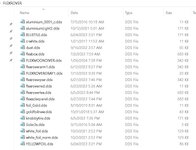
It is my FLEX. how to tell which texture is causing it.

So I loaded each mesh as a vessel and no error. But load the whole vessel and get that error.


Why this:
D3D9: ERROR: Base Object 0x6A3A62B8 = 'Alcantara' not cataloged
D3D9: ERROR: Base Object 0x6A3A6640 = 'Al Anbar' not cataloged
D3D9: ERROR: Base Object 0x6A3A69C8 = 'Baikonur' not cataloged
D3D9: ERROR: Base Object 0x6A3A3BE0 = 'Barent Sea' not cataloged

D3D9: ERROR: Configuration file not found for object 0x6A39EE30
 
Last edited:
Back
Top