New Release D3D9Client Development

Thanks for testing. I'll restore the previous cache code so that we can be sure that's it's cache problem. Problem is that the cache is for a physics. Graphics has it's own independent elevation management.
 
I have restored the old cache. So, let's see how this goes ? The binary goes in /Modules/Server/
Have you checked if the problem appears with the DX7 inline engine, if you are able to run it ?
 

Attachments

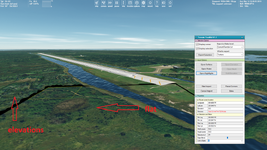
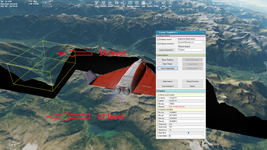
@jarmonik, I've tried your two Orbiter.exe files as well (with D3D9 Client, Windows 10). The black gaps and flat textures remain. It occurs for different levels:

1.png2.png

The first picture looks like the default elevation settings for a runway of Cape Canaveral doesn't work.
I still haven't been able to reproduce the problem
Do you not notice this problem on your computer?
 
Do you not notice this problem on your computer?
No, everything is working perfectly fine. Those caps that shows in your screen shots are very hard to miss. I am a bit puzzled by the problem.
I have reverted the Orbiter Main back to it's previous state. Could you check that it works as usual ?
 
Yes, I will try it right now and let you know.
 
I've tried. Yes, it works fine without any black gaps and flat tiles.

And I should to add: those black gaps and flat ground aren't a random problem. I notice it always after a few seconds after terrain loading. Firstly the terrain is elevated but a little bit later it becomes flat.

I think it's strange you don't notice this problem on your PC.
 
Last edited:
I've noticed that (part of) the shadow problem is caused by normals, a face only casts a shadow if the light hits its "normal" positive side.
Is it possible for d3d9 to cast shadows for all normals, or is it advisable to make double walls where needed?
 
@jarmonik : I've run CppCheck on the current D3D9Client sub directory (out of curiosity) and found some uninitialized members and a couple of other things that have been fixed a long time ago, but re-appeared again...
I'll wait a little as I don't want to interfere with your current troubles ;) and I don't know about the quality of the current HEAD.
Those "some see the issue, but others don't" always makes me think of uninitialized members :D
 
The current HEAD should be Ok. I have detected some problems with zero-initialization, so, maybe the whole code base should be checked.

C++:
D3DXVECTOR3 myVec = {0}  // Compiles fine but fails to zero initialize

struct myStr {
    myStr() { }
    int a = 0;
    int b = 0;
}
auto x = new std::vector<myStr>(10);  // This fails to initialize the content, random content


struct myStr2 {
    myStr2() : a(0), b(0) { }
    int a, b;
}
auto x = new std::vector<myStr2>(10);  // This appears to be ok 

std::vector<myStr2> myVec;
myVec.resize(10);  // Unknown, must be checked
 
Hi Jarmo,

I believe you are getting into the same situation I get: Once git gets on my nerves so much that I can't even get the simplest things done (brain is used up by compaining :D ..grumpy... grumpy ... grumpy...)

The current HEAD should be Ok. I have detected some problems with zero-initialization, so, maybe the whole code base should be checked.

C++:
D3DXVECTOR3 myVec = {0}  // Compiles fine but fails to zero initialize
I would have used 'list-initialization' like this (no assignment, as that operator might be different):
C++:
D3DXVECTOR3 myVec{0};


C++:
struct myStr {
    myStr() { }
    int a = 0;
    int b = 0;
}
auto x = new std::vector<myStr>(10);  // This fails to initialize the content, random content
Usually in this case I would have ommitted the default c'tor as it's dumb anyway:
C++:
struct myStr {
    myStr() = default; // compiler generated default c'tor
    int a = 0;
    int b = 0;
}
The exact reason why your code did not initialize the array/vector elements might be due to the fact std::array / vector behaves that way with () operator/c'tor:
"[...]initializes the array following the rules of aggregate initialization (note that default initialization may result in indeterminate values for non-class T)[...]"
See: https://en.cppreference.com/w/cpp/container/array rsp. https://en.cppreference.com/w/cpp/container/vector/vector
Although I thought your usage would be O.K....
Creating a pointer to a vector of myStr however might be the reason - I have to try it myself later ;)


Edit: Seems to be O.K. ... see Compiler Explorer ... hmmm
 
Last edited:
@jarmonik, I've tried your two Orbiter.exe files as well (with D3D9 Client, Windows 10). The black gaps and flat textures remain. It occurs for different levels:

View attachment 37223View attachment 37224

The first picture looks like the default elevation settings for a runway of Cape Canaveral doesn't work.

Do you not notice this problem on your computer?
Was there anything special you did to make this appear, settings-wise.

@jarmonik I'm testing pr#445 Earth and Moon seem to be fine, no issues like in the above image.

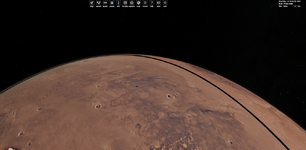
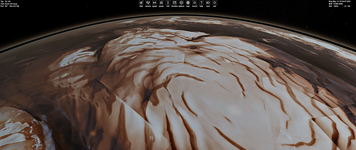
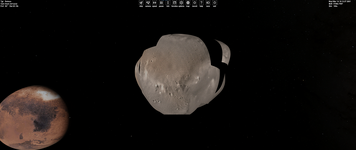
Mars on the other hand, has issues like below. this comes and goes with camera position and distance

1710299522984.png
1710299794298.png
1710299811458.png

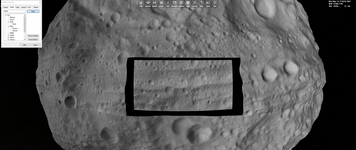
Vesta is showing something similar:
1710300002930.png

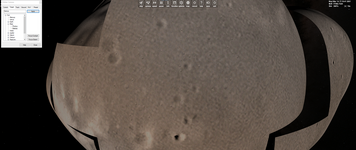
Deimos:

1710300058693.png

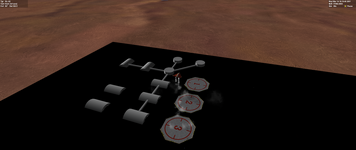
For those last two in particular, it looks like the surface textures are loading with spherical geometry instead of the elevation data. There is probably some weird edge-case causing this.


Reloading orbiter does not fix the problem. If I go back to the launch pad and immediately reload the scenerio, it looks exactly like above. buuut if I completely close and re-open Orbiter:
1710300593292.png
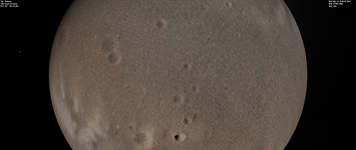
Perfectly spherical Deimos, which stays spherical until I move the camera.


1710300690292.png


  • I think something still isn't initialized because of the behavior on re-load.
  • I don't remember exactly how the elevation LOD works, but it seems like parts or the whole of the planet/moon thinks it should be at the lowest level (I think that's correct? Lowest Elevation LOD is just a sphere?). This could potentially be caused by the above point
 

Attachments

Last edited:
Thanks for the report. I can actually see it on Mars now, the cache is obvious thing to blame but this could be something else. Have to check the planet rendering code. There were some changes on there as well.
 
Was there anything special you did to make this appear, settings-wise.
Nothing special. Just downloaded the v240310 build, set a path to Orbiter 2016/Texture directory for "PlanetTexDir" in Orbiter_NG.cfg, and set Orbiter options on Launchpad (Video and others). No other addons at all.

The ground is just displayed flat when camera is approaching it at low altitude.

It happens both for the linear and cubic interpolation for the surface elevation settings on the Launchpad.

When the surface elevation is dissable (checkbox is unchecked) then all terrain is flat and there's not any black gaps, so everything is fine.

I've deleted the path for "PlanetTexDir" and copied Moon textures into /Textures/Moon/Archive from Orbiter 2016 and the flat problem remains.

One more observation: for example, the ground in Cape Canaveral is flat at closer distance of the camera, if we zoom out then the ground becomes elevated (we know this), but the runway area is elevated too (after zoom ut), so the runway doesn't remain flat as it should be, so the flat settings for the runway don't work and therefore DG is immersed into runway textures.
 
Here's a new patch for testing. It looks like there was nothing wrong in the tile cache. If a planet had no elevation data available then elevation manager was disabled due to resent optimizations. Having a planet with disabled elevation manager somewhere in a solar system caused issues in many other places. Why ? I don't know. It's now re-optimized slightly in a different way that elevation manages are valid for all bodies. Even though they return zeroes.

Let's do some final tests before Merge of the Pull Request. https://github.com/orbitersim/orbiter/pull/445

EDIT: I also found a bug that may effect in a virtual cockpit mouse click zones. Testing required.
 

Attachments

Last edited:
So this can't be tested on non-beta Orbiter right ?
I play with 2016 only
 
Here's a new patch for testing. It looks like there was nothing wrong in the tile cache. If a planet had no elevation data available then elevation manager was disabled due to resent optimizations. Having a planet with disabled elevation manager somewhere in a solar system caused issues in many other places. Why ? I don't know. It's now re-optimized slightly in a different way that elevation manages are valid for all bodies. Even though they return zeroes.

Let's do some final tests before Merge of the Pull Request. https://github.com/orbitersim/orbiter/pull/445

EDIT: I also found a bug that may effect in a virtual cockpit mouse click zones. Testing required.
Well the elevation issue definitely seems to be fixed. I wouldn't have guessed that was the problem in a hundred years.

The soft-dock code looks very cool. Haven't had a chance to play around with that yet, but it sounds like GLS tested it.


So this can't be tested on non-beta Orbiter right ?
I play with 2016 only
Correct. OpenOrbiter Only.
 
Well the elevation issue definitely seems to be fixed. I wouldn't have guessed that was the problem in a hundred years.
The soft-dock code looks very cool. Haven't had a chance to play around with that yet, but it sounds like GLS tested it.

The soft-dock code is very much Martin's code that's modified. Yeah, that tile problem is a real mystery. I kinda bugs me that the reason for the failure is yet unknown. Physics and graphics elevations are very much separate systems and the problem effects them both in a same way. Have to move on.
 
Here's a new patch for testing.
I copied these files into my 240310 build and was going to test this, but I get errors after running Orbiter_ng.exe. The errors say the ucrtbased.dll and vcruntime140.dll are missed. Do I need these files to try your patch? I just haven't gotten these errors before, maybe I do something wrong.

And I see right now a new Orbiter build on GitHub. Do I understand correctly that for now it doesn't contain the fixes/changes you've put in the PR445_Test.zip patch above?
I also found a bug that may effect in a virtual cockpit mouse click zones. Testing required.
Could you describe this bug a little more detailed so I can try/reproduce it?
Those "some see the issue, but others don't" always makes me think of uninitialized members :D
Could you explain what do these "uninitialized members" mean? And how it can be that some people can see the issue, but others don't.
 
Last edited:
Back
Top