New Release D3D9Client Development

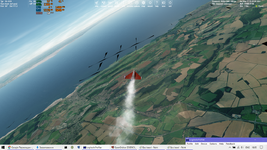
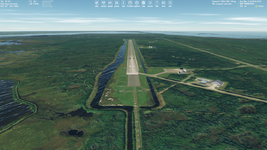
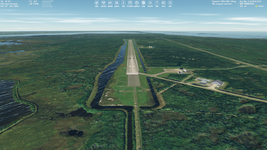
Once I've get the texture problem (as on the picture above) even with a 16 value, but without a crash.

Here are my 16 and 32 causes:
16.png32.png

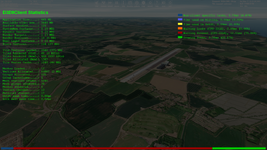
And once the following happened. I run a scenario (with a 16 value), flew for a while, and noticed that ~2.4 Gb of my Video Memory is used. Then I completely closed Orbiter, opened it again, run the same scenario, flew for the same time in the same area, and noticed that only ~1.4 Gb of my Video Memory is used (I monitored it with MSI Afterburner). And I haven't run other applications.
 
Last edited:
If you set the tile mipmap policy to "low level" or "none" does the texture problem still occur ?
 
Can you produce the texture problem without errors in the log ?
Does the problem only occur after re-launching the orbiter without fully exiting/closing the launchpad ?
 
@jarmonik, today-tomorrow I will made series (for some statistical reproduction) of such tests with various sets and write here together with attached screenshots and logs.
 
Set 1
Mesh res.=32
Tile mipmap policy=All levels
Max. res. level=21


I did six tests and it works without problems. First I tried the same scenario three times, and ~1.4 Gb of Video RAM was used. But hen I tried the same scenario running it as "Current State" on Launchpad and ~2.2-2.5 Gb of Video RAM was used (all these last three times). No texture problems and no crashes. See 32.log. I couldn't reproduce that one case I mentioned above.

Set 2
Mesh res.=64
Tile mipmap policy=All levels
Max. res. level=21


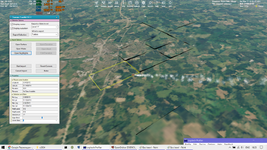
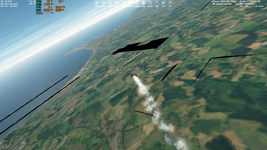
It's almost immediately causes texture problems, crashes and freeze every time. I did five tests (with the same scenario and my actions). Sometimes Orbiter crashes after a few seconds after the ship accelerates. Also, I noticed that sometimes I can't make screenshots with Prt Sc key on keyboard and insert it to Paint, so I had to open some other window like Logitech Profiler to make a screenshot). Here are screens of tests 1, 2, 5 and log files of tests 1-5.

1.png2.png5.png

Set 3
Mesh res.=64
Tile mipmap policy=Low level only
Max. res. level=21


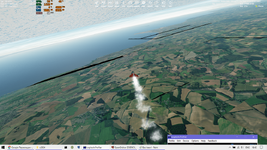
The same textrue artifacts (even crazier (look at the sky) and crashes:

6.png

Set 4
Mesh res.=64
Tile mipmap policy=All levels
Max. res. level=19


The same texture problems.

Set 5: Orbiter 2016 with Mesh res.=64

It works without problem.

Set 6: OpenOrbiter build from 6 Jun 2023 with Mesh res.=64

It also works fine.


So, it seems to be caused only by 64 mesh resolution in the latest builds. Sadly I haven't a previous Orbiter build where 20-21 levels were added, but MIP Maps for all levels not yet. Maybe it makes sence to try it with 64 mesh resolution. I just deleted that build and don't know where to find it now.

Added: Oh, I'm very sorry, here:

Once I've get the texture problem (as on the picture above) even with a 16 value, but without a crash.

Here are my 16 and 32 causes:
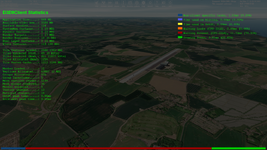
16.png
32.png


And once the following happened. I run a scenario (with a 16 value), flew for a while, and noticed that ~2.4 Gb of my Video Memory is used. Then I completely closed Orbiter, opened it again, run the same scenario, flew for the same time in the same area, and noticed that only ~1.4 Gb of my Video Memory is used (I monitored it with MSI Afterburner). And I haven't run other applications.
I made a mistake. Here are my 32 (not 16) and 64 (not 32) cases. And once I've get the texture problem even with a 32 value (NOT 16), but without a crash. But now I couldn't reproduce texture problems/crashes with 32 mesh resolution. Maybe this happens very rarely or I was wrong with that one case. I hope more tests will be done by other users.
 

Attachments

Last edited:
Thanks. Based on your test reports I was able to reproduce the texture issue which is cause by memory issue of some kind. What exactly is unclear, could be shared video memory that's running out. The mipmaps and few additional tile levels may have push the memory consumption over the edge. I'll disable the 64 tile size and I try to reduce the size of the vertex data.
 
Although in some cases the 16 value can look nicer (smoother) than 32. Just try switching between these two pictures of 16 and 32. Maybe these two options could be saved for selection, namely not to remove the 16 one... It would just be nice to have a choice (more settings) if it works...
 

Attachments

  • 16.png
    16.png
    876.3 KB · Views: 26
  • 32.png
    32.png
    890 KB · Views: 26
I suppose it's a known issue that the light is visible through objects:

Без імені.png
 
I suppose it's a known issue that the light is visible through objects:
I have no plans to add support for shadows for local lights. It would have heavy performance impact and there are some other problems with the implementation as well. There are more important things to do.
 
I have no plans to add support for shadows for local lights. It would have heavy performance impact and there are some other problems with the implementation as well. There are more important things to do.
That sounds like something best accomplished with the successor to D3D9.
 
That sounds like something best accomplished with the successor to D3D9.
Maybe. For an example the KSP supports shadows for local lights in a very limited manned and the range is no more than 3-4 meters from a source and the light count is around 2-4 light sources. Which in Orbiter would probably not work too well at all, it doesn't work too well in KSP either. I don't know any games with an extensive support for local light shadows.
 
Well they're all clearly fooling me haha. I didn't actually notice that.
 
I guess the shadows could be implementable but wide angle lights 120deg cone angle the max range would be about 3-6 meters, narrow angle 20deg could give a range of 50-100 meters. The ranges could be higher if the observer is in the source of the light. The main problem is that behavior of shadows would be chaotic with difficulties to predict how the shadows really behave it particular scenario/setup.
 
I have no plans to add support for shadows for local lights. It would have heavy performance impact and there are some other problems with the implementation as well. There are more important things to do.
Thanks, of course. Maybe it just will be possible to return to this in the distant future. By the way, maybe it will be a good idea to limit the visibility range of the local light, and then shadows won't impact performance as much. Or some other ways. These local lights look nice (just the local light shining through objects is quite noticeable).
 
Here's a development patch (only for developers) for a ray-traced VC textures. It's been a while since I last time build a binary patch so I hope I didn't forget anything. Orbiter can be downloaded from the GitHub page by clicking a small "tag" icon next to "branches" and then select "downloads". This patch is x86 build
 
Here's a development patch (only for developers) for a ray-traced VC textures. It's been a while since I last time build a binary patch so I hope I didn't forget anything. Orbiter can be downloaded from the GitHub page by clicking a small "tag" icon next to "branches" and then select "downloads". This patch is x86 build
It seems like you forgot a file:
Code:
**** Orbiter.log
000000.000: Build Feb  4 2024 [v.602931718]
000000.007: Timer precision: 1e-07 sec
000000.146: Found 0 joystick(s)
000000.382: ---------------------------------------------------------------
000000.386: BaseDir    : E:\OpenOrbiter\
000000.391: ConfigDir  : E:\OpenOrbiter\Config\
000000.398: MeshDir    : E:\OpenOrbiter\Meshes\
000000.403: TextureDir : E:\OpenOrbiter\Textures\
000000.407: HightexDir : E:\OpenOrbiter\Textures2\
000000.412: ScenarioDir: E:\OpenOrbiter\Scenarios\
000000.417: ---------------------------------------------------------------
000000.422: D3D9 DLLs  : C:\WINDOWS\SYSTEM32\d3d9.dll [v 10.0.19041.3636]
000000.427:            : C:\WINDOWS\SYSTEM32\d3dx9_43.dll [v 9.29.952.3111]
000000.432: ---------------------------------------------------------------
000000.437: Module D3D9Client.dll ........ [Build 240204, API 240204]
000000.486: [D3D9] Native Interface
000000.491: [D3D9] DirectX9 Created...
000000.496: [D3D9] Initialize VideoTab...
000000.614: Loading module D3D9Client
000000.619: Module TerrainToolBox.dll .... [Build 231126, API 231126]
000000.625: Loading module TerrainToolBox
000000.632: Module TerrainToolKit.dll .... [Build 240204, API 240204]
000000.637: Loading module TerrainToolKit
000000.643: Module AtlantisConfig.dll .... [Build 240204, API 240204]
000000.648: Loading module AtlantisConfig (legacy interface)
000000.653: Module AtmConfig.dll ......... [Build 240204, API 240204]
000000.659: Loading module AtmConfig (legacy interface)
000000.664: Module DGConfigurator.dll .... [Build 240204, API 240204]
000000.669: Loading module DGConfigurator (legacy interface)
000006.364: 
000006.369: **** Creating simulation session
000006.379: [D3D9] === clbkCreateRenderWindow ===
000006.392: D3D9: [DirectX 9 Initialized]
000006.404: D3D9: 3D-Adapter.............. : NVIDIA GeForce RTX 2070 SUPER
000006.412: D3D9: MaxTextureWidth......... : 16384
000006.418: D3D9: MaxTextureHeight........ : 16384
000006.425: D3D9: MaxTextureRepeat........ : 8192
000006.433: D3D9: VolTexAddressCaps....... : 0x3F
000006.439: D3D9: NumSimultaneousRTs...... : 4
000006.445: D3D9: VertexDeclCaps.......... : 0x30F
000006.451: D3D9: MiscCaps................ : 0x2FCEF2
000006.456: D3D9: Separate AlphaBlend..... : Yes
000006.462: D3D9: Shadow Mapping.......... : Yes
000006.467: D3D9: D3DFMT_A16B16G16R16F.... : Yes
000006.473: D3D9: Vertex_A16B16G16R16F.... : Yes
000006.479: D3D9: Vertex_A32B32G32R32F.... : Yes
000006.484: D3D9: Vertex_R16F............. : Yes
000006.490: D3D9: Vertex_R32F............. : Yes
000006.496: D3D9: D3DFMT_A32B32G32R32F.... : Yes
000006.503: D3D9: D3DFMT_D32F_LOCKABLE.... : Yes
000006.509: D3D9: D3DFMT_A2R10G10B10...... : Yes
000006.515: D3D9: D3DFMT_L8............... : Yes
000006.520: D3D9: D3DDTCAPS_DEC3N......... : No
000006.526: D3D9: D3DDTCAPS_FLOAT16_2..... : Yes
000006.532: D3D9: D3DDTCAPS_FLOAT16_4..... : Yes
000006.537: D3D9: Runs under WINE......... : No
000006.544: D3D9: D3D9Build Date.......... : 0
000006.616: D3D9: Available Texture Memory : 4069 MB
000006.623: D3D9: [3DDevice Initialized]
000009.630: Loaded 41057 records from star database
000009.794: ============================ ERROR: ===========================
000009.800: Mesh not found: .\Meshes\D3D9Cube.msh
000009.806: [MeshManager::LoadMesh | C:\Software\OrbiterRepositories\VCRaytrace\Src\Orbiter\Mesh.cpp | 1328]
000009.812: ===============================================================
000009.817: D3D9ERROR: D3D9Client::clbkStoreMeshPersistent(D3D9Cube) hMesh is NULL
000009.823: Failed to open D3D9Cube.msh
 
Oh and another thing, please exclude any root level .cfg files. I was going mad trying figure out why my planet textures weren't loading anymore and I have now found out it was because you included your Orbiter_NG.cfg file in the BakedVC_Testing.zip file which overwrote my Orbiter_NG.cfg file which in turn caused the PlanetTex file path to be incorrect.
 
Ok, thanks for the information. I have added the missing file and the *.cfg are no longer overwritten in root folder.
 
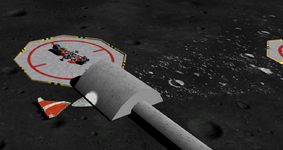
IS there anyway to fix the areas around the poles on the Moon? I don't know if we could flatten them and add a mesh of craters,.....
 
Back
Top